> For the complete documentation index, see [llms.txt](https://docs.sonarsource.com/llms.txt). Markdown versions of documentation pages are available by appending `.md` to page URLs; this page is available as [Markdown](https://docs.sonarsource.com/sonarqube-cli/integrations/conductor.md).
# Conductor
SonarQube CLI integration runs automatically in every Conductor workspace when you configure a setup script.
[Conductor](https://conductor.build/) orchestrates AI coding agent sessions such as Claude Code and OpenAI Codex, running each in an isolated Git worktree. `sonar integrate` installs globally in your user home, so a new Conductor workspace picks up the same agent hooks without a second install. Use a Conductor setup script if you want to make sure the integration has been run in that environment.
## Prerequisites
* [The SonarQube CLI is installed and authenticated](/sonarqube-cli/quickstart-guide.md) on the machine that runs the Conductor workspace.
* The repository has been analyzed with SonarQube and has a project key.
* `sonar` is available on the `PATH` used by Conductor setup scripts.
## Add a setup script
Conductor runs a setup script each time it creates a workspace. Add the integration command there:
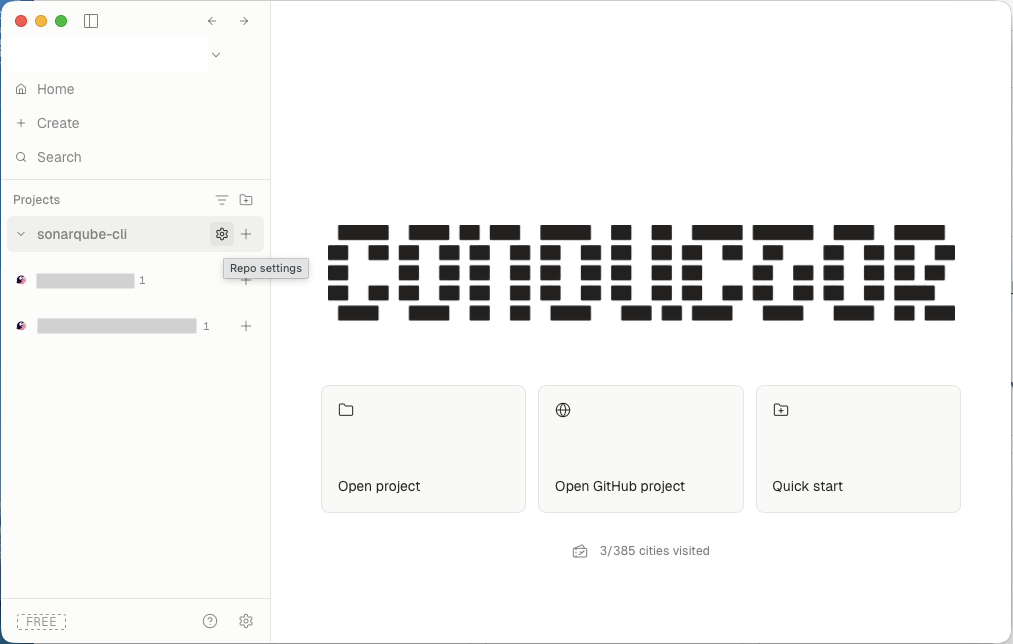
1. In the Conductor sidebar, hover over your project under **Projects** and select the gear icon to open **Repo settings**.
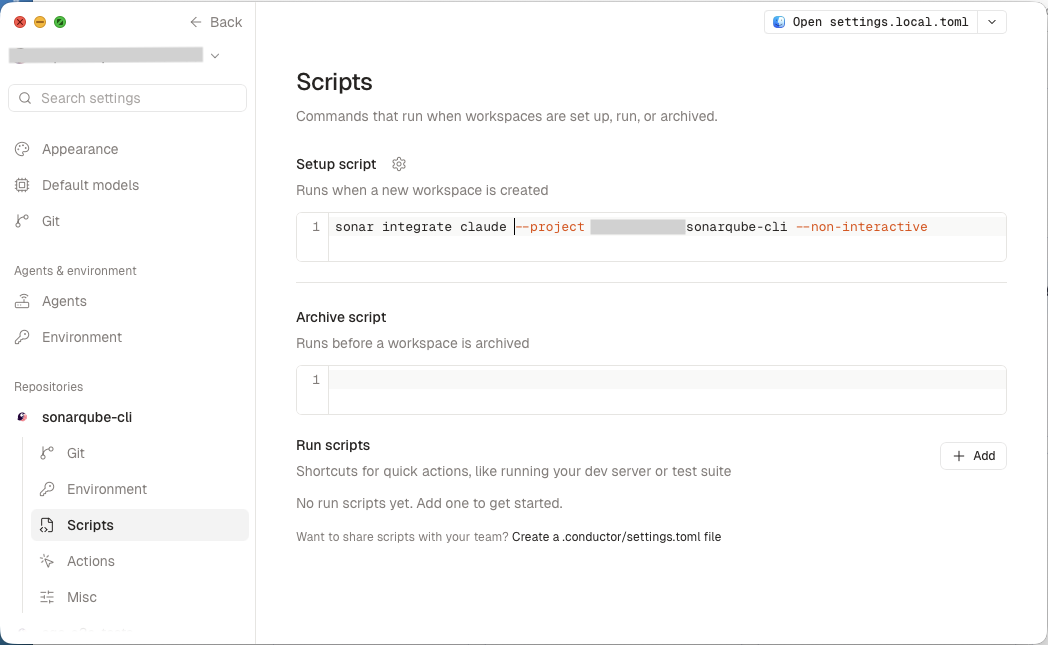
2. Under **Repositories**, select your repository, then select **Scripts**.
3. In the **Setup script** field, add this command:
```bash
sonar integrate --non-interactive
```
Replace `` with the agent you run in Conductor.
Conductor runs setup scripts in a non-interactive shell from the workspace directory. The `--non-interactive` flag prevents prompts, and the explicit integration subcommand tells the CLI which tool to set up. Running the command again is safe; it recognizes an existing global setup and updates it in place.
If your repository already has a setup script, append the integration command to the existing setup flow:
```bash
npm install && sonar integrate --non-interactive
```
### Share the script with your team
The settings UI saves the script to `.conductor/settings.local.toml`, which applies only on your machine. To give your whole team the same setup script, put it in `.conductor/settings.toml` instead:
```toml
"$schema" = "https://conductor.build/schemas/settings.repo.schema.json"
[scripts]
setup = "sonar integrate --non-interactive"
```
Commit `.conductor/settings.toml` and merge it to your default branch. Conductor picks up shared repository settings only after they land there.
## Use the right integration
Choose the integration that matches the agent you use in Conductor:
* `sonar integrate codex --non-interactive`
* `sonar integrate claude --non-interactive`
* `sonar integrate cursor --non-interactive`
If you use more than one agent in the same repository, add one command for each integration.
## Verify the workspace
After Conductor creates a workspace, open a terminal in that workspace and run:
```bash
sonar auth status
sonar system status
```
The status output should show the configured SonarQube connection and the installed integration features. If setup fails, confirm that the CLI is authenticated in the environment that runs the Conductor workspace. In non-interactive environments, you can authenticate with [environment variables](/sonarqube-cli/using-sonarqube-cli/environment-variables.md).
## Related pages
* [Overview](/sonarqube-cli/integrations/integrations.md)
* [OpenAI Codex](/sonarqube-cli/integrations/codex.md)
* [Git hooks](/sonarqube-cli/integrations/git-hooks.md)
* [Environment variables](/sonarqube-cli/using-sonarqube-cli/environment-variables.md)
---
# Agent Instructions
This documentation is published with GitBook. GitBook is the documentation platform designed so that both humans and AI agents can read, navigate, and reason over technical content effectively. Learn more at gitbook.com.
## Querying This Documentation
If you need additional information that is not directly available in this page, you can query the documentation by asking a question.
Perform an HTTP GET request on the following URL with the `ask` and `goal` query parameters:
```
GET https://docs.sonarsource.com/sonarqube-cli/integrations/conductor.md?ask=&goal=
```
`ask` is the immediate question: it should be specific, self-contained, and written in natural language.
`goal` is what the user is ultimately trying to achieve, the reason they need the answer. Sharing it helps GitBook give you a better, more relevant answer. A goal is most helpful when it describes the outcome the user wants rather than restating the question. For example, with `ask=how do I create an API token`, a goal like `automate deployments from our CI pipeline` lets GitBook tailor the answer to that use case.
The response will contain a direct answer to the question and relevant excerpts and sources from the documentation.
Use this mechanism when the answer is not explicitly present in the current page, you need clarification or additional context, or you want to retrieve related documentation sections.