> For the complete documentation index, see [llms.txt](https://docs.sonarsource.com/llms.txt). Markdown versions of documentation pages are available by appending `.md` to page URLs; this page is available as [Markdown](https://docs.sonarsource.com/sonarqube-cloud/administering-sonarcloud/enterprise-security/sso-and-provisioning/sso-restrictions.md).
# SSO restrictions
Two SonarQube Cloud settings let enterprise admins enforce SSO-only login, block DevOps platform tokens, and limit organization creation for managed users.
*These features require a SonarQube Cloud* [*Enterprise*](https://www.sonarsource.com/plans-and-pricing/) *license.*
The **Additional configurations** section of **SSO & Provisioning** offers two settings that let enterprise admins restrict what SSO-managed users can do:
* [**Restrict DevOps platform access**](#restrict-devops-platform-access): forces users on verified domains to authenticate exclusively through SSO, blocking DevOps platform logins and personal access tokens (PAT) in social accounts.
* [**Restrict org creation for managed users**](#restrict-the-creation-of-organizations): limits organization creation to enterprise admins creating organizations within the enterprise.
## Recovery account
Before enabling either setting, it's highly recommended that all enterprise admins configure a recovery account. If SSO becomes unavailable after enforcement is active, admins without a recovery account will be locked out of the enterprise.
See [Recovery account for SSO](/sonarqube-cloud/administering-sonarcloud/enterprise-security/sso-and-provisioning/recovery-account.md) for setup instructions.
## Restrict DevOps platform access
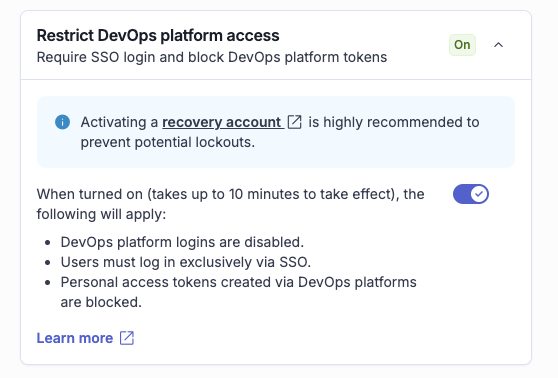
When SSO is initially configured, users with a company email address can still authenticate through an independent social or DevOps platform account. Enable **Restrict DevOps platform access** to require SSO login and close this governance gap: any user whose email belongs to a verified domain must log in exclusively through SSO. This also restricts the usage of personal access tokens (PAT) in social accounts.
### Prerequisites
[Domain verification](/sonarqube-cloud/administering-sonarcloud/enterprise-security/sso-and-provisioning/verify-domain.md) must be complete before you can enable this feature. Enforcement applies to all verified domains associated with your SSO connection.
### Enable Restrict DevOps platform access
1. Retrieve your enterprise. See [Retrieving and viewing your enterprise](/sonarqube-cloud/administering-sonarcloud/managing-enterprise/retrieving-and-viewing-your-enterprise.md).
2. Go to **Administration** > **SSO & Provisioning**.
3. In **Additional configurations**, enable **Restrict DevOps platform access**.
### Effect of enabling
When enabled, for all users whose email belongs to a verified domain:
* DevOps platform logins are disabled.
* Users must log in exclusively via SSO.
* Personal access tokens created via DevOps platforms are blocked.
Users whose email belongs to an unverified domain are not affected.
### Disable
Removing the last verified domain from your enterprise disables Restrict DevOps platform access. Users previously required to use SSO can then log in again through their DevOps platform account.
## Restrict the creation of organizations
The **Restrict org creation for managed users** setting lets enterprise admins control which accounts can create SonarQube Cloud organizations. When enabled, organization creation is limited to enterprise admins creating organizations within the enterprise.
### Prerequisites
To turn on this setting, you need:
* Enterprise admin access.
* SSO configured for your enterprise. See the [Set up SSO](/sonarqube-cloud/administering-sonarcloud/enterprise-security/sso-and-provisioning/set-up-sso.md) page.
* Your domain must be verified. See the [Domain verification](/sonarqube-cloud/administering-sonarcloud/enterprise-security/sso-and-provisioning/verify-domain.md) page.
### Enable the setting
1. Retrieve your enterprise. See the [Retrieving and viewing your enterprise](/sonarqube-cloud/administering-sonarcloud/managing-enterprise/retrieving-and-viewing-your-enterprise.md) page.
2. Go to **Administration** > **SSO & Provisioning**.
3. In **Additional configurations**, enable **Restrict org creation for managed users**.
When enabled:
* SSO-managed enterprise admins are restricted to creating organizations that automatically join this enterprise.
* All other domain users are blocked from creating organizations entirely.
### Disable the setting
Follow the same steps and disable the feature.
### Enterprise creation
SSO-managed users cannot create a new enterprise, regardless of whether this setting is enabled. If this setting is enabled, non-SSO users are also restricted when their email domain matches any enterprise that has verified their domain. To create an enterprise, use a non-SSO account and ensure the setting is off. See the [Creating your enterprise](/sonarqube-cloud/administering-sonarcloud/managing-enterprise/creating-your-enterprise.md) page for details.
## Related pages
* [Domain verification](/sonarqube-cloud/administering-sonarcloud/enterprise-security/sso-and-provisioning/verify-domain.md)
* [Recovery account for SSO](/sonarqube-cloud/administering-sonarcloud/enterprise-security/sso-and-provisioning/recovery-account.md)
* [Set up SSO](/sonarqube-cloud/administering-sonarcloud/enterprise-security/sso-and-provisioning/set-up-sso.md)
* [Adding organizations to your enterprise](/sonarqube-cloud/administering-sonarcloud/managing-enterprise/adding-organizations-to-your-enterprise.md)
* [About SSO and provisioning](/sonarqube-cloud/administering-sonarcloud/enterprise-security/sso-and-provisioning/about.md)
---
# Agent Instructions
This documentation is published with GitBook. GitBook is the documentation platform designed so that both humans and AI agents can read, navigate, and reason over technical content effectively. Learn more at gitbook.com.
## Querying This Documentation
If you need additional information that is not directly available in this page, you can query the documentation by asking a question.
Perform an HTTP GET request on the following URL with the `ask` and `goal` query parameters:
```
GET https://docs.sonarsource.com/sonarqube-cloud/administering-sonarcloud/enterprise-security/sso-and-provisioning/sso-restrictions.md?ask=&goal=
```
`ask` is the immediate question: it should be specific, self-contained, and written in natural language.
`goal` is what the user is ultimately trying to achieve, the reason they need the answer. Sharing it helps GitBook give you a better, more relevant answer. A goal is most helpful when it describes the outcome the user wants rather than restating the question. For example, with `ask=how do I create an API token`, a goal like `automate deployments from our CI pipeline` lets GitBook tailor the answer to that use case.
The response will contain a direct answer to the question and relevant excerpts and sources from the documentation.
Use this mechanism when the answer is not explicitly present in the current page, you need clarification or additional context, or you want to retrieve related documentation sections.