> For the complete documentation index, see [llms.txt](https://docs.sonarsource.com/llms.txt). Markdown versions of documentation pages are available by appending `.md` to page URLs; this page is available as [Markdown](https://docs.sonarsource.com/sonarqube-cloud/administering-sonarcloud/managing-organization/creating-organization/importing-bitbucket-workspace.md).
# Importing Bitbucket workspace
This page helps you understand how to import your Bitbucket workspace into SonarQube Cloud and explains prerequisites and key procedures.
{% hint style="warning" %}
If you bound or imported your Bitbucket workspace before August 31, 2026, your integration was probably set up through a now-deprecated app, which Atlassian is retiring on December 1, 2026. See [Migrating to the Bitbucket Forge app](/sonarqube-cloud/administering-sonarcloud/managing-organization/creating-organization/migrating-to-the-bitbucket-forge-app.md) to keep your integration working.
{% endhint %}
When you import a Bitbucket Cloud workspace to SonarQube Cloud, the corresponding [Organization](/sonarqube-cloud/administering-sonarcloud/about-sonarqube-cloud-solution/resources-structure/organization.md) is created in SonarQube Cloud and is bound to the DevOps platform organization. Each SonarQube Cloud organization corresponds one-to-one with a Bitbucket Cloud workspace. See [Binding with the DevOps platform](/sonarqube-cloud/administering-sonarcloud/about-sonarqube-cloud-solution/resources-structure/binding-with-dop.md) for more information.
SonarQube Cloud binds to Bitbucket Cloud using the **SonarQube Cloud for Bitbucket Cloud** app, which you install from your Bitbucket workspace.
{% hint style="warning" %}
SonarQube Cloud does not support linking an organization to more than one DevOps platform. If you want to link to more than one, you will need to create a separate organization to link to each DevOps platform.
{% endhint %}
The user account you used for the import is automatically assigned to the organization’s owners group which grants you administration rights on the organization. See [User group concept](/sonarqube-cloud/administering-sonarcloud/about-sonarqube-cloud-solution/user-management/user-group-concept.md) for more details.
## Prerequisites
You must be an administrator of the Bitbucket workspace:
* You will already be an administrator of your default workspace.
* For any other workspace, you have to add your Bitbucket account to a user group with the **Administer workspace** user right enabled.
* You have permission to install apps on the Bitbucket workspace you want to bind.
In SonarQube Cloud, each organization is assigned a subscription plan. Before importing your organization, choose the subscription plan suited to your needs, see [Subscription plans](/sonarqube-cloud/administering-sonarcloud/managing-subscription/subscription-plans.md) for more details. In particular, determine the number of Lines of Code (LOC) you need. See [Subscription plans](/sonarqube-cloud/administering-sonarcloud/managing-subscription/subscription-plans.md#loc-based-pricing) for more information.
{% hint style="info" %}
To avoid exceeding [Bitbucket Cloud API rate limits](https://support.atlassian.com/bitbucket-cloud/docs/api-request-limits/), it is recommended to use a dedicated Bitbucket user for SonarQube Cloud integration.
{% endhint %}
## Import procedure
To import a Bitbucket Cloud workspace to SonarQube Cloud, install the **SonarQube Cloud for Bitbucket Cloud** app on your Bitbucket workspace, then create your organization.
### Installing the app
1. Log in to SonarQube Cloud with your Bitbucket account.
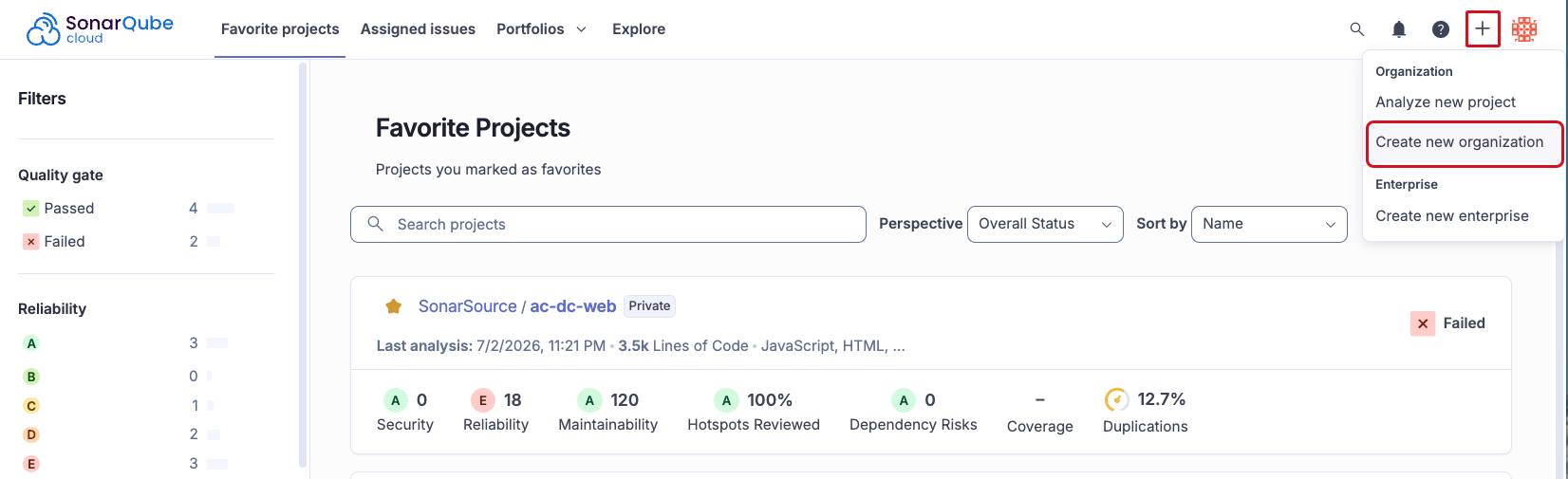
2. Select the **+** menu, then select **Create new organization**.
3. Under **Import from a DevOps platform**, select **Bitbucket**. An onboarding tutorial opens in SonarQube Cloud. Follow the instructions, then select **Install application** to continue in Atlassian.
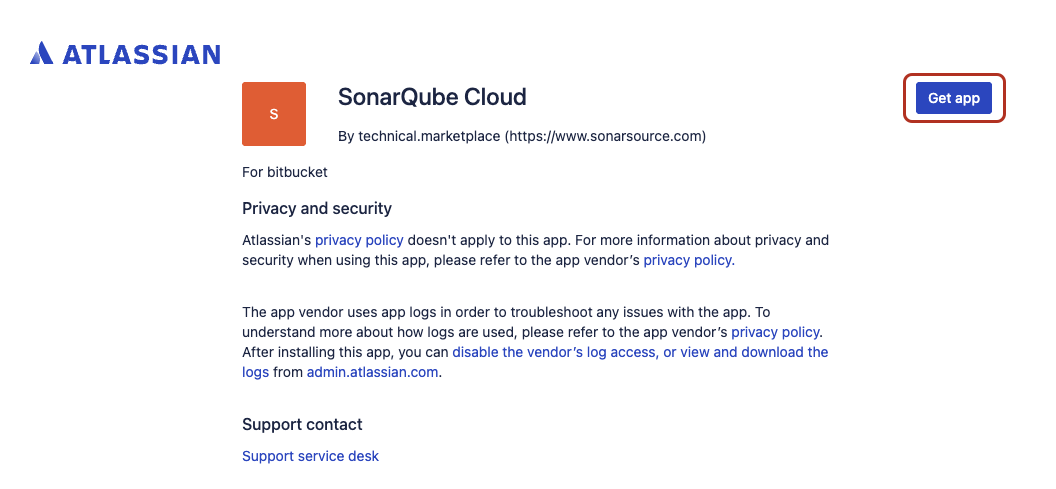
4. In Atlassian, select **Get app**.
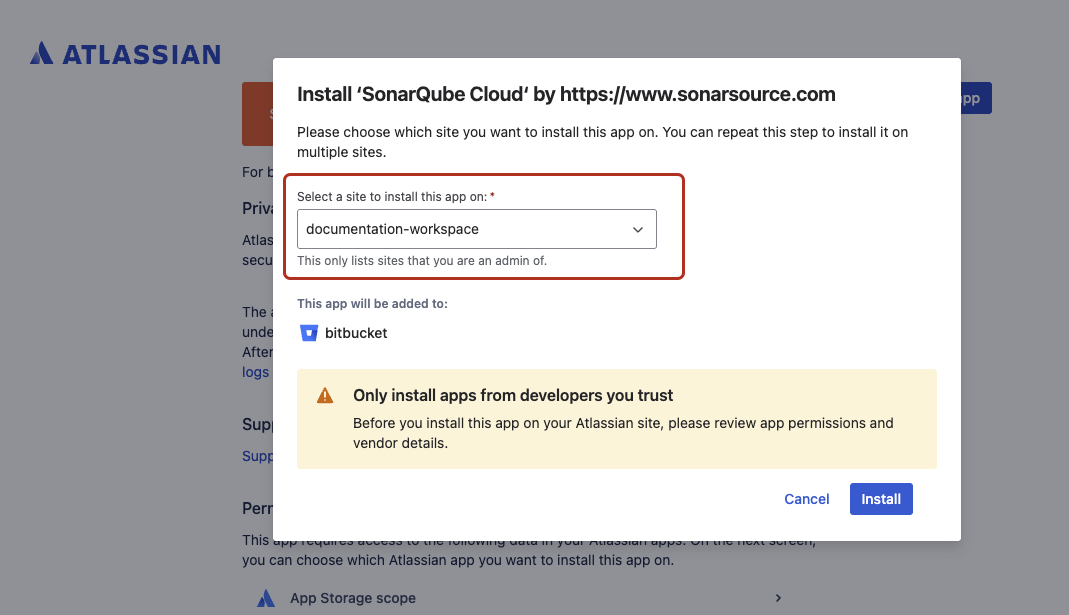
5. Select a site to install the app from the drop-down list.
6. Select **Install**.
### Creating the organization
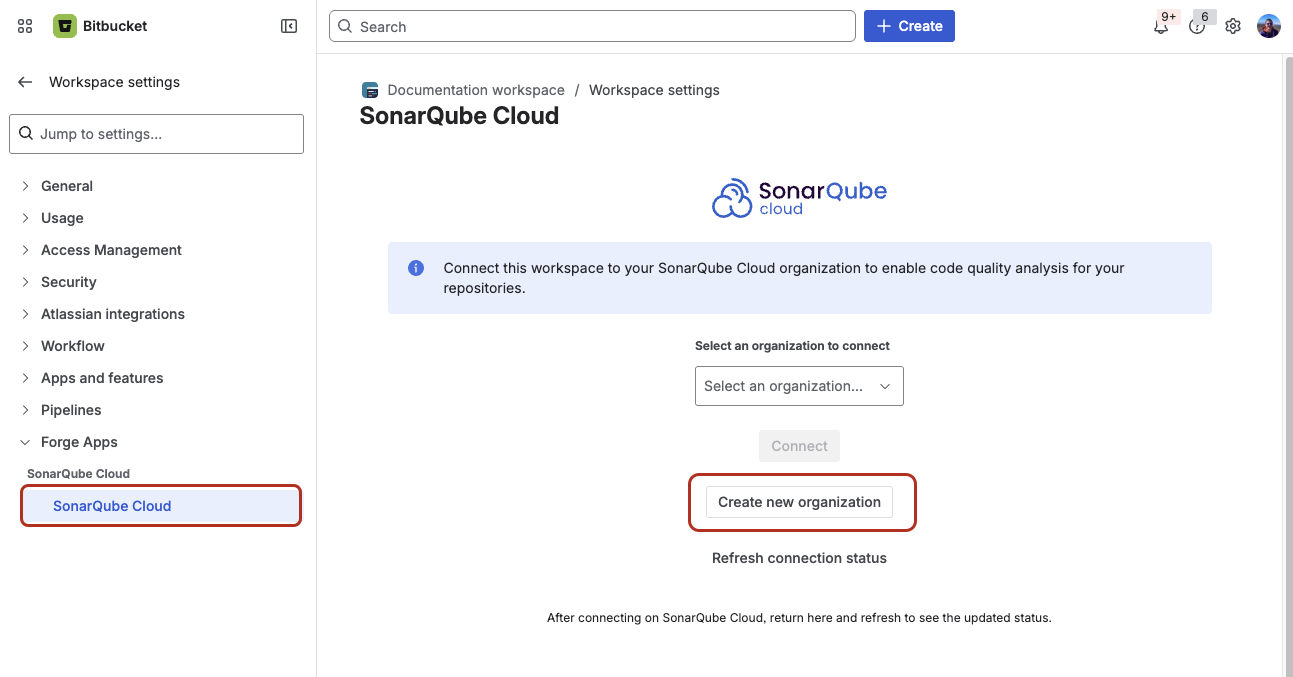
1. In Bitbucket, go to your **Workspace settings** > **Forge apps** > **SonarQube Cloud**.
2. Select **Create new organization**, confirming the redirect to SonarQube Cloud if prompted.
3. In **Import organization details**, SonarQube Cloud suggests a **Name** and **Key** for your SonarQube Cloud organization. The key is unique across all organizations within SonarQube Cloud. You can accept the suggestion or change it manually. The interface will prevent you from changing it to an already existing key.
4. Select **Add additional info** to add:
* An avatar: a small image representing the organization and displayed on the UI near the organization name.
* A description of the organization.
* A URL: the URL of the homepage of the organization displayed on the UI.
5. Select the subscription plan for your organization. See [Subscription plans](/sonarqube-cloud/administering-sonarcloud/managing-subscription/subscription-plans.md) for more information.
6. If you selected a paid plan, select the number of Lines of Code (LOC) for your plan and follow the instructions to enter your billing and payment information.
7. Select **Create Organization**. The organization is created and opened in SonarQube Cloud.
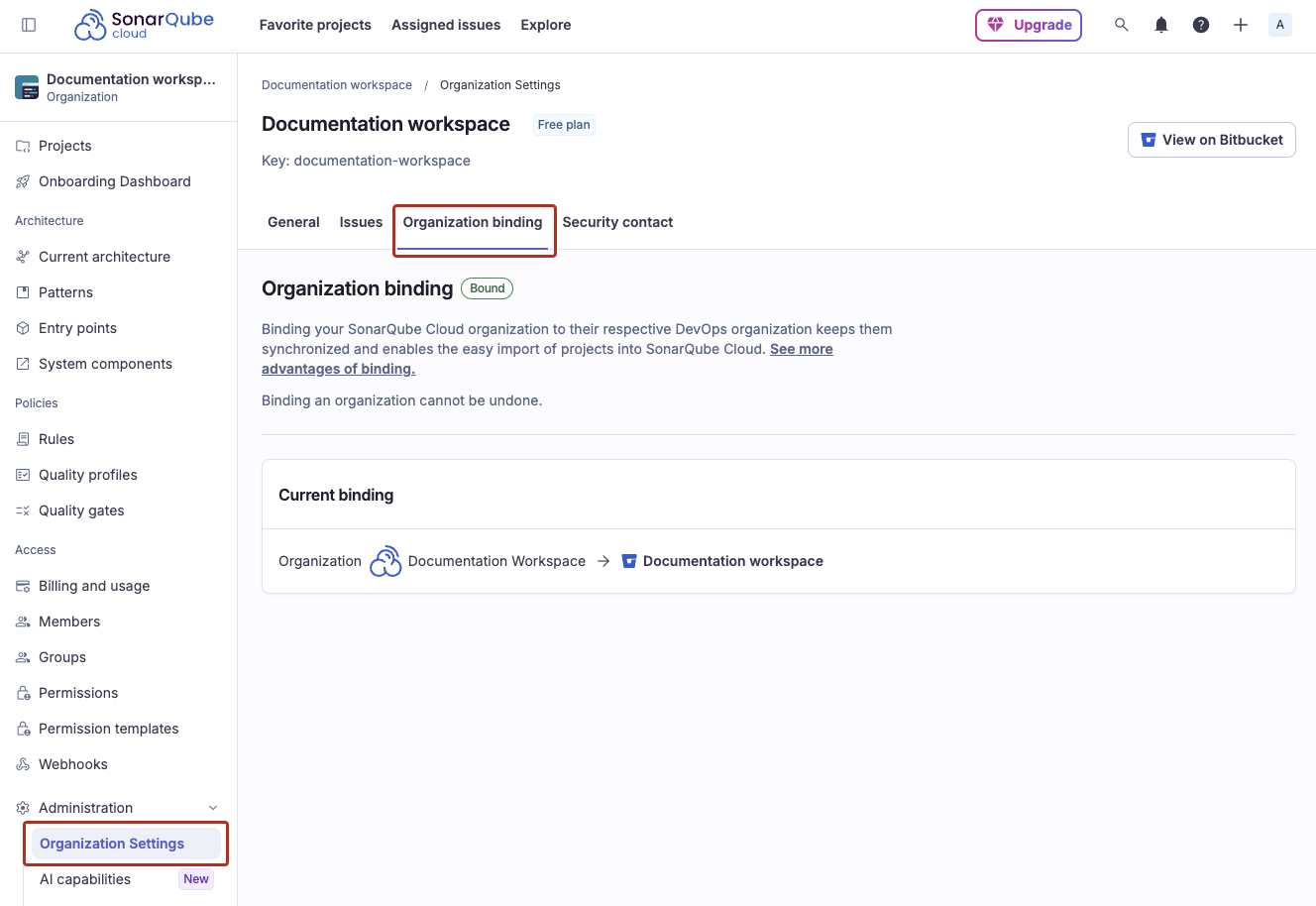
Your organization now appears as bound. To verify, go to **Administration** > **Organization settings** > **Organization binding**. In Bitbucket's app settings, you can select **Refresh connection status** to confirm the binding on Bitbucket's side.
{% hint style="info" %}
If the import fails because the organization already exists in SonarQube Cloud and you’ve lost administrator access to this organization, send a request to with all the necessary details.
{% endhint %}
To bind an existing organization to a Bitbucket workspace instead, see [Binding an unbound organization](/sonarqube-cloud/administering-sonarcloud/managing-organization/creating-organization/binding-unbound-organization.md#bitbucket-workspace).
## Related pages
* [Migrating to the Bitbucket Forge app](/sonarqube-cloud/administering-sonarcloud/managing-organization/creating-organization/migrating-to-the-bitbucket-forge-app.md)
* [Importing GitHub.com organization](/sonarqube-cloud/administering-sonarcloud/managing-organization/creating-organization/importing-github-organization.md)
* [Importing GitLab group](/sonarqube-cloud/administering-sonarcloud/managing-organization/creating-organization/importing-gitlab-group.md)
* [Importing Azure DevOps organization](/sonarqube-cloud/administering-sonarcloud/managing-organization/creating-organization/importing-azure-devops-organization.md)
* [Creating organization manually](/sonarqube-cloud/administering-sonarcloud/managing-organization/creating-organization/creating-organization-manually.md)
* [Binding an unbound organization](/sonarqube-cloud/administering-sonarcloud/managing-organization/creating-organization/binding-unbound-organization.md)
* [Changing organization binding](/sonarqube-cloud/administering-sonarcloud/managing-organization/creating-organization/changing-organization-binding.md)
* [Changing organization settings](/sonarqube-cloud/administering-sonarcloud/managing-organization/creating-organization/changing-organization-settings.md)
* [Deleting organization](/sonarqube-cloud/administering-sonarcloud/managing-organization/creating-organization/deleting-organization.md)
* [Using multiple accounts](/sonarqube-cloud/administering-sonarcloud/managing-organization/creating-organization/importing-from-multiple-platforms.md)
---
# Agent Instructions
This documentation is published with GitBook. GitBook is the documentation platform designed so that both humans and AI agents can read, navigate, and reason over technical content effectively. Learn more at gitbook.com.
## Querying This Documentation
If you need additional information that is not directly available in this page, you can query the documentation by asking a question.
Perform an HTTP GET request on the following URL with the `ask` and `goal` query parameters:
```
GET https://docs.sonarsource.com/sonarqube-cloud/administering-sonarcloud/managing-organization/creating-organization/importing-bitbucket-workspace.md?ask=&goal=
```
`ask` is the immediate question: it should be specific, self-contained, and written in natural language.
`goal` is what the user is ultimately trying to achieve, the reason they need the answer. Sharing it helps GitBook give you a better, more relevant answer. A goal is most helpful when it describes the outcome the user wants rather than restating the question. For example, with `ask=how do I create an API token`, a goal like `automate deployments from our CI pipeline` lets GitBook tailor the answer to that use case.
The response will contain a direct answer to the question and relevant excerpts and sources from the documentation.
Use this mechanism when the answer is not explicitly present in the current page, you need clarification or additional context, or you want to retrieve related documentation sections.