> For the complete documentation index, see [llms.txt](https://docs.sonarsource.com/llms.txt). Markdown versions of documentation pages are available by appending `.md` to page URLs; this page is available as [Markdown](https://docs.sonarsource.com/sonarqube-cloud/administering-sonarcloud/permissions.md).
# Permissions
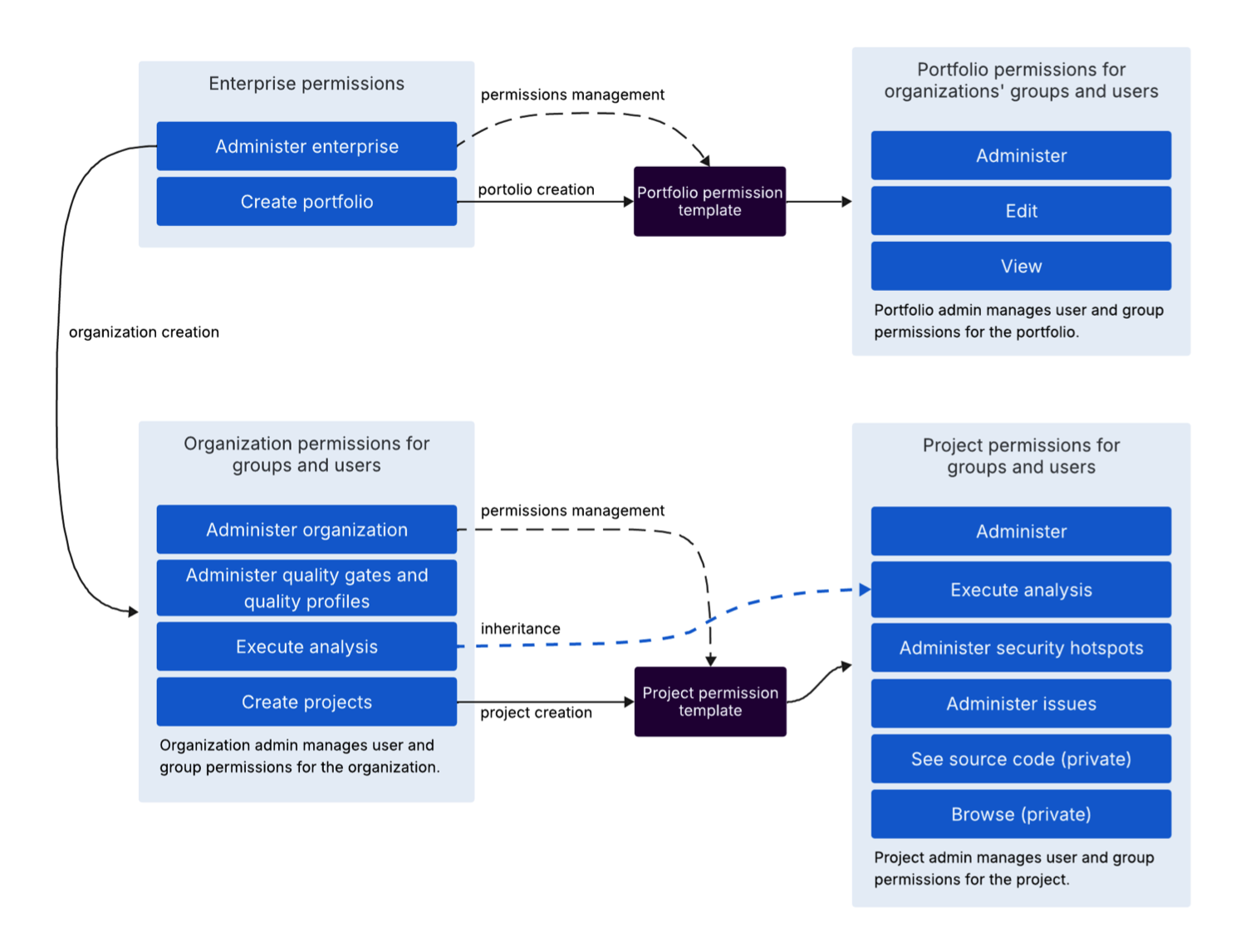
This is an overview of the permissions concept in SonarQube Cloud for the enterprise, portfolio, organization, and project levels.
## Introduction
Permissions in SonarQube Cloud exist at the enterprise, portfolio, organization, and project levels, each with its own set of actions. Permissions are set by an administrator at each level for individual users and groups, or by permission templates.
### Groups
Organization groups are the primary vehicle for assigning permissions consistently across many users at the organization, portfolio, and project levels. Since portfolios can be a collection of projects across multiple organizations, they can use groups from multiple organizations for permission assignment.
When an organization is created there are two groups that are created by default:
* **Owner**: This group contains by default the creator of the organization. The organization’s administrator can manage this group by adding, removing users and changing its name.
* **Members**: This group contains all members of the organization. The membership of this group cannot be modified.
The administrator can override the groups’ default permissions for an organization or project, if the organization is on the [Team and Enterprise](https://www.sonarsource.com/plans-and-pricing/) plans. See [Managing user groups](/sonarqube-cloud/administering-sonarcloud/managing-organization/users-and-permissions/user-groups.md) for more information.
Group permissions supplement the individual user permissions, working as a *union* between user and group permissions. For example, if you don’t have the **Create project** permission as an individual user (organization level) but you belong to the **Owner** group that has the permission enabled, you automatically get the permission from the group.
### Permission templates
Permission templates let administrators apply consistent permission sets (user, groups, creator) for new and existing projects and portfolios. When a new project or portfolio is created, permissions from the default permission template are automatically applied to it.
Permission templates don't continuously sync user and group permissions, even when the template is changed by the administrator. They act as one-time events and are triggered during the creation process or when you decide to reset permissions.
Custom project permissions templates are available in the [Team and Enterprise](https://www.sonarsource.com/plans-and-pricing/) plans. See [Using permission templates](/sonarqube-cloud/administering-sonarcloud/managing-organization/manage-org-projects/manage-project-permissions/templates.md) for projects and [Administering portfolios](/sonarqube-cloud/getting-started-with-enterprise/administering-portfolios.md#permission-templates) for more information.
## Enterprise permissions
The following are the permissions available for an enterprise:
Permission
Description
Administer Enterprise
The enterprise administrator can:
Change user permissions of an enterprise
Add an organization to the enterprise.
Remove or downgrade an organization.
Rename the organization
Manage portfolio permission templates
Create Portfolios
Can create portfolios.
### When an enterprise is created
The enterprise must have at least one administrator, we recommend two per enterprise. The initial user who created the enterprise is automatically its administrator.
See [Managing the enterprise-related permissions](/sonarqube-cloud/administering-sonarcloud/managing-enterprise/managing-the-enterprise-related-permissions.md) for more information.
## Portfolio permissions
The following permissions are available for a portfolio:
Permission
Description
Administer
Can change the portfolio’s permissions.
Edit
Grants the ability to:
Delete a portfolio.
Add projects by name (with projects’ Browse permission), by project tags, by organizations, or using regex (without projects’ Browse permission).
Remove any projects. Projects without the Browse permissions appear as hidden and once removed cannot be added back in.
View
Can view the portfolio’s Overview, Portfolio Breakdown, and Measures tabs. On the Portfolio Breakdown page, users can only view the projects they have access to (Browse permission).
### When a portfolio is created
When a portfolio is created by users with the enterprise-level **Create portfolio** permission, permissions from the default portfolio permission template (defined by the enterprise administrator) are applied to the new portfolio.
The portfolio permissions include users and groups of any organization that belongs to the enterprise.
See [Administering portfolios](/sonarqube-cloud/getting-started-with-enterprise/administering-portfolios.md) for more information.
## Organization permissions
The following permissions are available for an organization:
Permission Type
Description
Administer organization
Has full control over the administration functions for the organization, including the following permission-related functions:
Management of the organization’s user and group permissions
Can create and update Quality gates that can be applied to the organization’s projects.
Administer Quality Profiles
Can create and update quality profiles that can be applied to the organization’s projects. See Managing quality profiles for more details.
Execute analysis
Grants the ability to:
Retrieve all settings required to run the analysis, including secured credentials like passwords.
Push analysis results to SonarQube Cloud.
Run scans on any project in the organization, including private ones, regardless of existing project-level permissions.
Create projects
Can create new projects in the organization.
### When an organization is created
When an enterprise administrator creates an organization, they are automatically added to the Owner and Members groups with the following permissions:
* **Owner**: All permissions for the organization.
* **Members**: None.
Once the organization is created, the organization’s administrator can change the Owner and Members group permissions and create additional custom groups ([Team and Enterprise](https://www.sonarsource.com/plans-and-pricing/) plans). They can also manage individual users and their permissions.
Keep in mind that all members of the organization belong to the Members group, therefore all new users added to the organization, automatically have permissions of the Members group.
For more information, see:
* [Managing organization permissions](/sonarqube-cloud/administering-sonarcloud/managing-organization/users-and-permissions/organization-permissions.md)
* [Adding organization members](/sonarqube-cloud/administering-sonarcloud/managing-organization/users-and-permissions/organization-members.md)
* [Managing user groups](/sonarqube-cloud/administering-sonarcloud/managing-organization/users-and-permissions/user-groups.md)
* [Using permission templates](/sonarqube-cloud/administering-sonarcloud/managing-organization/manage-org-projects/manage-project-permissions/templates.md)
* [Recovering project admin access](/sonarqube-cloud/administering-sonarcloud/managing-organization/manage-org-projects/manage-project-permissions/recovering-admin-access.md)
* [Using Projects Management page](/sonarqube-cloud/administering-sonarcloud/managing-organization/manage-org-projects/projects-management-page.md)
## Project permissions
The following permissions are available for a project:
| Permission Type | Description |
| ---------------------------------------------------- | ------------------------------------------------------------------------------------------------------------------------------------------------------------------------------------------------------------------------------------------------------------------------------------------------------------------------------------------------------------------------------------------------------------------------------------------------------------------------------------------------------------------------------------------------------------------------------------------------------------------------------------------------------------------------------------------------------------------------------------------------------- |
| **Administer** |
On private projects, the Browse project permission must also be granted. The project administrator can access project settings and perform administration functions, including the following permission-related functions:
Management of the project’s user and group permissions.
Retrieve all settings required to run the analysis, including secured credentials like passwords
Push analysis results to SonarQube Cloud
Note: Users with the Execute Analysis permission at the organization-level are able to scan projects, even if they don’t have any explicit project permissions.
|
| **Administer security hotspots** | Can change the status of a security hotspot. For private projects, the **Browse** project permission must also be granted. |
| **Administer issues** |
Can perform the following actions:
Accept an issue
Mark an issue as False positive
|
| **Administer architecture** |
Can perform the following actions on the project's architecture:
Define and update the intended architecture
Apply an architecture pattern to a container
Create directives
Map the project's exit points to their target components
Grants the ability to view the source code (via API and web view) provided the Browse project permission is also granted.
Note: Anonymous and unauthorized users are prevented from easily downloading public projects’ source code via API and web views.
|
|
Browse (private projects)
| Can view a project. |
### When a project is created
When a user with the organization-level **Create projects** permission creates a new project, they are automatically added to the Owner and Members groups with the following default permissions.
* **Owner**: Administer architecture, Administer, Execute analysis.
* **Members**: Browse (private projects), See source code (private projects), Administer issues, Administer security hotspots.
These default group permissions are set by the default project permission template. They are managed by the organization’s administrator ([Team and Enterprise](https://www.sonarsource.com/plans-and-pricing/) plans).
Once the project is created, the project’s administrator can change the Owner and Members group permissions ([Team and Enterprise](https://www.sonarsource.com/plans-and-pricing/) plans). They can also manage individual user permissions.
Keep in mind that all members of the project belong to the Members group, therefore all new users automatically have project permissions from the Members group applied to them.
See [Setting your project's permissions](/sonarqube-cloud/managing-your-projects/administering-your-projects/setting-permissions.md) for more information.
## Managing permissions with Web API
See the following links in the Web API portal:
* [Users and Roles API](https://api-docs.sonarsource.com/sonarqube-cloud/default/public-externalusers-0-0)
* [Enterprises, Reports, Portfolios, Portfolio Permission Templates API](https://api-docs.sonarsource.com/sonarqube-cloud/default/public-sonarcloud-organizations-enterprises-external-1-0-1#/enterprises/list-enterprises)
* [Organizations API](https://api-docs.sonarsource.com/sonarqube-cloud/default/public-sonarcloud-organizations-organizations-external-1-0-2)
* [Projects External API](https://api-docs.sonarsource.com/sonarqube-cloud/default/public-projectsexternal-0-0-1)
---
# Agent Instructions
This documentation is published with GitBook. GitBook is the documentation platform designed so that both humans and AI agents can read, navigate, and reason over technical content effectively. Learn more at gitbook.com.
## Querying This Documentation
If you need additional information that is not directly available in this page, you can query the documentation by asking a question.
Perform an HTTP GET request on the following URL with the `ask` and `goal` query parameters:
```
GET https://docs.sonarsource.com/sonarqube-cloud/administering-sonarcloud/permissions.md?ask=&goal=
```
`ask` is the immediate question: it should be specific, self-contained, and written in natural language.
`goal` is what the user is ultimately trying to achieve, the reason they need the answer. Sharing it helps GitBook give you a better, more relevant answer. A goal is most helpful when it describes the outcome the user wants rather than restating the question. For example, with `ask=how do I create an API token`, a goal like `automate deployments from our CI pipeline` lets GitBook tailor the answer to that use case.
The response will contain a direct answer to the question and relevant excerpts and sources from the documentation.
Use this mechanism when the answer is not explicitly present in the current page, you need clarification or additional context, or you want to retrieve related documentation sections.