> For the complete documentation index, see [llms.txt](https://docs.sonarsource.com/llms.txt). Markdown versions of documentation pages are available by appending `.md` to page URLs; this page is available as [Markdown](https://docs.sonarsource.com/sonarqube-cloud/advanced-security/reviewing-and-fixing-dependency-risks.md).
# Reviewing and fixing dependency risks
SonarQube Cloud lets you manage the dependency risks detected during analysis and provides insights on how to fix them.
Advanced Security is a product that requires a separate subscription to your SonarQube Cloud's [plan](https://www.sonarsource.com/plans-and-pricing/#sonarqube-cloud-features).
*The Advanced Security product is available starting with the Team plan.* See the [Signing up for a plan or product](/sonarqube-cloud/administering-sonarcloud/managing-subscription/signing-up-for-plan.md#advanced-security) article for signup instructions.
SonarQube Advanced Security lets you manage dependency risks, mark them as safe, confirmed, or accepted, and assign them to other members of your team. For Remediation Agent subscribers, you can let the agent fix a vulnerability for you by opening a pull request that bumps the affected dependency version; see [SCA basic remediation](https://docs.sonarsource.com/agent-centric-development-cycle/solve/remediation-agent#sca-basic-remediation).
## Reviewing and fixing dependency risks
Navigate to the **Dependency Risks** tab of your project or portfolio.
Use **Filters** in the left side bar to narrow down the results. You can filter the results by:
* **Risk type**: Vulnerability, Malicious package, and Prohibited license
* **Risk severity**: Blocker, High, Medium, Low, or Info
* **Software quality**: Security, Maintainability
* **Reachability**: Show only confirmed reachable vulnerabilities
* **Dependency type**: Direct or Transitive
* **Dependency scope**: Production or Development
* **Package manager**: See [Analyzing project for dependencies](/sonarqube-cloud/advanced-security/analyzing-projects-for-dependencies-sca.md) for a list of supported package managers and languages.
* **Status**: Accepted, Confirmed, Open, Fixed, Safe
* **Assignee**: Type in the name of the person assigned and select it from the list.
From there, you can sort the list of results:
* by choosing the sorting criteria from the **Sort by** dropdown menu
* by vulnerability name by entering a vulnerability ID (such as CVE-2022-38392) into the search box
The following information is displayed for each dependency risk in the list:
1. Descriptive title of the dependency risk. Click on the title to open a detailed view.
2. Software quality, risk type, and severity
3. Status: Open, Confirmed, Accepted, Safe
4. Assignee of the risk
5. Amount of time that has passed since the risk was first detected
6. Affected dependency and version
7. If it is confirmed to be reachable by your code, a Reachable badge is displayed
## Understanding the risk types
Each dependency risk has an assigned risk type:
* **Vulnerability**: When a third-party dependency is affected by a publicly reported vulnerability, such as a record on [CVE.org](http://cve.org/)
* **Malicious package**: When a third-party dependency is known to be malicious
* **Prohibited license**: When a third-party dependency has a software license not allowed by the project's associated [license profile and policy](/sonarqube-cloud/advanced-security/managing-license-profiles-and-policies.md). Note that license risks are only available on the Enterprise [plan](https://www.sonarsource.com/plans-and-pricing/#sonarqube-cloud-features).
## Changing dependency status and assigning risks
### Dependency risk lifecycle
A dependency risk can have the following statuses:
* **Open**: Initial state of a dependency risk after analysis. The risk has not been yet reviewed.
* **Confirmed**: Indicates that the dependency risk has been reviewed and the risk is valid.
* **Accepted**: The risk is valid but it may not be fixed for a while.
* **Safe**: Indicates that the dependency risk does not compromise the security of the software. A mandatory justification must be provided.
To change the status of the dependency risk, click the **Change Status** button to open a modal. From the **Status** dropdown list select a new status for the risk and enter a description for the change in the **Explain your decision** text box.
If a release is updated without fixing a risk (such as to a new version that is under the same prohibited license), the risk is recreated as OPEN.
### Assigning a dependency risk
You can delegate a review of dependency risks to other team members by clicking the **Unassigned** dropdown menu and entering a name. You can also assign the risk to yourself.
### Email notifications
If you have subscribed to [email notifications](/sonarqube-cloud/managing-your-account/notifications.md) for a project, note that the notifications that apply to issues also apply to dependency risks.
## Detailed view
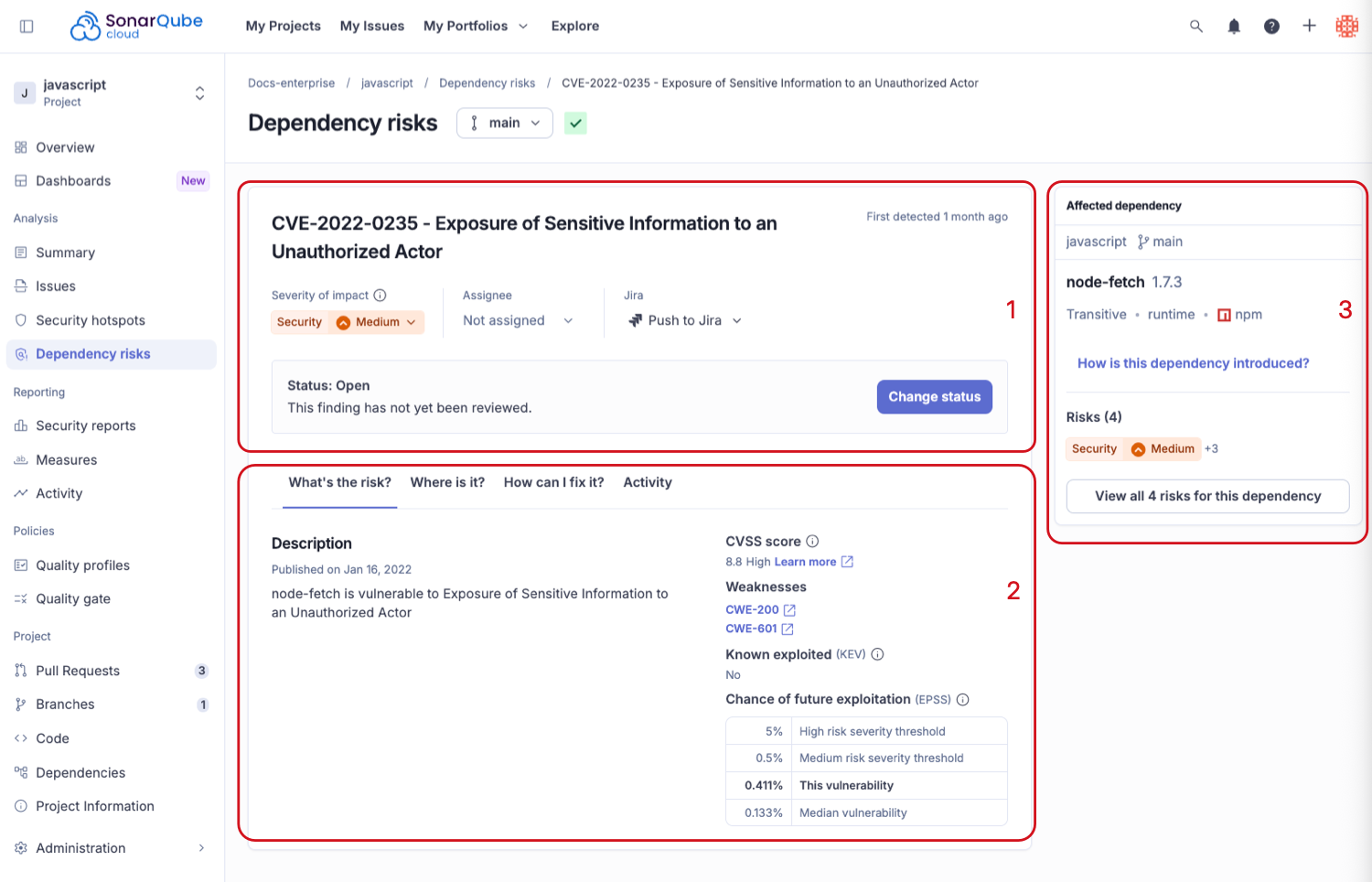
Clicking the title of the dependency risk in the list of results opens its detailed view page:
1. Details of the dependency risk, including **Risk type**, **Risk Severity**, **First detected**, **Assignee**, and **Status**.
2. **What’s the Risk?** and **How can I fix it?** allow you to review information about the dependency risk, the factors affecting the risk’s severity, and information about currently used dependency versions and fixes.
3. **Affected dependencies** shows the dependency version that raised the risk, dependency type, package manager and the associated risks. Click the **View all risks for this dependency** for a full list.
## What’s the risk?
Sonar uses a holistic approach to determine the severity of a dependency risk. The methods used depend on the associated risk type.
### Vulnerability risk
Sonar partners with select open source maintainers to uphold their software to secure development practices. As part of this partnership, Sonar-partnered maintainers provide guidance on vulnerabilities. This guidance includes:
* Whether the vulnerability is real, or a false positive
* How likely it is that the vulnerability will affect typical usage
* Whether the vulnerability affects development or test usage, or only production usage
* What workarounds, if any, are available
* What specific functions or methods are affected
This guidance ensures that developers have comprehensive information to speed up remediation times.
**Risk evaluation**
The risk evaluation is based on the following factors:
* **Severity**: Evaluates the technical severity of a vulnerability based on an assessment by [CVSS](https://www.first.org/cvss/).
* **Known exploited**: Shows if the risk has been actively exploited in the wild. It’s measured by [KEV](https://www.cisa.gov/known-exploited-vulnerabilities-catalog).
* **Chance of future exploitation**: Estimates the likelihood (percentage) of a software vulnerability being exploited in the wild over the next 30 days. It’s measured by [EPSS](http://first.org/epss).
Sonar combines these factors to assign a severity to a discovered vulnerability to ensure that developers are prioritizing the most urgent risk in their applications.
#### Vulnerability reachability
SonarQube performs reachability analysis of vulnerabilities to determine whether your code calls the vulnerable code in your third party dependencies.
Three possible values are shown for the reachable status of a vulnerability:
* Reachable: SonarQube found your code calling functions associated with the vulnerability
* Unreachable: SonarQube found no instances of your code directly calling functions associated with the vulnerability. You may still be affected due to transitive calls from other dependencies, or other ways of exploiting the vulnerability.
* Not analyzed: SonarQube did not analyze this vulnerability for reachability
Reachable vulnerabilities should be prioritized for immediate remediation.
Vulnerabilities may not be analyzed for reachability for a number of reasons. The vulnerability could be in an unsupported language, the vulnerable package may be a transitive dependency, or no deep vulnerability analysis has yet been performed.
Reachability is only calculated for a full analysis (either in CI, or via automatic analysis), as it requires a call graph analysis of your code. Vulnerabilities detected via [continual analysis](https://docs.sonarsource.com/sonarqube-cloud/advanced-security/analyzing-projects-for-dependencies-sca#continual-analysis) will be analyzed for reachability at the next full analysis.
Reachability analysis is currently only supported for vulnerabilities in Java/Kotlin, Python, and C#/VB.NET code. Sonar will add additional language support over time.
### Malicious package risk
Malicious package risks are always BLOCKER severity. They should be remediated immediately.
### Prohibited license risk
The dependency risk for prohibited license risk type depends on the configuration of your instance's license profile and policy. The **What's the risk?** tab provides information about the risk associated with the license and links to relevant resources. For more information, see [Managing license profiles and policies](/sonarqube-cloud/advanced-security/managing-license-profiles-and-policies.md). License risks are only available on the Enterprise plan.
## Dependency risk severities
The table below lists the dependency risk severities used for vulnerability risks and their definition.
| **Risk severity** | **Definition** |
| ----------------- | -------------------------------------------------------------------------------------------------------------------------------------------------------------------------------------------------------------------------------------------------------------------------------------------------------------------------------------------------------------------------------------- |
| Blocker | A vulnerability is on the CISA KEV list. |
| High |
Vulnerability has both:
High exploitability (an EPSS probability greater than 5%)
High risk (a CVSS score over 7.0)
|
| Medium |
Any other vulnerability that has both:
Moderate or unknown exploitability (an EPSS probability greater than 0.5%, or no EPSS scoring)
Moderate risk (a CVSS score over 4.0)
|
| Low | Any remaining vulnerability that does not fit into another category. |
| Info |
Any of the following is true:
A Tidelift or Sonar partnered maintainer has declared the vulnerability a false positive
The vulnerability has been declared as withdrawn by a vulnerability source (NIST, OSV)
Note: this categorization for Info overrides any criteria that would place the risk into Critical, High, or Low severity.
|
**Editing risk severities**
If you decide that a different level is more appropriate for a given risk, you can manually set a new severity level. Keep in mind that doing so may impact your quality gates.
To customize the risk severity level for **Software qualities impacted**:
1. Select a risk from the search results list.
2. Click on the quality: **Security**, **Reliability**, or **Maintainability**.
3. Select the severity level you wish to apply from the dropdown list. You can also change the severity level from the risk's details page.
Note that if you manually update the severity level for a risk, it will no longer be updated automatically by Sonar, even if the data used in the severity calculation changes.
## How can I fix it?
### Vulnerability
The **How can I fix it?** tab displays information about dependency versions, starting with the latest, and available fixes.
The following options are available:
* **Complete fix**: A dependency version that fixes all associated vulnerabilities.
* **Partial fix**: A dependency version that fixes the vulnerability but not all other vulnerabilities associated with the dependency.
* **Affected version**: A dependency version for which the vulnerability was detected.
The SonarQube Remediation Agent can apply the suggested version bump for you by opening a pull request. See [SCA basic remediation](https://docs.sonarsource.com/agent-centric-development-cycle/features/remediation-agent#sca-basic-remediation) for the supported package managers.
### Malicious package
Any machine that has an installed a malicious piece of software should be considered compromised and remediated immediately. The How can I fix it? tab provides steps that should be followed when malware is detected, including informing your information security team.
### Prohibited license
The dependency risk for prohibited license risk type depends on the configuration of your instance’s license profile and policy. The How can I fix it? tab provides information about different license categories and links to relevant resources. In general, resolving a license risk will require choosing a different software package to use instead. For more information, see [Managing license profiles and policies](/sonarqube-cloud/advanced-security/managing-license-profiles-and-policies.md).
## Setting a license profile and policy
Instance admins can configure a license profile and policy to define which licenses are allowed or prohibited for the dependencies used in your projects or the whole instance. For more information, see Managing license profiles and policies.
## Dependency risks in quality gates
The **Project overview** page displays dependency risks and indicates whether they pass or fail the associated quality gate.
As a quality gate administrator, you can configure quality gate conditions for **Prohibited license**, **Malicious package**, and **Vulnerability** types for new and overall code, or set limits on the number or severity of dependency risks that will cause the quality gate to fail. See [Managing custom quality gates](/sonarqube-cloud/standards/managing-quality-gates/managing-custom-quality-gates.md) for more information.
If your organization has recently purchased the Advanced Security package, you will have to create a custom quality gate to make sure no new dependency risks are introduced in your projects.
See [Understanding measures and metrics](/sonarqube-cloud/managing-your-projects/metric-definitions.md) for more information about Advanced Security metrics used in quality gates.
## Tracking risks via reports
{% hint style="info" %}
All reporting features are only available on the Enterprise [plan](https://www.sonarsource.com/plans-and-pricing/#sonarqube-cloud-features).
{% endhint %}
In addition to the existing SonarQube [enterprise reports](https://docs.sonarsource.com/sonarqube-cloud/getting-started-with-enterprise/viewing-enterprise-reports), you can download a specific report of your third party dependency risks for your project, applications, and portfolios from the project overview page, or by calling a [SonarQube Cloud API endpoint](https://api-docs.sonarsource.com/sonarqube-cloud/default/public-dependencyservice-v1-4).
The report lists dependency risks based on the latest scan for the default branch of your project or portfolio. It can help managers identify:
* What violations exist in their team’s projects
* What patterns of risk are associated with higher-level dependencies, and how to use the information to guide developers effectively
* What specific upgrades developers can perform to remove multiple violations.
The report is downloadable in JSON or CSV format and contains information on:
* Project or portfolio name
* Branch of project, if the report is for a project
* Project or portfolio key
* Package URL (purl) of the dependency
* Link to the risk in the SonarQube interface
* Dependency chain(s)
* Risk title (a short description of the risk)
* Risk type
* Risk severity
* Risk status, including comments when status was changed
* Scope of the dependency, including whether it is considered a production dependency
* Vulnerability specific fields
* Risk identifier (e.g., the CVE id)
* CVSS and EPSS scoring for the risk
* KEV status of the risk
* Associated CWE weakness ids
* Date the vulnerability was published
* Reachability status of the risk
* Date when Sonar assigned the Risk to the project
Additionally, you can download a machine-readable vulnerability risk report in [VEX format](https://cyclonedx.org/capabilities/vex/), which can be used to attest to the vulnerability posture of your products. The VEX report includes raw vulnerability detail, and also justifications based on comments made when marking vulnerabilities as SAFE in your projects.
## Required permissions
On private projects, and portfolios, the following permissions apply:
* **Browse**: access, browse, confirm dependency risks, change assignee.
* **Administer issues**: change risk severity, resolve risks as **Accepted** or **Safe**.
Anyone within an organization is allowed to browse dependency risks on public projects and portfolios.
Changing the status of a dependency risk requires the **Administer Issues** permission.
## Related pages
* [Viewing dependencies](/sonarqube-cloud/advanced-security/viewing-dependencies.md)
* [Analyzing projects for dependencies](/sonarqube-cloud/advanced-security/analyzing-projects-for-dependencies-sca.md)
* [Managing license profiles and policies](/sonarqube-cloud/advanced-security/managing-license-profiles-and-policies.md)
* [Troubleshooting](/sonarqube-cloud/advanced-security/troubleshooting-the-dependency-analysis.md)
* [Best practices for managing dependency risks](/sonarqube-cloud/advanced-security/best-practices-for-managing-dependency-risks.md)
* [SCA basic remediation](https://docs.sonarsource.com/agent-centric-development-cycle/features/remediation-agent#sca-basic-remediation)
---
# Agent Instructions
This documentation is published with GitBook. GitBook is the documentation platform designed so that both humans and AI agents can read, navigate, and reason over technical content effectively. Learn more at gitbook.com.
## Querying This Documentation
If you need additional information that is not directly available in this page, you can query the documentation by asking a question.
Perform an HTTP GET request on the following URL with the `ask` and `goal` query parameters:
```
GET https://docs.sonarsource.com/sonarqube-cloud/advanced-security/reviewing-and-fixing-dependency-risks.md?ask=&goal=
```
`ask` is the immediate question: it should be specific, self-contained, and written in natural language.
`goal` is what the user is ultimately trying to achieve, the reason they need the answer. Sharing it helps GitBook give you a better, more relevant answer. A goal is most helpful when it describes the outcome the user wants rather than restating the question. For example, with `ask=how do I create an API token`, a goal like `automate deployments from our CI pipeline` lets GitBook tailor the answer to that use case.
The response will contain a direct answer to the question and relevant excerpts and sources from the documentation.
Use this mechanism when the answer is not explicitly present in the current page, you need clarification or additional context, or you want to retrieve related documentation sections.


.png?alt=media)
