> For the complete documentation index, see [llms.txt](https://docs.sonarsource.com/llms.txt). Markdown versions of documentation pages are available by appending `.md` to page URLs; this page is available as [Markdown](https://docs.sonarsource.com/sonarqube-cloud/advanced-security/viewing-dependencies.md).
# Viewing dependencies
How to view the dependencies in your SonarQube Cloud projects and export the software bill of materials (SBOM).
Advanced Security is a product that requires a separate subscription to your SonarQube Cloud's [plan](https://www.sonarsource.com/plans-and-pricing/#sonarqube-cloud-features).
*The Advanced Security product is available starting with the Team plan.* See the [Signing up for a plan or product](/sonarqube-cloud/administering-sonarcloud/managing-subscription/signing-up-for-plan.md#advanced-security) article for signup instructions.
During project analysis, SonarQube Advanced Security conducts software composition analysis (SCA) to identify and list project dependencies and associated risks. It's also possible to export the software bill of materials (SBOM) for your project.
## Viewing the list of dependencies
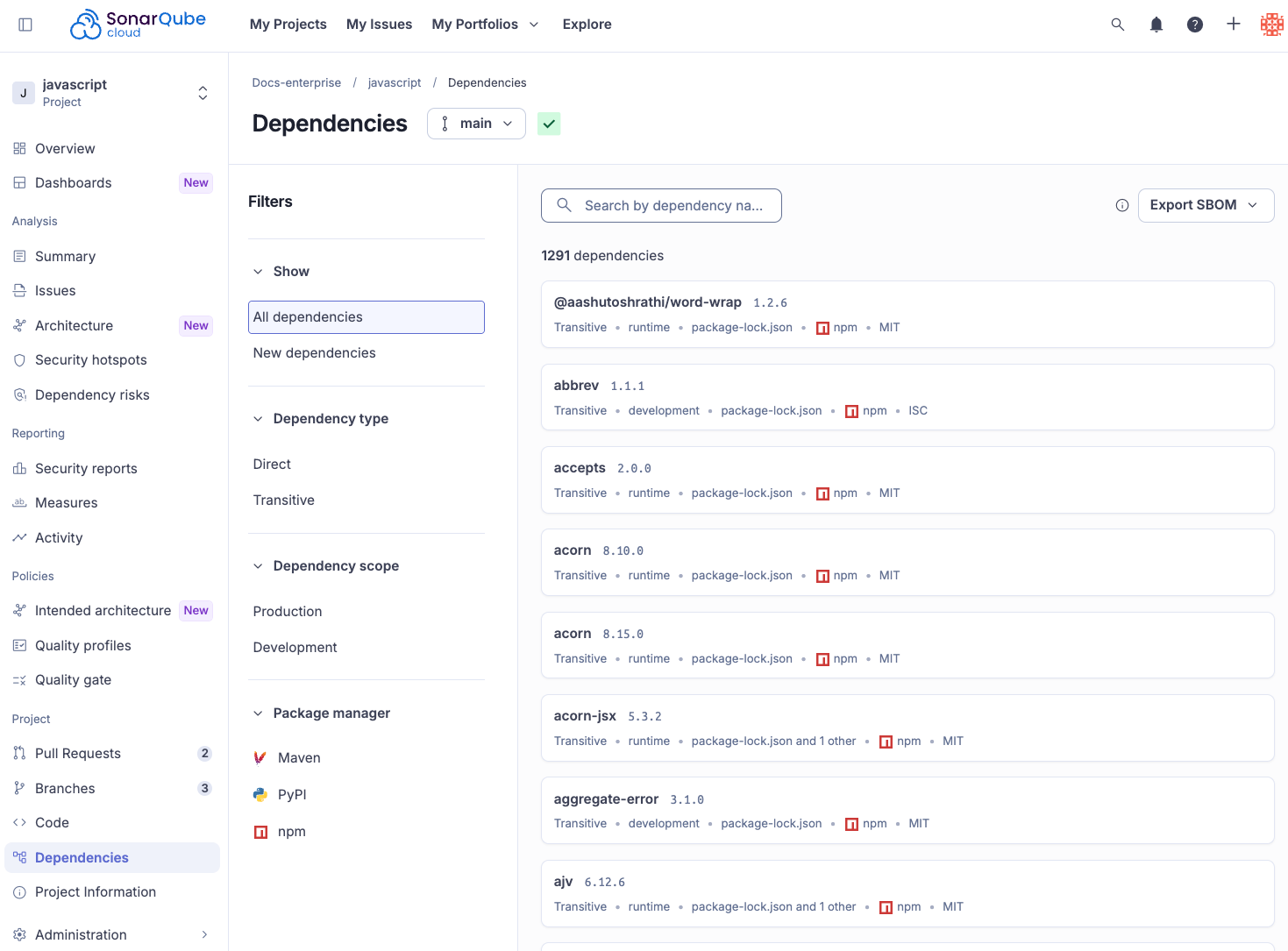
You must build, or rebuild your project's main branch to see the SCA results. After an analysis, a list of dependencies becomes available on the **Dependencies** page for projects and portfolios. It is updated with each analysis. You need the **Browse** permission to view dependencies on private projects and portfolios.
You can use **Filters** to narrow down the results. Dependencies can be filtered by:
* **Dependency type**: Direct or Transitive.
* **Dependency scope**: Production or Development.
* **Package manager**: A list of package managers. See [Analyzing projects for dependencies](/sonarqube-cloud/advanced-security/analyzing-projects-for-dependencies-sca.md) for supported package managers and languages.
Use the search feature to find specific dependencies.
The following information is displayed for each dependency card in the list:
1. Dependency name
2. Dependency version
3. Dependency type
4. Dependency scope
5. Files where the dependency was identified
6. Package manager
7. License
Click on the dependency name to open a detailed view.
## Detailed view
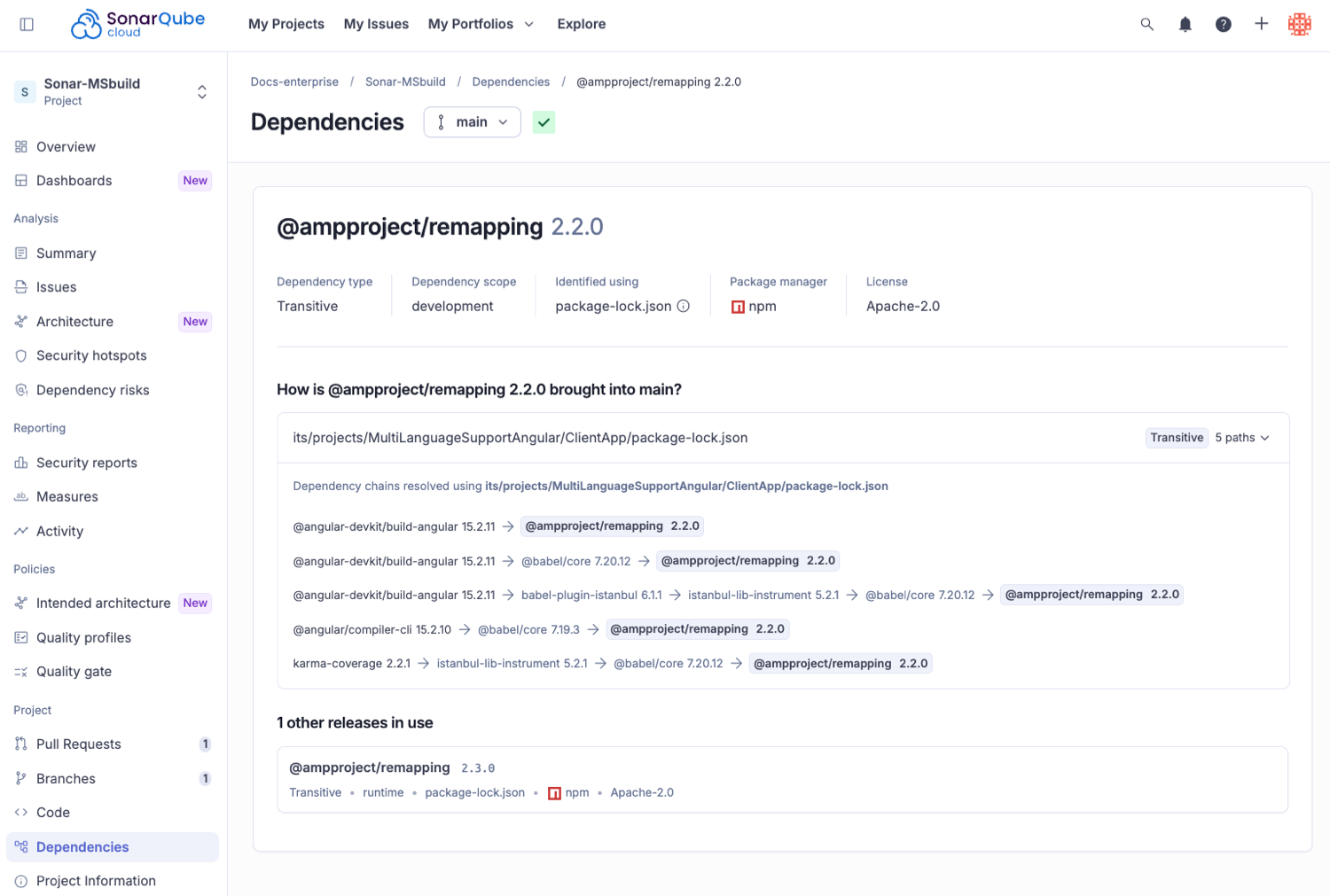
The detailed view of a dependency provides the following information:
* Details of the dependency, including **Dependency type**, **Dependency scope**, **Identified using**, **Package manager** and **License**. Click on the info icon for **Identify using** to reveal all the files where the dependency was identified.
* Dependency chains: A list of direct and transitive dependency chains, if available.
### About dependency chains
Dependency chains show how a dependency is brought into your project.
Project components often rely on other components, creating dependencies. These dependencies can be direct, where one component immediately uses another, or transitive, where a component relies on another component which, in turn, depends on yet another.
For example In a Project > Component 1 > Component 2 scenario:
* The dependency between Project and Component 1 is direct.
* The dependency between Project and Component 2 is transitive because Component 1 is built using Component 2.
The detailed view indicates whether a dependency has direct and transitive dependency chains and displays the complete path for transitive dependencies.
## Getting a high-level view of your dependency usage
You can also view dependencies for portfolios to get a higher-level view of your dependency usage. For example, to get a list, or bill of materials, for all software in use by your organization, you can create a [portfolio](/sonarqube-cloud/managing-portfolios.md) of **All Projects**.
After you create and refresh a portfolio, you can view **Dependencies** and **Dependency Risks**. Searching Dependencies by name allows you to see where a dependency is used in your organization. Searching Dependency Risks by a CVE name allows you to discover where your in organization you may be affected by a newly reported CVE.
## Software Bill of Materials (SBOM)
{% hint style="info" %}
Software Bill of Materials export is only available on the Enterprise [plan](https://www.sonarsource.com/plans-and-pricing/#sonarqube-cloud-features).
{% endhint %}
A software bill of materials (SBOM) is an inventory of components your project is built with, including details such as the component name, version, and license.
Because your project depends on these components to build and run your software, getting the SBOM for a project is a key element to track all the items that you depend on for both internal use in the remediation of dependency risks, and external use for compliance with regulations.
Compliance teams can use SBOMs as an index to keep an inventory of licenses in use. Developers can use SBOMs to manage dependencies. All of this creates greater interoperability and efficiency within an organization. It is a shared language for all of these teams that can be passively generated and maintained based on application builds.
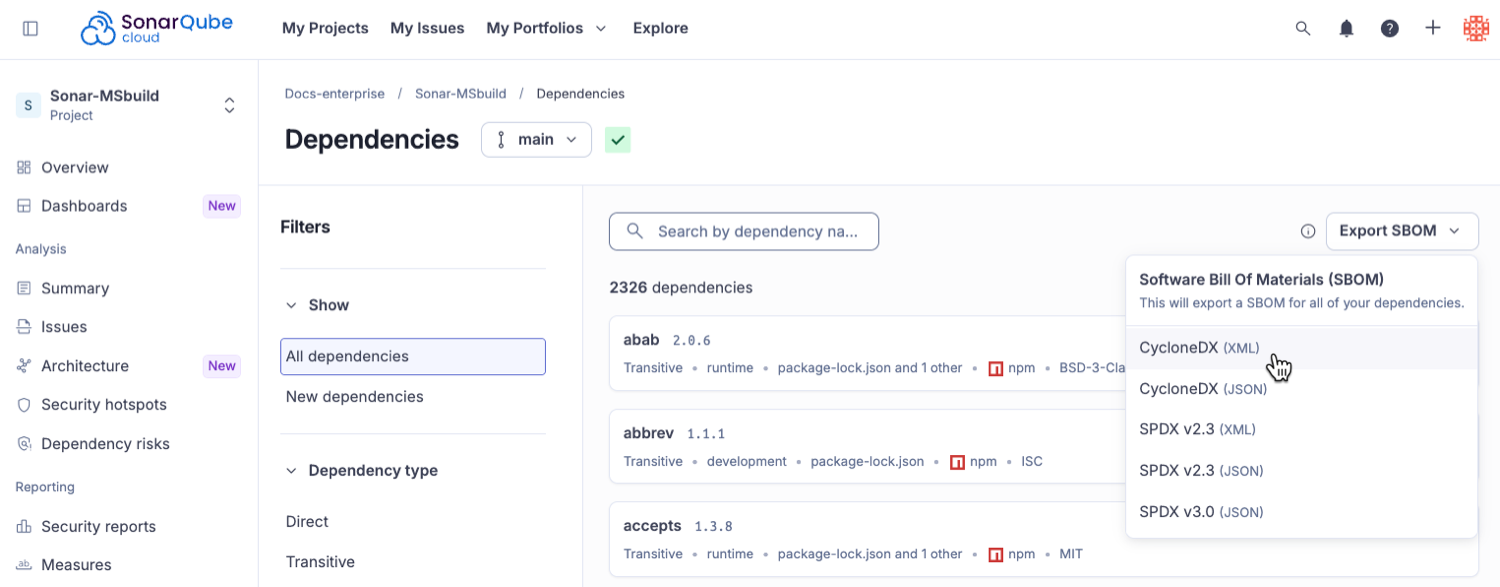
Sonar supports exporting an SBOM in two major SBOM formats: Software Package Data Exchange (SPDX) and CycloneDX.
### Exporting the SBOM
You can export the SBOM from the **Dependencies** page of **Projects** and **Portfolios**. SBOMs are available in the CycloneDX and SPDX, in both XML and JSON formats.
By default, a SonarQube-generated SBOM only includes 'production' dependencies - dependencies that end up in your released application. If you need to include all dependencies, including development dependencies, you can generate a SBOM via the API by passing `onlyProductionScope=false`.
SBOMs are generated when requested in the UI or API; there is no storage or history for SBOMs in SonarQube. If your needs require storing SBOMs for particular released versions of your projects or portfolios, you should export a SBOM at release time and save it somewhere outside of SonarQube for later use.
## Related pages
* [Reviewing and fixing dependency risks](/sonarqube-cloud/advanced-security/reviewing-and-fixing-dependency-risks.md)
* [Analyzing projects for dependencies](/sonarqube-cloud/advanced-security/analyzing-projects-for-dependencies-sca.md)
* [Managing license profiles and policies](/sonarqube-cloud/advanced-security/managing-license-profiles-and-policies.md)
* [Troubleshooting](/sonarqube-cloud/appendices/troubleshooting.md)
* [Best practices for managing dependency risks](/sonarqube-cloud/advanced-security/best-practices-for-managing-dependency-risks.md)
* [Cyber Resilience Act capability mapping](https://docs.sonarsource.com/cyber-resilience-act)
---
# Agent Instructions
This documentation is published with GitBook. GitBook is the documentation platform designed so that both humans and AI agents can read, navigate, and reason over technical content effectively. Learn more at gitbook.com.
## Querying This Documentation
If you need additional information that is not directly available in this page, you can query the documentation by asking a question.
Perform an HTTP GET request on the following URL with the `ask` and `goal` query parameters:
```
GET https://docs.sonarsource.com/sonarqube-cloud/advanced-security/viewing-dependencies.md?ask=&goal=
```
`ask` is the immediate question: it should be specific, self-contained, and written in natural language.
`goal` is what the user is ultimately trying to achieve, the reason they need the answer. Sharing it helps GitBook give you a better, more relevant answer. A goal is most helpful when it describes the outcome the user wants rather than restating the question. For example, with `ask=how do I create an API token`, a goal like `automate deployments from our CI pipeline` lets GitBook tailor the answer to that use case.
The response will contain a direct answer to the question and relevant excerpts and sources from the documentation.
Use this mechanism when the answer is not explicitly present in the current page, you need clarification or additional context, or you want to retrieve related documentation sections.