> For the complete documentation index, see [llms.txt](https://docs.sonarsource.com/llms.txt). Markdown versions of documentation pages are available by appending `.md` to page URLs; this page is available as [Markdown](https://docs.sonarsource.com/sonarqube-mcp-server/about-the-mcp-server.md).
# About the MCP Server
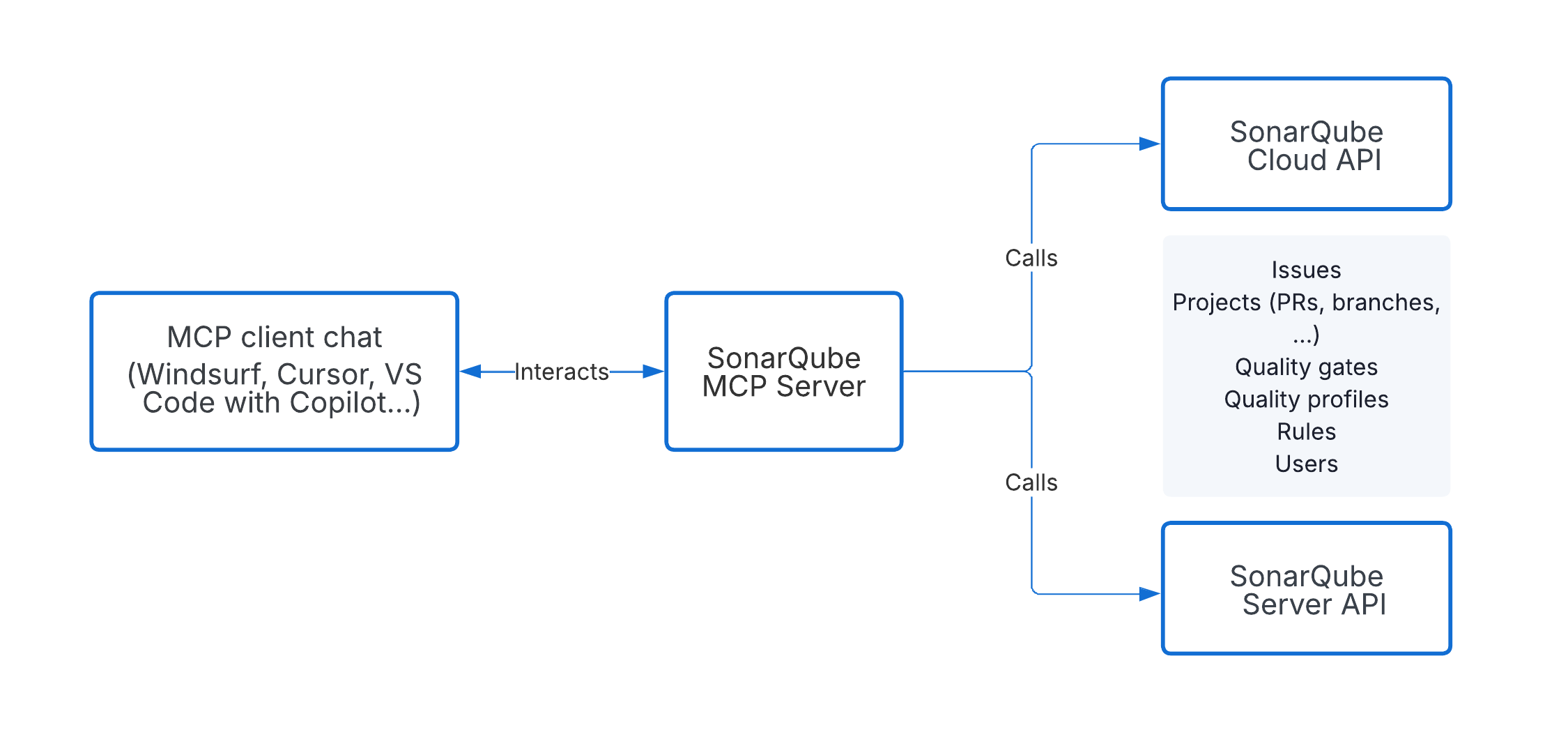
The SonarQube MCP Server is a Model Context Protocol (MCP) server that connects your AI coding agent to SonarQube's code quality and security data.
The SonarQube MCP Server gives your AI coding agent access to SonarQube's code quality and security data. It's a tool bag: a set of tools your agent can call to analyze code, retrieve issues, check quality gates, inspect security hotspots, measure coverage, and more.
It works with [Claude Code](/sonarqube-mcp-server/setup/quickstart-guides/claude-code.md), [Codex CLI](/sonarqube-mcp-server/setup/quickstart-guides/codex-cli.md), [Cursor](/sonarqube-mcp-server/setup/quickstart-guides/cursor.md), [Gemini CLI](/sonarqube-mcp-server/setup/quickstart-guides/antigravity.md), [GitHub Copilot CLI](/sonarqube-mcp-server/setup/quickstart-guides/github-copilot-cli.md), [GitHub Copilot Cloud Agent](/sonarqube-mcp-server/setup/quickstart-guides/github-copilot-cloud-agent.md), [Kiro](/sonarqube-mcp-server/setup/quickstart-guides/kiro.md), [VS Code](/sonarqube-mcp-server/setup/quickstart-guides/vs-code.md), [Devin Desktop](/sonarqube-mcp-server/setup/quickstart-guides/devin-desktop.md), and [Zed](/sonarqube-mcp-server/setup/quickstart-guides/zed.md).
It also powers the [SonarQube agent](/agent-centric-development-cycle/developer-tools/agent-plugins/agent-apps-for-github.md) through GitHub agent apps.
## Tools
The server exposes tools in these categories:
* [Analysis](/sonarqube-mcp-server/reference/tools.md#analysis): analyze code snippets or files directly in the agent context
* [Issues](/sonarqube-mcp-server/reference/tools.md#issues): search, review, and update code issues
* [Quality gates](/sonarqube-mcp-server/reference/tools.md#quality-gates): check quality gate status for a project
* [Security Hotspots](/sonarqube-mcp-server/reference/tools.md#security-hotspots): search and review security hotspots
* [Coverage](/sonarqube-mcp-server/reference/tools.md#coverage): find under-covered files and get line-by-line coverage details
* [Projects](/sonarqube-mcp-server/reference/tools.md#projects): search projects and pull requests
* [Dependency risks](/sonarqube-mcp-server/reference/tools.md#dependency-risks): SCA issues found in a project
* [Vortex context](/sonarqube-mcp-server/reference/tools.md#vortex-context): code architecture search, call flows, coding guidelines, and SCA dependency checks (requires an active subscription)
See the [Tools](/sonarqube-mcp-server/reference/tools.md) page for the full reference.
Some tools require an active [Sonar Vortex](/agent-centric-development-cycle/inside-your-agent-the-agentic-loop/sonar-vortex.md) subscription on SonarQube Cloud or in SonarQube Server. To set these up, the recommended methods are the SonarQube plugin or SonarQube CLI. See [Sonar Vortex analysis](/agent-centric-development-cycle/inside-your-agent-the-agentic-loop/sonar-vortex-analysis.md) and [Sonar Vortex context](/agent-centric-development-cycle/inside-your-agent-the-agentic-loop/sonar-vortex-context.md) for more details about the features.
## Data and telemetry
The SonarQube MCP Server collects anonymous usage data and sends it to Sonar to help improve the product. Sonar doesn't collect your IP address, your source code, or share data with anyone else.
Collection of telemetry can be disabled with: `TELEMETRY_DISABLED=true`. For a sample of the data collected, see [telemetry-sample.md](https://github.com/SonarSource/sonarqube-mcp-server/blob/master/telemetry-sample.md) in the source repository.
## License
Licensed under the [SONAR Source-Available License v1.0](https://www.sonarsource.com/license/ssal/). Using the SonarQube MCP Server in compliance with this documentation is a Non-Competitive Purpose and so is allowed under the SSAL.
Your use of SonarQube via MCP is governed by the [SonarQube Cloud Terms of Service](https://www.sonarsource.com/legal/sonarcloud/terms-of-service/) or [SonarQube Server Terms and Conditions](https://www.sonarsource.com/legal/sonarqube/terms-and-conditions/), including use of the Results Data solely for your internal software development purposes.
## Next steps
Read the [Environment considerations](/sonarqube-mcp-server/setup/environment-considerations.md) to find the setup that matches your needs and follow the [quickstart guides](/sonarqube-mcp-server/setup/quickstart-guides.md) to quickly get started with your favorite IDE or CLI.
---
# Agent Instructions
This documentation is published with GitBook. GitBook is the documentation platform designed so that both humans and AI agents can read, navigate, and reason over technical content effectively. Learn more at gitbook.com.
## Querying This Documentation
If you need additional information that is not directly available in this page, you can query the documentation dynamically by asking a question.
Perform an HTTP GET request on the following URL with the `ask` and `goal` query parameters:
```
GET https://docs.sonarsource.com/sonarqube-mcp-server/about-the-mcp-server.md?ask=&goal=
```
`ask` is the immediate question: it should be specific, self-contained, and written in natural language.
`goal` is what the user is ultimately trying to achieve, the reason they need the answer. Sharing it helps GitBook give you a better, more relevant answer. A goal is most helpful when it describes the outcome the user wants rather than restating the question. For example, with `ask=how do I create an API token`, a goal like `build a script that syncs our docs to a CMS` lets GitBook tailor the answer to that use case.
The response will contain a direct answer to the question and relevant excerpts and sources from the documentation.
Use this mechanism when the answer is not explicitly present in the current page, you need clarification or additional context, or you want to retrieve related documentation sections.