> For the complete documentation index, see [llms.txt](https://docs.sonarsource.com/llms.txt). Markdown versions of documentation pages are available by appending `.md` to page URLs; this page is available as [Markdown](https://docs.sonarsource.com/sonarqube-cloud/analyzing-source-code/branch-analysis/main-branch-analysis.md).
# Main branch analysis
SonarQube Cloud’s Main Branch analysis is your third line of defense in keeping your code clean, after SonarQube for IDE and Pull Request analysis.
SonarQube Cloud analyzes the **Main** branch every time a change is made to it.
1. Retrieve your project. See [Retrieving projects](/sonarqube-cloud/managing-your-projects/retrieving-projects.md) for details.
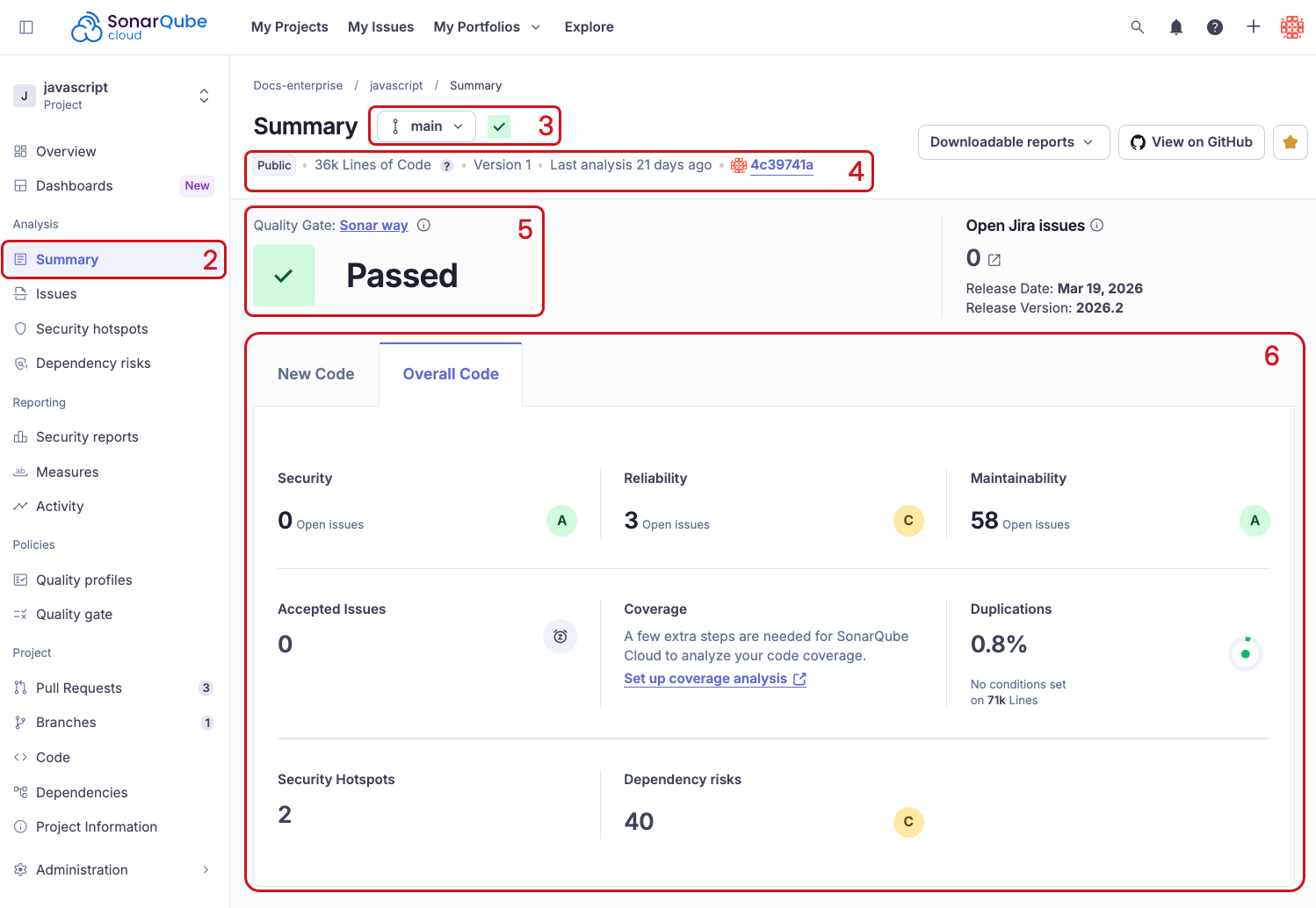
2. Go to **Summary**.
3. By default the summary page shows analysis results for the **Main** branch but you can change it to another branch or pull request.
4. View the analysis information at the top of the page, including:
1. Visibility
2. Lines of Code analyzed
3. Version
4. The amount of time that has passed since the last analysis.
5. Last pull request and commit information.
5. View the assigned quality gate and status
6. See issues, security hotspots, coverage, duplications and dependency risks for new code and overall code.
## Quality gate
The quality gate status for your main branch is displayed on the **Summary** page of the **Main** branch view. It shows the releasability status of the main branch of your project, answering the question, "Can I release my project today?"
A quality gate consists of a set of conditions like "Reliability is rated at least A", "Maintainability is rated at least B", and "Test coverage is at least 80%". These conditions are applied to analysis results to determine whether the code meets the level of quality required.
If the main branch meets or exceeds the quality gate conditions, it displays a **Passed** status:
If the main branch does not meet the quality gate conditions, it displays a **Failed** status:
### Built-in quality gate
SonarQube Cloud provides a built-in quality gate, called the *Sonar way* quality gate, enabled on the main branch by default. This quality gate reflects Sonar’s recommended settings. However, your requirements may differ, so you may wish to define a custom quality gate. For details see the [Quality gates](/sonarqube-cloud/standards/quality-gates.md) page.
## New code quality measures
When you first look at a newly analyzed project, it can be challenging to decide where to start fixing issues. To help with this, SonarQube Cloud encourages you to focus your efforts on *new code*. This is why we encourage users to set a suitable new code definition for their project.
To help you focus on recently changed code, the main branch summary displays a specific tab for new code.
Note that the new code quality measures and any quality gate that relies on them, like the default quality gate will only appear upon the *second* analysis performed *after* a new code definition has been set. See [New code definition](/sonarqube-cloud/managing-your-projects/project-analysis/configuring-new-code-calculation.md) for more details.
### Setting a new code definition
Initially, when you start a new project, you may end up performing an analysis without first setting a new code definition. Selecting a new code definition for your project is an essential part of setting up SonarQube Cloud. Without one, the default quality gate won’t work. In this case, the system directs you to set up your new code definition, like this:
What counts as new code can differ from project to project, so SonarQube Cloud provides a few options. We strongly encourage all users to choose a new code definition suitable for their project.
Once you have set up a new code definition and performed another analysis, the quality gate status should appear. See [Quality standards and new code](/sonarqube-cloud/standards/about-new-code.md) for more information.
## Overall code quality measures
In addition to new code quality measures, the main branch summary also displays the **Overall Code** quality measures in another tab. This tab shows the issues found in *all code*, including new code.
## Measures categories
The measures themselves are displayed as tiles corresponding to the following categories:
* **Reliability**: Details of issues with an impact on the reliability of your software.
* **Maintainability**: Details of issues with an impact on the maintainability of your software.
* **Security**: Details of issues with an impact on the security of your software.
* **Accepted issues**: Issues accepted by an authorized user if they decide to fix the issue later or not fix the issue.
* **Coverage**: Displays the percentage of potentially testable lines of code that are *actually* covered by test cases. The lines of code that *could* be covered are referred to as the **lines to cover**. Of those **lines to cover**, those that are currently *not covered* are referred to as the **uncovered lines**. The coverage percentage calculation is, therefore: `coverage = 100 - (100 * uncovered_lines / lines_to_cover)`. Note that **lines to cover** only counts lines that are included in the coverage report and testable (for example, lines that are only composed of `}` are not counted). This differs from how duplicated lines are counted. For more details see the [Overview](/sonarqube-cloud/analyzing-source-code/test-coverage/overview.md) of the test coverage page.
* **Duplications**: Identical lines of code detected. All lines of code into account (including non-testable lines). Since this differs from how coverage lines are counted, the final count for the two metrics may differ.
* **Security Hotspots**: Security-sensitive hotspots needing review.
Clicking on any figure takes you to a more detailed view, either in the **Measures** page or the **Issues** page.
## Incremental analysis
Some analyzers use the analysis cache mechanism to shorten the main branch analysis. See [Incremental analysis mechanisms](/sonarqube-cloud/analyzing-source-code/incremental-analysis-mechanisms.md) for more information.
## Other analysis views
Go to **Pull requests** and **Branches** to access code review and analysis results for other branches and pull requests.
See the [Branch analysis](/sonarqube-cloud/analyzing-source-code/branch-analysis/branch-analysis.md) and [Pull request analysis](/sonarqube-cloud/analyzing-source-code/pull-request-analysis.md) sections.
## Related pages
* [Branch analysis](/sonarqube-cloud/analyzing-source-code/branch-analysis/branch-analysis.md)
* [Pull request analysis](/sonarqube-cloud/analyzing-source-code/pull-request-analysis.md)
* [Managing your project](/sonarqube-cloud/managing-your-projects.md)
* [Quality gates](/sonarqube-cloud/standards/quality-gates.md)
* [New code definition](/sonarqube-cloud/managing-your-projects/project-analysis/configuring-new-code-calculation.md)
* [Quality standards and new code](/sonarqube-cloud/standards/about-new-code.md)
---
# Agent Instructions
This documentation is published with GitBook. GitBook is the documentation platform designed so that both humans and AI agents can read, navigate, and reason over technical content effectively. Learn more at gitbook.com.
## Querying This Documentation
If you need additional information that is not directly available in this page, you can query the documentation by asking a question.
Perform an HTTP GET request on the following URL with the `ask` and `goal` query parameters:
```
GET https://docs.sonarsource.com/sonarqube-cloud/analyzing-source-code/branch-analysis/main-branch-analysis.md?ask=&goal=
```
`ask` is the immediate question: it should be specific, self-contained, and written in natural language.
`goal` is what the user is ultimately trying to achieve, the reason they need the answer. Sharing it helps GitBook give you a better, more relevant answer. A goal is most helpful when it describes the outcome the user wants rather than restating the question. For example, with `ask=how do I create an API token`, a goal like `automate deployments from our CI pipeline` lets GitBook tailor the answer to that use case.
The response will contain a direct answer to the question and relevant excerpts and sources from the documentation.
Use this mechanism when the answer is not explicitly present in the current page, you need clarification or additional context, or you want to retrieve related documentation sections.