> For the complete documentation index, see [llms.txt](https://docs.sonarsource.com/llms.txt). Markdown versions of documentation pages are available by appending `.md` to page URLs; this page is available as [Markdown](https://docs.sonarsource.com/sonarqube-cloud/discovering-sonarcloud/integrations/jira-cloud.md).
# Jira Cloud
Understanding and using the SonarQube Cloud integration with Jira Cloud.
*The Jira Cloud integration is available in the Team and Enterprise plans.*
{% hint style="success" %}
To set up the SonarQube Cloud integration with Jira Cloud, see [Connecting your organization to Jira Cloud](/sonarqube-cloud/administering-sonarcloud/integrations/jira-cloud.md).
{% endhint %}
Push any SonarQube finding into your Jira sprint in two clicks. The work item is pre-filled with the file path, code lines, commit, rule, and severity. Your team tracks it on their board like any other work item — no copy-pasting, no context switching, no findings lost between tools.
* **Push to Jira** — Create a Jira work item from any issue without leaving SonarQube. All context transfers automatically.
* **Bulk push** — Select up to 500 issues and group them into a single Jira work item, useful for batching a sprint's worth of debt or security findings.
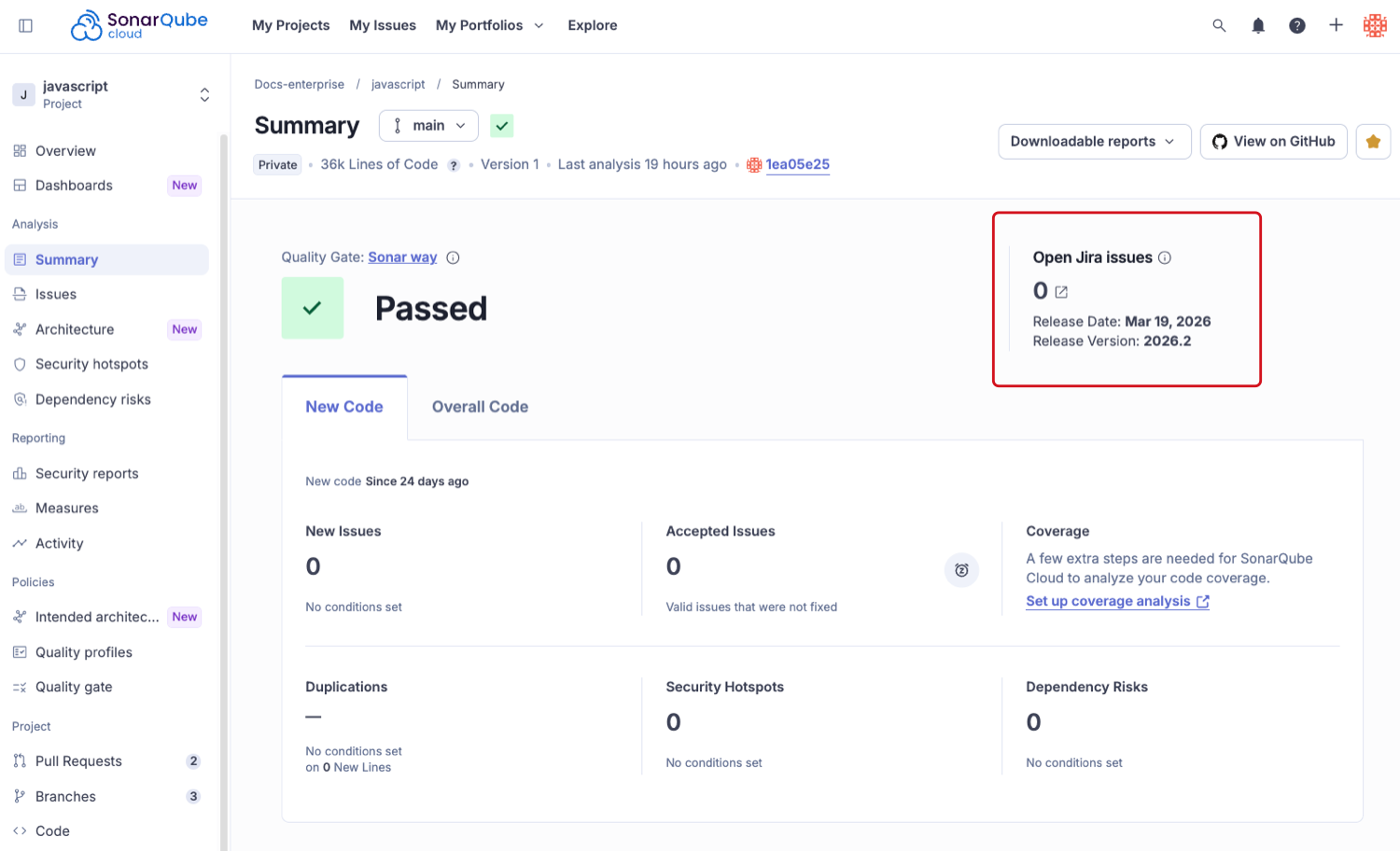
* **Release widget** — A widget on your main branch Summary page shows open Jira items in your upcoming release, so you know what's tracked before you ship.
* **No new workflow** — Issues appear as standard Jira work items on your existing boards with your existing work types.
## What's in the Jira work item
A Jira work item includes the following information for each connected issue:
* Title of the connected SonarQube issue.
* SonarQube issue link.
* Location of the issue.
* File path.
* Code lines.
* Commit hash.
* Date the issue was introduced.
* Information about why this is an issue and how to fix it with the rule name and link.
* Impact on software quality and severity.
The reporter for each Jira work item is the Atlassian account used for the org connection — see [#how-it-works](#how-it-works "mention") for why this matters.
You can navigate from the Jira work item back to the SonarQube issue and vice versa. To disconnect the link, click the close icon on the Jira badge in SonarQube. This removes the connection in SonarQube but does not delete the work item in Jira.
{% hint style="info" %}
* It is not possible to push a SonarQube issue to an existing Jira work item.
* A user cannot push the same issue to multiple Jira work items.
{% endhint %}
{% hint style="warning" %}
**When to push to Jira, and when not to.** SonarQube has built-in issue assignment — you can assign any issue to a developer directly. Push to Jira when the fix needs to enter sprint planning, requires cross-team visibility, or must appear on your Jira board. Do not push every issue to Jira. It creates noise in both tools and makes neither the source of truth.
{% endhint %}
## For AI agents
{% hint style="info" %}
**Product:** SonarQube Cloud only (not SonarQube Server) · **Plan:** Team or Enterprise required
**Setup sequence — must follow in this order:**
1. Org admin: **Your Organization → Administration → Organization settings → Jira → Connect** (OAuth 2.0 3LO authorization flow)
2. Project admin: **Your Project → Administration → General Settings → Jira** (select Jira space and enable work types)
3. Developer: Push to Jira button appears automatically on all issues in bound projects
**If Push to Jira button is not visible:**
* Org not connected to Jira → org admin must complete step 1
* Org connected but project not bound → project admin must complete step 2
* Both configured but all work types greyed out → mandatory Jira fields blocking
See [#troubleshooting](#troubleshooting "mention") for full details and fixes.
**Critical:** reporter = Atlassian account from step 1 (see [#how-it-works](#how-it-works "mention") warning). Use a team or service account, not a personal account.
**Hard limits:** 500 issues max per bulk push · new work items only (cannot push to existing) · Jira Cloud only, not Data Center or Server · connection expires after 3 months of inactivity · only Summary, Description, and Reporter fields are populated
{% endhint %}
## Who needs to do what
Three roles, three different jobs. You only need to do yours.
* **Organization admin** — Connect SonarQube Cloud to your Jira Cloud instance once. This unlocks the integration for your entire organization. See [Connecting your organization to Jira Cloud](/sonarqube-cloud/administering-sonarcloud/integrations/jira-cloud.md).
* **Project admin** — Bind this project to a Jira space and choose which work types developers can create. See [Connecting your project to Jira Cloud](/sonarqube-cloud/managing-your-projects/administering-your-projects/integrations/jira-cloud.md).
* **Developer** — Once both setup steps are done, the Push to Jira button appears on every issue. See [Pushing issues to Jira](/sonarqube-cloud/managing-your-projects/issues/pushing-issues-to-jira.md).
{% hint style="info" %}
Not sure if your org is already connected? Check **Your Organization → Administration → Organization settings → Jira**. If a Jira site URL appears with a green "Connected" badge, skip straight to project-level setup.
{% endhint %}
## Prerequisites
* SonarQube Cloud organization on **Team or Enterprise** plan
* **Organization admin** access in SonarQube Cloud (for the org connection)
* An Atlassian account that is a member of the Jira Cloud instance and all Jira projects you want to connect (the OAuth app requests `read:jira-work`, `manage:jira-configuration`, and `write:jira-work` during the connection flow)
* A **Jira Cloud** instance — Jira Data Center and Jira Server are not supported
* **Project admin** access in SonarQube Cloud on the specific project (for project binding)
* No additional access required for developers — any org member can push issues once the project is bound
## How it works
The integration runs at three levels. They happen in order, once each, then get out of the way.
1. **Organization admin connects once.** They authorize SonarQube Cloud to access your Jira Cloud instance via OAuth 2.0 3LO.
2. **Project admins bind their projects.** Each project connects to a specific Jira space and picks which work types developers can create from it.
3. **Developers push issues.** The Push to Jira button appears on every issue in a bound project. One click to push, one more to pick a work type if there is more than one.
{% hint style="warning" %}
**One decision before step 1 that is hard to change later.** The Atlassian account used for the org connection becomes the reporter on every Jira work item this integration ever creates, regardless of who clicks Push to Jira. Use a shared team account or service account. You can reauthorize later with a different account, but that changes the reporter on all future work items.
{% endhint %}
## Jira release widget
The main branch Summary page of each bound project shows the count of open Jira work items in the earliest unreleased version of your connected Jira space.
Two things to know before you expect this widget to work:
1. **Your Jira space must use the Jira Releases concept.** If it does not, the widget shows a warning instead of a count. Enable Releases in Jira first, or accept that this widget will not show data for your project. The Push to Jira button on individual issues works regardless.
2. **The widget counts all open items in that version, not just those created from SonarQube.** If your team tracks other work in the same Jira version, those items appear in the count too. This is expected.
{% hint style="info" %}
If two or more unreleased versions share the same date or have no assigned date, the widget selects the version with the lowest release ID, which is the release that was created first.
{% endhint %}
Click the count to navigate to those open items in Jira Cloud.
## Troubleshooting
### "Push to Jira" button is not visible
Work through these causes in order:
1. **The organization is not connected to Jira.** Check **Your Organization → Administration → Organization settings → Jira**. If no Jira instance is listed, an org admin must complete the connection. See [Connecting your organization to Jira Cloud](/sonarqube-cloud/administering-sonarcloud/integrations/jira-cloud.md).
2. **This project is not bound to a Jira space.** Check **Your Project → Administration → General Settings → Jira**. If no Jira space is listed, a project admin must bind this project. See [Connecting your project to Jira Cloud](/sonarqube-cloud/managing-your-projects/administering-your-projects/integrations/jira-cloud.md).
3. **All work types are greyed out.** See [#all-work-types-greyed-out](#all-work-types-greyed-out "mention") below.
### All Jira work types are greyed out
Every available work type has at least one mandatory custom field with no default value that SonarQube Cloud cannot fill. SonarQube Cloud fills only the Summary, Description, and Reporter fields. Any work type with additional mandatory fields is disabled.
**Fix:** In Jira, open the affected work type's field configuration and either remove the mandatory requirement or set a default value. Return to SonarQube Cloud project settings — the work type should now be selectable.
{% hint style="info" %}
If the Reporter field itself is mandatory in a way that conflicts with how SonarQube sets the reporter, set a default value for Reporter in Jira.
{% endhint %}
At least one supported Jira work type is required to save the configuration.
### Jira connection expired
If the integration is not used for more than three months, its access authorization will expire. The org admin must reauthorize:
1. Go to **Your Organization → Administration → Organization settings → Jira → Reauthorize**.
2. Reauthorizing is non-destructive — existing project bindings and issue-to-work-item connections remain intact.
3. Always select the same Jira instance during reauthorization.
If the admin who originally connected the integration has left, a new org admin must reauthorize with their own Atlassian account.
### Jira widget shows a warning instead of a count
The connected Jira space does not use the Jira Releases concept, or has no unreleased versions defined. Enable Releases in Jira Cloud and create at least one unreleased version. The Push to Jira button on individual issues works regardless.
## Limits
| Limit | Value |
| ---------------------------------- | ------------------------------------------------------- |
| Issues per bulk push | Up to 500, grouped into a single work item |
| Push to an existing Jira work item | Not supported |
| Jira Data Center or Server | Not supported — Jira Cloud only |
| Custom field population | Not supported — only Summary, Description, and Reporter |
| Connection expiry on inactivity | 3 months |
## Quick reference
| Task | Navigation path |
| ----------------------------------- | ------------------------------------------------------------------------------- |
| Connect org to Jira | Your Organization → Administration → Organization settings → Jira → Connect |
| Grant project admins binding access | Organization settings → Jira → Grant project administrators binding permissions |
| Bind project to a Jira space | Your Project → Administration → General Settings → Jira |
| Push a single issue | Issue detail page → Push to Jira → select work type |
| Push multiple issues | Issues page → select issues (up to 500) → Push to Jira |
| Reauthorize expired connection | Organization settings → Jira → Reauthorize |
## Related pages
* [Connecting your organization to Jira Cloud](/sonarqube-cloud/administering-sonarcloud/integrations/jira-cloud.md)
* [Connecting your project to Jira Cloud](/sonarqube-cloud/managing-your-projects/administering-your-projects/integrations/jira-cloud.md)
* [Pushing issues to Jira](/sonarqube-cloud/managing-your-projects/issues/pushing-issues-to-jira.md)
---
# Agent Instructions
This documentation is published with GitBook. GitBook is the documentation platform designed so that both humans and AI agents can read, navigate, and reason over technical content effectively. Learn more at gitbook.com.
## Querying This Documentation
If you need additional information that is not directly available in this page, you can query the documentation by asking a question.
Perform an HTTP GET request on the following URL with the `ask` and `goal` query parameters:
```
GET https://docs.sonarsource.com/sonarqube-cloud/discovering-sonarcloud/integrations/jira-cloud.md?ask=&goal=
```
`ask` is the immediate question: it should be specific, self-contained, and written in natural language.
`goal` is what the user is ultimately trying to achieve, the reason they need the answer. Sharing it helps GitBook give you a better, more relevant answer. A goal is most helpful when it describes the outcome the user wants rather than restating the question. For example, with `ask=how do I create an API token`, a goal like `automate deployments from our CI pipeline` lets GitBook tailor the answer to that use case.
The response will contain a direct answer to the question and relevant excerpts and sources from the documentation.
Use this mechanism when the answer is not explicitly present in the current page, you need clarification or additional context, or you want to retrieve related documentation sections.