> For the complete documentation index, see [llms.txt](https://docs.sonarsource.com/llms.txt). Markdown versions of documentation pages are available by appending `.md` to page URLs; this page is available as [Markdown](https://docs.sonarsource.com/sonarqube-cloud/managing-portfolios/viewing-portfolios.md).
# Viewing portfolios
View the ratings, metrics, and risks of a SonarQube Cloud portfolio and its child portfolios, and navigate a portfolio hierarchy.
This feature is only available in the [Enterprise plan](https://www.sonarsource.com/plans-and-pricing/#sonarqube-cloud-features).
A portfolio is a set of projects within your enterprise that enables an aggregate view of the project metrics and risks. More precisely, a portfolio consists of project branches and for each project, you can add a single long-lived branch to the portfolio. You can organize a portfolio into a hierarchy of child portfolios. See [Creating portfolios](https://docs.sonarsource.com/sonarqube-cloud/managing-portfolios/creating-portfolios.md#creating-child-portfolios).
{% hint style="info" %}
Before you can view the Enterprise-level reports, your organization must be added to an enterprise. For more information, see [Managing your enterprise](https://docs.sonarsource.com/sonarqube-cloud/administering-sonarcloud/managing-enterprise.md).
{% endhint %}
## Retrieving a portfolio
1. Go to **Portfolios** in the top navigation bar and select your enterprise, if you belong to more than one. Alternatively, you can retrieve your enterprise and select **Portfolios** from the left side menu.
2. The **Portfolios** page lists the root portfolios of the enterprise. Use the search box to narrow down the results. To see the portfolios you have not finished creating, select **My drafts**.
3. Here, you can review the portfolio’s overall code ratings, including the number of projects with the worst rating, see the number of Lines of Code analyzed, and see the number of projects included in the portfolio.
4. Select the portfolio name to view more details.
Child portfolios are not listed on the **Portfolios** page. To open a child portfolio, see [#navigating-a-portfolio-hierarchy](#navigating-a-portfolio-hierarchy "mention").
See [Creating portfolios](https://docs.sonarsource.com/sonarqube-cloud/managing-portfolios/creating-portfolios.md) and [Editing portfolios](https://docs.sonarsource.com/sonarqube-cloud/managing-portfolios/editing-portfolios.md) for more information about how to create, edit, and delete portfolios.
## Portfolio metrics
The reliability, security vulnerabilities, security review (deprecated), maintainability, releasability, and dependency risk ratings are calculated as the average of the ratings for all projects included in the portfolio and its child portfolios. Each project branch is counted once, even if several portfolios in the hierarchy select it.
SonarQube Cloud converts each project’s letter rating to a number, calculates an average number for the projects in the portfolio, and converts that average to a letter rating. Averages ending with .5 are rounded up, resulting in the "lower" of the two possible ratings, so an average of 2.5 would be rounded up to 3 and result in a "C" rating).
This gives a *problem density* measure for each of your portfolio’s ratings.
Rating conversion: E->5, D->4, C->3, B->2, A->1
A risk level is associated with each metric, except for the Releasability:
* **High**: if at least one project in the portfolio is rated E or D.
* **Medium**: if at least one project in the portfolio is rated C or B.
* **Low**: If all projects in the portfolio are rated A.
Each metric is calculated by SonarQube Cloud for New and Overall Code.
Releasability
* The releasability rating is based on the proportion of projects in the portfolio that have passed their quality gate. The rating is as follows:\
**A**: > 80%\
**B**: > 60% and <= 80%\
**C**: > 40% and <= 60%\
**D**: > 20% and <= 40%\
**E**: <= 20%
* At the project level: The state of the quality gate associated with the project can be passed or failed.
Security
* The average security rating of all projects in the portfolio.
* At the project level: The security rating is related to issues that mark potential weaknesses to hackers. The rating is as follows:\
**A**: 0 vulnerability\
**B**: at least one minor vulnerability\
**C**: at least one major vulnerability\
**D**: at least one critical vulnerability\
**E**: at least one blocker vulnerability
Reliability
* The average reliability rating of all projects in the portfolio.
* At the project level: The reliability rating is related to issues that mark code where you will get behavior other than what was expected. The rating is as follows:\
**A**: 0 bugs\
**B**: at least one minor bug\
**C**: at least one major bug\
**D**: at least one critical bug\
**E**: at least one blocker bug
Maintainability
* The average maintainability rating of all projects in the portfolio.
* At the project level: The maintainability rating is related to issues that mark code that will be more difficult to update competently than it should. The maintainability rating is based on the technical debt ratio value (the ratio between the cost to develop the software and the cost to fix it). The default rating is as follows (this rating definition can be changed):\
**A**: <= 0.05\
**B**: > 0.05 and <= 0.1\
**C**: > 0.1 and <= 0.20\
**D**: > 0.2 and <= 0.5\
**E**: > 0.5
Security review (deprecated)
> **Note:** To simplify the classification of findings, we are gradually transitioning security hotspots to vulnerabilities. As a result, rules that previously raised security hotspots will start raising vulnerabilities (type) or security issues (software quality).
* The average security review rating of all projects in the portfolio.
* At the project level: The security review rating is based on the percentage of reviewed security hotspots. Note that security hotspots are considered reviewed if they are marked as **Fixed** or **Safe**. The rating is as follows:\
**A**: >= 80%\
**B**: >= 70% and <80%\
**C**: >= 50% and <70%\
**D**: >= 30% and <50%\
**E**: < 30%
Dependency risk
* The average dependency risk rating of all projects in the portfolio. Requires [Advanced Security](https://docs.sonarsource.com/sonarqube-cloud/advanced-security.md).
* At the project level: The dependency risk rating calculates the severity of dependency risks on the project (prohibited license, vulnerability, and malicious packages). The rating is as follows:\
**A**: 0 risks, or only 'info' level risks\
**B**: at least one low risk\
**C**: at least one medium risk\
**D**: at least one high risk\
**E**: at least one blocker risk
## Portfolio recomputation
The following events will trigger the recalculation of a portfolio:
* When a project within the portfolio has a new analysis.
* If a project is removed from an organization within the enterprise.
* When an organization is removed from the enterprise.
* When you save a change to the portfolio definition.
* When a project key or project tags are changed.
* When a project is deleted.
* When a user changes an issue.
For information on how ratings are calculated, see [Understanding measures and metrics](https://docs.sonarsource.com/sonarqube-cloud/managing-your-projects/metric-definitions.md) for more information.
## Overview page
Once you retrieve a portfolio, you will land on an Overview page, which displays a summary of information from the project branches included in the portfolio and in all its child portfolios. Each project branch is counted once.
The top of the page shows the number of projects with a **See Portfolio Breakdown** link, the number of lines of code with a **See Language Breakdown** link, and when the portfolio was last computed. The page then has the following sections:
* **About this portfolio**: The portfolio description. To change the name or description, select **Edit info**. See [Editing portfolios](https://docs.sonarsource.com/sonarqube-cloud/managing-portfolios/editing-portfolios.md#changing-name-and-description).
* **Releasability**: The quality gate ratio and the project branches that failed their quality gate. Project branches that have not been analyzed yet have no quality gate status, so the ratio does not include them. Select **Failed**, **Passed**, or **See all projects** to open the releasability rating on the Measures page, which lists the quality gate status of every project branch. The section also has **View Coverage** and **View Duplications** links.
* **Security**, **Reliability**, **Maintainability**, and **Security Review** (deprecated): The rating on new and overall code, the distribution of project branches by rating, and the risk level.
* **Dependency Risk**: The same information for dependency risks. Requires [Advanced Security](https://docs.sonarsource.com/sonarqube-cloud/advanced-security.md).
Select **Download Portfolio Reports** to view a list of downloadable reports for your portfolio. See [Viewing portfolio PDF reports](https://docs.sonarsource.com/sonarqube-cloud/getting-started-with-enterprise/viewing-enterprise-reports/viewing-portfolio-pdf-reports.md) for more information.
## Portfolio breakdown page
The Portfolio breakdown page lists the child portfolios of the portfolio and the projects added to it directly, limited to those you have the **Browse** permission for. A message at the top of the list tells you how many of them you can browse. You can switch between **New code** and **Overall code** views, search for projects and child portfolios by name, and narrow the list with **Filters**.
* A child portfolio row shows the child portfolio's ratings. Select the child portfolio name to open it. See [#navigating-a-portfolio-hierarchy](#navigating-a-portfolio-hierarchy "mention").
* A project row shows the project branch and whether it passed or failed its quality gate.
The list only shows the direct child portfolios. The child portfolios further down the hierarchy appear on the Portfolio breakdown page of their own parent.
## Navigating a portfolio hierarchy
To open a child portfolio, select its name on the Portfolio breakdown page of its parent. The child portfolio opens on its Overview page.
A child portfolio has the same pages as a root portfolio, including its own dashboards, compliance reports, and PDF reports, but it has no **Administration** menu. You manage it through its root portfolio. See [Editing portfolios](https://docs.sonarsource.com/sonarqube-cloud/managing-portfolios/editing-portfolios.md#managing-child-portfolios).
To go back to the root portfolio, select the portfolio name at the top of the left side menu. The list that opens shows the root portfolio with the **Root portfolio** label, followed by the other portfolios of the enterprise. It does not include the portfolios between the root and the current child portfolio. To open one of them, start from the Portfolio breakdown page of the root portfolio.
## Measures page
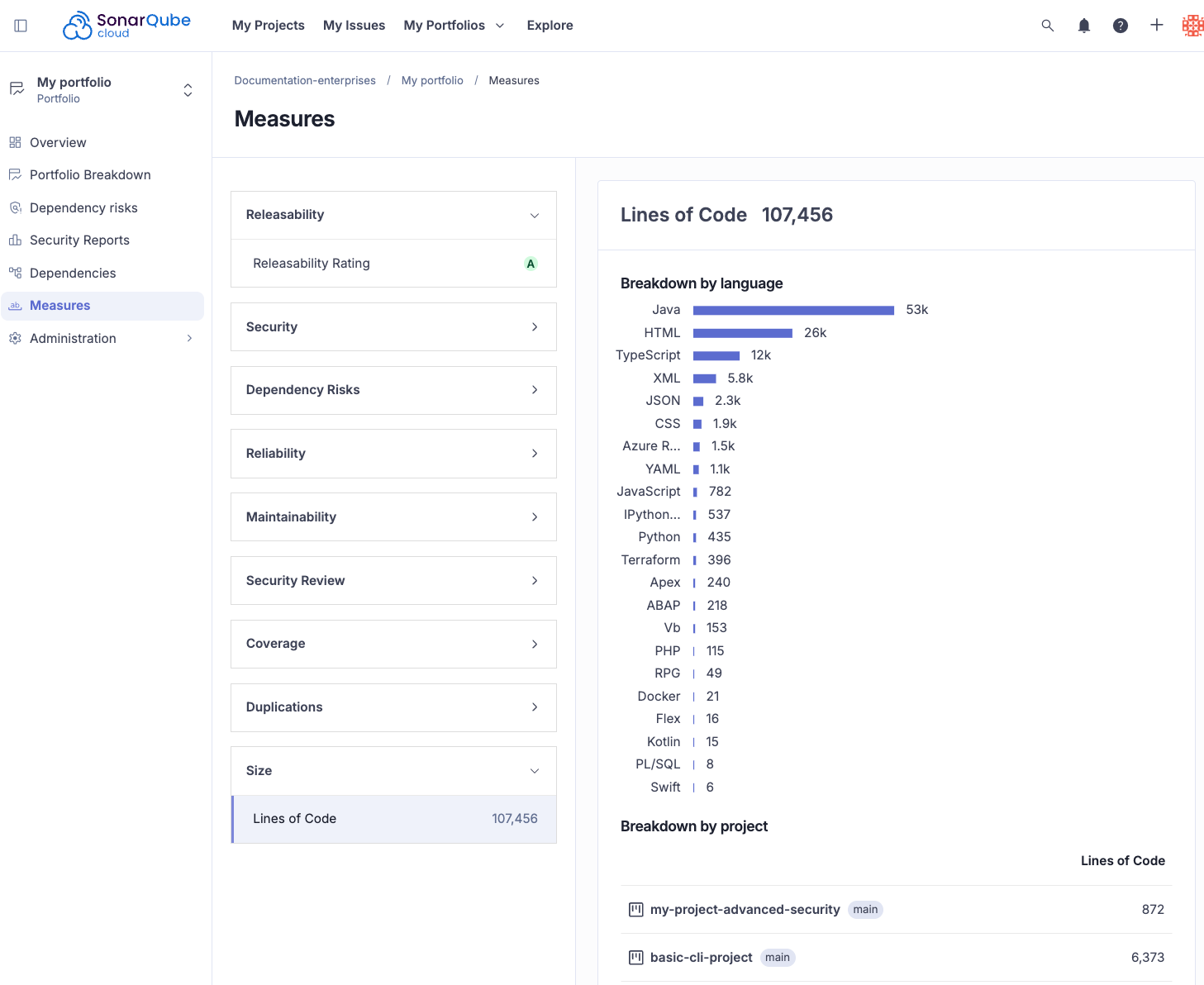
The Measures page provides an in-depth breakdown of metrics across your portfolio projects, helping you gain broader visibility. It includes:
* **Software quality rating breakdown**: View ratings breakdown across multiple projects at once.
* **Code coverage visibility**: Easily see code coverage at the portfolio level without manually aggregating project data.
* **Duplication insights**: View duplications by project in your portfolio to maintain high-quality, maintainable software. Note that his feature does not cover cross-project duplications.
* **Lines of Code (LOC) tracking**: Quickly understand LOC usage breakdown by language and by project.
See [Understanding measures and metrics](https://docs.sonarsource.com/sonarqube-cloud/managing-your-projects/metric-definitions.md) for more information about code metrics used in the SonarQube platform.
## Related pages
* [Managing portfolios](https://docs.sonarsource.com/sonarqube-cloud/managing-portfolios.md)
* [Administering portfolios](https://docs.sonarsource.com/sonarqube-cloud/managing-portfolios/administering-portfolios.md)
* [Portfolio compliance reports](https://docs.sonarsource.com/sonarqube-cloud/getting-started-with-enterprise/viewing-enterprise-reports/portfolio-compliance-reports.md)
* [Managing your enterprise](https://docs.sonarsource.com/sonarqube-cloud/administering-sonarcloud/managing-enterprise.md)
* [Viewing portfolio PDF reports](https://docs.sonarsource.com/sonarqube-cloud/getting-started-with-enterprise/viewing-enterprise-reports/viewing-portfolio-pdf-reports.md)
* [Understanding measures and metrics](https://docs.sonarsource.com/sonarqube-cloud/managing-your-projects/metric-definitions.md)
---
# Agent Instructions
This documentation is published with GitBook. GitBook is the documentation platform designed so that both humans and AI agents can read, navigate, and reason over technical content effectively. Learn more at gitbook.com.
## Querying This Documentation
If you need additional information that is not directly available in this page, you can query the documentation by asking a question.
Perform an HTTP GET request on the following URL with the `ask` and `goal` query parameters:
```
GET https://docs.sonarsource.com/sonarqube-cloud/managing-portfolios/viewing-portfolios.md?ask=&goal=
```
`ask` is the immediate question: it should be specific, self-contained, and written in natural language.
`goal` is what the user is ultimately trying to achieve, the reason they need the answer. Sharing it helps GitBook give you a better, more relevant answer. A goal is most helpful when it describes the outcome the user wants rather than restating the question. For example, with `ask=how do I create an API token`, a goal like `automate deployments from our CI pipeline` lets GitBook tailor the answer to that use case.
The response will contain a direct answer to the question and relevant excerpts and sources from the documentation.
Use this mechanism when the answer is not explicitly present in the current page, you need clarification or additional context, or you want to retrieve related documentation sections.