> For the complete documentation index, see [llms.txt](https://docs.sonarsource.com/llms.txt). Markdown versions of documentation pages are available by appending `.md` to page URLs; this page is available as [Markdown](https://docs.sonarsource.com/sonarqube-cloud/managing-your-projects/issues/introduction.md).
# Introduction
SonarQube Cloud issues are potential errors found in your code base. Understanding how to review your analysis is the first step to establishing code security and maintainability.
## Overview and workflow
An analysis detects an issue as a problem in your code. When a coding rule is broken, an issue is raised. Each issue affects one or more software qualities with a varying impact level, called severity, as inherited from the rule. The following applies:
* A new issue is automatically assigned to the last committer on the issue line - the author - if the author can be correlated to a SonarQube Cloud user. You can reassign the issue.
* The issue context locates the issue in the code. The *primary location* is where the issue message is displayed. *Secondary locations* may be shown to help you understand the issue. Paths through the code (execution flows) are shown from the source to the destination (sink) when the issue originated upstream.
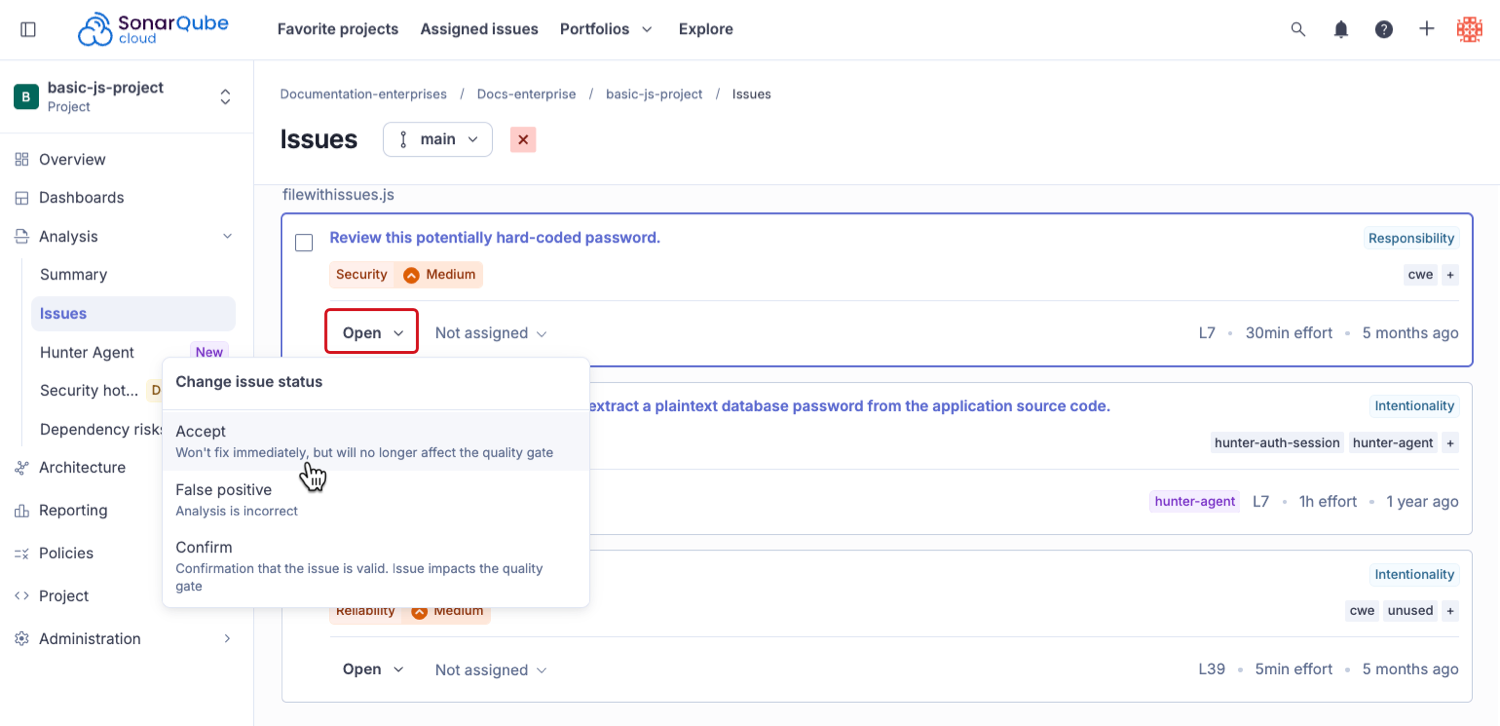
* An issue is assigned a status that changes during its lifecycle. See [SonarQube analysis process](/sonarqube-cloud/discovering-sonarcloud/analysis-process-overview/analysis-process.md) for more details. In particular:
* You can change the status of an issue from **Open** to **Accept** to fix it later.
* Set an issue to **False positive** if you think the analysis is mistaken.
* Select **Confirm** to confirm that the issue is valid. A confirmed issue still impacts the quality gate.
* You can tag and comment on issues.
* If you are a member of an organization that is part of an Enterprise you can view a list of issues from across all your projects at the organization level. See [Retrieving issues](/sonarqube-cloud/managing-your-projects/issues/retrieving.md) for more information.
{% hint style="info" %}
You can receive an email notification for issue-related events: see [Subscribing to email notifications](/sonarqube-cloud/managing-your-account/notifications.md) for more details.
{% endhint %}
## Permissions
Retrieving and managing issues is based on the permissions assigned to your profile on the project level.
* You can view issues on all public projects.
* On private projects, you need at least **Browse** permission to view issues, change an assignee, comment on issues, apply bulk changes, and change tags.
* In addition to the Browse permission, the **Administer Issues** permission enables you to change an issue’s status.
See [Retrieving issues](/sonarqube-cloud/managing-your-projects/issues/retrieving.md) for more information about how to retrieve, view, and filter issues.
To learn more about how to set project permissions, see [Setting your project's permissions](/sonarqube-cloud/managing-your-projects/administering-your-projects/setting-permissions.md).
## Related pages
* The [SonarQube analysis process](/sonarqube-cloud/discovering-sonarcloud/analysis-process-overview/analysis-process.md) page describes how SonarQube Cloud identifies, assigns, and synchronizes issues; the issue lifecycle.
* The [Retrieving issues](/sonarqube-cloud/managing-your-projects/issues/retrieving.md) page describes how to retrieve and filter issues.
* The [Reviewing issues](/sonarqube-cloud/managing-your-projects/issues/reviewing.md) page describes how to view and understand your issues in the SonarQube Cloud UI.
* The [Editing issues](/sonarqube-cloud/managing-your-projects/issues/editing.md) page describes how to accept, mark as false positive, reopen, assign, tag, or comment on an issue.
* The [Fixing issues](/sonarqube-cloud/managing-your-projects/issues/fixing.md) page describes how to get suggested fixes for your issues.
* The [Jira Cloud](/sonarqube-cloud/discovering-sonarcloud/integrations/jira-cloud.md) page describes how to integration SonarQube Cloud with Jira Cloud and create Jira Cloud work items from SonarQube issues.
* The [Subscribing to email notifications](/sonarqube-cloud/managing-your-account/notifications.md) page describes how to configure your account to receive email notifications for issue-related events.
* [In your DevOps platform](/sonarqube-cloud/managing-your-projects/issues/in-devops-platform.md)\
This page explains how to view and manage the security issues reported by SonarQube Cloud in your DevOps platform.
---
# Agent Instructions
This documentation is published with GitBook. GitBook is the documentation platform designed so that both humans and AI agents can read, navigate, and reason over technical content effectively. Learn more at gitbook.com.
## Querying This Documentation
If you need additional information that is not directly available in this page, you can query the documentation by asking a question.
Perform an HTTP GET request on the following URL with the `ask` and `goal` query parameters:
```
GET https://docs.sonarsource.com/sonarqube-cloud/managing-your-projects/issues/introduction.md?ask=&goal=
```
`ask` is the immediate question: it should be specific, self-contained, and written in natural language.
`goal` is what the user is ultimately trying to achieve, the reason they need the answer. Sharing it helps GitBook give you a better, more relevant answer. A goal is most helpful when it describes the outcome the user wants rather than restating the question. For example, with `ask=how do I create an API token`, a goal like `automate deployments from our CI pipeline` lets GitBook tailor the answer to that use case.
The response will contain a direct answer to the question and relevant excerpts and sources from the documentation.
Use this mechanism when the answer is not explicitly present in the current page, you need clarification or additional context, or you want to retrieve related documentation sections.