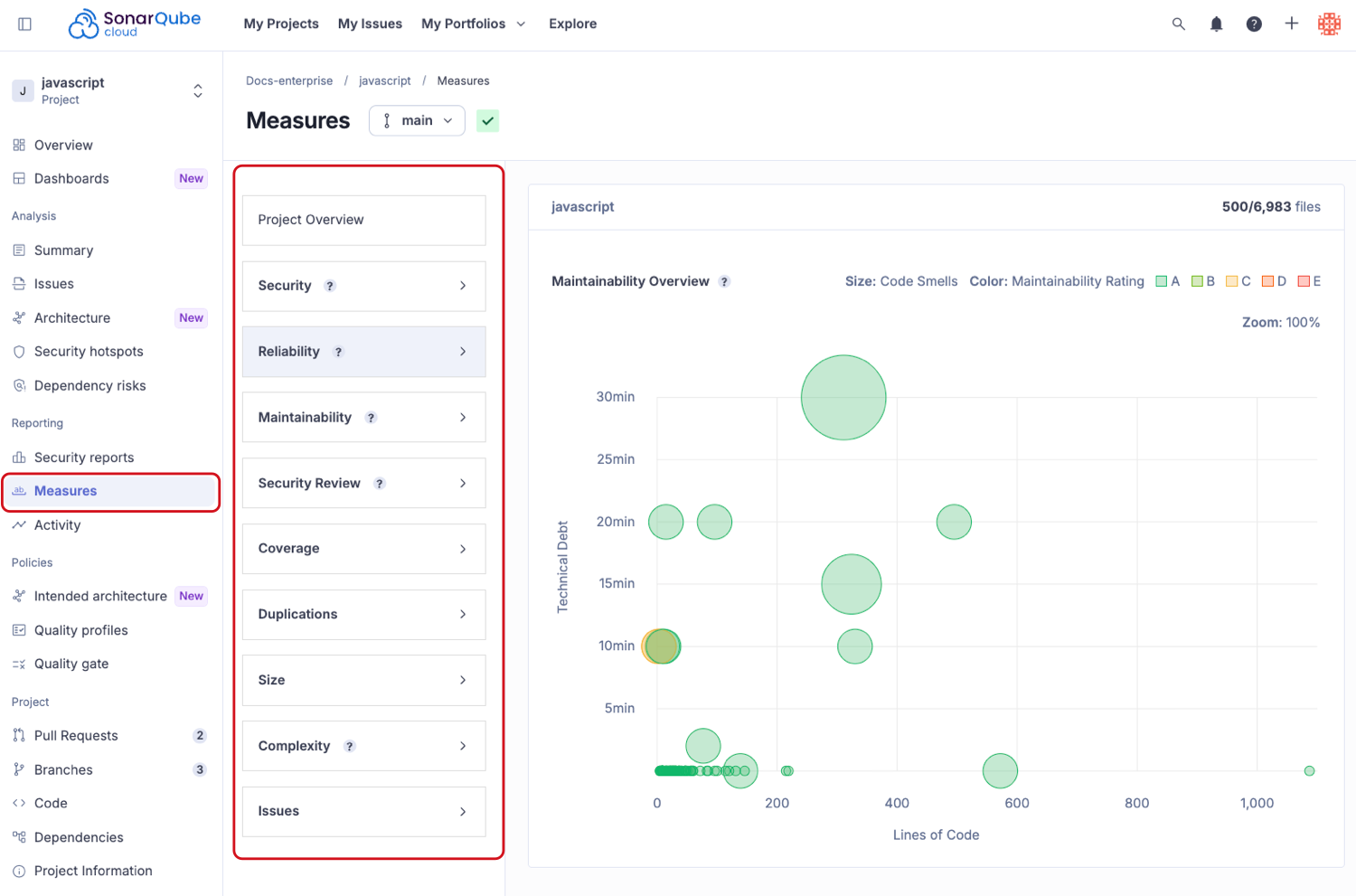
| Metric | Metric key | Definition |
|---|---|---|
| Security issues | software_quality_security_issues | The total number of issues impacting security. |
| Security issues on new code | new_software_quality_security_issues | The total number of security issues raised for the first time on new code. |
| Security issue severity | security_issue_severity | The severity level of the most severe security issue. |
| Security issue severity on new code | new_security_issue_severity | The severity level of the most severe security issue raised for the first time on new code. |
| Security rating | security_rating | Rating related to security. The rating grid is as follows: A = 0 vulnerability B = at least one minor vulnerability C = at least one major vulnerability D = at least one critical vulnerability E = at least one blocker vulnerability |
| Security rating on new code | new_security_rating | Rating related to security on new code. |
| Security remediation effort | security_remediation_effort | The effort to fix all vulnerabilities. The remediation cost of an issue is taken over from the effort (in minutes) assigned to the rule that raised the issue (see Technical debt in the Maintainability section). An 8-hour day is assumed when values are shown in days. |
| Security remediation effort on new code | new_security_remediation_effort | The same as Security remediation effort but on new code. |
| Vulnerabilities (deprecated) | vulnerabilities | The total number of vulnerabilities. Use software_quality_security_issues. |
| Vulnerabilities on new code (deprecated) | new_vulnerabilities | The total number of vulnerabilities raised for the first time on new code. Use new_software_quality_security_issues. |
| Vulnerabilities severity on new code (deprecated) | new_vulnerabilities_severity | The severity level of the most severe vulnerability raised for the first time on new code. Use new_security_issue_severity. |
| Metric | Metric key | Definition |
|---|---|---|
| Reliability issues | software_quality_reliability_issues | The total number of issues impacting reliability. |
| Reliability issues on new code | new_software_quality_reliability_issues | The total number of reliability issues raised for the first time on new code. |
| Reliability issue severity | reliability_issue_severity | The severity level of the most severe reliability issue. |
| Reliability issue severity on new code | new_reliability_issue_severity | The severity level of the most severe reliability issue raised for the first time on new code. |
| Reliability rating | reliability_rating | Rating related to reliability. The rating grid is as follows: A = 0 bug B = at least one minor bug C = at least one major bug D = at least one critical bug E = at least one blocker bug |
| Reliability rating on new code | new_reliability_rating | Rating related to reliability on new code. |
| Reliability remediation effort | reliability_remediation_effort | The effort to fix all reliability issues. The remediation cost of an issue is taken over from the effort (in minutes) assigned to the rule that raised the issue. An 8-hour day is assumed when values are shown in days. |
| Reliability remediation effort on new code | new_reliability_remediation_effort | The same as Reliability remediation effort but on new code. |
| Bugs (deprecated) | bugs | The total number of bugs. Use software_quality_reliability_issues. |
| Bugs on new code (deprecated) | new_bugs | The total number of bugs raised for the first time on new code. Use new_software_quality_reliability_issues. |
| Bugs severity on new code (deprecated) | new_bugs_severity | The severity level of the most severe bug raised for the first time on new code. Use new_reliability_issue_severity. |
| Metric | Metric key | Definition |
|---|---|---|
| Maintainability issues | software_quality_maintainability_issues | The total number of issues impacting maintainability. |
| Maintainability issues on new code | new_software_quality_maintainability_issues | The total number of maintainability issues raised for the first time on new code. |
| Maintainability issue severity | maintainability_issue_severity | The severity level of the most severe maintainability issue. |
| Maintainability issue severity on new code | new_maintainability_issue_severity | The severity level of the most severe maintainability issue raised for the first time on new code. |
| Technical debt | sqale_index | A measure of effort to fix all code smells. See below. |
| Technical debt on new code | new_technical_debt | A measure of effort to fix the code smells raised for the first time on new code. |
| Technical debt ratio | sqale_debt_ratio | The ratio between the cost to develop the software and the cost to fix it. See below. |
| Technical debt ratio on new code | new_sqale_debt_ratio | The ratio between the cost to develop the code changed on new code and the cost of the issues linked to it. See below. |
| Maintainability rating | sqale_rating | The rating related to the value of the technical debt ratio. See below. |
| Maintainability rating on new code | new_maintainability_rating | The rating related to the value of the technical debt ratio on new code. See below. |
| Code smells (deprecated) | code_smells | The total number of code smells. Use software_quality_maintainability_issues. |
| Code smells on new code (deprecated) | new_code_smells | The total number of code smells raised for the first time on new code. Use new_software_quality_maintainability_issues. |
| Code smells severity on new code (deprecated) | new_code_smells_severity | The severity level of the most severe code smell raised for the first time on new code. Use new_maintainability_issue_severity. |

| Metric | Metric key | Definition |
|---|---|---|
| Security hotspots | security_hotspots | The number of security hotspots. |
| Security hotspots on new code | new_security_hotspots | The number of security hotspots on new code. |
| Security hotspots reviewed | security_hotspots_reviewed | The percentage of reviewed security hotspots compared in relation to the total number of security hotspots. |
| New security hotspots reviewed | new_security_hotspots_reviewed | The percentage of reviewed security hotspots on new code. |
| Security review rating | security_review_rating | The security review rating is a letter grade based on the percentage of reviewed security hotspots. Note that security hotspots are considered reviewed if they are marked as Acknowledged, Fixed, or Safe. The rating grid is as follows: |
| Security review rating on new code | new_security_review_rating | The security review rating for new code. |
| Metric | Metric key | Definition |
|---|---|---|
| Coverage | coverage | A mix of line coverage and condition coverage. Its goal is to provide an even more accurate answer to the question: How much of the source code has been covered by unit tests?
where:
|
| Coverage on new code | new_coverage | This definition is identical to coverage but is restricted to new or updated source code. |
Lines to cover | lines_to_cover | Coverable lines. The number of lines of code that could be covered by unit tests, for example, blank lines or full comments lines are not considered as lines to cover. Note that this metric is about what is possible, not what is left to do - that’s uncovered lines. |
| Lines to cover on new code | new_lines_to_cover | This definition is identical to lines to cover but restricted to new or updated source code. |
| Uncovered lines | uncovered_lines | The number of lines of code that are not covered by unit tests. |
| Uncovered lines on new code | new_uncovered_lines | This definition is identical to uncovered lines but restricted to new or updated source code. |
| Line coverage | line_coverage | On a given line of code, line coverage simply answers the question: Has this line of code been executed during the execution of the unit tests? It is the density of covered lines by unit tests:
where:
|
| Line coverage on new code | new_line_coverage | This definition is identical to line coverage but restricted to new or updated source code. |
| Line coverage hits | coverage_line_hist_data | A list of covered lines. |
| Condition coverage | branch_coverage | The condition coverage answers the following question on each line of code containing boolean expressions: Has each boolean expression been evaluated both to This is the density of possible conditions in flow control structures that have been followed during unit tests execution.
where:
|
| Condition coverage on new code | new_branch_coverage | This definition is identical to condition coverage but is restricted to new or updated source code. |
| Condition coverage hits | branch_coverage_hits_data | A list of covered conditions. |
| Conditions by line | conditions_by_line | The number of conditions by line. |
| Covered conditions by line | covered_conditions_by_line | Number of covered conditions by line. |
Uncovered conditions | uncovered_conditions | The number of conditions that are not covered by unit tests. |
| Uncovered conditions on new code | new_uncovered_conditions | This definition is identical to Uncovered conditions but restricted to new or updated source code. |
| Unit tests | tests | The number of unit tests. |
| Unit test errors | test_errors | The number of unit tests that have failed. |
| Unit test failures | test_failures | The number of unit tests that have failed with an unexpected exception. |
| Skipped unit tests | skipped_tests | The number of skipped unit tests. |
| Unit tests duration | test_execution_time | The time required to execute all the unit tests. |
| Unit test success density (%) | test_success_density | test_success_density = (tests - (test_errors + test_failures)) / (tests) * 100 |
| Metric | Metric key | Definition |
|---|---|---|
| Duplicated lines density (%) | duplicated_lines_density | Duplicated lines density is calculated by using the following formula:
|
| Duplicated lines density (%) on new code | new_duplicated_lines_density | The same as duplicated lines density but on new code. |
| Duplicated lines | duplicated_lines | The number of lines involved in duplications. |
| Duplicated lines on new code | new_duplicated_lines | The number of lines involved in duplications on new code. |
| Duplicated blocks | duplicated_blocks | The number of duplicated blocks of lines. For a block of code to be considered as duplicated, for Non-Java projects:
for Java projects:
Differences in indentation and in string literals are ignored while detecting duplications. |
| Duplicated block on new code | new_duplicated_blocks | The number of duplicated blocks of lines on new code. |
| Duplicated files | duplicated_files | The number of files involved in duplications. |
| Metric | Metric key | Definition |
|---|---|---|
| Lines | lines | The number of physical lines (number of carriage returns). |
| New lines | new_lines | The number of physical lines on new code (number of carriage returns). |
| Lines of code | ncloc | The number of physical lines that contain at least one character which is neither a whitespace nor a tabulation nor part of a comment. |
| New lines of code | new_ncloc | The number of physical lines on new code that contain at least one character which is neither a whitespace nor a tabulation nor part of a comment. |
| Statements | statements | The number of statements. |
| Functions | functions | The number of functions. Depending on the language, a function is defined as either a function, a method, or a paragraph. Language-specific details:
|
| Classes | classes | The number of classes (including nested classes, interfaces, enums, annotations, mixins, extensions, and extension types). |
| Files | files | The number of files. |
| Comment lines | comment_lines | The number of lines containing either comment or commented-out code. See Comment lines for calculation details. |
| Comments (%) | comment_lines_density | The comment lines density. It is calculated based on the following formula: Examples:
|
| Lines of code per language | ncloc_language_distribution | The non-commented lines of code distributed by language. |
| Projects | projects | The number of projects in a portfolio. |
| Metric | Metric key | Definition |
|---|---|---|
| Cyclomatic complexity | complexity | A quantitative metric used to calculate the number of paths through the code. |
| Cognitive complexity | cognitive_complexity | A qualification of how hard it is to understand the code’s control flow. See Cyclomatic complexity: developer's guide for more information or sign up to download Cognitive Complexity white paper for a complete description of the mathematical model applied to compute this measure. |
| Metric | Metric key | Definition |
| Issues | violations | The number of issues in all states. |
| Issues on new code | new_violations | The number of issues raised for the first time on new code. |
| Open issues | open_issues | The number of issues in the Open status. |
| Closed issues | resolved_issues | The number of issues closed. An issue is considered closed when it no longer appears in a later analysis. |
| Issue density | issue_density | The number of issues per 1000 lines of code. |
| Accepted issues | accepted_issues | The number of issues marked as Accepted. |
| Accepted issues on new code | new_accepted_issues | The number of Accepted issues on new code. |
| False positive issues | false_positive_issues | The number of issues marked as False positive. |
| Blocker issues (deprecated) | blocker_violations | Issues with Blocker type severity level. Use one or more of security_issue_severity, reliability_issue_severity, or maintainability_issue_severity instead. |
| Critical issues (deprecated) | critical_violations | Issues with Critical type severity level. Use one or more of security_issue_severity, reliability_issue_severity, or maintainability_issue_severity instead. |
| Major issues (deprecated) | major_violations | Issues with Major type severity level. Use one or more of security_issue_severity, reliability_issue_severity, or maintainability_issue_severity instead. |
| Minor issues (deprecated) | minor_violations | Issues with Minor type severity level. Use one or more of security_issue_severity, reliability_issue_severity, or maintainability_issue_severity instead. |
| Info issues (deprecated) | info_violations | Issues with Info type severity level. Use one or more of security_issue_severity, reliability_issue_severity, or maintainability_issue_severity instead. |
| Metric | Metric key | Definition |
|---|---|---|
| Quality gate status | alert_status | The state of the quality gate associated with your project. Possible values are ERROR and OK. |
| Quality gate details | quality_gate_details | Status (passed or failed) of each condition in the quality gate. |
| Metric | Metric key | Definition |
|---|---|---|
| SCA issue count | sca_count_any_issue | The total number of dependency risks. |
| SCA issue count on new code | new_sca_count_any_issue | The total number of dependency risks raised for the first time on new code. |
| SCA severity threshold | sca_severity_any_issue | Indicates whether there is any dependency risk at or above the specified severity. |
| SCA severity threshold on new code | new_sca_severity_any_issue | Indicates whether there is any dependency risk at or above the specified severity raised for the first time on new code. |
| SCA vulnerability threshold | sca_severity_vulnerability | Indicates whether there is any vulnerability dependency risk at or above the specified severity. |
| SCA vulnerability threshold on new code | new_sca_severity_vulnerability | Indicates whether there is any vulnerability dependency risk at or above the specified severity raised for the first time on new code. |
| SCA licensing risk threshold | sca_severity_licensing | Indicates whether there is any license dependency risk at or above the specified severity. Note: License risks are currently always HIGH severity. If this parameter is set to BLOCKER, no license risk will fail the quality gate. |
| SCA licensing risk threshold on new code | new_sca_severity_licensing | Indicates whether there is any license dependency risk at or above the specified severity raised for the first time on new code. Note: License risks are currently always HIGH severity. If this parameter is set to BLOCKER, no license risk will fail the quality gate. |
| SCA rating | sca_rating_any_issue | Rating related to dependency risks. The rating grid is as follows:
|
| SCA rating on new code | new_sca_rating_any_issue | Rating related to dependency risks in new code. |
| SCA vulnerability rating | sca_rating_vulnerability | Rating related to vulnerability risks. |
| SCA vulnerability rating on new code | new_sca_rating_vulnerability | Rating related to vulnerability risks in new code. |
| SCA license rating | sca_rating_licensing | Rating related to dependency licenses. License risks always have a rating of D, so using E will not fail the quality gate. |
| SCA license rating on new code | new_sca_rating_licensing | Rating related to dependency licenses in new code. |