> For the complete documentation index, see [llms.txt](https://docs.sonarsource.com/llms.txt). Markdown versions of documentation pages are available by appending `.md` to page URLs; this page is available as [Markdown](https://docs.sonarsource.com/sonarqube-cloud/standards/managing-rules/viewing-rules.md).
# Retrieving and viewing rules
How to retrieve and view SonarQube rules.
To retrieve and view rules:
1. Retrieve your organization. See [Retrieving your organizations](/sonarqube-cloud/getting-started/viewing-organizations.md) for details.
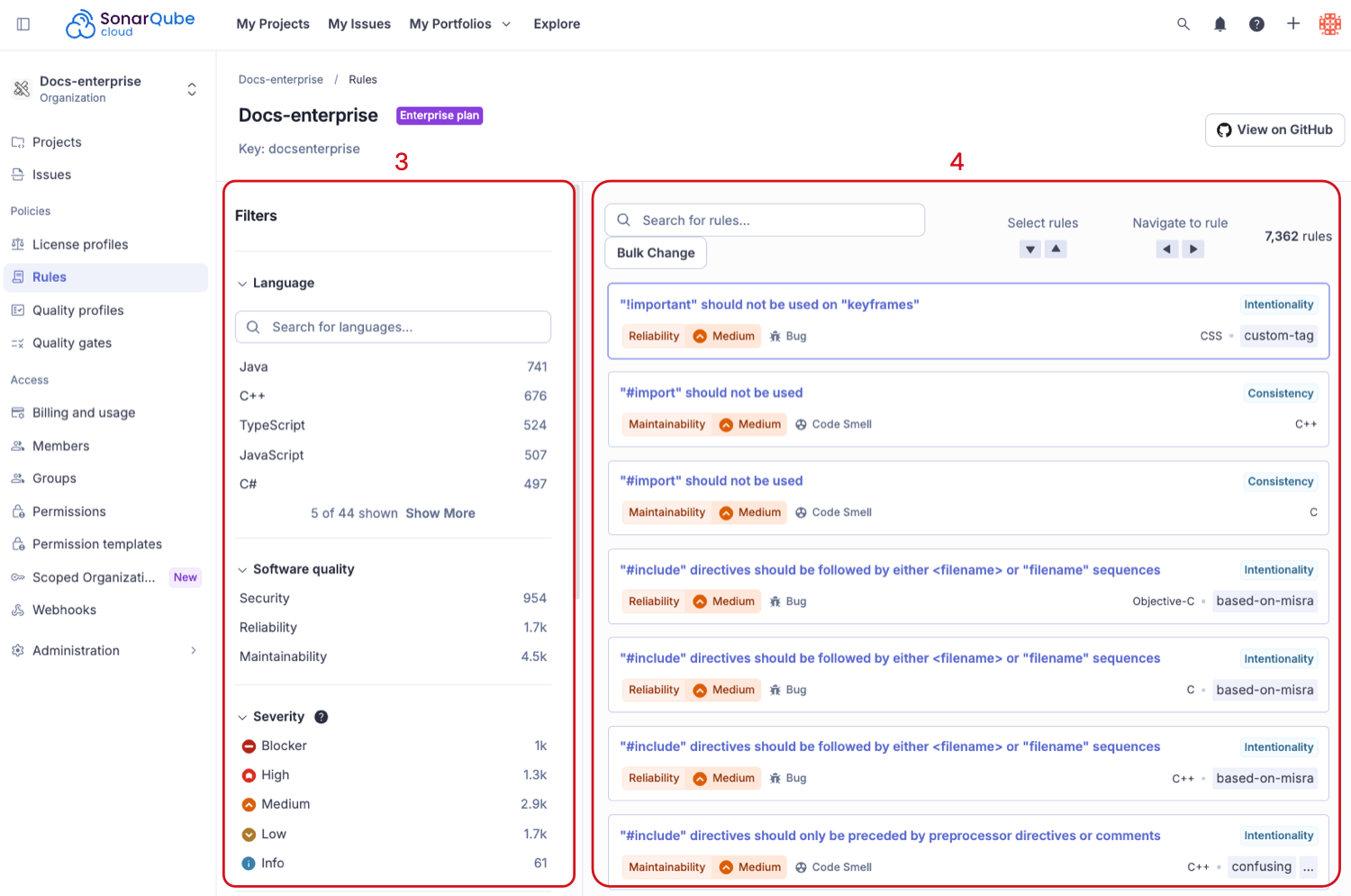
2. Go to **Rules** to see all the available rules.
3. Use filters to narrow your results.
4. A list of rules appears on the right side of the page.
## Filters
You can filter the list of rules using the following criteria in the left sidebar:
* **Language**: the language to which a rule applies.
* **Software Quality**: the software quality addressed by the rule. The same rule may address several software qualities. The possible values are: security, reliability, maintainability. Fore more information, see [SonarQube rules](/sonarqube-cloud/standards/managing-rules/rules.md#software-qualities).
* **Severity** (software quality): the impact level with which a software quality is impacted if the rule is broken. The possible values are: blocker, high, medium, low, info.
* **Code Attribute**: the single attribute evaluated by the rule. A code attribute contributes to the long-term value of your software. The possible values are: consistency, intentionality, adaptability, responsibility. For more information, see [SonarQube rules](/sonarqube-cloud/standards/managing-rules/rules.md#code-attributes).
* **Tag**: you can add tags to rules in order to classify them and to help discover them more easily.
* **Repository**: the engine/analyzer that contributes rules to SonarQube Cloud.
* **Status**: rules can have 3 different statuses:
* **Ready**: the rule is ready to be used in production.
* **Beta**: the rule has been recently implemented and Sonar hasn’t gotten enough feedback from users yet, so there may be false positives or false negatives.
* **Deprecated**: the rule should no longer be used because a similar, but more powerful and accurate rule exists.
* **Security Category**: security rules are classified according to well-established security standards such as [CWE](https://cwe.mitre.org/) and [OWASP Top 10](https://owasp.org/Top10/). See the [Security-related rules](/sonarqube-cloud/standards/managing-rules/security-related-rules.md) page for more detail.
* **Available Since**: The date when a rule was first added on SonarQube Cloud. This is useful to list all the new rules since the last upgrade of a plugin, for instance.
* **Quality Profile**: *Inclusion in* or *exclusion from* a specific profile.
* **Inheritance**: Available when an inherited quality profile is selected. It filters inherited rules, other rules, or inherited rules that have been overridden by other settings.
* **Activation severity** is available when an inherited quality profile is selected. It can filter by severity using the value chosen when the rule was activated in the quality profile.
* **Type** (deprecated): the category of the issue raised by the rule if the rule is broken. The possible values are: bug, vulnerability, code smell, security hotspot. Deprecated in favor of software qualities.
* **Type severity** (deprecated): the severity of the issue or hotspot raised by the rule if the rule is broken. The possible values are: blocker, critical, major, minor, info. Deprecated in favor of software quality severity.
## Rule details
To see the details of a rule, either select the rule title or use the arrow keys to cycle through the list. Inside the detailed view, along side the basic rule data, you’ll also see which profiles the rule is active in.
**Add/Remove tags**:
* You can add existing tags to a rule or create new ones, just enter a new name while typing in the text field. For more information, see [Adding tags to a rule](/sonarqube-cloud/standards/managing-rules/adding-tags-to-rule.md).
* Note that some rules have built-in tags that you cannot remove. They are provided by the plugins that contribute the rules.
**Extend description**:
* You can extend rule descriptions to let users know how your organization uses a particular rule or give more insight into a rule.
## Commercial-level rules
There are commercial-level rules that are available in SonarQube Cloud to all plans.
In order for these rules to appear in SonarQube for IDE, it must be in connected mode. In the standalone mode these rules are not visible. See [SonarQube for IDE](/sonarqube-cloud/analyzing-source-code/connected-mode.md) for more information about the connected mode.
## Related pages
* [SonarQube rules](/sonarqube-cloud/standards/managing-rules/rules.md)
* [Security-related rules](/sonarqube-cloud/standards/managing-rules/security-related-rules.md)
* [Security hotspot rules](/sonarqube-cloud/standards/managing-rules/security-hotspots.md)
* [If Sonar updates a rule](/sonarqube-cloud/standards/managing-rules/rule-update.md)
* [Adding tags to a rule](/sonarqube-cloud/standards/managing-rules/adding-tags-to-rule.md)
* [Rules for AI CodeFix](/sonarqube-cloud/standards/managing-rules/rules-for-ai-codefix.md)
* [Built-in rule tags](/sonarqube-cloud/standards/managing-rules/built-in-rule-tags.md)
---
# Agent Instructions
This documentation is published with GitBook. GitBook is the documentation platform designed so that both humans and AI agents can read, navigate, and reason over technical content effectively. Learn more at gitbook.com.
## Querying This Documentation
If you need additional information that is not directly available in this page, you can query the documentation by asking a question.
Perform an HTTP GET request on the following URL with the `ask` and `goal` query parameters:
```
GET https://docs.sonarsource.com/sonarqube-cloud/standards/managing-rules/viewing-rules.md?ask=&goal=
```
`ask` is the immediate question: it should be specific, self-contained, and written in natural language.
`goal` is what the user is ultimately trying to achieve, the reason they need the answer. Sharing it helps GitBook give you a better, more relevant answer. A goal is most helpful when it describes the outcome the user wants rather than restating the question. For example, with `ask=how do I create an API token`, a goal like `automate deployments from our CI pipeline` lets GitBook tailor the answer to that use case.
The response will contain a direct answer to the question and relevant excerpts and sources from the documentation.
Use this mechanism when the answer is not explicitly present in the current page, you need clarification or additional context, or you want to retrieve related documentation sections.