# Bitbucket Pipelines
Once your project is created and initiated from the repository you selected, you can follow the tutorial to configure your analysis with Bitbucket Pipelines.
## Launch your analysis and check your Quality Gate
Launch analyses with the [SonarQube Cloud Scan](https://bitbucket.org/sonarsource/sonarcloud-scan/) pipe and check the [quality-gates](https://docs.sonarsource.com/sonarqube-cloud/~/changes/1027/standards/quality-gates "mention") with the [SonarQube Cloud Quality Gate check](https://bitbucket.org/sonarsource/sonarcloud-quality-gate/) pipe.
{% hint style="info" %}
**Unsupported build technologies**:
These pipes cannot be used for projects built with Maven, Gradle, .NET, and C/C++.
{% endhint %}
More information:
* [SonarQube Cloud Scan](https://bitbucket.org/sonarsource/sonarcloud-scan/)
* [SonarQube Cloud Quality Gate check](https://bitbucket.org/sonarsource/sonarcloud-quality-gate/)
* [Get started with Bitbucket Pipelines](https://confluence.atlassian.com/bitbucket/get-started-with-bitbucket-pipelines-792298921.html)
## Analyzing branches
In order to trigger a SonarQube Cloud analysis on each push on a branch, you have to supply the same command in the `branches` section of `bitbucket-pipelines.yml` (check the [bitbucket-pipelines.yml configuration reference](https://confluence.atlassian.com/bitbucket/configure-bitbucket-pipelines-yml-792298910.html#Configurebitbucket-pipelines.yml-ci_branchesbranches) for more details about that section). Here is a sample configuration:
```yaml
pipelines:
...
branches:
main:
- step:
script:
- mvn org.sonarsource.scanner.maven:sonar-maven-plugin:sonar
...
```
Make sure that your `bitbucket-pipelines.yml` is up to date in the branch you want to analyze.
## Analyzing pull requests
In order to trigger a SonarQube Cloud analysis on each pull request update, you have to supply the same command in the `pull-requests` section of `bitbucket-pipelines.yml` (check the [bitbucket-pipelines.yml configuration reference](https://confluence.atlassian.com/bitbucket/configure-bitbucket-pipelines-yml-792298910.html#Configurebitbucket-pipelines.yml-ci_branchesbranches) for more details about that section). Here is a sample configuration:
```yaml
pipelines:
...
pull-requests:
feature/*:
- step:
script:
- mvn org.sonarsource.scanner.maven:sonar-maven-plugin:sonar
...
```
Make sure that your `bitbucket-pipelines.yml` is up to date in the pull request you want to analyze.
## Analyzing Monorepo Projects with Bitbucket Cloud: Pipeline Configuration
If you want to analyze a monorepo that contains more than one project, you need to ensure that you *specify the paths to each project for analysis* in your `bitbucket-pipelines.yml` file.
A typical yml file for a monorepo analysis should look something like this.
```yaml
definitions:
caches:
sonar: ~/.sonar/cache # Caching SonarQube Cloud artifacts will speed up your build
steps:
- step: &build-test-sonarcloud
name: Build, test and analyze on SonarQube Cloud
caches:
- sonar
script:
- pipe: sonarsource/sonarcloud-scan:2.0.0
variables:
SONAR_TOKEN: ${SONAR_TOKEN}
EXTRA_ARGS: '-Dsonar.projectKey=neil.hannonbbc4_monorepotest_proj1 -Dsonar.organization=neil.hannonbbc4 -Dsonar.projectBaseDir=proj1'
- pipe: sonarsource/sonarcloud-scan:2.0.0
variables:
SONAR_TOKEN: ${SONAR_TOKEN}
EXTRA_ARGS: '-Dsonar.projectKey=neil.hannonbbc4_monorepotest_proj2 -Dsonar.organization=neil.hannonbbc4 -Dsonar.projectBaseDir=proj2'
```
We recommend checking that you’re using the sonarcloud-scan pipe version mentioned [on this page](https://bitbucket.org/sonarsource/sonarcloud-scan/src/master/).
{% hint style="info" %}
Note that you need to build each project in the monorepo separately with a unique project key for each one.
{% endhint %}
## Failing the pipeline job when the quality gate fails
You can use the [SonarQube Cloud quality gate check Bitbucket Pipe](https://bitbucket.org/sonarsource/sonarcloud-quality-gate/src/master/) to ensure your code meets your quality standards by failing your pipeline job when your [quality-gates](https://docs.sonarsource.com/sonarqube-cloud/~/changes/1027/standards/quality-gates "mention") fail.
If you do not want to use the SonarQube Cloud quality gate check Pipe, you can instruct the scanner to wait for the SonarQube Cloud quality gate status at the end of the analysis by passing the `-Dsonar.qualitygate.wait=true` parameter in the `bitbucket-pipelines.yml` file.
This will make the analysis step poll SonarQube Cloud regularly until the quality gate is computed, increasing your pipeline duration. Note that if the quality gate is red, the analysis step will fail, even if the actual analysis itself is successful. We advise only using this parameter when necessary, for example, to block a deployment pipeline if the quality gate is red. It should not be used to report the quality gate status in a pull request.
You can set the `sonar.qualitygate.timeout` property to the amount of time (in seconds) that the SonarQube Cloud scan should wait for a report to be processed. The default is 300 seconds.
## Preventing pull request merges when the quality gate fails
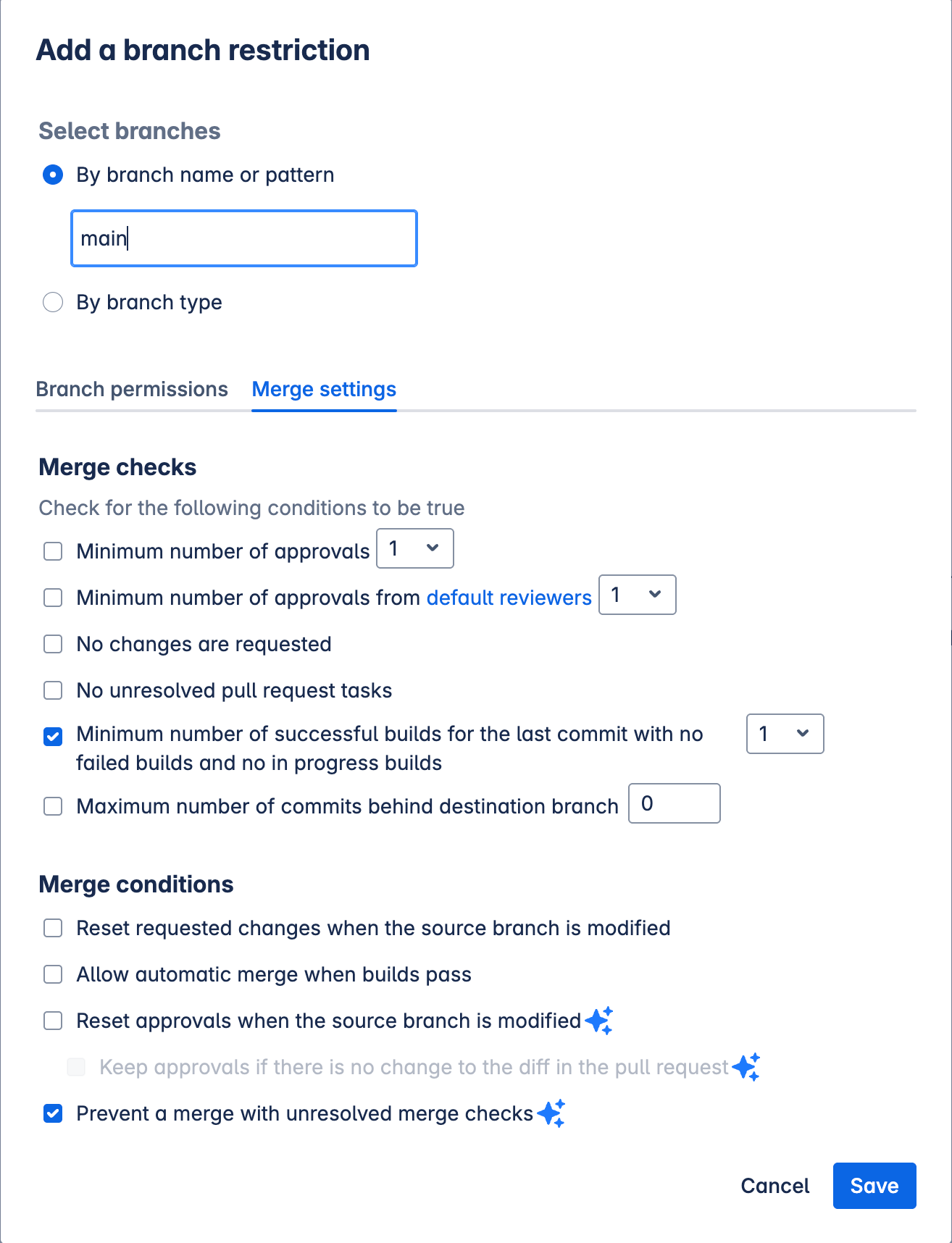
After setting up a pull request analysis, you can block pull requests from being merged if it is failing the quality gate.
1. You must be using Bitbucket Pipelines with a Premium Bitbucket Cloud plan.
2. Make sure that the Bitbucket Pipeline fails when the quality gate fails (refer to **Failing the pipeline job when the quality gate fails** above)
3. In Bitbucket, go to **Repository settings** > **Branch restrictions** to either **Add a branch restriction** or edit your existing one:
* In the **Merge settings** tab, select:
* **Minimum number of successful builds for the last commit with no failed builds and no in progress builds**,
* and **Prevent a merge with unresolved merge checks**.
## Sample projects
You can see our multiple sample projects to see how it works :
* [Built with Gradle](https://bitbucket.org/sonarsource/sample-gradle-project)
* [Built with Maven](https://bitbucket.org/sonarsource/sample-maven-project)
* [JavaScript project](https://bitbucket.org/sonarsource/sample-nodejs-project)
If you target a .NET application, see a [sample .NET project](https://bitbucket.org/sonarsource/sample-dotnet-project-azuredevops) built with Azure Pipelines.
## Troubleshooting
**Docker memory limit:**
If your Pipelines fail with the error `Container ‘docker' exceeded memory limit`, you’ll need to increase the memory limit for the docker process in your `bitbucket-pipelines.yml` file:
```yaml
...
definitions:
services:
docker:
memory: 2048
pipelines:
...
```
## Related pages
* [bitbucket-cloud](https://docs.sonarsource.com/sonarqube-cloud/~/changes/1027/getting-started/bitbucket-cloud "mention")
* [bitbucket-cloud](https://docs.sonarsource.com/sonarqube-cloud/~/changes/1027/managing-your-projects/administering-your-projects/devops-platform-integration/bitbucket-cloud "mention")
* [importing-bitbucket-workspace](https://docs.sonarsource.com/sonarqube-cloud/~/changes/1027/administering-sonarcloud/managing-organization/creating-organization/importing-bitbucket-workspace "mention")