# Agent backlog fixes
{% hint style="success" %}
The SonarQube Remediation Agent is a [Beta](https://docs.sonarsource.com/sonarqube-cloud/appendices/product-release-lifecycle#beta) feature available with the Team (annual) and Enterprise plan accounts. It is free during the beta phase and will be a paid feature when it moves to [General Availability](https://docs.sonarsource.com/sonarqube-cloud/appendices/product-release-lifecycle#general-availability). To learn more about the terms & conditions, please see our legal page about features in [Early Access](https://www.sonarsource.com/legal/early-access/).
{% endhint %}
*AI features are only available in SonarQube Cloud Team and Enterprise plans*. See the [subscription-plans](https://docs.sonarsource.com/sonarqube-cloud/~/changes/1027/administering-sonarcloud/managing-subscription/subscription-plans "mention") page for more details*.*
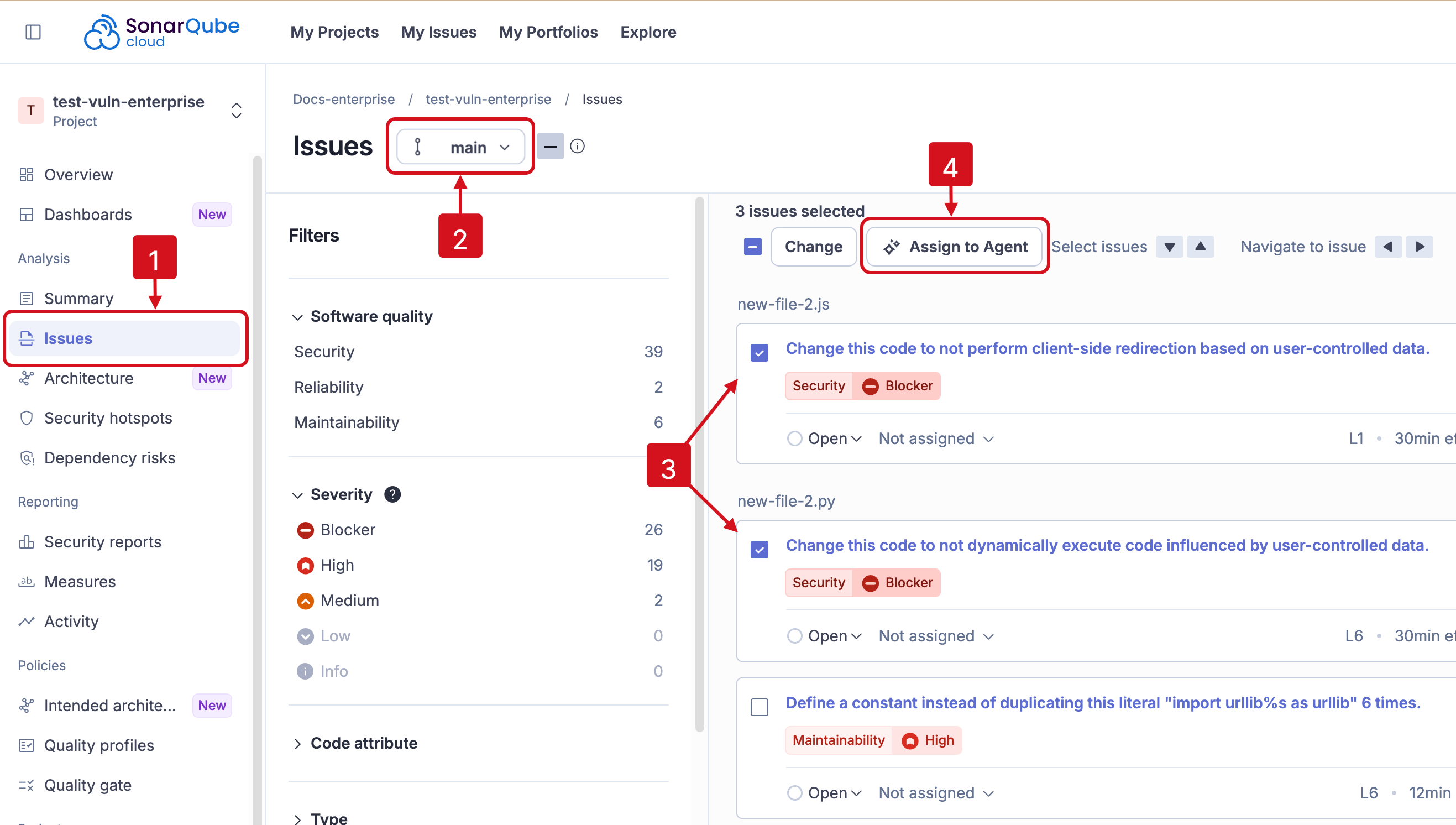
You can reduce technical debt by selecting issues from your main branch and letting the SonarQube Remediation Agent propose fixes in a new pull request (PR). A new **Assign to Agent** button on the **Issues** page lets you send selected issues to the agent so it can generate a fix proposal for you to review.
The **Backlog fixes** feature *runs only on the main branch*. It must be enabled by selecting **Backlog fixes** from the **AI capabilities** page in SonarQube Cloud. For step-by-step instructions to enable the **Backlog fixes**, see the [#enable-your-agent](https://docs.sonarsource.com/sonarqube-cloud/~/changes/1027/administering-sonarcloud/ai-features/sonarqube-remediation-agent#enable-your-agent "mention") article on the SonarQube Remediation Agent page.
Only eligible issues in your main branch can be assigned to the agent. If you select a mix of eligible and non-eligible issues, a warning appears and you are reminded that only eligible issues will be sent to the service. The **Assign to Agent** button stays greyed out until at least one eligible issue is selected. For details on which issues are eligible, see the Requirements and limitations article.
When you select **Assign to Agent**, the agent opens a new pull request in GitHub, authored by the SonarQube Remediation Agent. One PR will be opened for each fix suggestion you assign. An estimated time to fix notification will pop up and the agent's activity will visible on the **Agent activity** page when the PR is available.
1. Navigate to your project’s **Issues** page.
2. Check that you are on the `main` branch.
3. Select issues from your backlog that you want the agent to fix.
4. Select **Assign to Agent** to send eligible issues to the SonarQube Remediation Agent.
{% hint style="info" %}
**Backlog fixes** are only available when addressing issues in your main branch. See the [main-branch-analysis](https://docs.sonarsource.com/sonarqube-cloud/~/changes/1027/analyzing-source-code/branch-analysis/main-branch-analysis "mention") page for information about the main branch **Summary** page.
{% endhint %}
### Reviewing agent fixes in GitHub
The PR summary (in GitHub) includes issue information in the same format you expect see in an issue’s rule description from any SonarQube product. The agent’s fix proposal is delivered in a unique commit for each issue, ready for an engineer to review.
The SonarQube Remediation Agent's PR comment will have a list of **Fixed Issues** with information that includes the issue's rule description and the accompanying information as found with every SonarQube rule.
## Agent activity
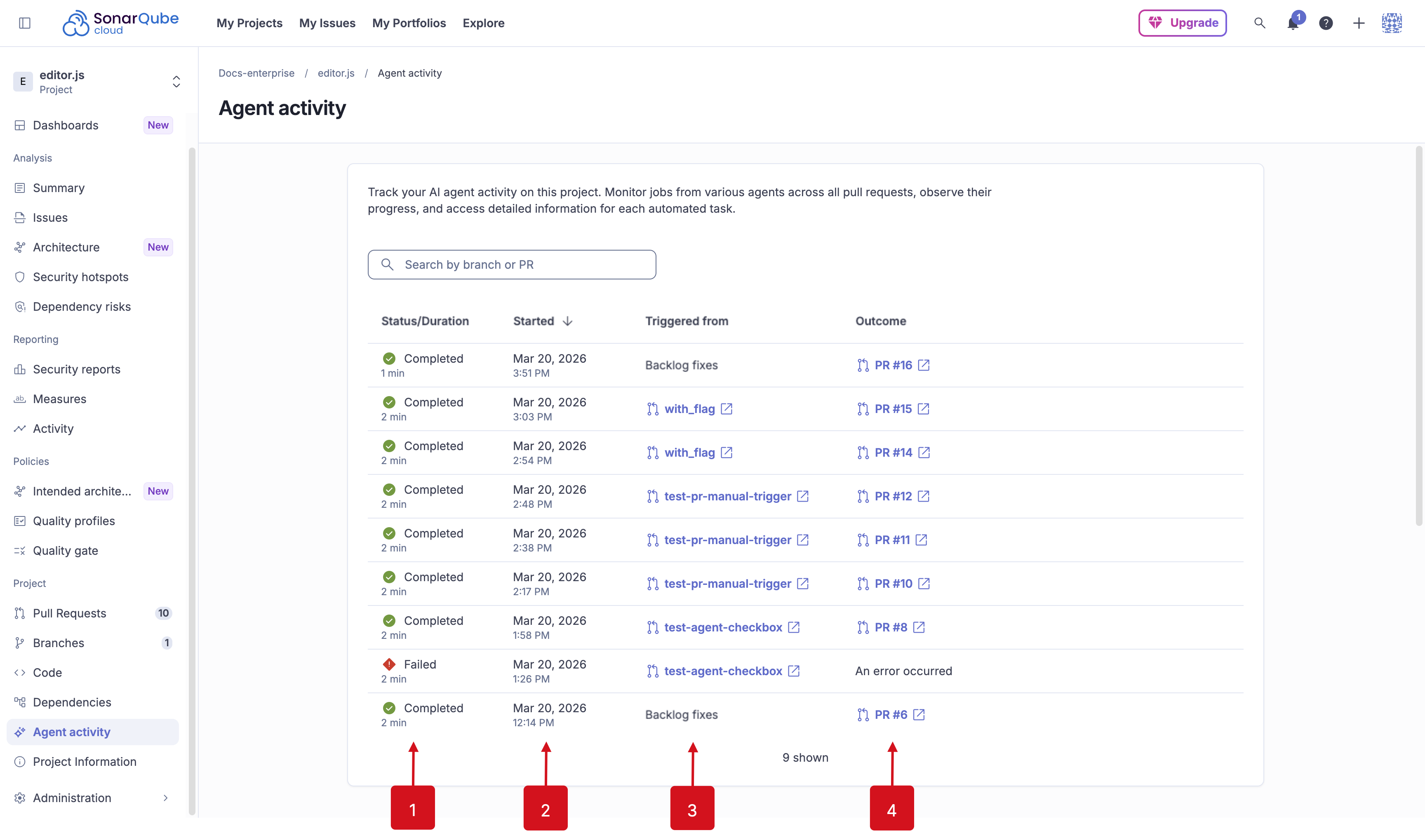
To review the SonarQube Remediation Agent's activity, go to *Your SonarQube Cloud Project* > **Agent activity**. From there you will see the agent's:
1. Status/duration: Time the agent spent to generate fixes.
2. Started: When you selected **Run Remediation Agent**.
3. Source: Where the agent is working. *Backlog fixes* means that the agent is working on issues found in your main branch; or a link will be provided to the branch where you first called the agent.
4. Outcome: A link to the agent's PR will be available.
* PRs made for *Backlog fixes* will be on your `main` branch. See the [agent-backlog-fixes](https://docs.sonarsource.com/sonarqube-cloud/~/changes/1027/managing-your-projects/issues/with-ai-features/agent-backlog-fixes "mention") page for details.
* PRs made for *Pull request fixes* will be made on your branch. See the [#engage-with-the-agent](https://docs.sonarsource.com/sonarqube-cloud/~/changes/1027/managing-your-projects/issues/agents-in-your-github-pull-request#engage-with-the-agent "mention") article for more information.
## Agents in your pull request
It's possible to get AI-generated fix suggestions in your pull request for Java, JavaScript/TypeScript, and Python projects when the quality gate fails with new issues introduced. See the [agents-in-your-github-pull-request](https://docs.sonarsource.com/sonarqube-cloud/~/changes/1027/managing-your-projects/issues/with-ai-features/agents-in-your-github-pull-request "mention") page for the full details.