> For the complete documentation index, see [llms.txt](https://docs.sonarsource.com/llms.txt). Markdown versions of documentation pages are available by appending `.md` to page URLs; this page is available as [Markdown](https://docs.sonarsource.com/sonarqube-community-build/extension-guide/web-api.md).
# Web API
SonarQube Community Build provides the Web API to access its functionalities from applications.
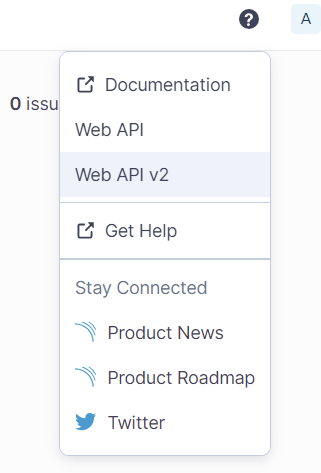
The web services composing the [web API](https://next.sonarqube.com/sonarqube/web_api) are documented within SonarQube Community Build. To access the documentation, select the help button from the top bar in SonarQube Community Build:
Note that the Web API V2 will gradually replace the Web API as endpoints get deprecated and replaced.
## Authenticating to the Web API
Administrative web services are secured and require the user to have specific permissions.
To authenticate to the Web API, we recommend that you use the bearer authentication scheme.
If you cannot use the bearer authentication scheme (e.g., with the API endpoint [monitoring/metrics](https://next.sonarqube.com/sonarqube/web_api/api/monitoring/metrics)), you can use the X-Sonar-Passcode authentication scheme.
With the bearer authentication scheme
With the bearer authentication scheme, a SonarQube Community Build token is used:
* A token of **User** type is generated in SonarQube Community Build UI.\
See [Managing your tokens](/sonarqube-community-build/user-guide/managing-tokens.md).
* It is provided through the `Authorization: Bearer ` header.\
See **Sample API request** below.
{% hint style="info" %}
If a token is used to interact with the API, a `SonarQube-Authentication-Token-Expiration` HTTP header is added to the response. This header contains the token expiration date and can help third-party tools track upcoming expirations; this method allows the token to be rotated in time.
{% endhint %}
With the X-Sonar-Passcode authentication scheme
With the X-Sonar-Passcode authentication scheme, a passcode is used:
* The passcode is defined:
* Either in the `sonar.properties` configuration file as the value of the `sonar.web.systemPasscode` property.
* Or through the `SONAR_WEB_SYSTEMPASSCODE` environment variable.
* The passcode is provided through the `X-Sonar-Passcode: ` header.
**Example**:
```css-79elbk
curl --request GET \
--url 'https://sonarqube.com/api/monitoring/metrics \
--header 'X-Sonar-Passcode: '
```
## Sending an API request
To make a request, you need to find the HTTP method and the right path for the operation that you want to use.
It’s highly recommended to use form data parameters when making POST requests to the Web API. If you use URI query parameters instead then these parameters won’t be securely passed to the endpoint.
### Content-Type header
Unless the Sonar Web API endpoint specifications list a specific `Content-Type` value, your request should use the following `Content-Type` header:
`Content-Type: application/x-www-form-urlencoded`
This is the default `Content-Type` value set by most tools and libraries, such as `curl` and Python’s `requests` module, but you should check their documentation for proper usage.
## Sample API request
If, for example, you want to use the Web API to extract measures, you can make a "GET MEASURES" call to the [`/api/measures`](https://next.sonarqube.com/sonarqube/web_api/api/measures) endpoint to extract measures of a given metric for a given project. In the case of a private project, the user used to create the user-type token has the Browse permission on this project.
For this example, a possible request and response are shown below.
Request
```css-79elbk
curl --request GET \
--url 'https://sonarqube.com/api/measures/component?metricKeys=ncloc%2Ccode_smells%2Ccomplexity&component=' \
--header 'Authorization: Bearer '
```
Response
```css-79elbk
{
"component": {
"id": "id",
"key": "my_project_key",
"name": "my_project_name",
"qualifier": "TRK",
"measures": [
{
"metric": "complexity",
"value": "4214"
},
{
"metric": "code_smells",
"value": "8595",
"bestValue": false
},
{
"metric": "ncloc",
"value": "51667"
}
]
}
}
```
## Notes
### Code metrics
You can retrieve code metric values and histories by using the [`/api/measures`](https://next.sonarqube.com/sonarqube/web_api/api/measures)\`\`endpoint. The metric keys are listed in the metric tables in [Understanding measures and metrics](/sonarqube-community-build/user-guide/code-metrics/metrics-definition.md), or you can use the `/api/metrics` endpoint to retrieve them.
## Related pages
* [Deprecation policy](/sonarqube-community-build/server-update-and-maintenance/maintenance/deprecations/deprecation-policy.md)
---
# Agent Instructions
This documentation is published with GitBook. GitBook is the documentation platform designed so that both humans and AI agents can read, navigate, and reason over technical content effectively. Learn more at gitbook.com.
## Querying This Documentation
If you need additional information that is not directly available in this page, you can query the documentation dynamically by asking a question.
Perform an HTTP GET request on the current page URL with the `ask` query parameter, and the optional `goal` query parameter:
```
GET https://docs.sonarsource.com/sonarqube-community-build/extension-guide/web-api.md?ask=&goal=
```
`ask` is the immediate question: it should be specific, self-contained, and written in natural language.
`goal` is optional and describes the broader end goal you are ultimately trying to accomplish on behalf of the user. GitBook uses it to tailor the answer towards what is most useful for that goal.
The response will contain a direct answer to the question and relevant excerpts and sources from the documentation.
Use this mechanism when the answer is not explicitly present in the current page, you need clarification or additional context, or you want to retrieve related documentation sections.