> For the complete documentation index, see [llms.txt](https://docs.sonarsource.com/llms.txt). Markdown versions of documentation pages are available by appending `.md` to page URLs; this page is available as [Markdown](https://docs.sonarsource.com/sonarqube-community-build/project-administration/adjusting-analysis/setting-analysis-scope/excluding-files-based-on-patterns.md).
# Excluding based on path-matching patterns
Adjusting your project’s initial analysis scope by excluding files based on path-matching patterns.
You can adjust your project’s initial analysis scope by excluding files based on path-matching patterns. To exclude the files, you define file exclusion parameters based on directory and file name patterns.
You can perform the setup in SonarQube UI (this requires that you have the project’s Administer permission) or on the CI/CD host. A parameter set on the CI/CD host has precedence over any UI setting of the same parameter.
{% hint style="info" %}
As a system administrator, you can perform these settings as the default settings for all projects in your SonarQube. See [Excluding files based on file paths](/sonarqube-community-build/instance-administration/analysis-functions/analysis-scope/excluding-files-based-on-file-paths.md) for more information.
{% endhint %}
## Example of an initial scope adjustment
We consider the following repository example where test files are contained in both `test/` directories. Source and test code files are contained in the same ancestor directory: `src/` which is chosen as the initial analysis scope for both source and test code. Therefore, a scope adjustment is necessary.
We adjust the initial scope as follows:
* For source files: by defining an exclusion parameter with the pattern `src/**/test/**/*`
* For test files: by defining an inclusion parameter with the pattern `src/**/test/**/*`
## Principles governing the use of file exclusion parameters
A file exclusion parameter:
* Applies either to source code (also called main code) or to test code files.\
The SonarScanner must identify the source code as well as the test code since they are processed differently by SonarQube. A code file is either a source or a test code; it cannot be both (If this is the case, the scanner will fail the analysis with an error message.).
* Contains:
* Either exclusion patterns: to define files to be excluded from the analysis scope.
* Or inclusion patterns: to define files to be included in the scope.\
It means that the rest of the files is excluded from the analysis scope.
For a given code category (source or test), we strongly recommend that you use either exclusion-pattern or inclusion-pattern parameters, depending on what is simpler in your situation (If you do not and there is an overlapping, then exclusion patterns have precedence over inclusion patterns.).
The following applies:
* The parameter defined at the project level will override the same parameter defined at the global level.\
For example, if the system administrator defines the exclusion pattern for source code `src/**/test1/**/*` at the global level, then, if the project administrator sets the exclusion pattern for source code `src/**/test2/**/*` for their project, the scanner will consider only the pattern `src/**/test2/**/*` to compute source file exclusion.
* If *test file inclusion* patterns are used, the scanner will automatically set these patterns as *source file exclusion* patterns during project analysis. These source file exclusion patterns will apply in addition to the other configured source file exclusion patterns.\
For example:
* If the exclusion pattern for source code is `src/**/test5/**/*` and the inclusion pattern for test code is `src/**/test6/**/*`
* Then the scanner will consider both patterns to compute the *source file exclusion*:\
`src/**/test5/**/*` and `src/**/test6/**/*`
{% hint style="info" %}
A file path definition is either relative to the `sonar.projectBaseDir` property (which is by default the directory from which the analysis was started, for more information see [Analysis parameters](/sonarqube-community-build/analyzing-source-code/analysis-parameters.md)) or absolute.
{% endhint %}
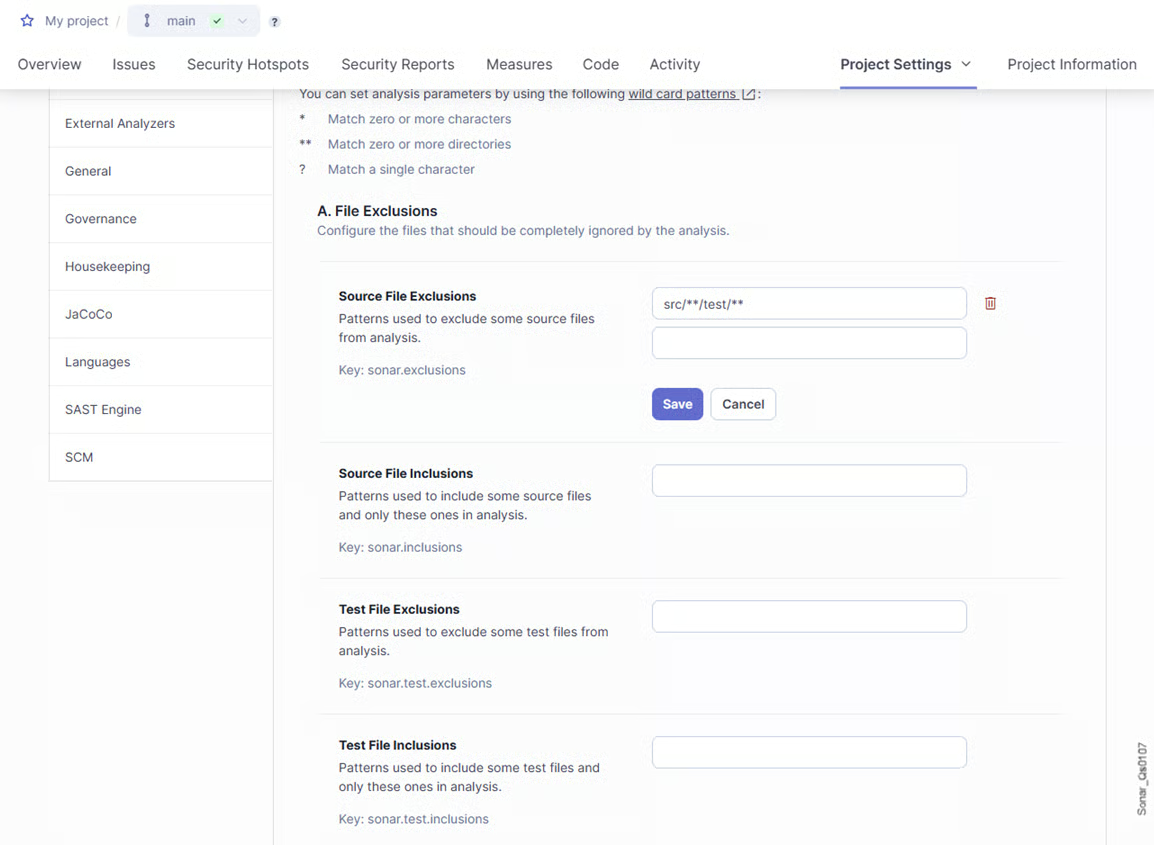
## Defining a file exclusion parameter in the UI
1. Retrieve your project. See [Retrieving projects](/sonarqube-community-build/user-guide/viewing-projects/retrieving-projects.md) for more details.
2. Go to **Project Settings** > **General Settings** > **Analysis Scope**.
3. In **A. File Exclusions**, choose the parameter to configure (source or test code; exclusion or inclusion patterns), and enter and save the first pattern. See [Defining matching patterns](/sonarqube-community-build/project-administration/adjusting-analysis/setting-analysis-scope/defining-matching-patterns.md) for more information.
4. Add additional patterns to the parameter if necessary.
5. Define other parameters if necessary. Make sure you use either **Source File Exclusions** or **Source File Inclusions**, and either **Test File Exclusions** or **Test File Inclusions**.
{% hint style="info" %}
If a parameter is defined at the global level, it will appear at the project level as "(default)". You can edit it for your project. Click **Reset** to reset the value to its default value.
{% endhint %}
## Defining a file exclusion parameter on the CI/CD host
The table below lists the properties you can use to define a file exclusion parameter by setting sonar properties on CI/CD host. For more information, see [Analysis parameters](/sonarqube-community-build/analyzing-source-code/analysis-parameters.md).
| **Property key** | **Description** |
| --------------------- | ------------------------------------------------------------------------------------------------------------------------------------------------------------------------------------------------------------------------------------------------------------------------------------------------------------------------------------------------------------------------------------------------------------------------------------------------------------------------------------------------------------------------------------------------------- |
| sonar.exclusions |
Defines the source files (non-test files) to be excluded from the analysis.
Note: In this property key, the test string is in singular, unlike the sonar.tests property defining the initial scope
|
## Related pages
* [Excluding from coverage or duplication](/sonarqube-community-build/project-administration/adjusting-analysis/setting-analysis-scope/exclude-from-coverage-duplication.md)
* [Excluding based on file extension](/sonarqube-community-build/project-administration/adjusting-analysis/setting-analysis-scope/excluding-based-on-file-extension.md)
* [Applying advanced exclusions](/sonarqube-community-build/project-administration/adjusting-analysis/setting-analysis-scope/advanced-exclusions.md)
* [Other adjustments](/sonarqube-community-build/project-administration/adjusting-analysis/setting-analysis-scope/other-adjustments.md)
* [Setting initial scope](/sonarqube-community-build/project-administration/adjusting-analysis/setting-analysis-scope/setting-initial-scope.md)
* [Verifying analysis scope](/sonarqube-community-build/project-administration/adjusting-analysis/setting-analysis-scope/verifying-analysis-scope.md)
* [Introduction](/sonarqube-community-build/instance-administration/analysis-functions/analysis-scope/introduction.md) to Analysis scope
---
# Agent Instructions
This documentation is published with GitBook. GitBook is the documentation platform designed so that both humans and AI agents can read, navigate, and reason over technical content effectively. Learn more at gitbook.com.
## Querying This Documentation
If you need additional information that is not directly available in this page, you can query the documentation by asking a question.
Perform an HTTP GET request on the following URL with the `ask` and `goal` query parameters:
```
GET https://docs.sonarsource.com/sonarqube-community-build/project-administration/adjusting-analysis/setting-analysis-scope/excluding-files-based-on-patterns.md?ask=&goal=
```
`ask` is the immediate question: it should be specific, self-contained, and written in natural language.
`goal` is what the user is ultimately trying to achieve, the reason they need the answer. Sharing it helps GitBook give you a better, more relevant answer. A goal is most helpful when it describes the outcome the user wants rather than restating the question. For example, with `ask=how do I create an API token`, a goal like `automate deployments from our CI pipeline` lets GitBook tailor the answer to that use case.
The response will contain a direct answer to the question and relevant excerpts and sources from the documentation.
Use this mechanism when the answer is not explicitly present in the current page, you need clarification or additional context, or you want to retrieve related documentation sections.