> For the complete documentation index, see [llms.txt](https://docs.sonarsource.com/llms.txt). Markdown versions of documentation pages are available by appending `.md` to page URLs; this page is available as [Markdown](https://docs.sonarsource.com/sonarqube-for-eclipse/using/security-hotspots.md).
# Security hotspots
How to fix security hotspots using SonarQube for Eclipse.
> **Note:** To simplify the classification of findings, we are gradually transitioning security hotspots to vulnerabilities. As a result, rules that previously raised security hotspots will start raising vulnerabilities (type) or security issues (software quality).
A security hotspot highlights a security-sensitive piece of code that the developer needs to review. Upon review, you’ll either find there is no threat or you need to apply a fix to secure the code. For more information about what security hotspots are and why they're different than other security issues, take a look at the server documentation:
* [Managing Security Hotspots](/sonarqube-server/2026.1/user-guide/security-hotspots.md) in SonarQube Server
* [Security hotspot rules](/sonarqube-cloud/standards/managing-rules/security-hotspots.md) in SonarQube Cloud
* [Managing Security Hotspots](/sonarqube-community-build/user-guide/security-hotspots.md) in SonarQube Community Build
## Hotspot analysis
SonarQube for Eclipse does not detect hotspots on its own but is able to report hotspots found by SonarQube Server and SonarQube Community Build when running in connected mode. Starting from SonarQube for Eclipse 5.7, you can use the SonarQube **Open in IDE** feature to open a security hotspot in Eclipse. Unfortunately, at this time, *SonarQube for Eclipse does not report security hotspots found on SonarQube Cloud*.
## Reviewing hotspots
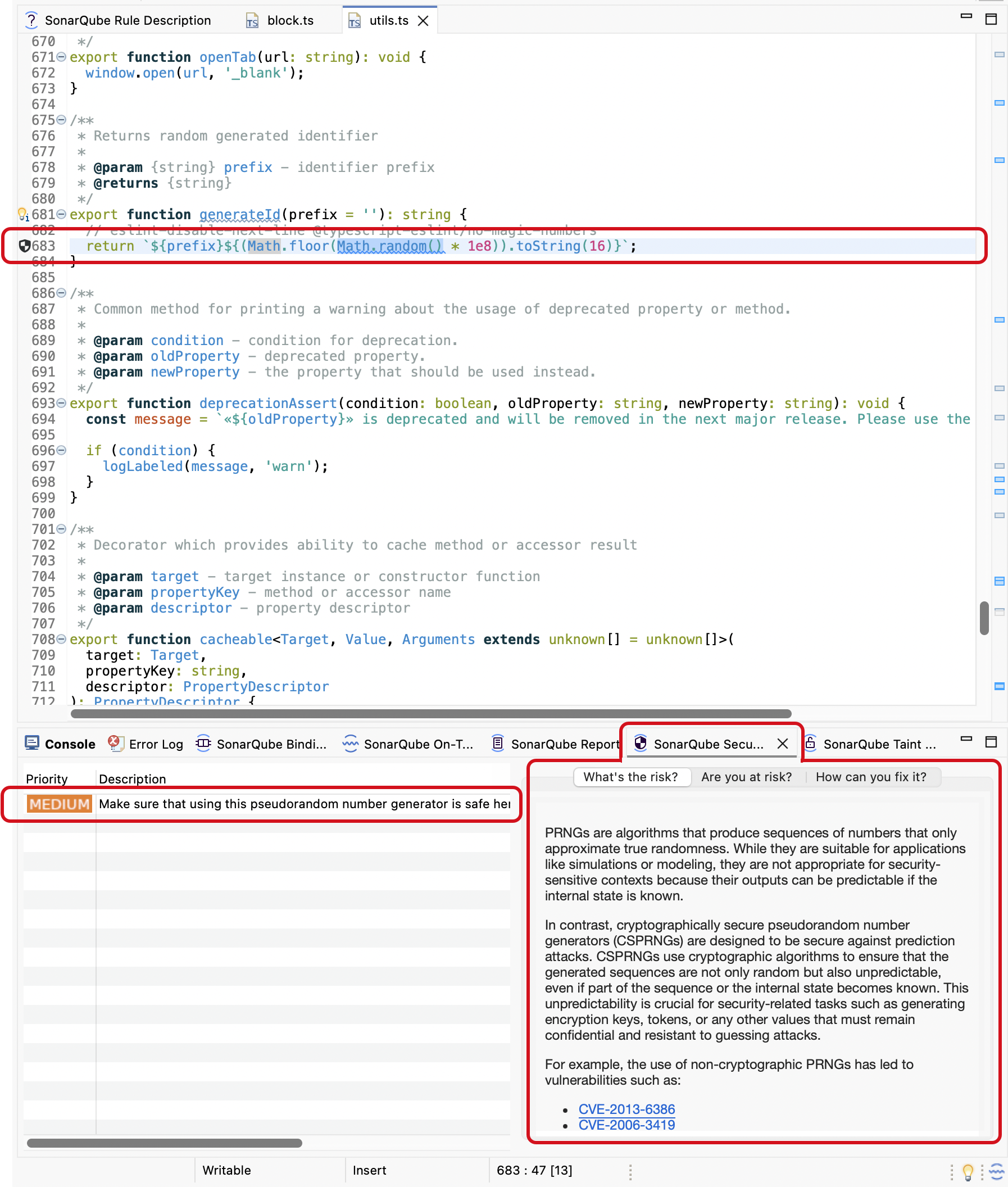
First, open a file in Eclipse and bind your project using Connected Mode with SonarQube Server 2025.1 or newer. In SonarQube Server, go to the ***Your Project*** > **Security Hotspots** page and select a hotspot to review. Then, select the **Open in IDE** button and choose your **Eclipse IDE** from the list; the correct file will open in Eclipse and the hotspot will be highlighted in the code explorer. By default, a SonarQube for Eclipse hotspot badge is displayed for the security hotspot in the Eclipse **Vertical ruler**.
More information about your security hotspot result is presented in the **SonarQube Security Hotspots** view window where you can find more details about the potential risk and how to fix it.
Hotspots are categorized by a High, Medium, or Low review priority. As with all issues found by SonarQube for Eclipse, double-clicking an issue in the SonarQube for Eclipse view window highlights the code in the code editor. Selecting a hotspot will automatically open the rule description where you have a chance to investigate further.
## Fixing hotspots
How you fix a security hotspot depends on your assessment of the risk. Check the Rule description and the **How can you fix it?** tab to find recommended secure coding practices and compliant solutions (when available). More information can be found in the security hotspot Workflow articles in the server documentation:
* See security hotspot [Managing Security Hotspots](/sonarqube-server/2026.1/user-guide/security-hotspots.md#workflow) in SonarQube Server
* See the [Reviewing security hotspots](/sonarqube-cloud/managing-your-projects/issues/reviewing-security-hotspots.md) page in SonarQube Cloud.
* See security hotspot [Managing Security Hotspots](/sonarqube-community-build/user-guide/security-hotspots.md#workflow) in SonarQube Community Build.
Once you determine the risk, you can either fix or mark your hotspot accordingly.
The **SonarQube Security Hotspots** view window in Eclipse will give you three tabs to help asses the hotspot’s risk and in most cases, will offer you a compliant solution. You can update your code locally and submit your code to SonarQube Server or SonarQube Community Build for analysis to improve your code’s health.
Or, in SonarQube Server or SonarQube Community Build, navigate to the hotspot and select the **Change status** button. From there, you can mark it as **Acknowledged**, **Fixed**, or **Safe**. You must be granted the *Administer Security Hotspot* permission level by a SonarQube Server or SonarQube Community Build project administrator to see the **Change status** button.
---
# Agent Instructions
This documentation is published with GitBook. GitBook is the documentation platform designed so that both humans and AI agents can read, navigate, and reason over technical content effectively. Learn more at gitbook.com.
## Querying This Documentation
If you need additional information that is not directly available in this page, you can query the documentation by asking a question.
Perform an HTTP GET request on the following URL with the `ask` and `goal` query parameters:
```
GET https://docs.sonarsource.com/sonarqube-for-eclipse/using/security-hotspots.md?ask=&goal=
```
`ask` is the immediate question: it should be specific, self-contained, and written in natural language.
`goal` is what the user is ultimately trying to achieve, the reason they need the answer. Sharing it helps GitBook give you a better, more relevant answer. A goal is most helpful when it describes the outcome the user wants rather than restating the question. For example, with `ask=how do I create an API token`, a goal like `automate deployments from our CI pipeline` lets GitBook tailor the answer to that use case.
The response will contain a direct answer to the question and relevant excerpts and sources from the documentation.
Use this mechanism when the answer is not explicitly present in the current page, you need clarification or additional context, or you want to retrieve related documentation sections.