> For the complete documentation index, see [llms.txt](https://docs.sonarsource.com/llms.txt). Markdown versions of documentation pages are available by appending `.md` to page URLs; this page is available as [Markdown](https://docs.sonarsource.com/sonarqube-for-vs-code/using/taint-vulnerabilities.md).
# Injection vulnerabilities
How to fix injection vulnerabilities using SonarQube for VS Code.
*Injection vulnerabilities* are also known as *injection flaws* or *taint vulnerabilities*; the names are often used interchangeably (ie: injection flaws, injection vulnerabilities, and taint vulnerabilities). They are issues raised by specific security-related rules in SonarQube (Server, Cloud) and remain a top concern. Common types include SQL Injection, Deserialization, and Command Injection vulnerabilities. See the server related documentation for more details about this type of rule:
* [Security-related rules](/sonarqube-server/2026.1/quality-standards-administration/managing-rules/security-related-rules.md) in SonarQube Cloud
* [Security-related rules](/sonarqube-cloud/standards/managing-rules/security-related-rules.md) in SonarQube Cloud
[Injection vulnerabilities](/sonarqube-for-vs-code/resources/glossary.md#i) are unique issues because of how data and information flow within your application. This flow becomes a problem when a user controls the data input into the application (source), and that data is not validated or sanitized before it is used by sensitive functions (sink). This lack of validation or sanitization is what allows a potential attacker to manipulate the data flow for malicious purposes.
Because injection vulnerabilities (i.e., taint vulnerabilities) often involve code in multiple files and functions, SonarQube for IDE can only raise them after a full project analysis. This is why taint vulnerabilities are pulled from SonarQube Server or SonarQube Cloud after a project analysis.
## Prerequisites
* Running SonarQube for IDE in connected mode with SonarQube Cloud or a SonarQube Server commercial edition is required. See the pages on [Connected mode](/sonarqube-for-vs-code/connect-your-ide/connected-mode.md) and [Connected mode setup](/sonarqube-for-vs-code/connect-your-ide/setup.md) for more details.
* Your project should be analyzed regularly, ideally by your CI server.
### Limitations
* Only taint vulnerabilities in open files are shown in the IDE.
* SonarQube for IDE does not support short-lived branches therefore, when running in connected mode with SonarQube Cloud, you must work with [Branch analysis setup](/sonarqube-cloud/analyzing-source-code/branch-analysis/branch-analysis-setup.md#long-lived-and-short-lived-branches); SonarQube Server does not distinguish between long- and short-lived branches.
* SonarQube for VS Code follows a logic pattern as defined in the [Connected mode](/sonarqube-for-vs-code/connect-your-ide/connected-mode.md#branch-awareness) article to sync the branch analysis on SonarQube (Server, Cloud) with the local analysis, including the synchronization of taint vulnerabilities, in your IDE.
* You’re limited by your SonarQube (Server, Cloud) plan restrictions regarding lines of code limits and branches you can analyze.
## How to display taint vulnerabilities
1. Complete your [Connected mode setup](/sonarqube-for-vs-code/connect-your-ide/setup.md) and bind your project to SonarQube (Server, Cloud).
2. In the standard VS Code Panel below the editor region, open the **SONARQUBE** panel.
3. The **SONARQUBE** panel displays the list of injection vulnerabilities that are found in the bound folder. The injection vulnerabilities found in the entire project will be listed by file.
## How to fix your taint vulnerabilities
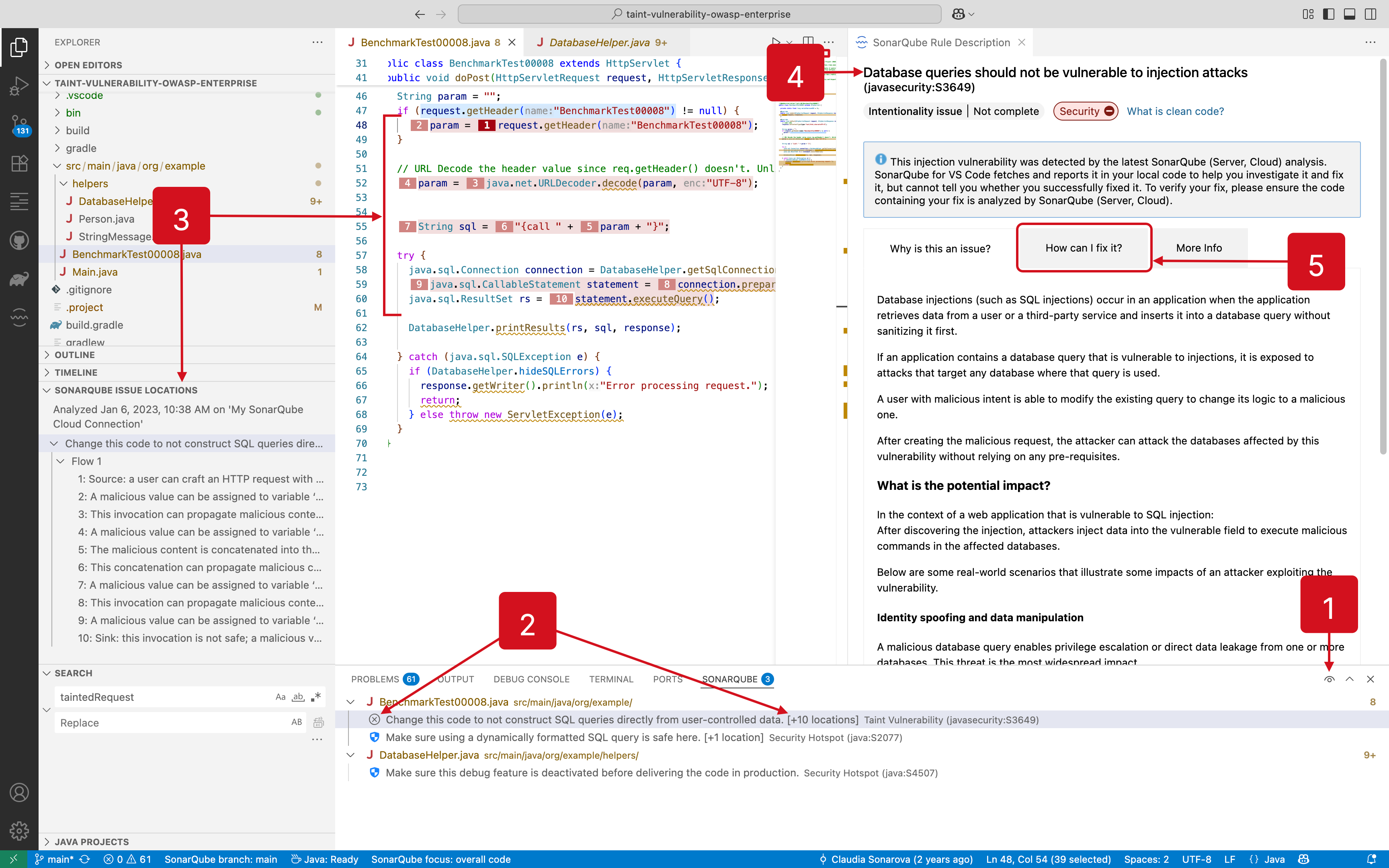
Injection vulnerabilities are distinguished in the **SONARQUBE** panel as shown in the following image. Learn how to fix your injection vulnerability by using the tooltip options:
1. Note that your issue list might be collapsed depending on the new code period that is activated when selecting **Focus on New Code** (see [New code](/sonarqube-for-vs-code/using/new-code.md#setting-your-focus-on-new-code)).
2. In the **SONARQUBE** panel, your taint vulnerabilities are easily identifiable by looking at the  identifying badge. You will also see how many locations this vulnerability occupies.
3. Select one of your taint vulnerabilities to focus the code editor and open the **SONARQUBE ISSUE LOCATIONS** view.
4. Selecting an issue will also open the **SonarQube Rule Description** view.
5. Find more information under the **How can I fix it?** tab.
Because the detection of taint vulnerabilities requires that you run in connected mode, any changes you make to the code must be analyzed by your instance of SonarQube (Server, Cloud). Here are two options to resolve taint vulnerabilities displayed by SonarQube for IDE:
* After you fix the taint vulnerability in your IDE, commit your code to the server and rerun the analysis on SonarQube (Server, Cloud). The new status (of the vulnerability) will be reflected in your IDE.
* Go to the issue in SonarQube (Server, Cloud) and mark it as **Accept** or **False positive**. The new status will be updated locally in less than one minute.
{% hint style="info" %}
When running in connected mode with SonarQube Server 10.4 or newer, **Won’t Fix** becomes **Accept**.
{% endhint %}
See the [Fixing issues](/sonarqube-for-vs-code/using/fixing-issues.md) page for complete details about fixing issues, including [Fixing issues](/sonarqube-for-vs-code/using/fixing-issues.md#fixing-taint-vulnerabilities), in SonarQube for VS Code.
---
# Agent Instructions
This documentation is published with GitBook. GitBook is the documentation platform designed so that both humans and AI agents can read, navigate, and reason over technical content effectively. Learn more at gitbook.com.
## Querying This Documentation
If you need additional information that is not directly available in this page, you can query the documentation by asking a question.
Perform an HTTP GET request on the following URL with the `ask` and `goal` query parameters:
```
GET https://docs.sonarsource.com/sonarqube-for-vs-code/using/taint-vulnerabilities.md?ask=&goal=
```
`ask` is the immediate question: it should be specific, self-contained, and written in natural language.
`goal` is what the user is ultimately trying to achieve, the reason they need the answer. Sharing it helps GitBook give you a better, more relevant answer. A goal is most helpful when it describes the outcome the user wants rather than restating the question. For example, with `ask=how do I create an API token`, a goal like `automate deployments from our CI pipeline` lets GitBook tailor the answer to that use case.
The response will contain a direct answer to the question and relevant excerpts and sources from the documentation.
Use this mechanism when the answer is not explicitly present in the current page, you need clarification or additional context, or you want to retrieve related documentation sections.