> For the complete documentation index, see [llms.txt](https://docs.sonarsource.com/llms.txt). Markdown versions of documentation pages are available by appending `.md` to page URLs; this page is available as [Markdown](https://docs.sonarsource.com/sonarqube-server/10.8/server-upgrade-and-maintenance/upgrade/upgrade-the-server/active-versions.md).
# Patched versions
A detailed explanation of the SonarQube Server release cycle and patch policy. This page is for SonarQube Server 10.8.
{% hint style="info" %}
**For AI agents:** You're in the SonarQube Server 10.8 documentation. For a list of all 10.8 pages, see the [SonarQube Server 10.8 page index](https://312504542-files.gitbook.io/~/files/v0/b/gitbook-x-prod.appspot.com/o/spaces%2FiJj3TXBdWssTGGg8qK5I%2Fuploads%2FmeJ1nVNGPezOurNrTy4A%2Fsonarqube-server-10.8-llms.txt?alt=media). For the whole site, see the [page index](https://docs.sonarsource.com/llms.txt) or the [full text](https://docs.sonarsource.com/llms-full.txt). For another version, replace 10.8 in the URL with that version. The [latest version](https://docs.sonarsource.com/sonarqube-server/) has no version number in its URL.
{% endhint %}
In order to ensure that you continue to avail of the best user experience, you need to make sure that you are on a *patched version*. A patched version of SonarQube Server is a version that is deemed suitable for use and support and will provide you with the best user experience, given how often you upgrade. Ensuring you are on a patched version allows you to benefit from different levels of support from Sonar:
* New features - your organizations gain immediate access to all new capabilities released, as well as to continuous product improvements. This leads to a better user experience and improved developer productivity (LTA and latest versions only).
* Patch releases - users on the LTA and latest versions have immediate access to bug fixes and security patches from Sonar. Users on unpatched versions do not receive these patches so are at increased risk of operational issues.
* Technical support - all organizations receive [Troubleshooting](/sonarqube-server/10.8/server-upgrade-and-maintenance/troubleshooting.md) support and technical assistance from Sonar, addressing problems quickly and minimizing downtime.
## SonarQube Server patch policy
{% hint style="warning" %}
This version of SonarQube Server is no longer patched.
{% endhint %}
The current patch policy applies to LTA releases starting with 2026.5.
* Developer edition, Enterprise edition, and Data Center edition customers get 12 months of patches from the release date.
* Enterprise edition and Data Center edition customers with Enterprise Support get 18 months of patches.
If your release does not receive patches, upgrade to a newer one for fixes.
See [Sonar support](https://www.sonarsource.com/support/) for commercial support tier details, including Enterprise Support.
{% hint style="info" %}
LTA (Long-Term Active) refers to a version of SonarQube Server that is functionally complete and receives patches for a longer period of time (previously known as LTS). Starting in 2026, SonarQube Server releases two LTA versions per year.
{% endhint %}
## Checking if your version is active
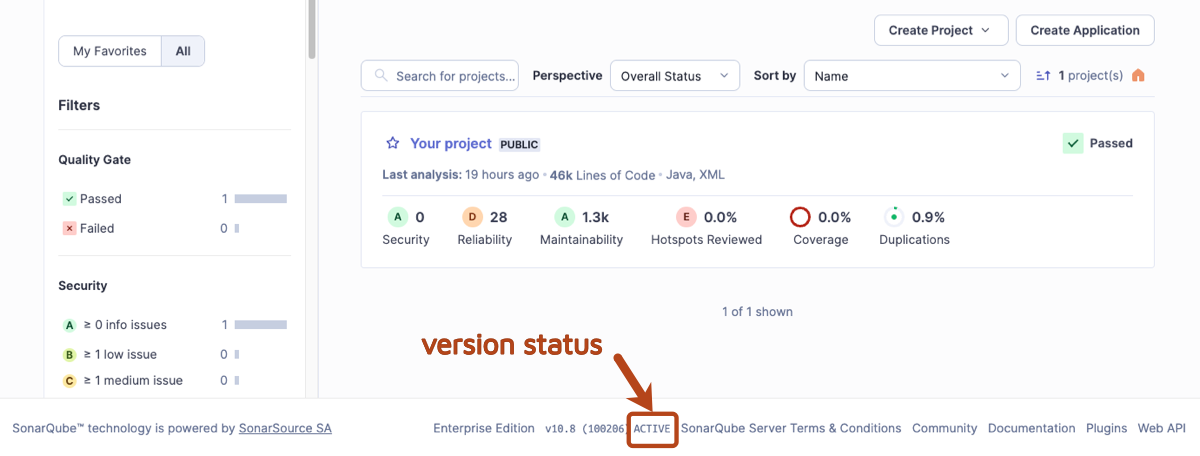
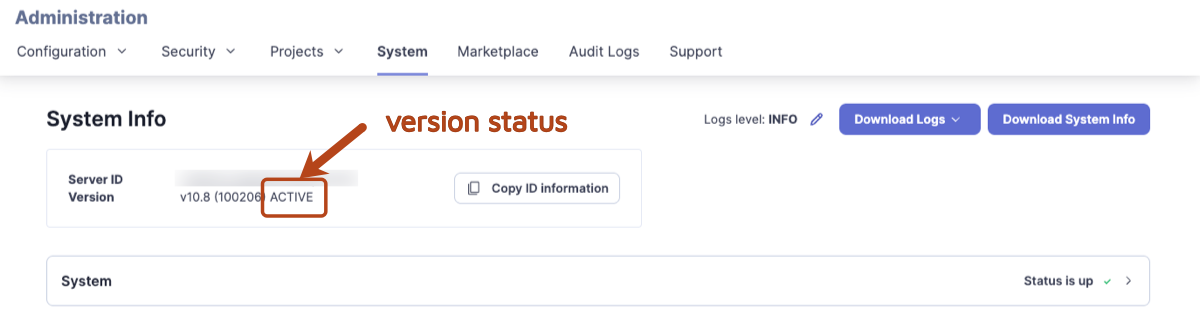
There are two main ways to check if you are using an active version of SonarQube Server:
1. In SonarQube Server, in the footer next to the version number, you can immediately see if your version is *active* or *no longer active.*
2\. Administrators can go to the **Administration** > **System.** As per above, you can see in the footer if you are on an active version.
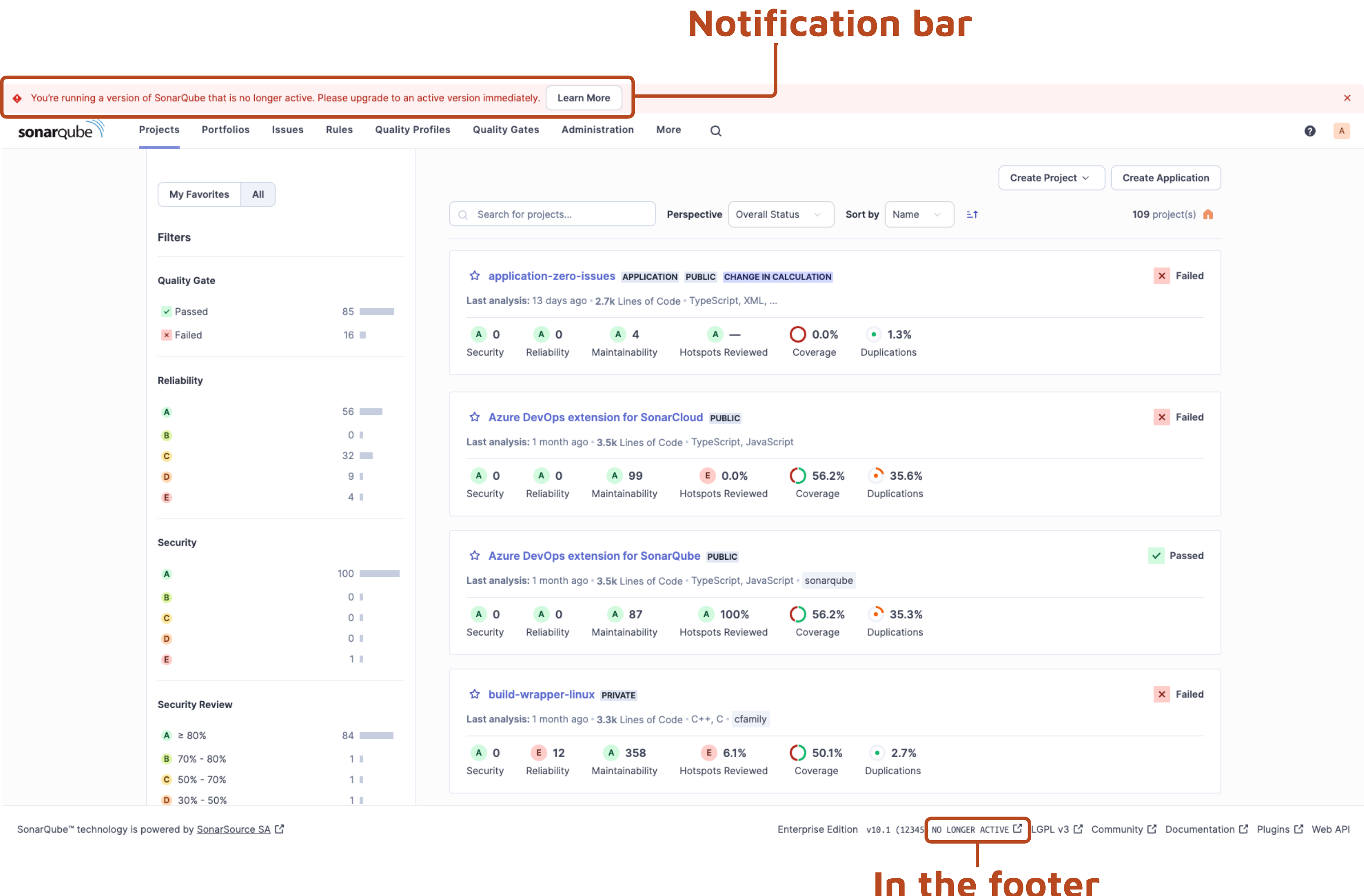
If there is a new version available, administrators will see a message at the top of the screen prompting you to upgrade to the latest version:
## Reasons to upgrade immediately
In SonarQube Server, you need to perform an upgrade in the following situations:
1. If you are on a version of SonarQube Server that is no longer active.
2. If you are on the latest version of SonarQube Server and there is a new upgrade available.
3. If you are on the latest version or LTA for which there is a new patch version available (security and bug fixes).
## Learn more
For information on how to upgrade to and from an LTA, see [Determining the upgrade path](/sonarqube-server/10.8/server-upgrade-and-maintenance/upgrade/upgrade-the-server/determine-path.md).
---
# Agent Instructions
This documentation is published with GitBook. GitBook is the documentation platform designed so that both humans and AI agents can read, navigate, and reason over technical content effectively. Learn more at gitbook.com.
## Querying This Documentation
If you need additional information that is not directly available in this page, you can query the documentation by asking a question.
Perform an HTTP GET request on the following URL with the `ask` and `goal` query parameters:
```
GET https://docs.sonarsource.com/sonarqube-server/10.8/server-upgrade-and-maintenance/upgrade/upgrade-the-server/active-versions.md?ask=&goal=
```
`ask` is the immediate question: it should be specific, self-contained, and written in natural language.
`goal` is what the user is ultimately trying to achieve, the reason they need the answer. Sharing it helps GitBook give you a better, more relevant answer. A goal is most helpful when it describes the outcome the user wants rather than restating the question. For example, with `ask=how do I create an API token`, a goal like `automate deployments from our CI pipeline` lets GitBook tailor the answer to that use case.
The response will contain a direct answer to the question and relevant excerpts and sources from the documentation.
Use this mechanism when the answer is not explicitly present in the current page, you need clarification or additional context, or you want to retrieve related documentation sections.