> For the complete documentation index, see [llms.txt](https://docs.sonarsource.com/llms.txt). Markdown versions of documentation pages are available by appending `.md` to page URLs; this page is available as [Markdown](https://docs.sonarsource.com/sonarqube-server/2025.2/try-out-sonarqube.md).
# Try out SonarQube Server
Follow these steps to try out SonarQube Server 2025.2.
You’ve heard about how [SonarQube Server](https://www.sonarsource.com/products/sonarqube/) can help you write high quality, safer code, and now you’re ready to try it out for yourself. This guide shows you how to install a local instance of SonarQube Server and analyze a project. Installing a local instance gets you up and running quickly, so you can experience SonarQube Server firsthand.
You can try [Developer Edition](https://www.sonarsource.com/plans-and-pricing/developer/) or [Enterprise Edition](https://www.sonarsource.com/plans-and-pricing/enterprise/) for free for 14 days.
Once you’re ready to set up a production instance, take a look at the [Introduction](/sonarqube-server/2025.2/setup-and-update/install-the-server/introduction.md) documentation on installing the Developer or Enterprise Editions.
## Installing a local instance of SonarQube Server
To get started quickly, we recommend evaluating SonarQube Server by spinning up a [Docker container](https://hub.docker.com/_/sonarqube/). Alternatively, an installation using a [zip file](https://www.sonarsource.com/products/sonarqube/downloads/) is also available.
### From the Docker image
Find the Developer Edition Docker image on [Docker hub](https://hub.docker.com/_/sonarqube/). Start the server by running:
```css-79elbk
$ docker run -d --name sonarqube -e SONAR_ES_BOOTSTRAP_CHECKS_DISABLE=true -p 9000:9000 sonarqube:latest
```
Once your instance is up and running, log in to `http://localhost:9000` using System Administrator credentials:
* login: admin
* password: admin
You will be asked to change your password.
### Zip file alternative
To install from the zip file, use the following instructions:
From the zip file
1. Download and install [Java 17](https://adoptium.net/en-GB/temurin/releases/?version=17) or [Java 21](https://adoptium.net/en-GB/temurin/releases/?version=21) on your system.
2. [Download](https://www.sonarsource.com/products/sonarqube/downloads/) the SonarQube Server zip file for your edition.
3. As a **non-`root`** **user**, unzip it in, for example, `C:\sonarqube` or `/opt/sonarqube`.
4. As a **non-`root`** **user**, start the SonarQube server:
```css-79elbk
# On Windows, execute:
C:\sonarqube\bin\windows-x86-64\StartSonar.bat
# On other operating systems, as a non-root user execute:
/opt/sonarqube/bin//sonar.sh console
```
If your instance fails to start, check your [Server logs](/sonarqube-server/2025.2/server-update-and-maintenance/troubleshooting/server-logs.md) to find the cause.
Once your instance is up and running, log in to `http://localhost:9000` using System Administrator credentials:
* login: admin
* password: admin
You will be asked to change your password.
## Analyzing a project
Now that you’re logged in to your local SonarQube Server instance, let’s analyze a project:
1. Select **Create new project**.
2. Give your project a **Project key** and a **Display name** and select **Set up**.
3. Under **Provide a token**, select **Generate a token**. Give your token a name, select **Generate**, and click **Continue**.
4. Select your project’s main language under **Run analysis on your project**, and follow the instructions to analyze your project. Here you’ll download and execute a scanner on your code (if you’re using Maven or Gradle, the scanner is automatically downloaded).
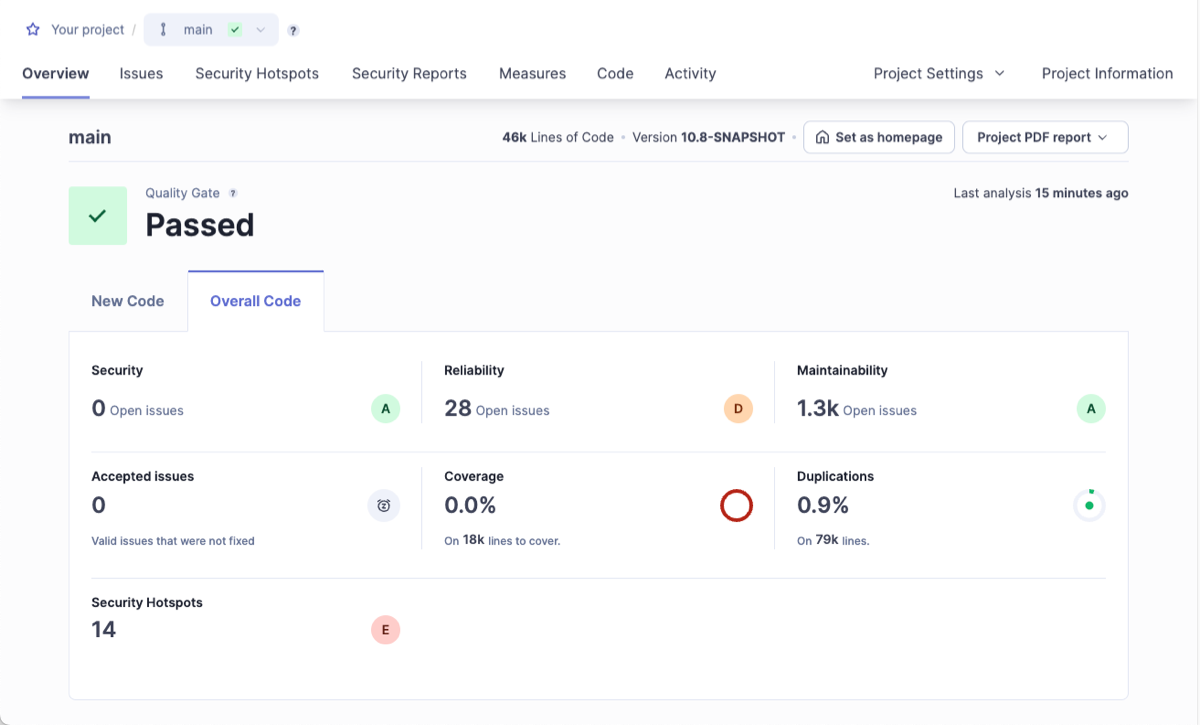
After successfully analyzing your code, you’ll see your first analysis on SonarQube Server:
Your first analysis is a measure of your current code. As a developer, you focus on maintaining high standards and taking responsibility specifically for the new code you’re working on. Code that has been added or changed from this point should be your focus moving forward. See [Quality standards and new code](/sonarqube-server/2025.2/user-guide/about-new-code.md) for more information.
---
# Agent Instructions
This documentation is published with GitBook. GitBook is the documentation platform designed so that both humans and AI agents can read, navigate, and reason over technical content effectively. Learn more at gitbook.com.
## Querying This Documentation
If you need additional information that is not directly available in this page, you can query the documentation by asking a question.
Perform an HTTP GET request on the following URL with the `ask` and `goal` query parameters:
```
GET https://docs.sonarsource.com/sonarqube-server/2025.2/try-out-sonarqube.md?ask=&goal=
```
`ask` is the immediate question: it should be specific, self-contained, and written in natural language.
`goal` is what the user is ultimately trying to achieve, the reason they need the answer. Sharing it helps GitBook give you a better, more relevant answer. A goal is most helpful when it describes the outcome the user wants rather than restating the question. For example, with `ask=how do I create an API token`, a goal like `automate deployments from our CI pipeline` lets GitBook tailor the answer to that use case.
The response will contain a direct answer to the question and relevant excerpts and sources from the documentation.
Use this mechanism when the answer is not explicitly present in the current page, you need clarification or additional context, or you want to retrieve related documentation sections.