> For the complete documentation index, see [llms.txt](https://docs.sonarsource.com/llms.txt). Markdown versions of documentation pages are available by appending `.md` to page URLs; this page is available as [Markdown](https://docs.sonarsource.com/sonarqube-server/2025.3/server-installation/data-center-edition/dce-topology.md).
# DCE topology
The Data Center Edition (DCE) allows SonarQube Server 2025.3 to run in a clustered configuration to make it resilient to failures.
As a DCE subscriber, Sonar will assist with the setup and configuration of your cluster. Get in touch with your account manager to receive appropriate onboarding resources.
The DCE consists of:
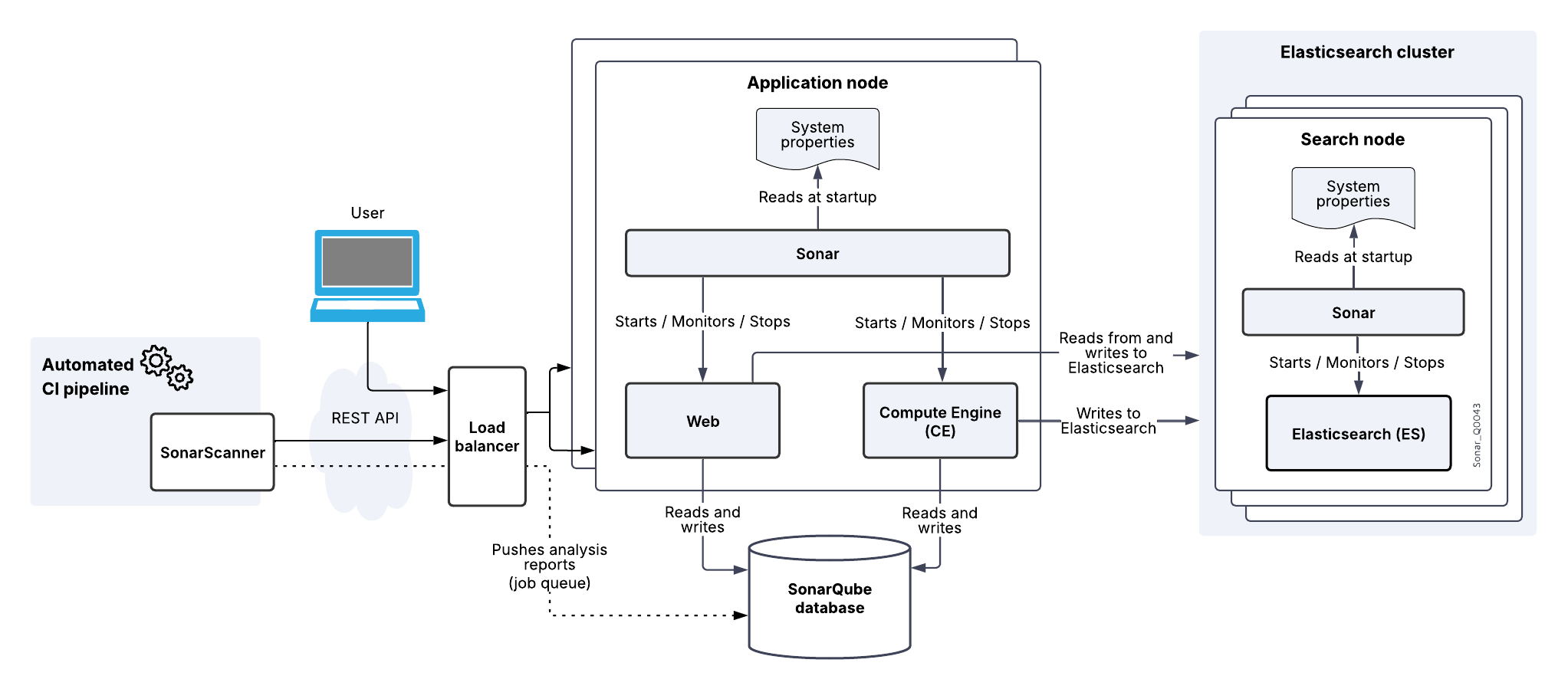
* Application nodes responsible for handling web requests from users (Web process) and handling analysis reports (Compute Engine process). You can add application nodes to increase computing capabilities.
* Search nodes that host the Elasticsearch process that will store data indices. The search nodes build an Elasticsearch cluster. Unicast discovery is used in this cluster.
* A reverse proxy / load balancer to load balance traffic between the two application nodes. The installing organization must supply this hardware or software component.
* PostgreSQL, Oracle, or Microsoft SQL Server database server. This software must be supplied by the installing organization.
We recommend having one machine for each node to be resilient to failures. To maintain an even higher level of availability, each of your three search nodes can be located in a separate availability zone *within the same region*.
For more information about the SonarQube Server processes (Sonar, Web, Compute Engine, and Elasticsearch), see [Server components](/sonarqube-server/2025.3/server-installation/server-components-overview.md).
## Default topology
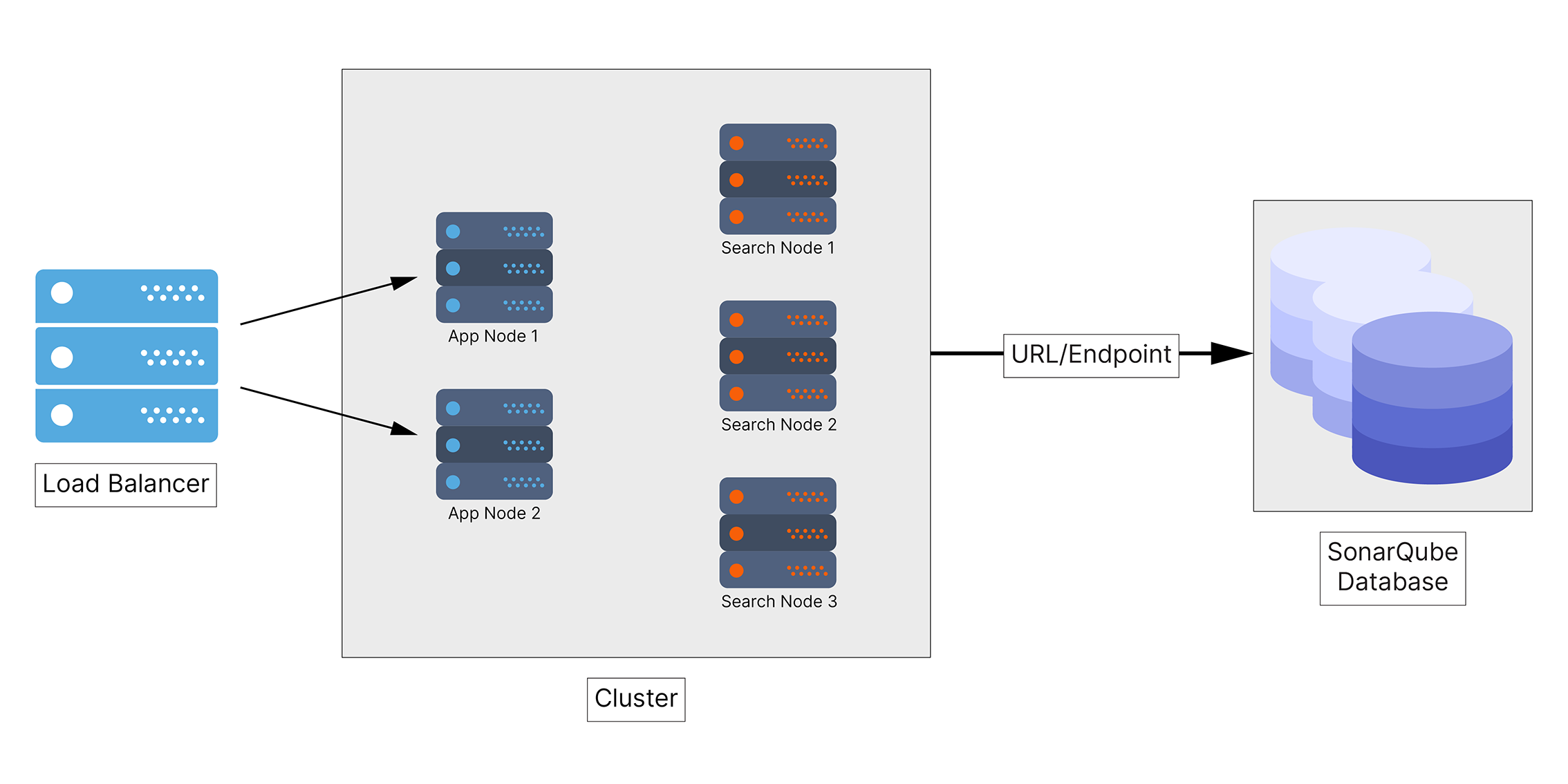
The default topology of the Data Center Edition corresponds to the minimum topology and comprises:
* Two application nodes.
* Three search nodes.
With this topology, one application node and one search node can be lost without impacting users. Below is a diagram of the default topology.
## Related pages
* [Installation requirements](/sonarqube-server/2025.3/server-installation/data-center-edition/installation-requirements.md)
* [Pre-installation steps](/sonarqube-server/2025.3/server-installation/data-center-edition/pre-installation.md)
* [Installing from ZIP file](/sonarqube-server/2025.3/server-installation/data-center-edition/from-zip-file.md)
* [Installing on Kubernetes or Openshift](/sonarqube-server/2025.3/server-installation/data-center-edition/on-kubernetes-or-openshift.md)
* **Configuring network security features:**
* [Securing behind a proxy](/sonarqube-server/2025.3/server-installation/data-center-edition/network-security/securing-behind-proxy.md)
* [Elasticsearch security features](/sonarqube-server/2025.3/server-installation/data-center-edition/network-security/elasticsearch-security-features.md)
* [Network rules](/sonarqube-server/2025.3/server-installation/data-center-edition/network-security/network-rules.md)
* [Starting and stopping cluster](/sonarqube-server/2025.3/server-installation/data-center-edition/starting-stopping-cluster.md)
---
# Agent Instructions
This documentation is published with GitBook. GitBook is the documentation platform designed so that both humans and AI agents can read, navigate, and reason over technical content effectively. Learn more at gitbook.com.
## Querying This Documentation
If you need additional information that is not directly available in this page, you can query the documentation by asking a question.
Perform an HTTP GET request on the following URL with the `ask` and `goal` query parameters:
```
GET https://docs.sonarsource.com/sonarqube-server/2025.3/server-installation/data-center-edition/dce-topology.md?ask=&goal=
```
`ask` is the immediate question: it should be specific, self-contained, and written in natural language.
`goal` is what the user is ultimately trying to achieve, the reason they need the answer. Sharing it helps GitBook give you a better, more relevant answer. A goal is most helpful when it describes the outcome the user wants rather than restating the question. For example, with `ask=how do I create an API token`, a goal like `automate deployments from our CI pipeline` lets GitBook tailor the answer to that use case.
The response will contain a direct answer to the question and relevant excerpts and sources from the documentation.
Use this mechanism when the answer is not explicitly present in the current page, you need clarification or additional context, or you want to retrieve related documentation sections.