> For the complete documentation index, see [llms.txt](https://docs.sonarsource.com/llms.txt). Markdown versions of documentation pages are available by appending `.md` to page URLs; this page is available as [Markdown](https://docs.sonarsource.com/sonarqube-server/2025.3/server-installation/data-center-edition/from-zip-file.md).
# Installing from ZIP file
Installing SonarQube Server's Data Center Edition (DCE) from the ZIP file. This page is for SonarQube Server 2025.3.
Don’t start this journey alone! As a DCE subscriber, Sonar will assist with the setup and configuration of your cluster. Get in touch with your account manager to receive appropriate onboarding resources.
## Prerequisites
You have:
1. Prepared the cluster environment by setting up the network and provisioning the nodes and load balancer. See [Installation requirements](/sonarqube-server/2025.3/server-installation/data-center-edition/installation-requirements.md).
2. Performed the pre-installation steps. See [Pre-installation steps](/sonarqube-server/2025.3/server-installation/data-center-edition/pre-installation.md).
3. Installed your database. See [Installing database](/sonarqube-server/2025.3/server-installation/installing-the-database.md).
## Step 1: Install an application node and create your ZIP installation package
1. On a single application node of the cluster, download and install SonarQube Server DCE:
* Download the [distribution](https://www.sonarsource.com/products/sonarqube/downloads/).
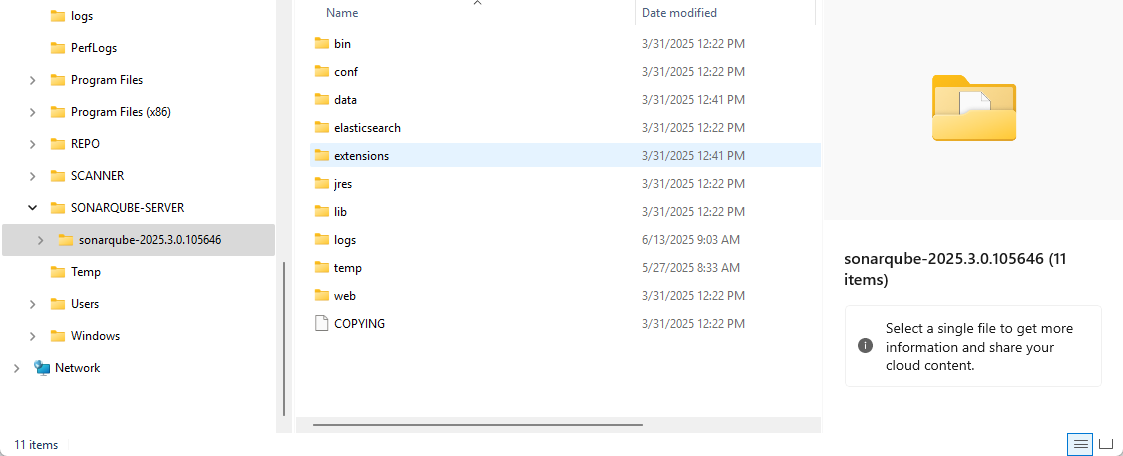
* Unzip the downloaded ZIP file into the directory you want to use to install your SonarQube (except a directory starting with a digit). The figure below shows this directory. It is called `` in this documentation.
2. Perform the basic setup (see [Basic installation](/sonarqube-server/2025.3/server-installation/from-zip-file/basic-installation.md)):
* Set access to the database.
* If using Oracle, add the JDBC driver.
* Set the web server connection parameters.
3. Add the cluster-related parameters to `/conf/sonar.properties`. See [#sample-configuration](#sample-configuration "mention") below.
4. You can perform advanced setup: see [Advanced setup](/sonarqube-server/2025.3/server-installation/from-zip-file/advanced-setup.md). In particular, store the JWT token to keep the user sessions alive on server restart. This is also a good opportunity to install a plugin: see [Installing a plugin](/sonarqube-server/2025.3/server-installation/plugins/install-a-plugin.md).
5. Zip the directory ``. This archive is a customized SonarQube Server DCE package that can be copied to other nodes.
## Step 2: Test your node installation
1. On the application node where you created your ZIP package, comment out all cluster-related parameters in `/conf/sonar.properties`.
2. Configure the load balancer to proxy with single application node.
3. Start the node and test access through load balancer.
4. Request license from Sonar Sales Team.
5. After applying license, you will have a full-featured SonarQube Server system operating on a single node.
## Step 3: Deploy your ZIP package on other nodes
1. Unzip SonarQube Server package on the other nodes.
2. Complete the basic installation (see [Basic installation](/sonarqube-server/2025.3/server-installation/from-zip-file/basic-installation.md)):
* On the application nodes:
* Set access to the database.
* If using Oracle, add the JDBC driver.
* Set the web server connection parameters.
* On the search nodes:
* Configure the Elasticsearch storage path.
3. Configure node-specific parameters in `/conf/sonar.properties` on all search and application nodes. Make sure the cluster-related parameters are properly set.
4. You can perform advanced setup (see [Advanced setup](/sonarqube-server/2025.3/server-installation/from-zip-file/advanced-setup.md)):
* On all nodes:
* Adjust java executable path.
* Enable IPv6.
* On the application nodes:
* Self-signed certificates.
* Change DNS cache TTL.
* Store JWT token in order to keep user sessions alive on server restart.
5. Start all search nodes. To start a node, see [From the ZIP file](/sonarqube-server/2025.3/server-installation/from-zip-file/starting-stopping-server/from-zip-file.md).
6. After all search nodes are running, start all application nodes.
7. Configure the load balancer to proxy with all application nodes.
{% hint style="info" %}
Once SonarQube Server UI is up, you can encrypt sensitive properties stored in `/conf/sonar.properties`. See [Sensitive settings](/sonarqube-server/2025.3/instance-administration/security/encrypting-settings.md).
{% endhint %}
## Sample Configuration
The following example represents a sample configuration of a SonarQube Server Data Center Edition’s `sonar.properties` file. The example assumes:
* The VMs having IP addresses ip1 and ip2 (server1, server2) are application nodes
* The VMs having IP addresses ip3, ip4, and ip5 (server3, server4 and server5) are search nodes
{% hint style="info" %}
In the example, the hosts followed by ports are written using the IPv4 notation (e.g. `ip3:9001`). If you use IPv6 addresses, enclose the IP address in square brackets (`[ip3]:9001`).
{% endhint %}
The system properties indicated below are described in [List of DCE-specific properties](/sonarqube-server/2025.3/server-installation/system-properties/dce-specific.md#general).
The configuration to be added to `sonar.properties` for each node is the following:
### Application nodes
server1:
```css-79elbk
...
sonar.cluster.enabled=true
sonar.cluster.node.type=application
sonar.cluster.node.host=ip1
sonar.cluster.node.port=9003
sonar.cluster.hosts=ip1,ip2
sonar.cluster.search.hosts=ip3:9001,ip4:9001,ip5:9001
sonar.auth.jwtBase64Hs256Secret=YOURGENERATEDSECRET
...
```
server2
```css-79elbk
...
sonar.cluster.enabled=true
sonar.cluster.node.type=application
sonar.cluster.node.host=ip2
sonar.cluster.node.port=9003
sonar.cluster.hosts=ip1,ip2
sonar.cluster.search.hosts=ip3:9001,ip4:9001,ip5:9001
sonar.auth.jwtBase64Hs256Secret=YOURGENERATEDSECRET
...
```
### Search nodes
server3
```css-79elbk
...
sonar.cluster.enabled=true
sonar.cluster.node.type=search
sonar.cluster.node.search.host=ip3
sonar.cluster.node.search.port=9001
sonar.cluster.node.es.host=ip3
sonar.cluster.node.es.port=9002
sonar.cluster.es.hosts=ip3:9002,ip4:9002,ip5:9002
...
```
server4
```css-79elbk
...
sonar.cluster.enabled=true
sonar.cluster.node.type=search
sonar.cluster.node.search.host=ip4
sonar.cluster.node.search.port=9001
sonar.cluster.node.es.host=ip4
sonar.cluster.node.es.port=9002
sonar.cluster.es.hosts=ip3:9002,ip4:9002,ip5:9002
...
```
server5
```css-79elbk
...
sonar.cluster.enabled=true
sonar.cluster.node.type=search
sonar.cluster.node.search.host=ip5
sonar.cluster.node.search.port=9001
sonar.cluster.node.es.host=ip5
sonar.cluster.node.es.port=9002
sonar.cluster.es.hosts=ip3:9002,ip4:9002,ip5:9002
...
```
## Related pages
* [DCE topology](/sonarqube-server/2025.3/server-installation/data-center-edition/dce-topology.md)
* [Installation requirements](/sonarqube-server/2025.3/server-installation/data-center-edition/installation-requirements.md)
* [Pre-installation steps](/sonarqube-server/2025.3/server-installation/data-center-edition/pre-installation.md)
* [Installing on Kubernetes or Openshift](/sonarqube-server/2025.3/server-installation/data-center-edition/on-kubernetes-or-openshift.md)
* **Configuring network security features:**
* [Securing behind a proxy](/sonarqube-server/2025.3/server-installation/data-center-edition/network-security/securing-behind-proxy.md)
* [Elasticsearch security features](/sonarqube-server/2025.3/server-installation/data-center-edition/network-security/elasticsearch-security-features.md)
* [Network rules](/sonarqube-server/2025.3/server-installation/data-center-edition/network-security/network-rules.md)
* [Starting and stopping cluster](/sonarqube-server/2025.3/server-installation/data-center-edition/starting-stopping-cluster.md)
---
# Agent Instructions
This documentation is published with GitBook. GitBook is the documentation platform designed so that both humans and AI agents can read, navigate, and reason over technical content effectively. Learn more at gitbook.com.
## Querying This Documentation
If you need additional information that is not directly available in this page, you can query the documentation by asking a question.
Perform an HTTP GET request on the following URL with the `ask` and `goal` query parameters:
```
GET https://docs.sonarsource.com/sonarqube-server/2025.3/server-installation/data-center-edition/from-zip-file.md?ask=&goal=
```
`ask` is the immediate question: it should be specific, self-contained, and written in natural language.
`goal` is what the user is ultimately trying to achieve, the reason they need the answer. Sharing it helps GitBook give you a better, more relevant answer. A goal is most helpful when it describes the outcome the user wants rather than restating the question. For example, with `ask=how do I create an API token`, a goal like `automate deployments from our CI pipeline` lets GitBook tailor the answer to that use case.
The response will contain a direct answer to the question and relevant excerpts and sources from the documentation.
Use this mechanism when the answer is not explicitly present in the current page, you need clarification or additional context, or you want to retrieve related documentation sections.