> For the complete documentation index, see [llms.txt](https://docs.sonarsource.com/llms.txt). Markdown versions of documentation pages are available by appending `.md` to page URLs; this page is available as [Markdown](https://docs.sonarsource.com/sonarqube-server/2025.3/server-installation/data-center-edition/on-kubernetes-or-openshift/setting-up-disaster-recovery/test-failover-scenarios.md).
# Step 4: Test failover scenarios
How to test the failover of the Data Center Edition (DCE) deployed on Kubernetes in SonarQube Server 2025.3.
The disaster scenarios described below are based on a [Disaster recovery architecture example with Azure resources](/sonarqube-server/2025.3/server-installation/data-center-edition/on-kubernetes-or-openshift/setting-up-disaster-recovery/architecture-example.md).
## Regional failure of AKS
1. Stop the Primary AKS cluster and go to Azure portal's **Home** > **Kubernetes services**.
2. Select the primary cluster and select **Stop**.
3. Wait until the cluster's **Power state** changes to **Stopped** and the **Cluster operation status** changes to **Succeeded**.
4. Power on the Replica cluster and wait for the cluster's **Power state** to change to **Started** and **Cluster operation status** to **Succeeded**.
5. Once the cluster starts, perform a forced Elasticsearch reindexing. The [Reindexing](/sonarqube-server/2025.3/server-update-and-maintenance/maintenance/reindexing.md) page has a special article about [Reindexing](/sonarqube-server/2025.3/server-update-and-maintenance/maintenance/reindexing.md#forcing-es-reindex).
6. Using the Azure CLI, make sure the correct cluster credentials are set to your Helm and kubectl commands context with the command below.
```bash
az aks get-credentials --resource-group --name
```
7. Run the following command to reduce the replica count of the search nodes from 3 to 0. The monitoring passcode is required for the helm upgrade operation.
```bash
helm upgrade sonarqube-dce sonarqube/sonarqube-dce --set searchNodes.replicaCount=0,monitoringPasscode="mypassword" -n sonarqube-dce
```
8. If you are using any PVC with SonarQube deployment, delete the PVC, which should delete any PV, assuming the reclaim policy is Delete. Otherwise, manually delete/remove any PV. Typically, there is one PVC for each search node. Repeat this step for all the PVCs associated with the search nodes.
```bash
kubectl delete pvc
sonarqube-dce-sonarqube-dce-sonarqube-dce-sonarqube-dce-search-0 -n sonarqube-dce
```
9. Run the following commands to bring the replica count back to 3 for the search nodes.
```bash
export JWT_SECRET=$(echo -n "your_secret" | openssl dgst -sha256 -hmac "your_key" -binary | base64)
helm upgrade sonarqube-dce sonarqube/sonarqube-dce --set searchNodes.replicaCount=3,monitoringPasscode="mypassword",applicationNodes.jwtSecret=$JWT_SECRET -n sonarqube-dce
```
10. Login to your SonarQube Server instance using the Azure FrontDoor endpoint to confirm the failover was successful.
## Regional failure of Azure Database for PostgreSQL flexible server
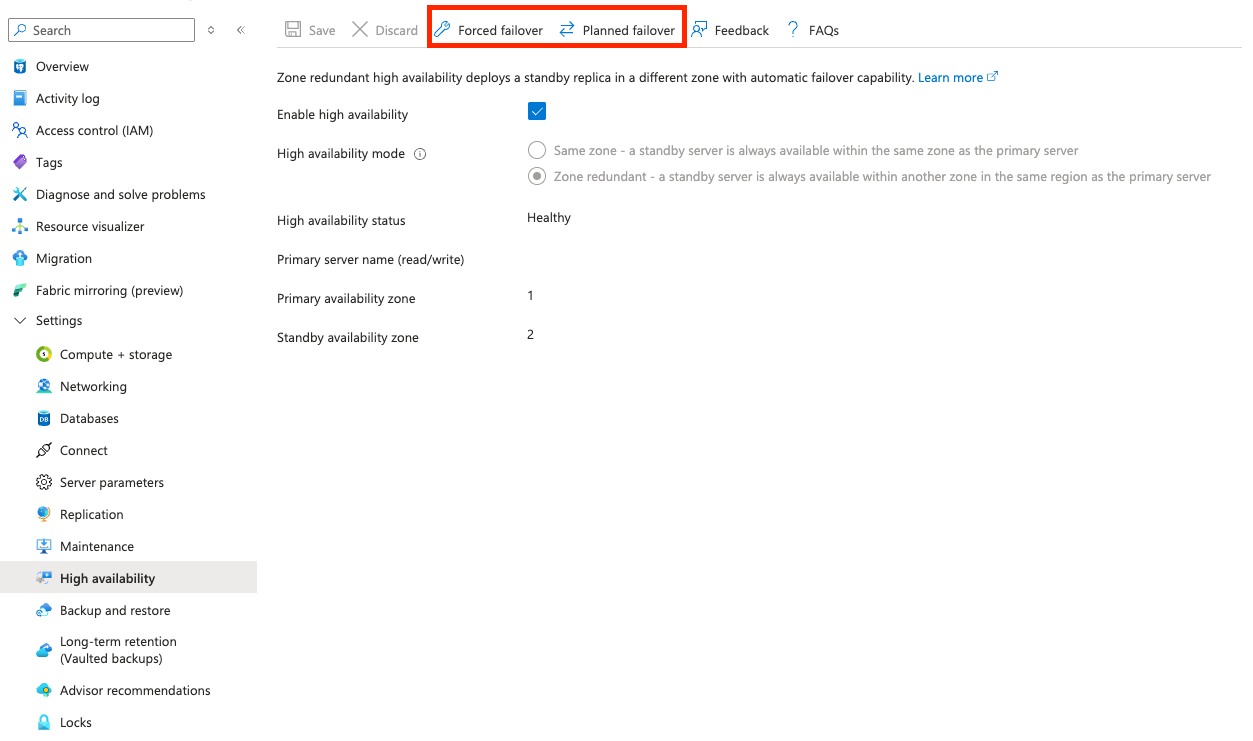
1. On the Azure portal home page, go to **Azure Database for PostgreSQL flexible servers**.
2. Select the primary SonarQube database from the list.
3. On the database home page, go to **Settings** > **High availability.**
4. Select **Planned failover** or **Forced failover**. For less downtime, select **Planned failover**.
5. Once the failover is complete, open your SonarQube server instance and check the integrity of your data.
## Related pages
* [Disaster recovery architecture example with Azure resources](/sonarqube-server/2025.3/server-installation/data-center-edition/on-kubernetes-or-openshift/setting-up-disaster-recovery/architecture-example.md)
* [Step 1: Deploy the primary and replica databases](/sonarqube-server/2025.3/server-installation/data-center-edition/on-kubernetes-or-openshift/setting-up-disaster-recovery/deploy-databases.md)
* [Step 2: Set up the primary and replica clusters on AKS](/sonarqube-server/2025.3/server-installation/data-center-edition/on-kubernetes-or-openshift/setting-up-disaster-recovery/set-up-clusters-on-aks.md)
* [Step 3: Configure the Azure Front Door](/sonarqube-server/2025.3/server-installation/data-center-edition/on-kubernetes-or-openshift/setting-up-disaster-recovery/configure-azure-front-door.md)
---
# Agent Instructions
This documentation is published with GitBook. GitBook is the documentation platform designed so that both humans and AI agents can read, navigate, and reason over technical content effectively. Learn more at gitbook.com.
## Querying This Documentation
If you need additional information that is not directly available in this page, you can query the documentation by asking a question.
Perform an HTTP GET request on the following URL with the `ask` and `goal` query parameters:
```
GET https://docs.sonarsource.com/sonarqube-server/2025.3/server-installation/data-center-edition/on-kubernetes-or-openshift/setting-up-disaster-recovery/test-failover-scenarios.md?ask=&goal=
```
`ask` is the immediate question: it should be specific, self-contained, and written in natural language.
`goal` is what the user is ultimately trying to achieve, the reason they need the answer. Sharing it helps GitBook give you a better, more relevant answer. A goal is most helpful when it describes the outcome the user wants rather than restating the question. For example, with `ask=how do I create an API token`, a goal like `automate deployments from our CI pipeline` lets GitBook tailor the answer to that use case.
The response will contain a direct answer to the question and relevant excerpts and sources from the documentation.
Use this mechanism when the answer is not explicitly present in the current page, you need clarification or additional context, or you want to retrieve related documentation sections.