> For the complete documentation index, see [llms.txt](https://docs.sonarsource.com/llms.txt). Markdown versions of documentation pages are available by appending `.md` to page URLs; this page is available as [Markdown](https://docs.sonarsource.com/sonarqube-server/2026.2/instance-administration/ai-features/enable-ai-codefix.md).
# Enable AI CodeFix
In SonarQube Server 2026.2, Sonar’s AI CodeFix can suggest fixes for a select set of rules in Java, JavaScript, TypeScript, Python, HTML, CSS, C#, and C++.
*AI CodeFix is only available in SonarQube Server* [*Enterprise and Data Center editions*](https://www.sonarsource.com/plans-and-pricing/sonarqube/) to provide AI-generated fixes for your issues.
Sonar’s AI CodeFix uses a large language model (LLM) to automatically generate AI-driven code fixes for the issues discovered by SonarQube Server. As a software administrator, you have flexible configuration options. You can use models hosted by SonarSource or connect to LLMs running within your own infrastructure. This includes cloud hyperscalers or completely self-hosted on-prem LLMs.
You have the option to define the LLM used to suggest fixes for a select set of rules in Java, JavaScript, TypeScript, Python, HTML, CSS, C#, and C++. Choose between:
* One of Sonar's two OpenAI models space.vars.SQS\_20261\_Supported\_LLM\_version.
* Bring your own LLM running on one of the following providers: [Azure OpenAI LLM Service model](https://learn.microsoft.com/en-us/azure/ai-services/openai/concepts/models?tabs=global-standard%2Cstandard-chat-completions) or [AWS Bedrock](https://aws.amazon.com/bedrock/model-choice/).
* Configure a self‑hosted LLM gateway (for example, Ollama, LiteLLM, or vLLM).
Using AI CodeFix is simple. When you request a fix, the affected code and issue description are sent to the LLM you define. AI CodeFix then proposes an edit that resolves the problem without changing the code’s functionality.
## Sharing your code with Sonar
For fully self-hosted SonarQube Server configurations, AI CodeFix is designed to operate without outbound internet access. All necessary prompts and rule descriptions for AI CodeFix are provided with the SonarQube product installation.
* Requirement: The SonarQube Server instance must be able to reach your configured LLM endpoint.
If you use Sonar’s AI CodeFix LLM, the affected code snippet will be sent by the AI CodeFix service to the selected LLM. Service agreements with Sonar’s LLMs prevent your code from being used to train those models.
For details about terms and conditions, please refer to the [AI CodeFix terms](https://www.sonarsource.com/legal/ai-codefix-terms/) in our [Legal Documentation](https://www.sonarsource.com/legal/).
## Enabling AI-generated fix suggestions
As an Instance Admin, you can enable or disable AI-generated fix suggestions on your projects. Select your provider below and follow the steps for that provider.
{% tabs %}
{% tab title="SONAR" %}
To configure AI CodeFix using Sonar’s hosted OpenAI service:
1. Go to **Administration** > **Configuration** > **General settings** > **AI CodeFix** and select **Enable AI CodeFix**.
2. Under **Provider**, select your model:
* space.vars.SQS\_20261\_Recommended\_LLM\_version (recommended)
* GPT-4o
3. Lastly, select either **All projects** or **Only selected projects** to decide which projects have access to AI CodeFix suggestions.
When choosing **Only selected projects**, add projects individually from the list to activate the feature. New projects are not added automatically.
{% hint style="info" %}
You’ll need a connection to the internet to access SonarQube Server’s AI CodeFix service.
The service is provided via api.sonarqube.io and has these static IP addresses:
* 99.83.135.55 (CIDR: 99.83.135.55/32)
* 15.197.164.24 (CIDR: 15.197.164.24/32)
{% endhint %}
{% endtab %}
{% tab title="AZURE OPENAI" %}
Your SonarQube Server instance must be able to reach your configured LLM endpoint and therefore, doesn’t require internet access to run. To configure AI CodeFix using your own Azure OpenAI LLM Service model:
1. Go to **Administration** > **Configuration** > **General settings** > **AI CodeFix** and select **Enable AI CodeFix**.
2. Under **Provider**, select **Azure OpenAI**, then provide the following:
* **Endpoint** (required): the full URL to your Azure OpenAI deployment, including the `deployment-id` and `api-version` parameters. For example: `https://.openai.azure.com/openai/deployments//completions?api-version=`
* **API Key** (required): your Azure OpenAI API key. For more information, see the [Azure OpenAI Service documentation](https://learn.microsoft.com/en-us/azure/ai-services/openai/).
3. Select either **All projects** or **Only selected projects** to decide which projects have access to AI CodeFix suggestions. When choosing **Only selected projects**, add projects individually from the list to activate the feature. New projects are not added automatically.
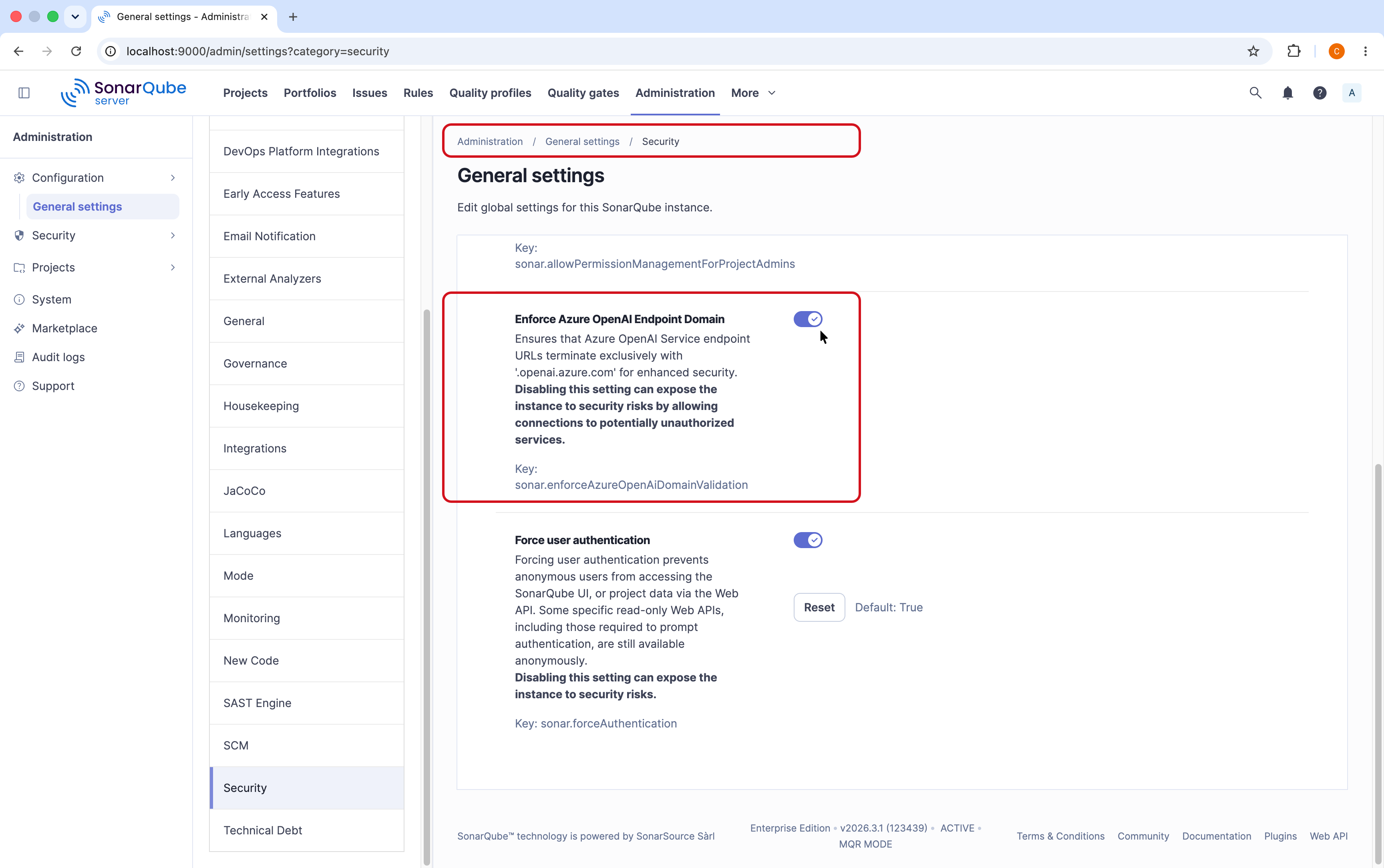
4. Optional: for enhanced security, go to **Administration** > **Configuration** > **General settings** > **Security** and select **Enforce Azure OpenAI Endpoint Domain** to restrict accepted endpoint URLs to domains ending in `.openai.azure.com`. Verify that your endpoint from step 2 matches this domain before enabling this setting.
{% hint style="warning" %}
Sonar recommends using space.vars.SQS\_20261\_Recommended\_LLM\_version based on Sonar's benchmarks. If you select a different model, fix suggestion quality may vary. Sonar is not responsible for quality degradation when using models other than the recommended one.
For more information, see the [Azure documentation on service models](https://learn.microsoft.com/en-us/azure/ai-services/openai/concepts/models?tabs=global-standard%2Cstandard-chat-completions).
{% endhint %}
{% endtab %}
{% tab title="AWS BEDROCK" %}
Your SonarQube Server instance must be able to reach your configured LLM endpoint and therefore, doesn’t require internet access to run. To configure AI CodeFix using your own AWS Bedrock model:
Prerequisites: Your SonarQube Server instance must be running on Amazon EC2, Amazon ECS, or Amazon EKS, and must have permission to access AWS Bedrock.
1. Go to **Administration** > **Configuration** > **General settings** > **AI CodeFix** and select **Enable AI CodeFix**.
2. Under **Provider**, select **AWS Bedrock**, then provide the following:
* **Region** (required): the AWS region where your Bedrock model is deployed. For example: `us-east-1` or `eu-central-1`.
* **Model ID** (required): the identifier of the Bedrock model to use. For a list of supported models and their IDs, see the [Amazon Bedrock documentation](https://docs.aws.amazon.com/bedrock/latest/userguide/models-supported.html).
3. Lastly, select either **All projects** or **Only selected projects** to decide which projects have access to AI CodeFix suggestions.
When choosing **Only selected projects**, add projects individually from the list to activate the feature. New projects are not added automatically.
{% hint style="warning" %}
Sonar recommends using space.vars.SQS\_20261\_Recommended\_LLM\_version based on Sonar's benchmarks. If you select a different model, fix suggestion quality may vary. Sonar is not responsible for quality degradation when using models other than the recommended one.
{% endhint %}
{% endtab %}
{% tab title="SELF-HOSTED GATEWAY" %}
Your SonarQube Server instance must be able to reach your configured LLM endpoint and therefore, doesn’t require internet access to run. To configure AI CodeFix using a self-hosted LLM gateway (for example, Ollama, LiteLLM, or vLLM):
1. Go to **Administration** > **Configuration** > **General settings** > **AI CodeFix** and select **Enable AI CodeFix**.
2. Under **Provider**, select **Custom**, then provide the following:
* **Endpoint** (required): the URL of your OpenAI-compatible self-hosted gateway endpoint. For example: `http://localhost:11434/v1`.
* **Model ID** (required): the name of the model served by your gateway. For example: `llama3.2.1b`.
* **Header name** and **Value** (optional): add any HTTP headers required by your gateway, such as authentication tokens. It's possible to add multiple headers.
SonarQube Server only accepts gateways that expose an OpenAI-compatible API. For example, if you are using Ollama, use the OpenAI-compatible endpoint (`/v1`) rather than the native Ollama API (`/api`).
3. Lastly, select either **All projects** or **Only selected projects** to decide which projects have access to AI CodeFix suggestions.
When choosing **Only selected projects**, add projects individually from the list to activate the feature. New projects are not added automatically.
{% hint style="warning" %}
Sonar recommends using space.vars.SQS\_20261\_Recommended\_LLM\_version based on Sonar's benchmarks. If you select a different model, fix suggestion quality may vary. Sonar is not responsible for quality degradation when using models other than the recommended one.
{% endhint %}
{% endtab %}
{% endtabs %}
Once enabled, developers can get AI-generated fix suggestions from the **Issues** page in their projects. See the [Fixing issues](/sonarqube-server/2026.2/user-guide/issues/fixing.md) page for more details.
### Disabling AI CodeFix
To disable AI CodeFix completely in SonarQube Server and hide the feature from all users, including Instance Admins, set the system property `sonar.ai.codefix.hidden` to `true`. For more information, see the [Configuration methods](/sonarqube-server/2026.2/server-installation/system-properties/configuration-methods.md) page.
## Getting AI-generated fix suggestions
Once AI CodeFix is enabled, users will be able to select **Generate AI Fix** on eligible issues and copy/paste the fix into their IDE with the **Open in IDE** feature when using connected mode.
The easiest way to use AI CodeFix is by using AI CodeFix in your IDE. Simply open your project in SonarQube for [VS Code](https://docs.sonarsource.com/sonarqube-for-vs-code/) or SonarQube for [IntelliJ](https://docs.sonarsource.com/sonarqube-for-intellij/), and set up connected mode with SonarQube Server. In your IDE, select an issue marked with the  icon, open the **Rule description** > **AI CodeFix** tab, and select **Generate Fix**. A fix will be generated in the code editor and you’ll have a chance to **Apply** or **Decline** the suggestion.
* For IntelliJ, see [AI CodeFix](/sonarqube-for-intellij/ai-capabilities/ai-codefix.md#ai-codefix).
* For VS Code, see [AI CodeFix](/sonarqube-for-vs-code/ai-capabilities/ai-codefix.md#ai-codefix).
For complete details about using AI CodeFix to fix your issues in SonarQube Cloud, see [Fixing issues](/sonarqube-server/2026.2/user-guide/issues/fixing.md#getting-ai-generated-fix-suggestions). See the [Rules for AI CodeFix](/sonarqube-server/2026.2/quality-standards-administration/managing-rules/rules-for-ai-codefix.md#ai-codefix-rules) article to learn more about which rules are eligible for AI CodeFix.
## Usage limits
Limits are placed on the AI CodeFix feature to manage abuse. Developers will be notified directly when the monthly allocation is reached for your organization. If the instance is blocked due to reaching the allowance, users attempting to generate a fix will see an error message. Usage quotas are reset on the first day of each month.
SonarQube Server instances that are using a self-hosted LLM are not subject to Sonar’s limits however, you may encounter rate limits from your self-hosted LLM provider.
## Marking a project as containing AI-generated code
Sonar recognizes that code should be monitored with additional quality standards and offers administrators a series of project labels and custom quality gate certifications described on the [Set your AI standards](/sonarqube-server/2026.2/quality-standards-administration/ai-code-assurance/overview.md) page.
## Related pages
* [Rules for AI CodeFix](/sonarqube-server/2026.2/quality-standards-administration/managing-rules/rules-for-ai-codefix.md#ai-codefix-rules)
* [Agent Centric Development Cycle](https://docs.sonarsource.com/agent-centric-development-cycle/) of AI capabilities in SonarQube Server
* [Connected mode](/sonarqube-server/2026.2/user-guide/connected-mode.md)
---
# Agent Instructions
This documentation is published with GitBook. GitBook is the documentation platform designed so that both humans and AI agents can read, navigate, and reason over technical content effectively. Learn more at gitbook.com.
## Querying This Documentation
If you need additional information that is not directly available in this page, you can query the documentation by asking a question.
Perform an HTTP GET request on the following URL with the `ask` and `goal` query parameters:
```
GET https://docs.sonarsource.com/sonarqube-server/2026.2/instance-administration/ai-features/enable-ai-codefix.md?ask=&goal=
```
`ask` is the immediate question: it should be specific, self-contained, and written in natural language.
`goal` is what the user is ultimately trying to achieve, the reason they need the answer. Sharing it helps GitBook give you a better, more relevant answer. A goal is most helpful when it describes the outcome the user wants rather than restating the question. For example, with `ask=how do I create an API token`, a goal like `automate deployments from our CI pipeline` lets GitBook tailor the answer to that use case.
The response will contain a direct answer to the question and relevant excerpts and sources from the documentation.
Use this mechanism when the answer is not explicitly present in the current page, you need clarification or additional context, or you want to retrieve related documentation sections.