> For the complete documentation index, see [llms.txt](https://docs.sonarsource.com/llms.txt). Markdown versions of documentation pages are available by appending `.md` to page URLs; this page is available as [Markdown](https://docs.sonarsource.com/sonarqube-server/2026.2/project-administration/adjusting-analysis/setting-analysis-scope/verifying-analysis-scope.md).
# Verifying analysis scope
In SonarQube Server 2026.2, review configured properties and properties identified by the SonarScanner to determine your SonarQube project's analysis scope.
This section explains how to verify the configured properties and the properties read by the scanner to compute the project’s analysis scope.
## Verifying the analysis scope properties configured for the project
This procedure allows you to view the properties *configured* in the different possible locations on the CI/CD host and in SonarQube Server UI for a given analysis run.
To verify the configured analysis properties for a project:
1. Run the project analysis.
2. The analysis debug logs show which source and test files are indexed for the analysis (the scanner logs out to the place it was invoked from).\
If the analysis fails with the error `File can't be indexed twice. Please check that inclusion/exclusion patterns produce disjoint sets for main and test files` then it means that the indicated file is defined in your analysis scope as both source (non-test) and test file. In this case, you must correct your analysis scope.
3. You can also verify all the project’s exclusion parameters. To do so, proceed as follows:
1. Retrieve the project. See [Retrieving projects](/sonarqube-server/2026.2/user-guide/viewing-projects/retrieving-projects.md) for details.
2. Go to **Project Settings** > **Background Tasks**.
3. In the list, locate the project run you want to verify and click the action menu in the far right column.
4. In the contextual menu, select **Show SonarScanner Context**. The scanner context is shown:
* The **Global server settings** section shows the analysis parameters set in the UI at the global level.
* The **Project server settings** section shows the analysis parameters set in the UI for the project.
* The **Project scanner properties** section shows the analysis parameters set on the CI/CD host.
{% hint style="warning" %}
Any property set on the CI/CD host and identified by the scanner as a sonar property (that means, with a key starting with `sonar.`) will be listed as a scanner property even if the scanner does not know about it (in that case, the scanner will just ignore the property, and no error will be raised).
{% endhint %}
{% hint style="info" %}
In the **Global server settings** section of the scanner context, the `sonar.global.exclusions` and `sonar.global.test.exclusions` are forced global parameters (see [Excluding files based on file paths](/sonarqube-server/2026.2/instance-administration/analysis-functions/analysis-scope/excluding-files-based-on-file-paths.md)).
{% endhint %}
## Verifying the analysis scope properties read by the scanner
To know which properties the scanner processes during the analysis run:
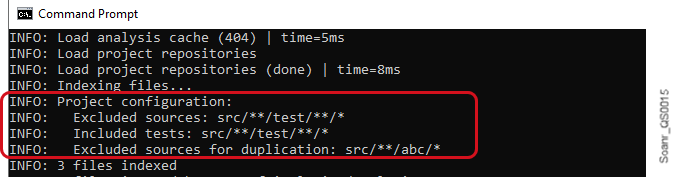
* In analysis debug logs, search for the `Project configuration` section as illustrated below (The scanner logs out to the place it was invoked from). The section may show:
* `Excluded sources`: exclusion patterns processed by the scanner to compute the source files to be analyzed.
* `Included sources`**:** inclusion patterns processed by the scanner to compute the source files to be analyzed.
* `Excluded tests`: exclusion patterns processed by the scanner to compute the test files to be analyzed.
* `Included tests`**:** inclusion patterns processed by the scanner to compute the test files to be analyzed.
## Related pages
* [Excluding based on path-matching patterns](/sonarqube-server/2026.2/project-administration/adjusting-analysis/setting-analysis-scope/excluding-files-based-on-patterns.md)
* [Excluding based on file extension](/sonarqube-server/2026.2/project-administration/adjusting-analysis/setting-analysis-scope/excluding-based-on-file-extension.md)
* [Excluding from coverage or duplication](/sonarqube-server/2026.2/project-administration/adjusting-analysis/setting-analysis-scope/exclude-from-coverage-duplication.md)
* [Applying advanced exclusions](/sonarqube-server/2026.2/project-administration/adjusting-analysis/setting-analysis-scope/advanced-exclusions.md)
* [Other adjustments](/sonarqube-server/2026.2/project-administration/adjusting-analysis/setting-analysis-scope/other-adjustments.md) for analysis scope
* [Setting initial scope](/sonarqube-server/2026.2/project-administration/adjusting-analysis/setting-analysis-scope/setting-initial-scope.md)
* Adjusting the analysis scope [Introduction](/sonarqube-server/2026.2/instance-administration/analysis-functions/analysis-scope/introduction.md)
---
# Agent Instructions
This documentation is published with GitBook. GitBook is the documentation platform designed so that both humans and AI agents can read, navigate, and reason over technical content effectively. Learn more at gitbook.com.
## Querying This Documentation
If you need additional information that is not directly available in this page, you can query the documentation by asking a question.
Perform an HTTP GET request on the following URL with the `ask` and `goal` query parameters:
```
GET https://docs.sonarsource.com/sonarqube-server/2026.2/project-administration/adjusting-analysis/setting-analysis-scope/verifying-analysis-scope.md?ask=&goal=
```
`ask` is the immediate question: it should be specific, self-contained, and written in natural language.
`goal` is what the user is ultimately trying to achieve, the reason they need the answer. Sharing it helps GitBook give you a better, more relevant answer. A goal is most helpful when it describes the outcome the user wants rather than restating the question. For example, with `ask=how do I create an API token`, a goal like `automate deployments from our CI pipeline` lets GitBook tailor the answer to that use case.
The response will contain a direct answer to the question and relevant excerpts and sources from the documentation.
Use this mechanism when the answer is not explicitly present in the current page, you need clarification or additional context, or you want to retrieve related documentation sections.