> For the complete documentation index, see [llms.txt](https://docs.sonarsource.com/llms.txt). Markdown versions of documentation pages are available by appending `.md` to page URLs; this page is available as [Markdown](https://docs.sonarsource.com/sonarqube-server/instance-administration/integrations/webhooks.md).
# Configuring webhooks at global level
In SonarQube Server 2026.5, SonarQube webhooks notify external services when a project analysis is complete.
This page explains how to manage webhooks at the global level. For more information about the feature, see [Webhooks](/sonarqube-server/discovering/integrations/webhooks.md). You must be a system administrator to be able to manage webhooks for your SonarQube Server instance.
{% hint style="info" %}
* You can configure up to 10 webhooks at the global level.
* Global-level webhooks are not replaced by project-level webhooks. All webhooks at both levels will be executed.
{% endhint %}
## Creating a webhook
This paragraph explains how to configure webhooks in the UI. You can also use the `api/webhooks` endpoints of the Web API.
To create a webhook at the global level:
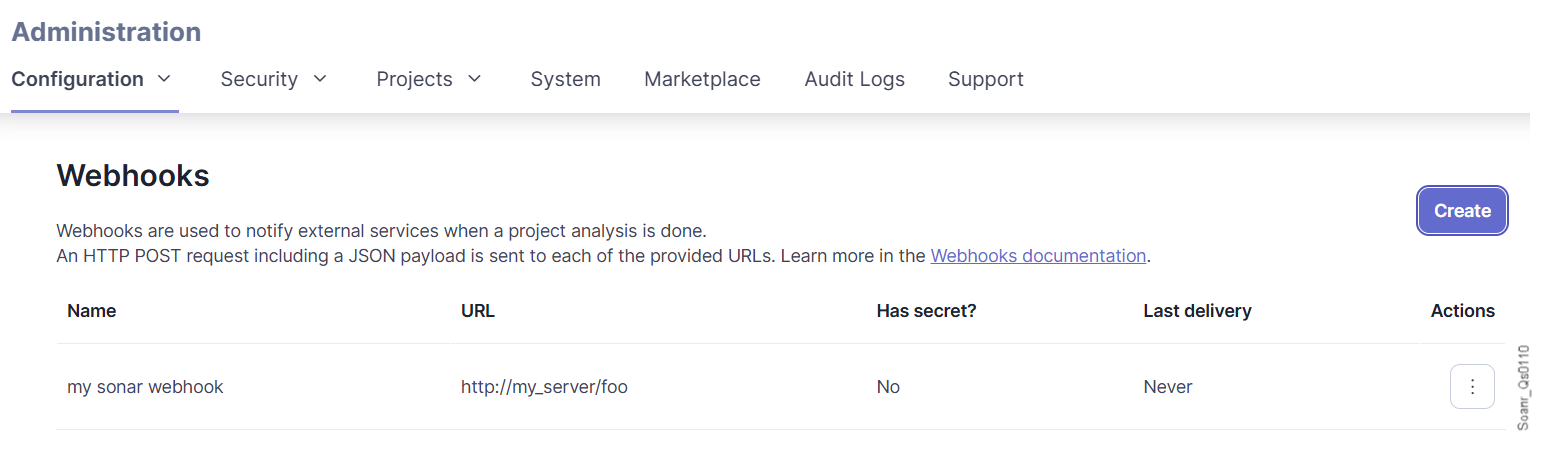
1. Go to **Administration** > **Configuration** > **Webhooks**.
2. Select **Create**. The **Create Webhook** dialog is displayed.
3. Enter the webhook name.
4. Enter the URL to which the webhook is to be delivered. You can provide user/password in the URL as described in **Securing your webhooks** below.
5. Enter a secret if you want to protect the webhook with HMAC. See **Securing your webhooks** below.
6. To update or delete a webhook, select the corresponding command in the three-dot menu at the far right of the webhook row.
7. Test your configured webhooks. To do so, you can use various webhook testing/debugging tools.
## Monitoring the webhook delivery
You can monitor the delivery of your webhooks in the SonarQube UI. You can also use the `api/webhooks` endpoints of the Web API to retrieve the webhook deliveries.
Each webhook’s delivery status is indicated. A delivery is marked as failed if the URL doesn’t respond within 10 seconds. Response records are purged after 30 days.
{% hint style="info" %}
SonarQube Server doesn’t retry to deliver failed webhook deliveries. You may use the Web API to implement an automatic redelivering mechanism.
{% endhint %}
To monitor your global-level webhooks:
1. Go to **Administration** > **Configuration** > **Webhooks**. The page shows the result and timestamp of each webhook’s most recent delivery.
2. To view the payload of the last delivery, select the three-dot menu at the far right of the webhook row.
3. To view the results and payloads of earlier deliveries, select the three-dot menu at the far right of the webhook row.
## Securing webhooks
After you’ve configured your server to receive payloads, you want to be sure that the payloads you receive are initiated by SonarQube and not by attackers. You can do this by validating a hash signature that ensures that requests originate from SonarQube.
{% hint style="info" %}
A basic authentication mechanism is supported by providing user/password in the URL of the Webhook such as `https://myLogin:myPassword@my_server/foo`.
{% endhint %}
{% stepper %}
{% step %}
**Set your secret**
1. Go to **Administration** > **Configuration** > **Webhooks**.
2. You can either select **Create** to create a new webhook or click an existing webhook’s settings drop-down and select **Update**.
3. Enter a random string in the **Secret** text box. This is used as the key to generate the HMAC hex digest value in the `X-Sonar-Webhook-HMAC-SHA256` header.
4. Select **Update**.
{% endstep %}
{% step %}
**Validate the received payload**
After setting your secret, it’s used by SonarQube to create a hash signature with each payload that’s passed using the `X-Sonar-Webhook-HMAC-SHA256` HTTP header. The header value needs to match the signature you are expecting to receive. SonarQube uses a HMAC lower-case SHA256 digest to compute the signature of the request body. Below is some sample Java code for your server. In this example, we are using the lib from [apache commons-codec HmacUtils class](https://commons.apache.org/proper/commons-codec/apidocs/org/apache/commons/codec/digest/HmacUtils.html).
```http
private static boolean isValidSignature(YourHttpRequest request) {
String receivedSignature = request.getHeader("X-Sonar-Webhook-HMAC-SHA256");
// See Apache commons-codec
String expectedSignature = new HmacUtils(HmacAlgorithms.HMAC_SHA_256, "your_secret").hmacHex(request.getBody())
return Objects.equals(expectedSignature, receivedSignature);
}
```
If the signatures don’t match, then the payload should be ignored.
{% endstep %}
{% endstepper %}
## Validating webhook destinations
By default, SonarQube Server validates the address that a webhook URL resolves to and rejects webhooks that point to internal destinations. The validation applies when you create or update a webhook and each time a webhook is delivered, including to redirect targets. It blocks the following addresses:
* Loopback and wildcard addresses
* Link-local and site-local (private network) addresses, such as `10.x.x.x` and `192.168.x.x`
* Multicast addresses
* Cloud metadata addresses
* Addresses of the SonarQube Server host
If your webhooks must reach a receiver on your internal network, such as a CI server, go to **Administration** > **Configuration** > **General settings** > **Security** and disable **Enable local webhooks validation** (`sonar.validateWebhooks`). Disabling the setting turns off address validation for all webhooks on the instance, including webhooks that project administrators create.
## Adding parameters to the webhook payload
If you provide additional properties to your SonarScanner using the pattern `sonar.analysis.*`, these properties will be automatically added to the section `"properties"` of the payload.
For example these additional parameters:
```json
sonar-scanner -Dsonar.analysis.buildNumber=12345
```
would add this to the payload:
```json
"properties": {
"sonar.analysis.buildNumber": "12345"
}
```
## Related pages
* [Webhooks](/sonarqube-server/discovering/integrations/webhooks.md) (solution overview)
* [Configuring webhooks for your project](/sonarqube-server/project-administration/integrations/webhooks.md)
---
# Agent Instructions
This documentation is published with GitBook. GitBook is the documentation platform designed so that both humans and AI agents can read, navigate, and reason over technical content effectively. Learn more at gitbook.com.
## Querying This Documentation
If you need additional information that is not directly available in this page, you can query the documentation by asking a question.
Perform an HTTP GET request on the following URL with the `ask` and `goal` query parameters:
```
GET https://docs.sonarsource.com/sonarqube-server/instance-administration/integrations/webhooks.md?ask=&goal=
```
`ask` is the immediate question: it should be specific, self-contained, and written in natural language.
`goal` is what the user is ultimately trying to achieve, the reason they need the answer. Sharing it helps GitBook give you a better, more relevant answer. A goal is most helpful when it describes the outcome the user wants rather than restating the question. For example, with `ask=how do I create an API token`, a goal like `automate deployments from our CI pipeline` lets GitBook tailor the answer to that use case.
The response will contain a direct answer to the question and relevant excerpts and sources from the documentation.
Use this mechanism when the answer is not explicitly present in the current page, you need clarification or additional context, or you want to retrieve related documentation sections.