> For the complete documentation index, see [llms.txt](https://docs.sonarsource.com/llms.txt). Markdown versions of documentation pages are available by appending `.md` to page URLs; this page is available as [Markdown](https://docs.sonarsource.com/sonarqube-server/instance-administration/devops-platforms/azure-devops.md).

# Binding to Azure DevOps

Binding your Azure DevOps Services organization or Server collection to your SonarQube Server 2026.5 instance.

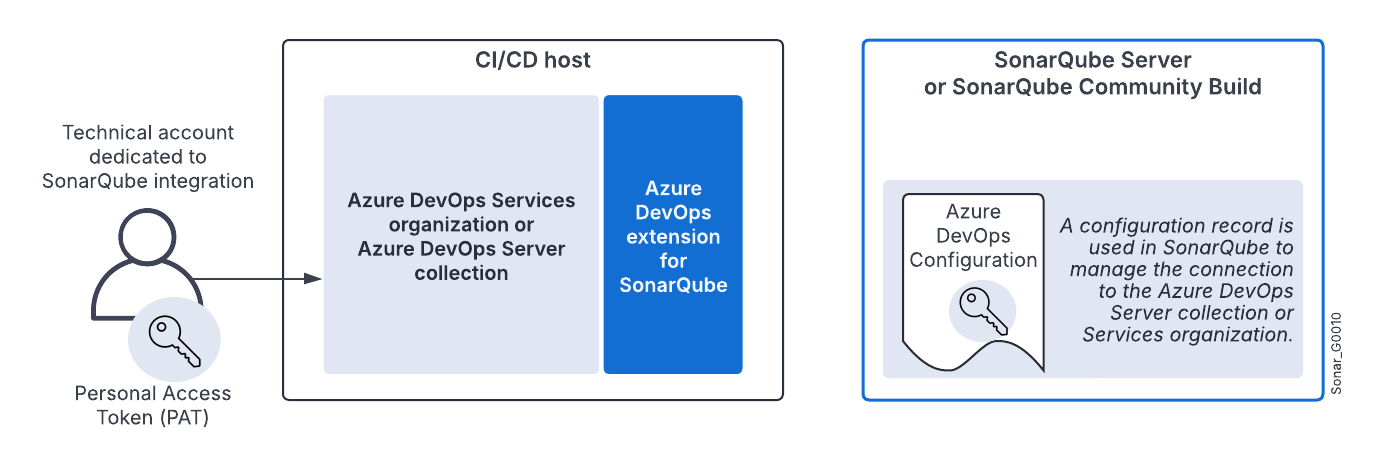
For the integration of an Azure DevOps Services organization or an Azure DevOps Server collection with SonarQube Server, you must:

* Create a configuration record in SonarQube Server. This record stores the Personal Access Token (PAT) of the technical account used by SonarQube Server to connect to Azure DevOps. This is necessary for importing Azure DevOps repositories and reporting the quality gate status.
* Install an Azure DevOps Extension for SonarQube Server on the CI/CD host to integrate with Azure Pipelines.

You can also open the **DevOps Platform Integrations** page from **Administration** > **Project coverage**. See the [Project coverage](/sonarqube-server/quickstart-guide/project-coverage.md) page.

<figure><img src="https://2661720783-files.gitbook.io/~/files/v0/b/gitbook-x-prod.appspot.com/o/spaces%2FKXW79zfYFiA8incTvwZK%2Fuploads%2Fgit-blob-7e6ee527f56aa6b52252f7b6f07b56306ba2cecb%2Fsonarqube-azure-devops-integration-global-setup_G0010.png?alt=media" alt="Installing Azure DevOps Extension for SonarQube Server on the CI/CD host"><figcaption></figcaption></figure>

For more information about the Azure DevOps integration solution, see [Azure DevOps](/sonarqube-server/discovering/devops-platforms/azure-devops.md).

## Prerequisites <a href="#prerequisites" id="prerequisites"></a>

See [Azure DevOps Extension](/sonarqube-server/analyzing-source-code/scanners/sonarqube-extension-for-azure-devops.md#requirements) for Azure DevOps extension.

The SonarQube Server base URL must be properly set, otherwise, integration features will not work correctly. See [Server base URL](/sonarqube-server/instance-administration/server-base-url.md).

## Preparing the integration <a href="#preparing" id="preparing"></a>

SonarQube Server uses an Azure DevOps user account to import Azure DevOps repositories to SonarQube Server and report the quality gate status to Azure DevOps. You must provide a [Personal Access Token](https://docs.microsoft.com/en-us/azure/devops/organizations/accounts/use-personal-access-tokens-to-authenticate?view=tfs-2017\&tabs=preview-page) (PAT) from this account.

{% hint style="warning" %}
Be aware of the following PAT failure points:

* Azure PATs require an expiration date. Check the [Microsoft documentation](https://learn.microsoft.com/en-us/azure/devops/organizations/accounts/use-personal-access-tokens-to-authenticate?view=azure-devops\&tabs=Windows#create-a-pat) for details when creating your PAT.
* Azure requires that a user log in every 30 days, or it automatically stops a PAT; this action may cause your related pipeline to fail. Here is [an Azure Q\&A](https://learn.microsoft.com/en-us/azure/devops/organizations/accounts/use-personal-access-tokens-to-authenticate?view=azure-devops\&tabs=Windows#q-why-did-my-pat-stop-working) on this topic.
  {% endhint %}

<details>

<summary>Creating a technical user account</summary>

We highly recommend that you use a dedicated technical user account in Azure DevOps to manage the integration with SonarQube.

* Do not set the technical user’s account with a **Stakeholder** access type. Use the **Basic** access type instead. (Users with the **Stakeholder** access type can have problems finding their repos when trying to Analyze projects.)
* We recommend that you add the account to the **Contributors** security group.

See the Azure documentation for more information [about access levels](https://learn.microsoft.com/en-us/azure/devops/organizations/security/access-levels?view=azure-devops).

</details>

<details>

<summary>Generating your Azure PAT</summary>

1\. Log in to Azure DevOps with the technical user account created before.

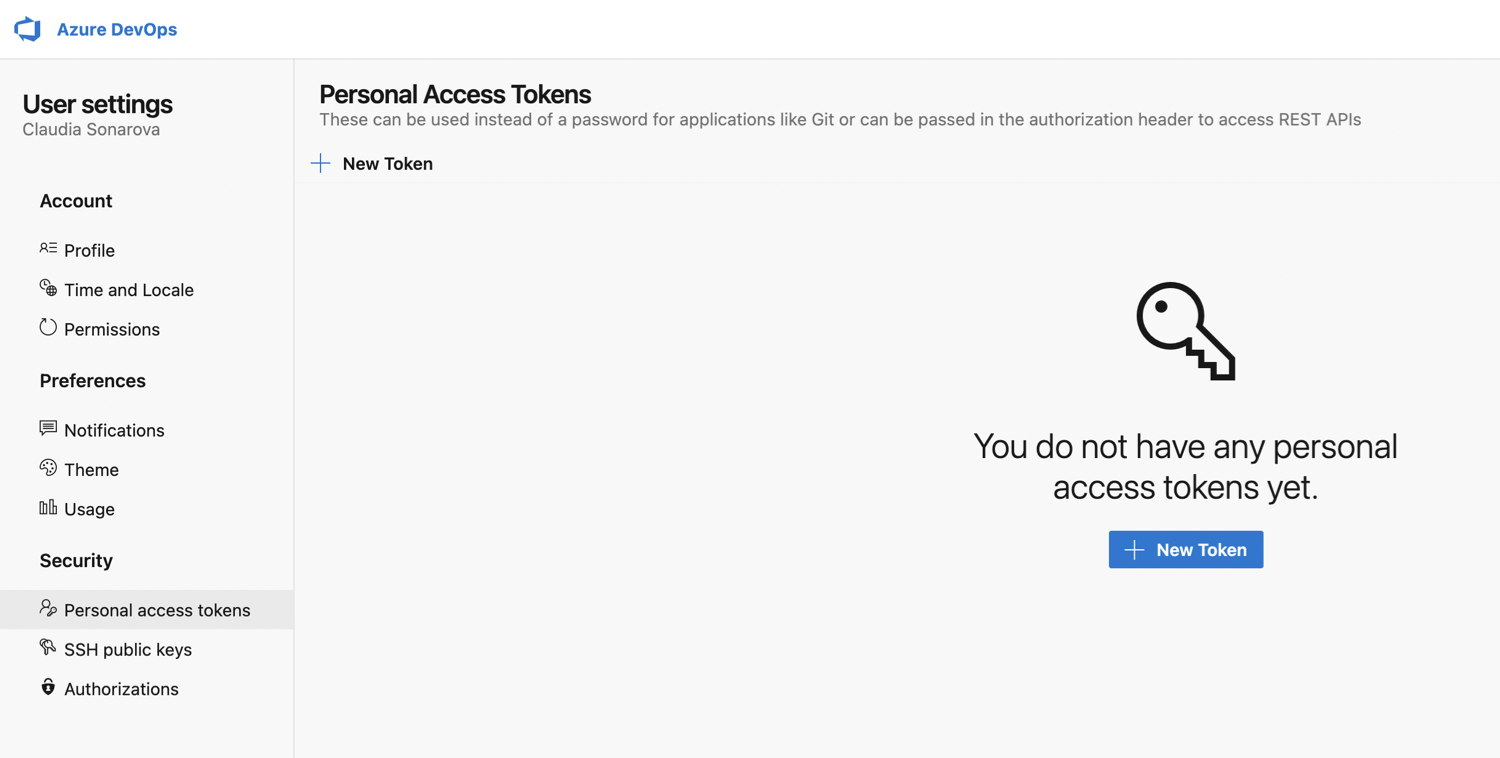
2\. Go to your Azure DevOps organization **User settings** > **Personal access tokens** and select **+ New token**.

<div align="left"><figure><img src="https://content.gitbook.com/content/mX1WoFEHhJp6VdSbyTDi/blobs/P8XrUfFP3JJAgJR9np6N/azure-devops-create-new-personal-access-token-for-sonarqube.png" alt="The Personal access tokens page found in Azure DevOps." width="563"><figcaption></figcaption></figure></div>

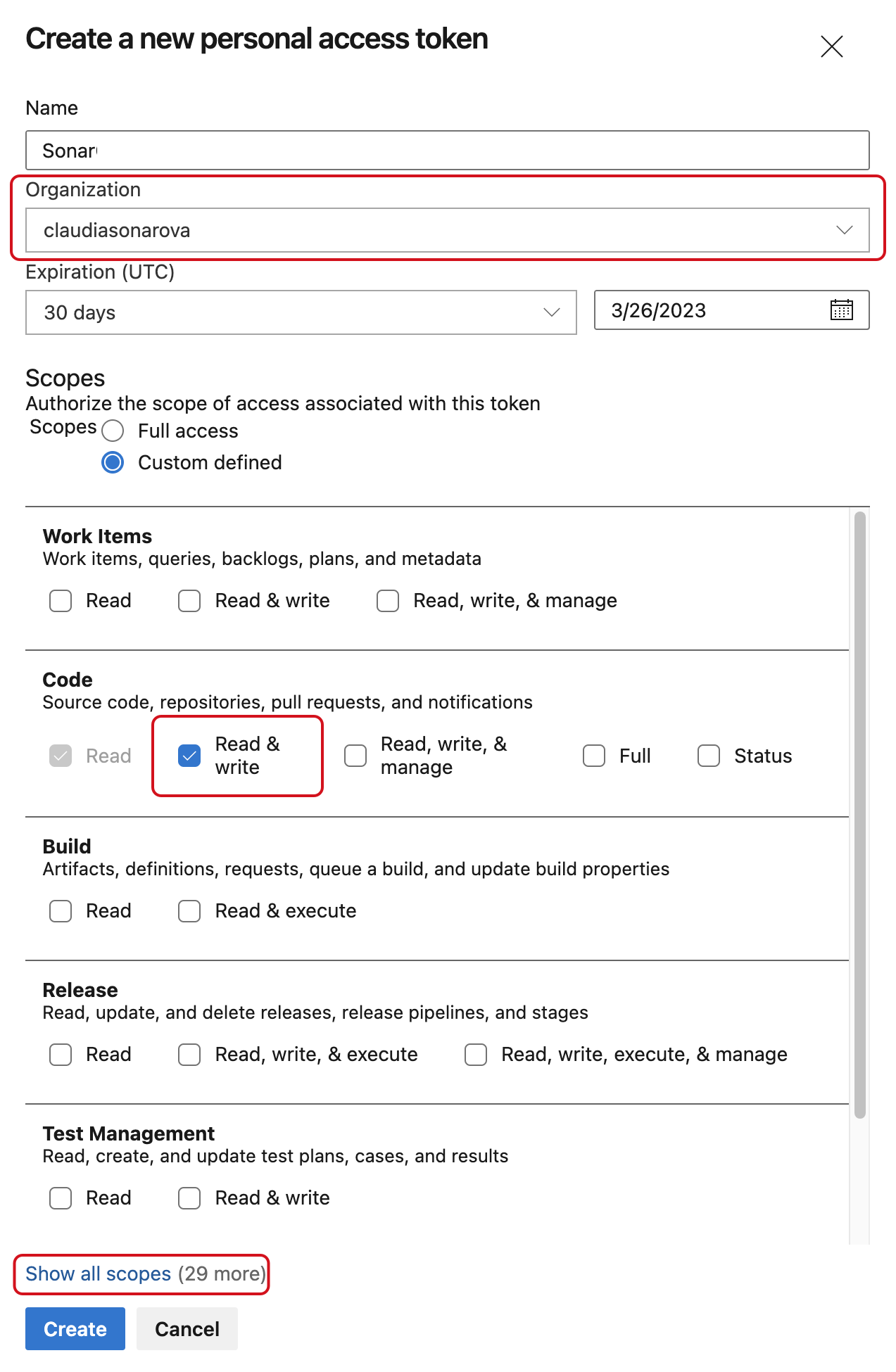
> **Warning:** If you're using Azure DevOps Services, SonarQube Server does not allow Global PATs, personal access tokens scoped to **All accessible organizations**, which Microsoft is [retiring](https://devblogs.microsoft.com/devops/retirement-of-global-personal-access-tokens-in-azure-devops/). When creating your PAT, under **Organization**, select the specific organization you're integrating with instead. Azure DevOps Server users are not affected.

3\. If you're using Azure DevOps Services, on the next page, under **Organization**, select the organization you're integrating with. Under **Scopes**, make sure that you specify at least the scope **Code** > **Read & write**. This lets SonarQube Server import repositories and report the quality gate status. If you use the Remediation Agent, also add **Identity** > **Read**: select **Show all scopes** to find it. This lets the agent assign a reviewer to the pull request. Without it, the pull request opens with no reviewer assigned. SonarQube Server cannot verify these scopes for you on Azure DevOps, so check them here. For more details, check the [Remediation Agent's DevOps platform permission requirements](/sonarqube-server/instance-administration/ai-features/remediation-agent.md#devops-platform-permissions).

<div align="left"><figure><img src="https://4213461411-files.gitbook.io/~/files/v0/b/gitbook-x-prod.appspot.com/o/spaces%2FmX1WoFEHhJp6VdSbyTDi%2Fuploads%2Fgit-blob-945774528d30a66cac0b1dee8f77c6a3bf1e1332%2Fazure-devops-scope-of-global-personal-access-token-for-sonarqube.png?alt=media" alt="The Create a new personal access token modal found in Azure DevOps." width="375"><figcaption></figcaption></figure></div>

4\. Click **Create** to generate the token.

5\. When the personal access token is displayed, copy it (you will have to paste it to SonarQube’s configuration record as described below).

6\. If necessary, encrypt this token: see [Sensitive settings](/sonarqube-server/instance-administration/security/encrypting-settings.md).

</details>

## Creating the global configuration record in SonarQube Server <a href="#creating-config-record" id="creating-config-record"></a>

You need the global System Administration permission to perform this procedure.

In SonarQube Server, a global configuration record stores the parameters necessary to connect to your Azure DevOps Server collection or Azure DevOps Services organization.

{% hint style="info" %}
Starting in [Enterprise edition](https://www.sonarsource.com/plans-and-pricing/enterprise/), you can set up the integration of SonarQube Server with multiple Azure DevOps platform instances. To do so, you create in SonarQube Server a configuration record for each instance.
{% endhint %}

To create the Azure DevOps configuration record in SonarQube:

1. Go to **Administration** > **Configuration** > **General settings** > **DevOps platform integrations**.
2. Select the **Azure DevOps** tab.
3. Select the **Create configuration** button. The **Create a configuration** dialog opens.
4. Specify the settings as described below.

<table><thead><tr><th width="207">Field</th><th>Description</th></tr></thead><tbody><tr><td>Configuration Name</td><td>Enterprise and Data Center edition only. The name used to identify your Azure DevOps configuration at the project level. Use something succinct and easily recognizable.</td></tr><tr><td>Azure DevOps URL</td><td><p>• If you are using Azure DevOps Server: the full Azure DevOps collection URL. For example, https://ado.your-company.com/DefaultCollection.</p><p>• If you are using Azure DevOps Services: the full Azure DevOps organization URL. For example, https://dev.azure.com/your_organization.</p></td></tr><tr><td>Personal Access Token</td><td>Personal access token generated in <a data-mention href="#generating-your-azure-pat">#generating-your-azure-pat</a> above (or its encrypted value).</td></tr></tbody></table>

## Installing the Azure DevOps Extension for SonarQube <a href="#installing-extension" id="installing-extension"></a>

See the [Azure DevOps Extension](/sonarqube-server/analyzing-source-code/scanners/sonarqube-extension-for-azure-devops.md) page.

## Related pages <a href="#related-pages" id="related-pages"></a>

* [About Azure Pipelines integration](/sonarqube-server/analyzing-source-code/ci-integration/azure-pipelines/integration-overview.md)
* [Importing your Azure DevOps repository](/sonarqube-server/project-administration/creating-project/azure-devops/import-repos.md)
* [Setting up Azure integration for your project](/sonarqube-server/project-administration/creating-project/azure-devops/setting-up-project-integration.md)
* [Azure Pipelines](/sonarqube-server/analyzing-source-code/ci-integration/azure-pipelines.md) (adding analysis to your pipeline)
* [Troubleshooting analysis with Azure](/sonarqube-server/analyzing-source-code/ci-integration/azure-pipelines/troubleshooting-analysis.md)


---

# Agent Instructions
This documentation is published with GitBook. GitBook is the documentation platform designed so that both humans and AI agents can read, navigate, and reason over technical content effectively. Learn more at gitbook.com.

## Querying This Documentation
If you need additional information that is not directly available in this page, you can query the documentation by asking a question.

Perform an HTTP GET request on the following URL with the `ask` and `goal` query parameters:

```
GET https://docs.sonarsource.com/sonarqube-server/instance-administration/devops-platforms/azure-devops.md?ask=<question>&goal=<user_goal>
```

`ask` is the immediate question: it should be specific, self-contained, and written in natural language.
`goal` is what the user is ultimately trying to achieve, the reason they need the answer. Sharing it helps GitBook give you a better, more relevant answer. A goal is most helpful when it describes the outcome the user wants rather than restating the question. For example, with `ask=how do I create an API token`, a goal like `automate deployments from our CI pipeline` lets GitBook tailor the answer to that use case.

The response will contain a direct answer to the question and relevant excerpts and sources from the documentation.

Use this mechanism when the answer is not explicitly present in the current page, you need clarification or additional context, or you want to retrieve related documentation sections.
