> For the complete documentation index, see [llms.txt](https://docs.sonarsource.com/llms.txt). Markdown versions of documentation pages are available by appending `.md` to page URLs; this page is available as [Markdown](https://docs.sonarsource.com/sonarqube-server/quality-standards-administration/managing-rules/rules.md).
# SonarQube rules
SonarQube Server 2026.5 evaluates your code against a set of rules to generate issues.
## Overview
SonarQube Server executes rules on source code to generate issues. The way rules are categorized depends on the mode your SonarQube Server instance is using. See the Instance mode [Overview](/sonarqube-server/instance-administration/analysis-functions/instance-mode/instance-mode-overview.md) page for more information.
{% tabs %}
{% tab title="MQR MODE" %}
In Multi-Quality Rule (MQR) mode, rules are categorized by software qualities: security, reliability, and maintainability. A rule may impact more than one software quality.
Under maintainability and reliability, zero *false positives* are expected. At least this is the target so that developers don’t have to wonder if a fix is required.
For vulnerabilities, the goal is to have more than 80% of issues be *true positives*.
Security hotspot rules draw attention to security-sensitive code. After being reviewed by a developer, more than 80% of issues are expected to be quickly resolved as "reviewed."
{% endtab %}
{% tab title="STANDARD EXPERIENCE MODE" %}
There are four types of rules:
* Code smell (maintainability domain)
* Bug (reliability domain)
* Vulnerability (security domain)
* Security hotspot (security domain)
For code smells and bugs, zero *false positives* are expected. At least this is the target so that developers don’t have to wonder if a fix is required.
For vulnerabilities, the goal is to have more than 80% of issues be *true positives*.
Security hotspot rules draw attention to security-sensitive code. After being reviewed by a developer, more than 80% of issues are expected to be quickly resolved as "reviewed."
{% endtab %}
{% endtabs %}
## Rules
{% tabs %}
{% tab title="RULES IN MQR MODE" %}
By default, when selecting the top menu item **Rules**, you will see all the available rules installed on your SonarQube Server instance. You have the ability to review and narrow the selection based on search criteria in the left sidebar:
* **Language**: the language to which a rule applies.
* **Software Quality**: security, reliability, maintainability bug
* **Security hotspot:** security hotspot rules.
* **Default Severity:** the severity of all the software qualities it has an impact on.
* **Tag**: it is possible to add tags to rules in order to classify them and to help discover them more easily.
* **Coding attributes:** consistency, intentionality, adaptability, responsibility
* **Repository**: the engine/analyzer that contributes rules to SonarQube Server.
* **Status**: rules can have 3 different statuses:
* **Beta**: The rule has been recently implemented and we haven’t gotten enough feedback from users yet, so there may be false positives or false negatives.
* **Deprecated**: The rule should no longer be used because a similar, but more powerful and accurate rule exists.
* **Ready**: The rule is ready to be used in production.
* **Available since**: the date when a rule was first added on SonarQube Server. This is useful to list all the new rules since the last upgrade of a plugin for instance.
* **Template**: display rule templates that allow you to create custom rules (see Custom rules below on this page).
* **Quality profile**: *inclusion in* or *exclusion from* a specific profile
If a Quality profile is selected, it is also possible to check for its active severity and whether it is inherited or not. See the Quality profiles [Introduction](/sonarqube-server/quality-standards-administration/managing-quality-profiles/introduction.md) page for more information.
{% endtab %}
{% tab title="RULES IN STANDARD EXPERIENCE MODE" %}
By default, when selecting the top menu item **Rules**, you will see all the available rules installed on your SonarQube Server instance. You have the ability to review and narrow the selection based on search criteria in the left sidebar:
* **Language**: the language to which a rule applies.
* **Type**: bug, vulnerability, code smell, or security hotspot rules.
* [Understanding measures and metrics](/sonarqube-server/user-guide/code-metrics/metrics-definition.md) the original severity of the rule - as defined by SonarQube Server.
* **Tag**: it is possible to add tags to rules in order to classify them and to help discover them more easily.
* **Repository**: the engine/analyzer that contributes rules to SonarQube Server.
* **Status**: rules can have 3 different statuses:
* **Beta**: The rule has been recently implemented and we haven’t gotten enough feedback from users yet, so there may be false positives or false negatives.
* **Deprecated**: The rule should no longer be used because a similar, but more powerful and accurate rule exists.
* **Ready**: The rule is ready to be used in production.
* **Available since**: the date when a rule was first added on SonarQube Server. This is useful to list all the new rules since the last upgrade of a plugin for instance.
* **Template**: display rule templates that allow you to create custom rules (see Custom rules below on this page).
* **Quality profile**: *inclusion in* or *exclusion from* a specific profile
If a Quality profile is selected, it is also possible to check for its active severity and whether it is inherited or not. See the Quality profiles [Introduction](/sonarqube-server/quality-standards-administration/managing-quality-profiles/introduction.md) page for more information.
{% endtab %}
{% endtabs %}
## Rule details
To see the details of a rule, either click the rule with your mouse or use the right arrow key. Along with basic rule data, you’ll also be able to see which, if any, profiles the rule is active in and how many open issues have been raised with it.
The following actions are available only if you have the correct permission level *Administer quality profiles and gates*:
* **Add/Remove tags**:
* It is possible to add existing tags on a rule, or to create new rules; simply enter a new name while typing in the text field.
* Note that some rules have built-in tags that you cannot remove. For example, the rules are provided by the plugins which contribute to the rules.
* **Extend description**:
* You can extend rule descriptions to let users know how your organization is using a particular rule or to give more insight into a rule.
* Note that the extension will be available to non-admin users as a normal part of the rule details.
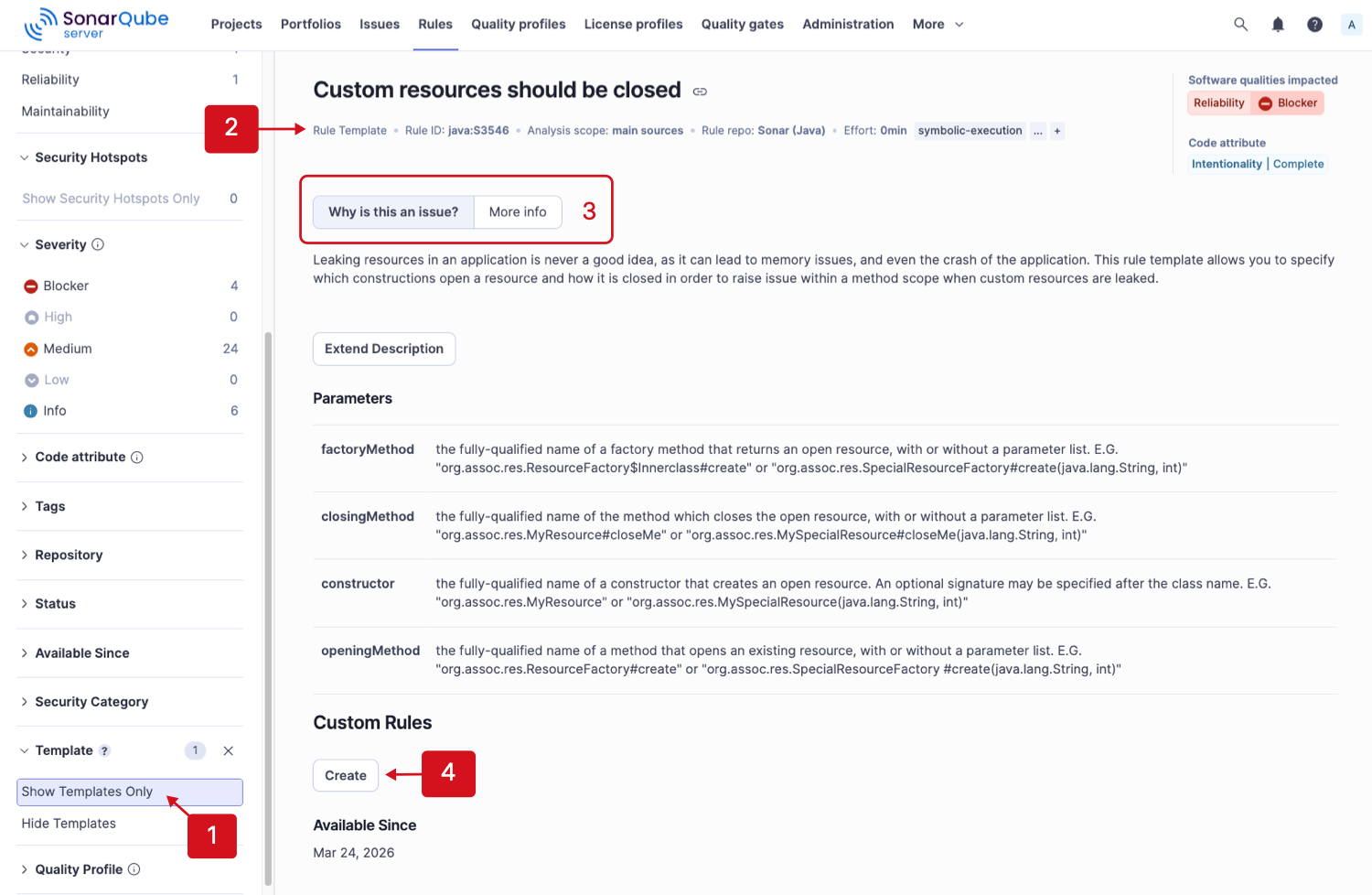
## Rule templates and custom rules
Rule templates are provided by plugins as a basis for users to define their own custom rules in SonarQube Server.
1. To find templates, select the **Show Templates Only** option from the **Template** dropdown menu.
2. **Rule Template** appears below the title indicating that this is a template.
3. Click through the tabs for more information about the custom rule.
4. Click **Create** to define your custom rule and enter the following information:
{% tabs %}
{% tab title="CUSTOM RULE FIELDS IN MQR MODE" %}
* **Name:** Enter a meaningful name for the rule.
* **Key** (auto-suggested)
* **Type:** The options are Issue or Security Hotspot, inherited by default from the template.
* **Category:** The options are Consistency, Intentionality, Adaptability, or Responsibility, which are inherited by default from the template.
* **Attribute:** The options are Conventional, Identifiable, or Formatted, which are inherited by default from the template.
* **Software Quality:** Select all that apply, the options are Security, Reliability, and Maintainability, inherited by default from the template.
* **Severity:** The options are Blocker, High, Medium, Low, or Info, inherited by default from the template.
* **Status:** The options are Ready, Beta, or Deprecated, inherited by default from the template.
* **Description** (Markdown format is supported): Write a meaningful description for your custom rule.
* The parameters specified by the template
{% endtab %}
{% tab title="CUSTOM RULE FIELDS IN STANDARD EXPERIENCE" %}
* **Name:** Enter a meaningful name for the rule.
* **Key** (auto-suggested)
* **Type:** The options are Bug, Vulnerability, Code Smell, or Security Hotspot, inherited by default from the template.
* **Severity:** The options are Blocker, Critical, Major, Minor, or Info. The recommended severity level is inherited from the template.
* **Status:** The options are Ready, Beta, or Deprecated, inherited by default from the template.
* **Description** (Markdown format is supported): Write a meaningful description for your custom rule.
* The parameters specified by the template.
{% endtab %}
{% endtabs %}
The **Custom rules** section contains a list of all custom rules created from the template. Click on the custom rule link to view details or **Delete** it from the system.
### Custom rules
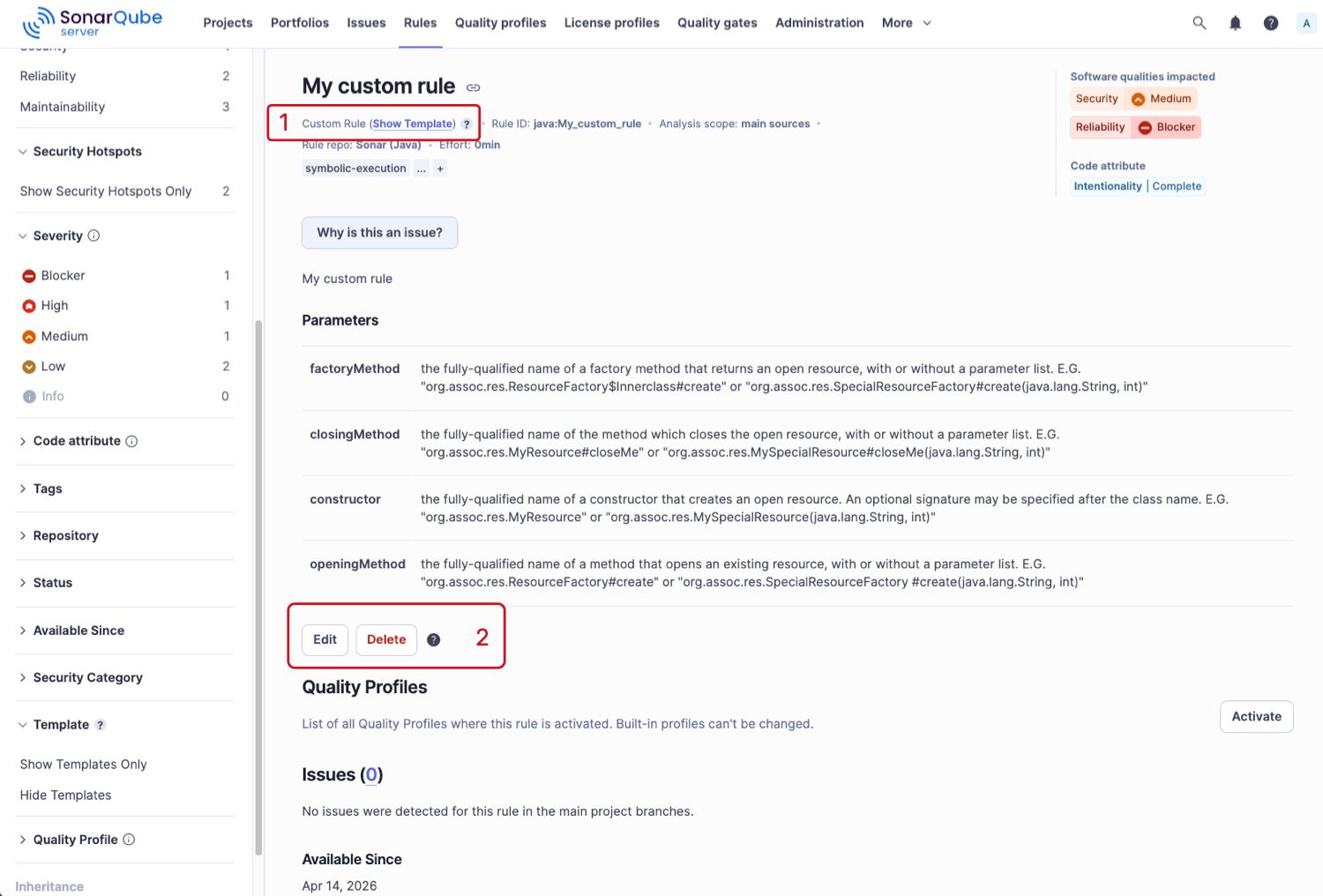
Custom rules are considered like any other rule, except that you can edit or delete them:
1. **Custom Rule** label shows beneath the title of the rule.
2. You can **Edit** or **Delete** a custom rule.
When deleting a custom rule, it is not deleted from the SonarQube Server instance. Instead, its status is set to *REMOVED*. This allows current or old issues related to this rule to be displayed properly in SonarQube Server until they are fully removed.
See [Adding coding rules](/sonarqube-server/extension-guide/adding-coding-rules.md) for more information about how to add custom rules.
## Rule types and severities
{% hint style="info" %}
Security Hotspots are being phased out. Rules that previously raised hotspots now raise vulnerabilities (in Standard Experience) or security issues (in MQR Mode), and the hotspot findings already in your database must be converted to their new issue type. For more information about migrating existing Security Hotspots to issues see [Migrating security hotspots to vulnerabilities](/sonarqube-server/server-update-and-maintenance/update/post-update-steps.md#migrate-hotspots).
{% endhint %}
{% tabs %}
{% tab title="CATEGORIZATION IN MQR MODE " %}
When using Multi-Quality Rule mode, there are four categories: Security, reliability, maintainability, and security hotspots. Rules are assigned to one or more categories based on the answers to these questions:
**Is the rule about code that could be exploited by an attacker?**\
If so, then it’s a security rule.
**Is the rule about code that is security-sensitive?**\
If so, then it’s a security hotspot rule.
**Is the rule about code that is demonstrably wrong, or more likely wrong than not?**\
If the answer is "yes", then it’s a reliability rule.
**Is the rule neither a bug nor a vulnerability?**\
If so, then it’s a maintainability rule.
{% endtab %}
{% tab title="CATEGORIZATION IN STANDARD EXPERIENCE" %}
When using Standard Experience mode, there are four categories: Bugs, vulnerabilities, security hotspots, bugs, and code smells. Rules are assigned to categories based on the answers to these questions:
**Is the rule about code that could be exploited by an attacker?**\
If so, then it’s a vulnerability rule.\
If not…
**Is the rule about code that is security-sensitive?**\
If so, then it’s a security hotspot rule.\
If not…
**Is the rule about code that is demonstrably wrong, or more likely wrong than not?**\
If the answer is "yes", then it’s a bug rule.\
If not…
**Is the rule neither a bug nor a vulnerability?**\
If so, then it’s a code smell rule.
{% endtab %}
{% endtabs %}
## How severities are assigned
{% tabs %}
{% tab title="MQR SEVERITY TYPES" %}
The table below lists the severity metrics used in Multi-Quality Rule mode.
| **Severity** | **Definition** |
| ------------ | ------------------------------------------------------------------------------------------------------------------------------------------------------------------------------------------------------------------------------------------------------------------------------ |
| Blocker | An issue that has a significant probability of severe unintended consequences on the application that should be fixed immediately. This includes bugs leading to production crashes and security flaws allowing attackers to extract sensitive data or execute malicious code. |
| High | An issue with a high impact on the application that should be fixed as soon as possible. |
| Medium | An issue with a medium impact. |
| Low | An issue with a low impact. |
| Info | There is no expected impact on the application. For informational purposes only. |
| {% endtab %} | |
{% tab title="STANDARD EXPERIENCE SEVERITY TYPES" %}
The table below lists the severity metrics used in Standard Experience mode.
| **Severity** | Definition |
| ------------- | ------------------------------------------------------------------------------------------------------------------------------------------------------------------------------------------------------------------------------------------------------------------------------ |
| Blocker | An issue that has a significant probability of severe unintended consequences on the application that should be fixed immediately. This includes bugs leading to production crashes and security flaws allowing attackers to extract sensitive data or execute malicious code. |
| Critical | An issue with a critical impact on the application that should be fixed as soon as possible. |
| Major | An issue with a major impact on the application. |
| Minor | An issue with a minor impact on the application. |
| Info | There is no expected impact on the application. For informational purposes only. |
| {% endtab %} | |
| {% endtabs %} | |
To assign severity to a rule, we ask a further series of questions. The first one is basically:
**What’s the worst thing that could happen?**
In answering this question, we try to factor in Murphy’s Law without predicting Armageddon.
Then we assess whether the impact and likelihood of the worst thing (see the *How severity and likelihood are decided* section below) are high or low, and plug the answers into a truth table:
| | | | |
| ----------------------- | ------------ | ---------- | -------------- |
| **Standard Experience** | **MQR mode** | **Impact** | **Likelihood** |
| Blocker | Blocker | ✅ | ✅ |
| Critical | High | ✅ | ❌ |
| Major | Medium | ❌ | ✅ |
| Minor | Low | ❌ | ❌ |
## How severity and likelihood are decided
To assess the severity of a rule, we start from the worst thing (see the *How severities are assigned* section above) and ask category-specific questions.
{% tabs %}
{% tab title="MQR MODE" %}
**Reliability**
Impact: **Could the worst thing cause the application to crash or corrupt stored data?**
Likelihood: **What’s the probability that the worst thing will happen?**
**Security**
Impact: **Could the exploitation of the worst thing result in significant damage to your assets or your users?**
Likelihood: **What is the probability that an attacker will be able to exploit the worst thing?**
**Security hotspots**
Security hotspots are not assigned severities as it is unknown whether there is truly an underlying vulnerability until they are reviewed.
{% endtab %}
{% tab title="STANDARD EXPERIENCE" %}
**Bugs**
Impact: **Could the worst thing cause the application to crash or corrupt stored data?**
Likelihood: **What’s the probability that the worst thing will happen?**
**Vulnerabilities**
Impact: **Could the exploitation of the worst thing result in significant damage to your assets or your users?**
Likelihood: **What is the probability that an attacker will be able to exploit the worst thing?**
**Security hotspots**
Security hotspots are not assigned severities as it is unknown whether there is truly an underlying vulnerability until they are reviewed.
{% endtab %}
{% endtabs %}
{% hint style="info" %}
Users with appropriate permissions are able to set a custom severity on a rule.
{% endhint %}
## Commercial edition rules
There are rules that are available in SonarQube Server but not in SonarQube Community Build.
In order for these rules to appear in SonarQube for IDE it must be in connected mode. In the standalone mode these rules are not visible. See [Connected mode](/sonarqube-server/user-guide/connected-mode.md) for more information.
## Rules covered with AI CodeFix
AI-generated fix suggestions are available with SonarQube Server, Enterprise and Data Center editions for a select set of rules in Java, JavaScript, TypeScript, Python, HTML, CSS, C#, and C++. To learn more about which rules are eligible for AI CodeFix, see the list of [Rules for AI CodeFix](/sonarqube-server/quality-standards-administration/managing-rules/rules-for-ai-codefix.md#ai-codefix-rules).
## Related pages
* [If Sonar updates a rule](/sonarqube-server/quality-standards-administration/managing-rules/rule-update.md)
* [Software qualities](/sonarqube-server/quality-standards-administration/managing-rules/software-qualities.md)
* [Security-related rules](/sonarqube-server/quality-standards-administration/managing-rules/security-related-rules.md)
* [Adding tags to a rule](/sonarqube-server/quality-standards-administration/managing-rules/adding-tags-to-rule.md)
* [Built-in rule tags](/sonarqube-server/quality-standards-administration/managing-rules/built-in-rule-tags.md)
* [Rules for AI CodeFix](/sonarqube-server/quality-standards-administration/managing-rules/rules-for-ai-codefix.md)
## Related online learning
* :desktop: [Introduction to rules, quality profiles, and quality gates in SonarQube](https://www.sonarsource.com/learn/course/core-concepts/4ce5a772-5253-41dd-b521-8f7c72a7c6dd/introduction-to-rules-quality-profiles-and-quality-gates-in-sonarqube)
---
# Agent Instructions
This documentation is published with GitBook. GitBook is the documentation platform designed so that both humans and AI agents can read, navigate, and reason over technical content effectively. Learn more at gitbook.com.
## Querying This Documentation
If you need additional information that is not directly available in this page, you can query the documentation by asking a question.
Perform an HTTP GET request on the following URL with the `ask` and `goal` query parameters:
```
GET https://docs.sonarsource.com/sonarqube-server/quality-standards-administration/managing-rules/rules.md?ask=&goal=
```
`ask` is the immediate question: it should be specific, self-contained, and written in natural language.
`goal` is what the user is ultimately trying to achieve, the reason they need the answer. Sharing it helps GitBook give you a better, more relevant answer. A goal is most helpful when it describes the outcome the user wants rather than restating the question. For example, with `ask=how do I create an API token`, a goal like `automate deployments from our CI pipeline` lets GitBook tailor the answer to that use case.
The response will contain a direct answer to the question and relevant excerpts and sources from the documentation.
Use this mechanism when the answer is not explicitly present in the current page, you need clarification or additional context, or you want to retrieve related documentation sections.