> For the complete documentation index, see [llms.txt](https://docs.sonarsource.com/llms.txt). Markdown versions of documentation pages are available by appending `.md` to page URLs; this page is available as [Markdown](https://docs.sonarsource.com/sonarqube-server/server-update-and-maintenance/update/release-cycle-model.md).
# Release cycle model
A detailed explanation of the SonarQube Server release cycle and patch policy. This page is for SonarQube Server 2026.5.
SonarQube Server releases a new version every two months—six per year. Two of those releases are Long-Term Active (LTA) versions (formerly LTS), which receive longer-term patch support.
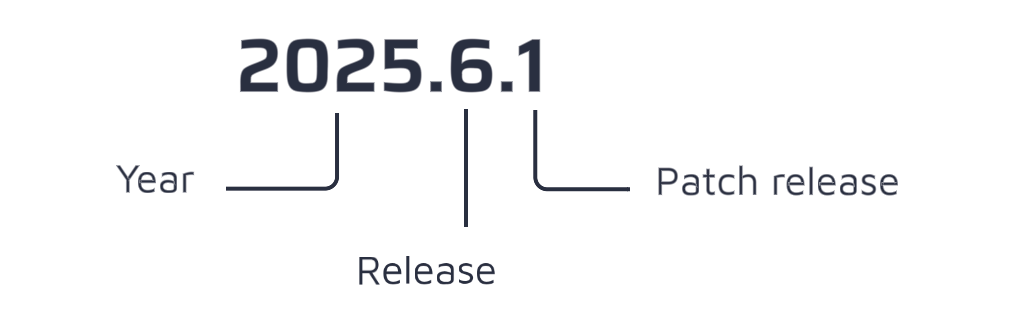
SonarQube Server releases follow the following version scheme:
`YYYY.ReleaseNumber.PatchReleaseNumber`
{% hint style="info" %}
Up to version 10.8, SonarQube Server followed the `MAJOR.MINOR.PATCH` version scheme.
{% endhint %}
## SonarQube Server patch policy
This policy applies to LTA releases starting with 2026.5.
* Developer Edition, Enterprise Edition, and Data Center Edition customers get 12 months of patches from the release date.
* Enterprise Edition and Data Center Edition customers with Enterprise Support get 18 months of patches.
If your release doesn't receive patches, upgrade to a newer one for fixes.
See [Sonar support](https://www.sonarsource.com/support/) for commercial support tier details, including Enterprise Support.
### Which versions of SonarQube Server are patched?
* The latest version of SonarQube Server.
* Each LTA, for as long as it receives patches under the patch policy above (up to 18 months for Enterprise Edition and Data Center Edition customers with Enterprise Support).
How do I know if my SonarQube version is active?
There are two main ways to check if you are using an active version of SonarQube Server:
1. In SonarQube Server, in the footer next to the version number, you can immediately see if your version is *active* or *no longer active.*
2\. Administrators can go to the **Administration** > **System.** As per above, you can see in the footer if you are on an active version.
If there is a new version available, administrators will see a message at the top of the screen prompting you to update to the latest version:
## Agentic features release cycle
The agentic features run as their own containers and follow the SonarQube Server release cycle for new features, so a new capability arrives with a SonarQube Server release.
Patches are different. The agentic feature containers receive their own patches, released independently of SonarQube Server, covering bug and security fixes and improvements to how the agents work with your large language model. For the Agent Orchestrator and the agent runtimes, you can take those patches without updating SonarQube Server itself.
Sonar Vortex is the exception. It runs analyzers of its own, which need to stay aligned with the analyzer versions your SonarQube Server deployment uses, so update it alongside SonarQube Server rather than on its own. See [Installation overview](/sonarqube-server/server-installation/ai-agents/installation-overview.md#analyzer-versions).
The version numbers reflect this. SonarQube Server and the agentic feature containers share the major and minor version, and each carries its own patch number:
| Component | Version |
| -------------------------- | -------- |
| SonarQube Server | 2026.5.x |
| Agentic feature containers | 2026.5.y |
Updating SonarQube Server does not update the agentic feature containers, and updating them does not update SonarQube Server, so plan both. See [Deploying AI agents](/sonarqube-server/server-installation/ai-agents.md) for how each one is deployed and updated.
## Related pages
* [SonarQube Server Long Term Active (LTA) and FAQ](https://www.sonarsource.com/products/sonarqube/downloads/lts/)
* [Determining the update path](/sonarqube-server/server-update-and-maintenance/update/determine-path.md)
---
# Agent Instructions
This documentation is published with GitBook. GitBook is the documentation platform designed so that both humans and AI agents can read, navigate, and reason over technical content effectively. Learn more at gitbook.com.
## Querying This Documentation
If you need additional information that is not directly available in this page, you can query the documentation by asking a question.
Perform an HTTP GET request on the following URL with the `ask` and `goal` query parameters:
```
GET https://docs.sonarsource.com/sonarqube-server/server-update-and-maintenance/update/release-cycle-model.md?ask=&goal=
```
`ask` is the immediate question: it should be specific, self-contained, and written in natural language.
`goal` is what the user is ultimately trying to achieve, the reason they need the answer. Sharing it helps GitBook give you a better, more relevant answer. A goal is most helpful when it describes the outcome the user wants rather than restating the question. For example, with `ask=how do I create an API token`, a goal like `automate deployments from our CI pipeline` lets GitBook tailor the answer to that use case.
The response will contain a direct answer to the question and relevant excerpts and sources from the documentation.
Use this mechanism when the answer is not explicitly present in the current page, you need clarification or additional context, or you want to retrieve related documentation sections.