For the complete documentation index, see llms.txt. This page is also available as Markdown.

Compliance reports

In SonarQube Server 2026.5, compliance reports show how your projects, applications, and portfolios measure up against security-focused, regulatory, and accessibility standards.

Security Hotspots are being phased out. Rules that previously raised hotspots now raise vulnerabilities (in Standard Experience) or security issues (in MQR Mode), and the hotspot findings already in your database must be converted to their new issue type. For more information about migrating existing Security Hotspots to issues see Migrating security hotspots to vulnerabilities.

Compliance reports are available starting in Enterprise edition.

Introduction

Compliance reports give you the big picture of how your project, application, or portfolio measures up against the standards your organization must meet. For each supported standard, the report shows the findings from your latest analysis that relate to that standard, so security, compliance, and audit teams can track their progress.

Depending on the configuration of your SonarQube Server instance, compliance reports are generated with metrics either from Standard Experience or MQR mode.

Compliance reports are different from regulatory reports, which are downloadable ZIP snapshots of a project branch for audit and governance purposes. See Regulatory reports for details.

Retrieving compliance reports

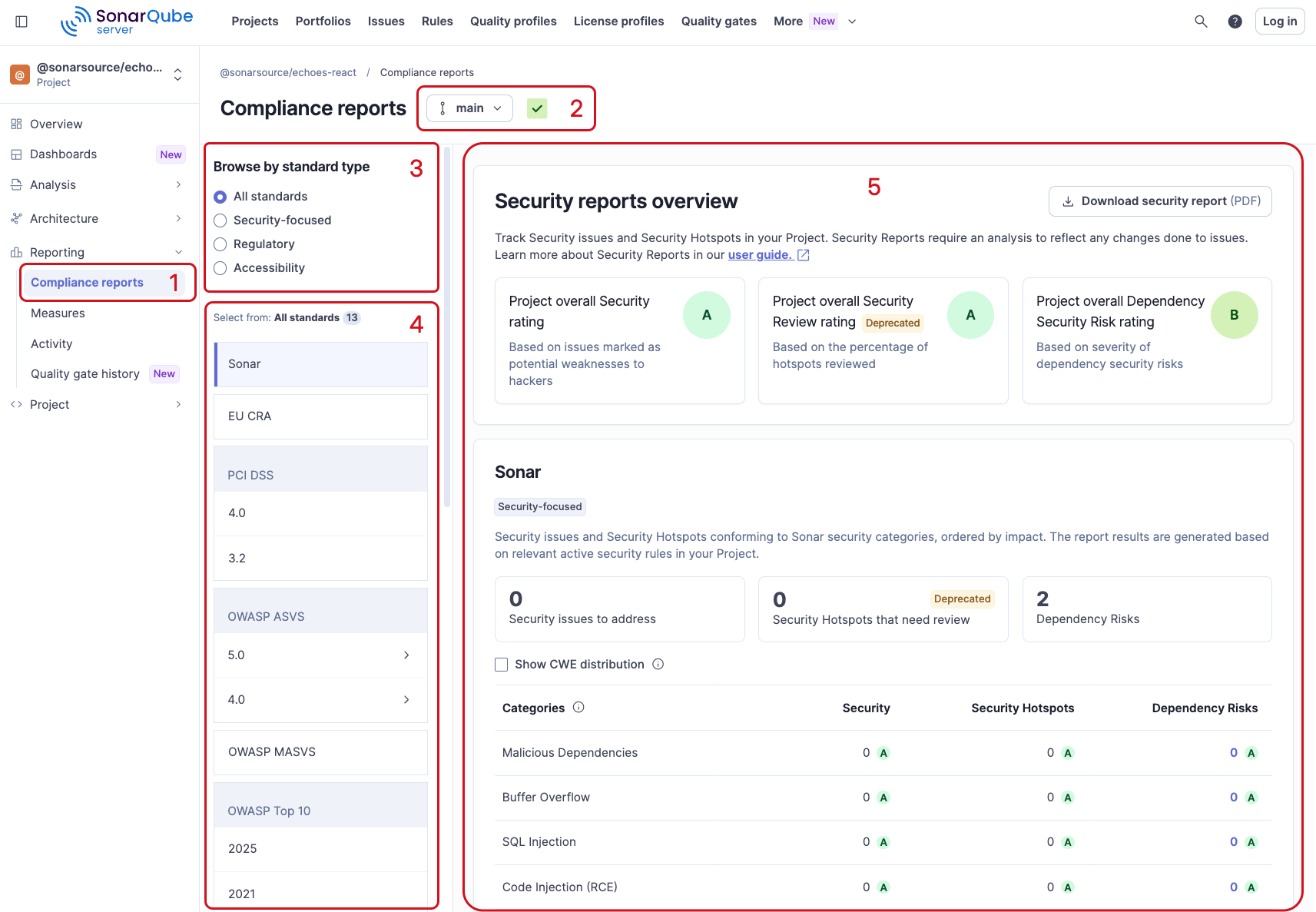
  1. Go to your project, your application, or your portfolio > Reporting > Compliance reports. See Retrieving projects or Retrieving a portfolio for how to find your project, application, or portfolio.

  2. For a project, select the branch you want to review.

  3. In Browse by standard type, select a standard type to filter the list of standards: All standards, Security-focused, Regulatory, or Accessibility.

  4. Select a standard for which you want to view the report.

  5. The report is generated on the right side of the screen.

The project Compliance reports page with numbered callouts for the nav entry, branch selector, standard type filter, standards list, and report.

Standards

The compliance reports page groups the supported standards into three types: security-focused, regulatory, and accessibility. Select All standards to list every standard, or select a type to show only the standards of that type.

Security-focused

Security-focused standards help you understand where you stand compared to the most common security mistakes made in the past. Compliance reports cover the following security-focused standards:

OWASP Top 10 security standards covered by Sonar for version 2025
Category
Python
JS/TS
Java
C#
C/C++
PHP
Kotlin
Go

A01:Broken Access Control

Checkmark icon

Checkmark icon

Checkmark icon

Checkmark icon

Checkmark icon

Checkmark icon

Checkmark icon

Checkmark icon

A02: Security Misconfiguration

Checkmark icon

Checkmark icon

Checkmark icon

Checkmark icon

Checkmark icon

Checkmark icon

Checkmark icon

Checkmark icon

A03: Software Supply Chain Failures

Checkmark icon

Checkmark icon

Checkmark icon

Checkmark icon

Checkmark icon

Checkmark icon

A04: Cryptographic Failures

Checkmark icon

Checkmark icon

Checkmark icon

Checkmark icon

Checkmark icon

Checkmark icon

Checkmark icon

Checkmark icon

A05: Injection

Checkmark icon

Checkmark icon

Checkmark icon

Checkmark icon

Checkmark icon

Checkmark icon

Checkmark icon

A06: Insecure design

Checkmark icon

Checkmark icon

Checkmark icon

Checkmark icon

Checkmark icon

Checkmark icon

Checkmark icon

Checkmark icon

A07: Authentication Failures

Checkmark icon

Checkmark icon

Checkmark icon

Checkmark icon

Checkmark icon

Checkmark icon

Checkmark icon

Checkmark icon

A08: Software and Data Integrity Failures

Checkmark icon

Checkmark icon

Checkmark icon

Checkmark icon

Checkmark icon

Checkmark icon

A09: Logging and Alerting Failures

Checkmark icon

Checkmark icon

Checkmark icon

Checkmark icon

Checkmark icon

A10: Mishandling of Exceptional Conditions

Checkmark icon

Checkmark icon

Checkmark icon

Checkmark icon

Checkmark icon

Checkmark icon

Checkmark icon

Checkmark icon

OWASP Mobile Top 10 security standards covered by Sonar for version 2024
Standard
Java
Kotlin
Dart
Swift

M1: Improper Credential Usage

Checkmark icon

Checkmark icon

Checkmark icon

Checkmark icon

M2: Inadequate Supply Chain Security

Checkmark icon

Checkmark icon

Checkmark icon

Checkmark icon

M3: Insecure Authentication/Authorization

Checkmark icon

Checkmark icon

Checkmark icon

Checkmark icon

M4: Insufficient Input/Output Validation

Checkmark icon

Checkmark icon

Checkmark icon

Checkmark icon

M5: Insecure Communication

Checkmark icon

Checkmark icon

Checkmark icon

Checkmark icon

M6: Inadequate Privacy Controls

Checkmark icon

Checkmark icon

Checkmark icon

Checkmark icon

M7: Insufficient Binary Protections

Checkmark icon

M8: Security Misconfiguration

Checkmark icon

Checkmark icon

Checkmark icon

Checkmark icon

M9: Insecure Data Storage

Checkmark icon

Checkmark icon

Checkmark icon

M10: Insufficient Cryptography

Checkmark icon

Checkmark icon

Checkmark icon

Checkmark icon

CWE Top 25 security standards covered by Sonar for version 2024
Category
Python
JS/TS
Java
C#
C/C++
PHP
Kotlin

CWE-79 Improper Neutralization of Input During Web Page Generation (‘Cross-site Scripting’)

Checkmark icon

Checkmark icon

Checkmark icon

Checkmark icon

Checkmark icon

Checkmark icon

CWE-787 Out-of-bounds Write

Checkmark icon

CWE-89 Improper Neutralization of Special Elements used in an SQL Command (‘SQL Injection’)

Checkmark icon

Checkmark icon

Checkmark icon

Checkmark icon

Checkmark icon

Checkmark icon

CWE-352 Cross-Site Request Forgery (CSRF)

Checkmark icon

Checkmark icon

Checkmark icon

Checkmark icon

Checkmark icon

CWE-22 Improper Limitation of a Pathname to a Restricted Directory (‘Path Traversal’)

Checkmark icon

Checkmark icon

Checkmark icon

Checkmark icon

Checkmark icon

Checkmark icon

CWE-125 Out-of-bounds Read

Checkmark icon

CWE-78 Improper Neutralization of Special Elements used in an OS Command (‘OS Command Injection’)

Checkmark icon

Checkmark icon

Checkmark icon

Checkmark icon

Checkmark icon

Checkmark icon

CWE-416 Use After Free

Checkmark icon

CWE-862 Missing Authorization

CWE-434 Unrestricted Upload of File with Dangerous Type

Checkmark icon

CWE-94 Improper Control of Generation of Code (‘Code Injection’)

Checkmark icon

Checkmark icon

Checkmark icon

Checkmark icon

Checkmark icon

Checkmark icon

CWE-20 Improper Input Validation

Checkmark icon

Checkmark icon

Checkmark icon

Checkmark icon

Checkmark icon

Checkmark icon

CWE-77 Improper Neutralization of Special Elements used in a Command (‘Command Injection’)

Checkmark icon

Checkmark icon

Checkmark icon

Checkmark icon

Checkmark icon

CWE-287 Improper Authentication

Checkmark icon

Checkmark icon

CWE-269 Improper Privilege Management

Checkmark icon

Checkmark icon

CWE-502 Deserialization of Untrusted Data

Checkmark icon

Checkmark icon

Checkmark icon

Checkmark icon

Checkmark icon

CWE-200 Exposure of Sensitive Information to an Unauthorized Actor

Checkmark icon

Checkmark icon

Checkmark icon

Checkmark icon

Checkmark icon

Checkmark icon

Checkmark icon

CWE-863 Incorrect Authorization

CWE-918 Server-Side Request Forgery (SSRF)

Checkmark icon

Checkmark icon

Checkmark icon

Checkmark icon

Checkmark icon

Checkmark icon

CWE-119 Improper Restriction of Operations within the Bounds of a Memory Buffer

Checkmark icon

CWE-476 NULL Pointer Dereference

Checkmark icon

Checkmark icon

Checkmark icon

Checkmark icon

Checkmark icon

CWE-798 Use of Hard-coded Credentials

Checkmark icon

Checkmark icon

Checkmark icon

Checkmark icon

Checkmark icon

Checkmark icon

Checkmark icon

CWE-190 Integer Overflow or Wraparound

Checkmark icon

Checkmark icon

Checkmark icon

CWE-400 Uncontrolled Resource Consumption

Checkmark icon

Checkmark icon

Checkmark icon

Checkmark icon

Checkmark icon

Checkmark icon

CWE-306 Missing Authentication for Critical Function

They represent the bare minimum compliance for anyone putting in place a secure development lifecycle.

The EU Cyber Resilience Act also includes security requirements. It's listed with the regulatory standards. See #regulatory for details.

Regulatory

Regulatory standards come from laws, regulations, and industry bodies that set requirements for particular markets or types of products. Compliance reports cover the following regulatory standards:

  • EU Cyber Resilience Act (CRA): the European Union regulation that sets cybersecurity requirements for products with digital elements placed on the EU market. It's maintained by the European Commission. For details about how SonarQube features map to the CRA requirements, see Cyber Resilience Act capability mapping.

EU Cyber Resilience Act security standards covered by Sonar security features
Requirement
Security
Dependency Risks

Part I - Cybersecurity requirements relating to the properties of products with digital elements

Partial coverage (partial)

Partial coverage

1.1 Risk-Based Security Standards for Digital Products

1.2 Security Obligations Derived from Risk Assessments

Partial coverage

Partial coverage

1.2.a be made available on the market without known exploitable vulnerabilities

1.2.b be made available on the market with a secure by default configuration, unless otherwise agreed between manufacturer and business user in relation to a tailor-made product with digital elements, including the possibility to reset the product to its original state

Checkmark icon

Checkmark icon

1.2.c ensure that vulnerabilities can be addressed through security updates, including, where applicable, through automatic security updates that are installed within an appropriate timeframe enabled as a default setting, with a clear and easy-to-use opt-out mechanism, through the notification of available updates to users, and the option to temporarily postpone them

1.2.d ensure protection from unauthorised access by appropriate control mechanisms, including but not limited to authentication, identity or access management systems, and report on possible unauthorised access

Checkmark icon

Checkmark icon

1.2.e protect the confidentiality of stored, transmitted or otherwise processed data, personal or other, such as by encrypting relevant data at rest or in transit by state of the art mechanisms, and by using other technical means

Checkmark icon

Checkmark icon

1.2.f protect the integrity of stored, transmitted or otherwise processed data, personal or other, commands, programs and configuration against any manipulation or modification not authorised by the user, and report on corruptions

Checkmark icon

Checkmark icon

1.2.g process only data, personal or other, that are adequate, relevant and limited to what is necessary in relation to the intended purpose of the product with digital elements (data minimisation)

1.2.h protect the availability of essential and basic functions, also after an incident, including through resilience and mitigation measures against denial-of-service attacks

Checkmark icon

Checkmark icon

1.2.i minimise the negative impact by the products themselves or connected devices on the availability of services provided by other devices or networks

1.2.j be designed, developed and produced to limit attack surfaces, including external interfaces

1.2.k be designed, developed and produced to reduce the impact of an incident using appropriate exploitation mitigation mechanisms and techniques

1.2.l provide security related information by recording and monitoring relevant internal activity, including the access to or modification of data, services or functions, with an opt-out mechanism for the user

1.2.m provide the possibility for users to securely and easily remove on a permanent basis all data and settings and, where such data can be transferred to other products or systems, ensure that this is done in a secure manner

Part II - Vulnerability handling requirements

2.1 identify and document vulnerabilities and components contained in products with digital elements, including by drawing up a software bill of materials in a commonly used and machine-readable format covering at the very least the top-level dependencies of the products

2.2 in relation to the risks posed to products with digital elements, address and remediate vulnerabilities without delay, including by providing security updates; where technically feasible, new security updates shall be provided separately from functionality updates

2.3 apply effective and regular tests and reviews of the security of the product with digital elements

2.4 once a security update has been made available, share and publicly disclose information about fixed vulnerabilities, including a description of the vulnerabilities, information allowing users to identify the product with digital elements affected, the impacts of the vulnerabilities, their severity and clear and accessible information helping users to remediate the vulnerabilities; in duly justified cases, where manufacturers consider the security risks of publication to outweigh the security benefits, they may delay making public information regarding a fixed vulnerability until after users have been given the possibility to apply the relevant patch

2.5 put in place and enforce a policy on coordinated vulnerability disclosure

2.6 take measures to facilitate the sharing of information about potential vulnerabilities in their product with digital elements as well as in third-party components contained in that product, including by providing a contact address for the reporting of the vulnerabilities discovered in the product with digital elements

2.7 provide for mechanisms to securely distribute updates for products with digital elements to ensure that vulnerabilities are fixed or mitigated in a timely manner and, where applicable for security updates, in an automatic manner

2.8 ensure that, where security updates are available to address identified security issues, they are disseminated without delay and, unless otherwise agreed between a manufacturer and a business user in relation to a tailor-made product with digital elements, free of charge, accompanied by advisory messages providing users with the relevant information, including on potential action to be taken

When you select MISRA, the report displays the number of MISRA issues to address and a table with the Classification and Issues columns. The results are based on the relevant active MISRA rules in your quality profiles. Each classification combines a guideline category with a guideline type (directive or rule):

  • Advisory directives

  • Advisory rules

  • Mandatory directives

  • Mandatory rules

  • Required directives

  • Required rules

For MISRA results to appear, your project must include C/C++ code and use a C/C++ quality profile with MISRA rules activated. Select one of the Sonar MISRA compliance quality profiles or activate MISRA rules in a custom C/C++ quality profile, then run a new analysis. See The Sonar MISRA compliance quality profiles for more information.

MISRA and MISRA C are the registered trade marks of The MISRA Consortium Limited.

Accessibility

Accessibility standards help you check that the user interfaces you build can be used by people with disabilities. Compliance reports cover the following accessibility standard:

  • WCAG (versions 2.0, 2.1, and 2.2, each at Level A, Level AA, and Level AAA): the Web Content Accessibility Guidelines, published by the World Wide Web Consortium (W3C). The conformance levels build on each other: Level A is the minimum and Level AAA is the highest.

When you select a WCAG version and level, the report displays a table with the Categories and Issues columns. The categories are the four WCAG principles:

  1. Perceivable

  2. Operable

  3. Understandable

  4. Robust

Each principle contains guidelines and success criteria. For the full list, see the WCAG standards and guidelines published by the W3C.

Software Composition Analysis (SCA) in compliance reports

If you have SonarQube Advanced Security, the reports include Software Composition Analysis (SCA) data in a Dependency Risk column for project, application, and portfolio-level reports in the SonarQube Server UI, and in the PDFs exported for projects and applications. See Advanced Security for more details.

Why don’t I see any security issues?

A rating is unavailable and displayed as a dash (-) for Security Vulnerabilities (in Standard Experience), Security issues (in MQR Mode), or Security Hotspots for the following reasons:

  • Your code has been written without using any security-sensitive API.

  • Security Vulnerability (in Standard Experience), Security (in MQR Mode), or Security Hotspot rules are available but not activated in your quality profile, so no security issues are being raised. For example. if there are no rules corresponding to a given OWASP category activated in your quality profile, you won’t get issues linked to that specific category and the rating displayed will be a dash (-).

  • SonarQube Server might not currently have many rules for your programming language, so it won’t raise any issues or only a few security issues are being recognized.

Downloading a Security report (PDF)

You can download a PDF copy of the security report for projects and applications. Portfolio compliance reports cannot be downloaded.

  1. Go to your project or your application > Reporting > Compliance reports.

  2. Select Download security report (PDF).

The PDF contains:

  • The number of open Security Vulnerabilities (in Standard Experience) or Security issues (in MQR Mode) and the security rating on both overall code and new code.

  • The number of Security Hotspots, the percentage of reviewed Security Hotspots, and the security review rating on both overall and new code.

  • Your Sonar, OWASP, CWE reports.

Last updated

Was this helpful?