> For the complete documentation index, see [llms.txt](https://docs.sonarsource.com/llms.txt). Markdown versions of documentation pages are available by appending `.md` to page URLs; this page is available as [Markdown](https://docs.sonarsource.com/sonarqube-server/user-guide/viewing-reports/pdf-reports.md).
# PDF reports
In SonarQube Server 2026.5, PDF reports give a periodic, high-level overview of the overall code quality and security for your projects, applications, and portfolios.
*PDF reports are available as part of* [*Enterprise Edition*](https://www.sonarsource.com/plans-and-pricing/enterprise/) *and above.*
{% hint style="info" %}
The content on this page is aimed at developers who want to get PDF reports and subscribe to updates. If you're an admin, see [PDF reports](/sonarqube-server/instance-administration/system-functions/pdf-reports.md) in the instance administration section.
{% endhint %}
The PDF reports focus mainly on new code and quality gate conditions. This means that, if there are failing conditions on the overall code, they will appear in the report as well.
Depending on the configuration of your SonarQube Server instance, the PDF reports are generated with metrics either from [Standard Experience](/sonarqube-server/instance-administration/analysis-functions/instance-mode/standard-experience.md) or [MQR mode](/sonarqube-server/instance-administration/analysis-functions/instance-mode/mqr-mode.md).
## Project and application PDF reports
You can download PDF reports for a permanent branch of a project or application and subscribe to regular updates. The frequency with which you receive reports is set by a project or system administrator. See [Maintaining project branches](/sonarqube-server/project-administration/maintaining-project/maintaining-the-branches-of-your-project.md) for more information.
To download a PDF report for a project or application:
1. Retrieve the project or application. See [Retrieving projects](/sonarqube-server/user-guide/viewing-projects/retrieving-projects.md) for more information.
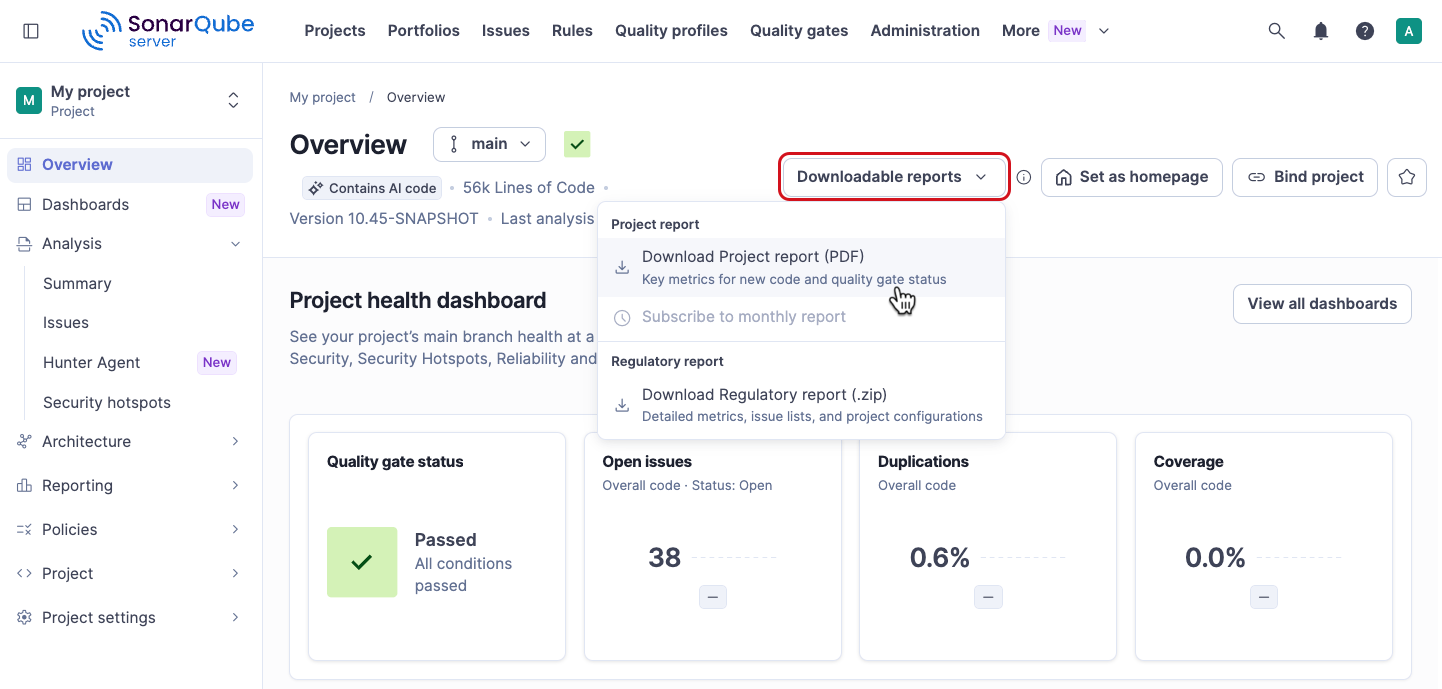
2. Open the **Downloadable reports** menu. It's available on both of these pages:
* The **Overview** page, which opens when you retrieve the project or application.
* The **Summary** page, which shows the quality gate status and the analysis results. Go to *Your project* > **Analysis** > **Summary**.
3. Select **Download Project report (PDF)** or **Download Application report (PDF)**. You can also select **Subscribe to monthly report**. Subscribing to monthly reports requires an email address associated with your user account. See [Viewing your user profile](/sonarqube-server/user-guide/managing-your-account/viewing-user-profile.md) for more information.
{% hint style="info" %}
You cannot download or subscribe to a PDF report for a temporary branch. If you are unable to download or subscribe to a PDF report for a branch, go to *Your project* > **Project** > **Branches and Pull Requests** and make sure that the **Keep when inactive** toggle is on for that branch. You must be a project admin to do so.
{% endhint %}
## Portfolio PDF reports
You can download a PDF report for a portfolio from the portfolio’s Overview page:
* Click on the **Downloadable reports** drop-down menu.
* Select **Download Portfolio report (PDF).** This is really convenient, for example, if you’re going into a meeting where you may not have access to your SonarQube Server instance.
You can also **Subscribe to monthly report.** The default subscription frequency is monthly, but a portfolio administrator can change it. See [Managing portfolios](/sonarqube-server/project-administration/managing-portfolios.md) for more information. Subscribing to monthly reports requires an email address associated with your user account. See [Viewing your user profile](/sonarqube-server/user-guide/managing-your-account/viewing-user-profile.md) for more information.
{% hint style="info" %}
You will only receive the PDF when the portfolio is computed.
{% endhint %}
## Related pages
* [Compliance reports](/sonarqube-server/user-guide/viewing-reports/compliance-reports.md)
* [Regulatory reports](/sonarqube-server/user-guide/viewing-reports/regulatory-reports.md)
* [Portfolios](/sonarqube-server/user-guide/viewing-reports/portfolios.md)
* [PDF reports](/sonarqube-server/instance-administration/system-functions/pdf-reports.md)
---
# Agent Instructions
This documentation is published with GitBook. GitBook is the documentation platform designed so that both humans and AI agents can read, navigate, and reason over technical content effectively. Learn more at gitbook.com.
## Querying This Documentation
If you need additional information that is not directly available in this page, you can query the documentation by asking a question.
Perform an HTTP GET request on the following URL with the `ask` and `goal` query parameters:
```
GET https://docs.sonarsource.com/sonarqube-server/user-guide/viewing-reports/pdf-reports.md?ask=&goal=
```
`ask` is the immediate question: it should be specific, self-contained, and written in natural language.
`goal` is what the user is ultimately trying to achieve, the reason they need the answer. Sharing it helps GitBook give you a better, more relevant answer. A goal is most helpful when it describes the outcome the user wants rather than restating the question. For example, with `ask=how do I create an API token`, a goal like `automate deployments from our CI pipeline` lets GitBook tailor the answer to that use case.
The response will contain a direct answer to the question and relevant excerpts and sources from the documentation.
Use this mechanism when the answer is not explicitly present in the current page, you need clarification or additional context, or you want to retrieve related documentation sections.