> For the complete documentation index, see [llms.txt](https://docs.sonarsource.com/llms.txt). Markdown versions of documentation pages are available by appending `.md` to page URLs; this page is available as [Markdown](https://docs.sonarsource.com/sonarqube-server/user-guide/viewing-reports/regulatory-reports.md).
# Regulatory reports
In SonarQube Server 2026.5, download a regulatory report with your project's quality gate status, ratings, and issue distribution for new and overall code.
Starting in [Enterprise](https://www.sonarsource.com/plans-and-pricing/enterprise/), you can download a regulatory report for any permanent branch of a project. A permanent branch is one that has been set to **Keep when inactive**, see [Maintaining project branches](/sonarqube-server/project-administration/maintaining-project/maintaining-the-branches-of-your-project.md) for details.
The regulatory report is different from the regulatory standards in compliance reports, which show how your project measures up against regulations such as the EU Cyber Resilience Act and MISRA C++:2023. See [Compliance reports](/sonarqube-server/user-guide/viewing-reports/compliance-reports.md#regulatory) for details.
## Downloading regulatory reports
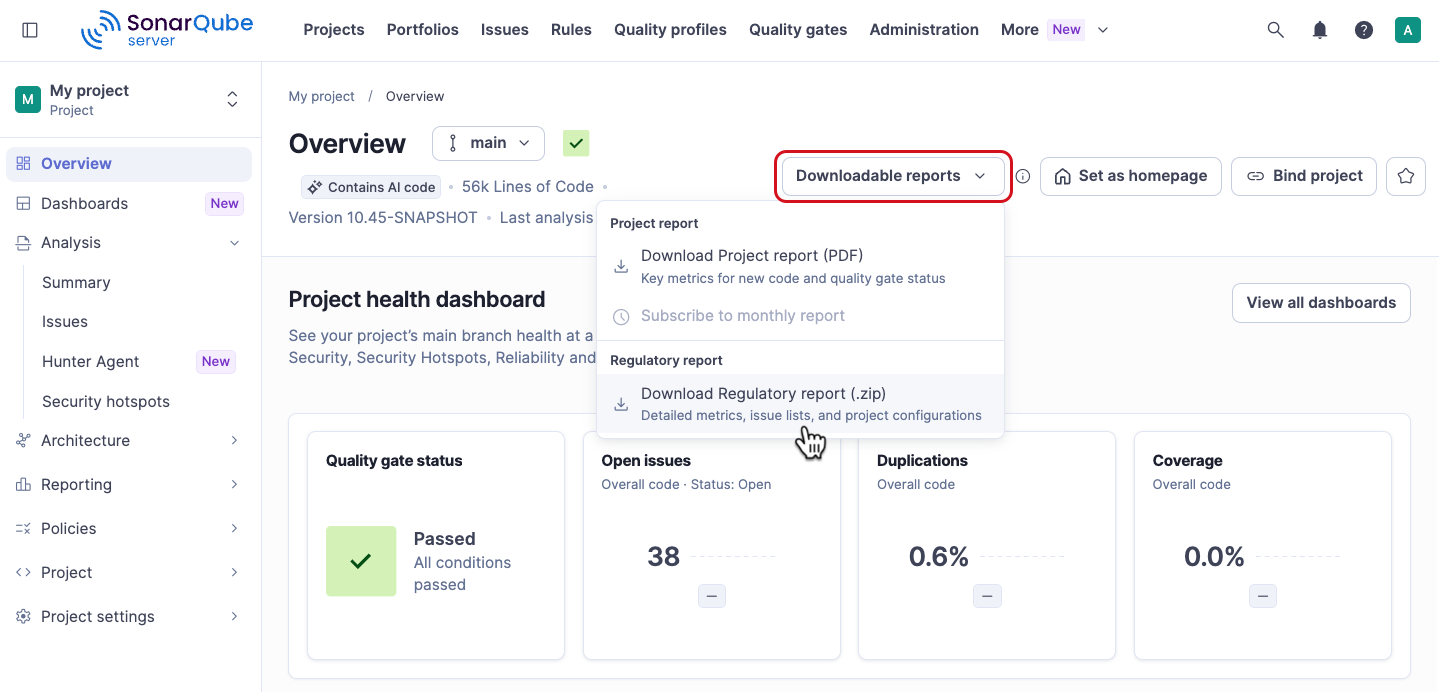
To download a regulatory report:
1. Retrieve your project. See [Retrieving projects](/sonarqube-server/user-guide/viewing-projects/retrieving-projects.md) for more information.
2. Open the **Downloadable reports** menu. It's available on both of these pages:
* The **Overview** page, which opens when you retrieve the project.
* The **Summary** page, which shows the quality gate status and the analysis results. Go to *Your project* > **Analysis** > **Summary**.
3. Select **Download Regulatory report (.zip)**.
Alternatively:
1. Go to *Your project* > **Project** > **Project information**.
2. In the **Regulatory Report** section, choose a project branch from the drop down menu.
3. Click **Download report**.
SonarQube generates the report for download, which may take a few minutes depending on the size of the project.
## Contents of the regulator report’s ZIP file
The reports are in a ZIP file containing a snapshot of the latest analysis of the selected branch and include TXT, CSV, and PDF files.
The PDF file includes:
* **Project overview**:
* Project details
* Quality gates information and status
* **Project rating** **overview** for:
* New code broken down by new issues, accepted issues, coverage, duplication, and security hotspots.
* Overall code broken down by security, reliability, maintainability (in [MQR mode](/sonarqube-server/instance-administration/analysis-functions/instance-mode/mqr-mode.md)) or vulnerabilities, bugs, and code smells (in [Standard Experience](/sonarqube-server/instance-administration/analysis-functions/instance-mode/standard-experience.md)), accepted issues, coverage, duplication, and security hotspots.
* **Distribution of issues in new code** showing open issues and breakdown by severity, based on security, reliability, maintainability (in [MQR mode](/sonarqube-server/instance-administration/analysis-functions/instance-mode/mqr-mode.md)) or vulnerabilities, bugs, and code smells (in [Standard Experience](/sonarqube-server/instance-administration/analysis-functions/instance-mode/standard-experience.md)).
* **Distribution of issues in overall code** showing open issues and breakdown by severity, based on security, reliability, maintainability (in [MQR mode](/sonarqube-server/instance-administration/analysis-functions/instance-mode/mqr-mode.md)) or vulnerabilities, bugs, and code smells (in [Standard Experience](/sonarqube-server/instance-administration/analysis-functions/instance-mode/standard-experience.md)).
* **Quality gate and quality profiles** information.
* **Files** lists all relevant files included in the ZIP file.
* **Definitions** lists all the definitions of terms related to the report.
Depending on the configuration of your SonarQube Server instance, the regulatory report is generated with metrics either from [Standard Experience](/sonarqube-server/instance-administration/analysis-functions/instance-mode/standard-experience.md) or [MQR mode](/sonarqube-server/instance-administration/analysis-functions/instance-mode/mqr-mode.md). Some CSV files may contain metrics from both modes and they are marked accordingly.
If you have [SonarQube Advanced Security](https://www.sonarsource.com/solutions/security/), the regulatory report ZIP file includes both a [risk report](/sonarqube-server/advanced-security/reviewing-and-fixing-dependency-risks.md#tracking-risks-via-reports) and a [software bill of materials](/sonarqube-server/advanced-security/viewing-dependencies.md#software-bill-of-materials).
## Related pages
* [Compliance reports](/sonarqube-server/user-guide/viewing-reports/compliance-reports.md)
* [PDF reports](/sonarqube-server/user-guide/viewing-reports/pdf-reports.md)
* [Portfolios](/sonarqube-server/user-guide/viewing-reports/portfolios.md)
* [Other issues](/sonarqube-server/server-update-and-maintenance/troubleshooting/other-issues.md)
* [Cyber Resilience Act capability mapping](https://docs.sonarsource.com/cyber-resilience-act)
---
# Agent Instructions
This documentation is published with GitBook. GitBook is the documentation platform designed so that both humans and AI agents can read, navigate, and reason over technical content effectively. Learn more at gitbook.com.
## Querying This Documentation
If you need additional information that is not directly available in this page, you can query the documentation by asking a question.
Perform an HTTP GET request on the following URL with the `ask` and `goal` query parameters:
```
GET https://docs.sonarsource.com/sonarqube-server/user-guide/viewing-reports/regulatory-reports.md?ask=&goal=
```
`ask` is the immediate question: it should be specific, self-contained, and written in natural language.
`goal` is what the user is ultimately trying to achieve, the reason they need the answer. Sharing it helps GitBook give you a better, more relevant answer. A goal is most helpful when it describes the outcome the user wants rather than restating the question. For example, with `ask=how do I create an API token`, a goal like `automate deployments from our CI pipeline` lets GitBook tailor the answer to that use case.
The response will contain a direct answer to the question and relevant excerpts and sources from the documentation.
Use this mechanism when the answer is not explicitly present in the current page, you need clarification or additional context, or you want to retrieve related documentation sections.