> For the complete documentation index, see [llms.txt](https://docs.sonarsource.com/llms.txt). Markdown versions of documentation pages are available by appending `.md` to page URLs; this page is available as [Markdown](https://docs.sonarsource.com/sonarqube-server/2025.1/setup-and-upgrade/install-the-server/introduction.md).
# Introduction
Read this before starting the installation of SonarQube Server’s Developer or Enterprise Edition. This page is for SonarQube Server 2025.1.
{% hint style="info" %}
We recommend installing SonarQube Server from a [Docker image](https://hub.docker.com/_/sonarqube) or [Helm chart](https://artifacthub.io/packages/helm/sonarqube/sonarqube) (Kubernetes/OpenShift). These methods make it easier to update to newer versions and to operate your instance. Install from the ZIP file only if neither of those options is feasible for your environment.
{% endhint %}
This section describes a single-node SonarQube Server instance from the ZIP file or from the Docker image. For a Kubernetes installation, see [Introduction](/sonarqube-server/2025.1/setup-and-upgrade/deploy-on-kubernetes/server/introduction.md). For details on clustered setup, see [Data Center Edition (DCE)](/sonarqube-server/2025.1/setup-and-upgrade/install-the-server-as-a-cluster.md).
## Installation roadmap
Proceed as follows to install SonarQube Server on server side:
1. Install the database. See [Installing the database](/sonarqube-server/2025.1/setup-and-upgrade/install-the-server/installing-the-database.md).
2. Install SonarQube Server and perform a basic setup. You can install it either from the Docker image (see [Installing from the Docker image](/sonarqube-server/2025.1/setup-and-upgrade/install-the-server/installing-sonarqube-from-docker.md)) or from the ZIP file (see [Installing from the ZIP file](/sonarqube-server/2025.1/setup-and-upgrade/install-the-server/installing-sonarqube-from-zip-file.md)).
3. If necessary, perform [Advanced installation](/sonarqube-server/2025.1/setup-and-upgrade/install-the-server/advanced-installation-features.md).
4. Once your SonarQube Server is installed and running, you can access SonarQube Server UI in your web browser (the default system administrator credentials are **admin**/**admin**) and you’re ready to begin [Project analysis setup](/sonarqube-server/2025.1/analyzing-source-code/overview.md).
{% hint style="info" %}
Check out this [video](https://www.youtube.com/watch?v=O0yFLS30InY) on installing SonarQube Server on Windows for a process overview.
{% endhint %}
## Instance components
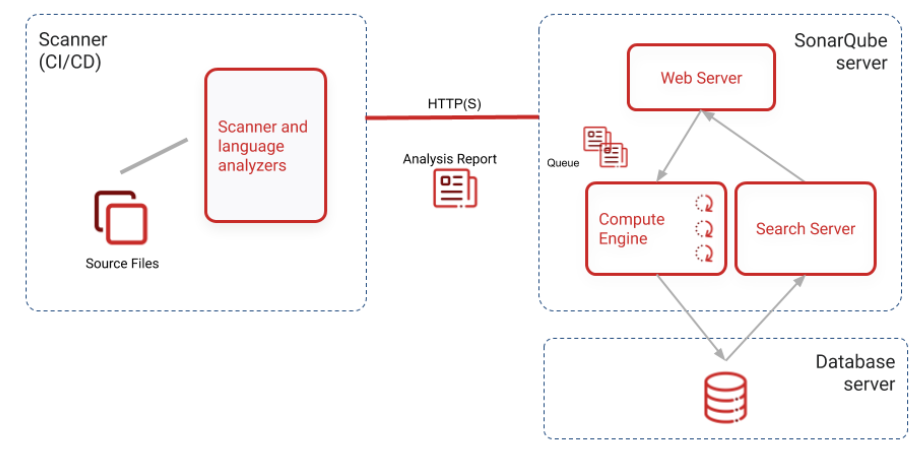
Three components are necessary to run a SonarQube Server analysis:
SonarQube instance components
1. SonarQube Server running the following processes:
* A web server that serves the SonarQube Server user interface.
* A search server based on Elasticsearch.
* The compute engine in charge of processing code analysis reports and saving them in the SonarQube Server database.
2. The database to store the following:
* Metrics and issues for code quality and security generated during code scans.
* The SonarQube Server instance configuration.
3. One or more scanners running on your build or continuous integration servers to analyze projects.
## Hosts and locations
For optimal performance, SonarQube Server and its database should be installed on separate hosts, and the Server host should be dedicated. The Server and database hosts should be located on the same network.
All hosts must be time-synchronized.
---
# Agent Instructions
This documentation is published with GitBook. GitBook is the documentation platform designed so that both humans and AI agents can read, navigate, and reason over technical content effectively. Learn more at gitbook.com.
## Querying This Documentation
If you need additional information that is not directly available in this page, you can query the documentation by asking a question.
Perform an HTTP GET request on the following URL with the `ask` and `goal` query parameters:
```
GET https://docs.sonarsource.com/sonarqube-server/2025.1/setup-and-upgrade/install-the-server/introduction.md?ask=&goal=
```
`ask` is the immediate question: it should be specific, self-contained, and written in natural language.
`goal` is what the user is ultimately trying to achieve, the reason they need the answer. Sharing it helps GitBook give you a better, more relevant answer. A goal is most helpful when it describes the outcome the user wants rather than restating the question. For example, with `ask=how do I create an API token`, a goal like `automate deployments from our CI pipeline` lets GitBook tailor the answer to that use case.
The response will contain a direct answer to the question and relevant excerpts and sources from the documentation.
Use this mechanism when the answer is not explicitly present in the current page, you need clarification or additional context, or you want to retrieve related documentation sections.