> For the complete documentation index, see [llms.txt](https://docs.sonarsource.com/llms.txt). Markdown versions of documentation pages are available by appending `.md` to page URLs; this page is available as [Markdown](https://docs.sonarsource.com/sonarqube-server/server-update-and-maintenance/troubleshooting/server-logs.md).
# Server logs
Accessing and using server logs for troubleshooting in SonarQube Server 2026.5.
If you’re having trouble starting your server for the first time (or any subsequent time!) the first thing to do is check your server logs.
The following log files are created (log files rotate on a regular basis):
* One per SonarQube Server process (main process, compute engine, search engine, and web server).
* The access log.
* The deprecation log which stores the Web API requests that use deprecated Web API endpoints or parameters. See [Monitoring API deprecation](/sonarqube-server/server-update-and-maintenance/maintenance/deprecations/monitoring-api-deprecation.md) for more information.
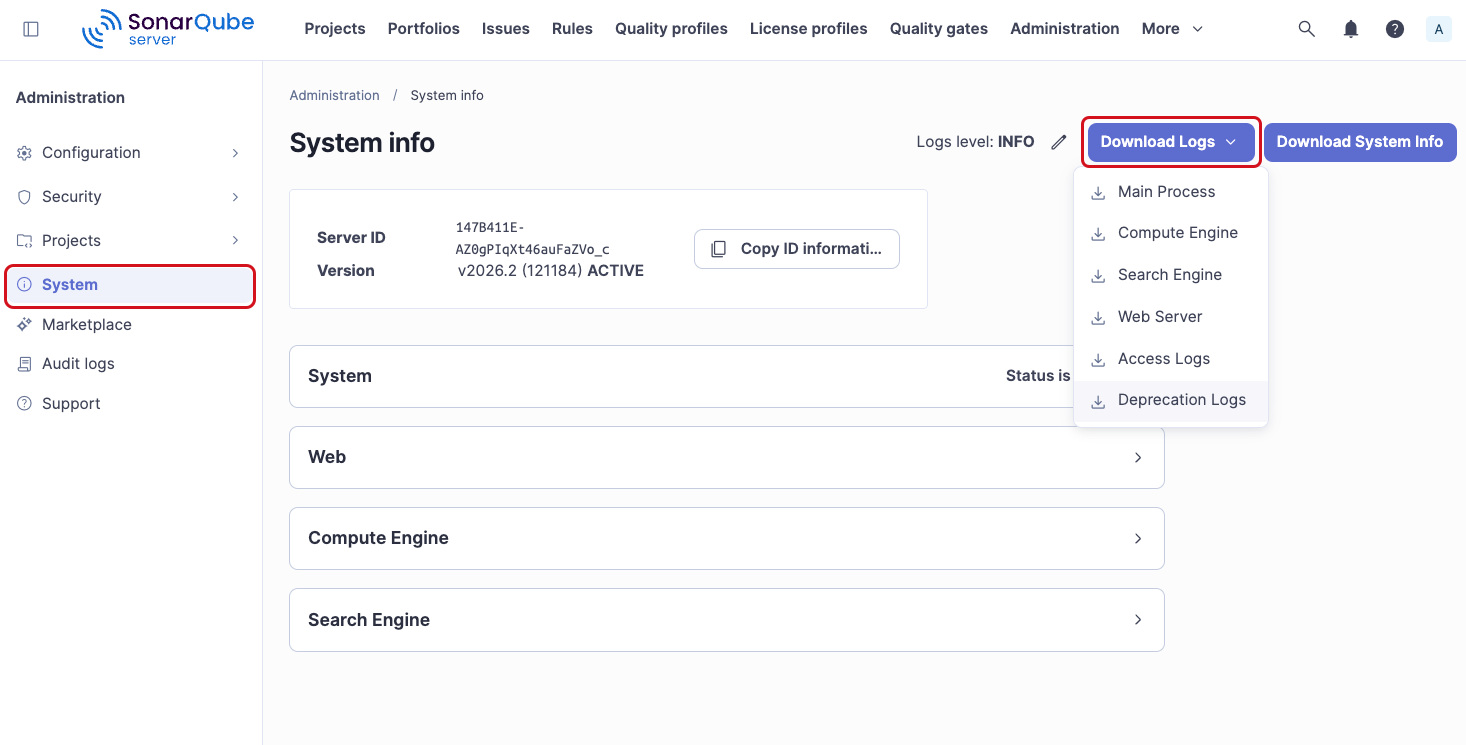
If you have a support contract, you can download your instance’s current log files from the UI. To do so:
* Go to **Administration > System** and click **Download logs.**
Otherwise, you’ll find them in `/logs`:
* `sonar.log`: Log for the main process. Holds general information about startup and shutdown. You’ll get overall status here but not details. Look to the other logs for that.
* `web.log`: Information about initial connection to the database, database migration and reindexing, and the processing of HTTP requests. This includes database and search engine logs related to those requests.
* `ce.log`: Information about background task processing and the database and search engine logs related to those tasks.
* `es.log`: Ops information from the search engine, such as Elasticsearch startup, health status changes, cluster-, node- and index-level operations, etc.
* `access.log`: access log. Not written if `sonar.web.accessLogs.target` is `console`. See [#access-log-output](#access-log-output "mention").
## Understanding the logs
When there’s an error, you’ll very often find a stacktrace in the logs. If you’re not familiar stacktraces, they can be intimidatingly tall walls of incomprehensible text. As a sample, here’s a fairly short one:
```css-79elbk
java.lang.IllegalStateException: Unable to blame file **/**/foo.java
at org.sonarsource.scm.git.JGitBlameCommand.blame(JGitBlameCommand.java:128)
at org.sonarsource.scm.git.JGitBlameCommand.access$000(JGitBlameCommand.java:44)
at org.sonarsource.scm.git.JGitBlameCommand$1.call(JGitBlameCommand.java:112)
at org.sonarsource.scm.git.JGitBlameCommand$1.call(JGitBlameCommand.java:109)
at java.util.concurrent.FutureTask.run(Unknown Source)
at java.util.concurrent.ThreadPoolExecutor.runWorker(Unknown Source)
at java.util.concurrent.ThreadPoolExecutor$Worker.run(Unknown Source)
at java.lang.Thread.run(Unknown Source)
Caused by: java.lang.NullPointerException
at org.eclipse.jgit.treewalk.filter.PathFilter.create(PathFilter.java:77)
at org.eclipse.jgit.blame.BlameGenerator.(BlameGenerator.java:161)
at org.eclipse.jgit.api.BlameCommand.call(BlameCommand.java:203)
at org.sonarsource.scm.git.JGitBlameCommand.blame(JGitBlameCommand.java:126)
... 7 more
```
Unless you wrote the code that produced this error, you really only care about:
* the first line, which ought to have a human-readable message after the colon. In this case, it’s Unable to blame file `**/**/foo.java`
* and any line that starts with `Caused by`. There are often several `Caused by` lines, and indentation makes them easy to find as you scroll through the error. Be sure to read each of these lines. Very often one of them - the last one or next-to-last one - contains the real problem.
## Setting up the server-side logging
Server-side logging is controlled by system properties. A configuration of the log format is currently not possible.
### Log level
The server-side log level can be customized via the `sonar.log.level` property in `/conf/sonar.properties`. Supported values are:
* **`INFO`**: The default.
* **`DEBUG`**: For advanced logs. Starting from this log level, some personal user information can be logged.
* **`TRACE`**: Show advanced logs and all SQL and Elasticsearch requests. `TRACE` level logging slows down the server environment, and should be used only for tracking web request performance problems.
{% hint style="info" %}
You can tune the log level via controls at the top of the page **Administration > System**. Changes made here are temporary, and last only until the next time the instance is restarted, at which point the level will be reset to the more permanent value set in `sonar.properties`. Regardless, if you change your log level *from* `INFO`, be sure to change it back as soon as is practical; log files can get very large very quickly at lower log levels.
{% endhint %}
### Log level by process
The server-side log level can be adjusted more precisely for the four processes of SonarQube via the following system properties:
* **`sonar.log.level.app`**: for the Main process of SonarQube (aka WrapperSimpleApp, the bootstrapper process starting the 3 others)
* **`sonar.log.level.web`**: for the WebServer
* **`sonar.log.level.ce`**: for the ComputeEngineServer
* **`sonar.log.level.es`**: for the SearchServer
### Log rotation
To control log rolling, set the `sonar.log.rollingPolicy` property to one of these values:
* **`time:[value]`**: for time-based rotation. For example, use `time:yyyy-MM-dd` for daily rotation, and `time:yyyy-MM` for monthly rotation.
* **`size:[value]`**: for size-based rotation. For example, `size:10MB`.
* **`none`**: for no rotation. Typically this would be used when logs are handled by an external system like logrotate.
`sonar.log.maxFiles` is the maximum number of files to keep. This property is ignored if `sonar.log.rollingPolicy=none`.
### Access log output
By default, SonarQube Server writes the access log to `access.log`. To collect it with the rest of the logs in a containerized deployment, set the `sonar.web.accessLogs.target` property to one of these values:
* `file`: writes the access log to `access.log` only. This is the default.
* `console`: writes the access log to standard output only.
* `both`: writes the access log to `access.log` and to standard output.
Both destinations use the format set by `sonar.web.accessLogs.pattern`, and `sonar.log.jsonOutput` does not apply to the access log. The property is ignored if `sonar.web.accessLogs.enable` is `false`. An unsupported value prevents SonarQube Server from starting.
### Log output in JSON format
By default, SonarQube prints all logs in plain text. You can convert the standard output of SonarQube logs to [JSON format](https://edgedelta.com/company/blog/what-are-json-logs/) by setting the system property `sonar.log.jsonOutput` to `true`. This will enable log collection tools like [Loki](https://grafana.com/docs/loki/latest/) to post-process the information provided by the application.
## Related pages
* [System info and server ID](/sonarqube-server/instance-administration/system-info-and-server-id.md)
* [Performance issues](/sonarqube-server/server-update-and-maintenance/troubleshooting/performance-issues.md)
* [Database-related issues](/sonarqube-server/server-update-and-maintenance/troubleshooting/database-related-issues.md)
* [Elasticsearch-related issues](/sonarqube-server/server-update-and-maintenance/troubleshooting/elasticsearch.md)
* [Other issues](/sonarqube-server/server-update-and-maintenance/troubleshooting/other-issues.md)
---
# Agent Instructions
This documentation is published with GitBook. GitBook is the documentation platform designed so that both humans and AI agents can read, navigate, and reason over technical content effectively. Learn more at gitbook.com.
## Querying This Documentation
If you need additional information that is not directly available in this page, you can query the documentation by asking a question.
Perform an HTTP GET request on the following URL with the `ask` and `goal` query parameters:
```
GET https://docs.sonarsource.com/sonarqube-server/server-update-and-maintenance/troubleshooting/server-logs.md?ask=&goal=
```
`ask` is the immediate question: it should be specific, self-contained, and written in natural language.
`goal` is what the user is ultimately trying to achieve, the reason they need the answer. Sharing it helps GitBook give you a better, more relevant answer. A goal is most helpful when it describes the outcome the user wants rather than restating the question. For example, with `ask=how do I create an API token`, a goal like `automate deployments from our CI pipeline` lets GitBook tailor the answer to that use case.
The response will contain a direct answer to the question and relevant excerpts and sources from the documentation.
Use this mechanism when the answer is not explicitly present in the current page, you need clarification or additional context, or you want to retrieve related documentation sections.