> For the complete documentation index, see [llms.txt](https://docs.sonarsource.com/llms.txt). Markdown versions of documentation pages are available by appending `.md` to page URLs; this page is available as [Markdown](https://docs.sonarsource.com/sonarqube-server/2025.2/devops-platform-integration/azure-devops-integration/setting-up-project-integration.md).
# Setting up project integration
SonarQube Server 2025.2 project-level settings required for Azure DevOps or Azure Pipelines for your project analysis.
## Setting up pull request integration with Azure DevOps
SonarQube Server can:
* Report the quality gate status and analysis metrics to your pull requests in Azure DevOps.
* Show issues detected on a pull request in Azure DevOps. Each issue will be a comment on the Azure DevOps pull request. If you change the status of an issue in SonarQube Server, that status change is immediately reflected in the Azure DevOps interface.
{% hint style="info" %}
The report of the analysis results to your pull requests is supported for monorepo projects starting in [Enterprise Edition](https://www.sonarsource.com/plans-and-pricing/enterprise/).
{% endhint %}
To set up the pull request analysis:
1. Check the [Setting up the pull request analysis](/sonarqube-server/2025.2/analyzing-source-code/pull-request-analysis/setting-up-the-pull-request-analysis.md#prerequisites) for setting up a pull request analysis.
2. Enable the pull request analysis on the target branch; open the [#enabling-pull-request-analysis-on-target-branch](#enabling-pull-request-analysis-on-target-branch "mention") collapsible below for details.
3. If you don't use an integrated CI tool like Azure Pipelines, you must set up the pull request parameters manually; check the [Setting up the pull request analysis](/sonarqube-server/2025.2/analyzing-source-code/pull-request-analysis/setting-up-the-pull-request-analysis.md#setup-pull-request-parameters) article for details.
4. For an unbound project, an additional setup is required; open the [#additional-setup-for-an-unbound-project](#additional-setup-for-an-unbound-project "mention") collapsible below for instructions.
5. You can prevent the pull request merge if the quality gate fails; open the [#preventing-pull-request-merges-when-the-quality-gate-fails](#preventing-pull-request-merges-when-the-quality-gate-fails "mention") collapsible below for more information.
Enabling pull request analysis on target branch
To ensure that all of your pull requests get automatically analyzed:
* Add a [build validation branch policy](https://docs.microsoft.com/en-us/azure/devops/pipelines/repos/azure-repos-git#pr-triggers) on the target branch.
Additional setup for an unbound project
For an unbound project (a project *not* created by importing the corresponding Azure DevOps repository), an additional setup is required as explained below:
1. Retrieve the project in SonarQube Server and select **Project Settings** > **General Settings** > **DevOps Platform Integration**.
2. Enter the **Project name** and **Repository name**.
Preventing pull request merges when the quality gate fails
To prevent the merge of pull requests when the quality gate fails, proceed as follows (you can also watch this [video](https://www.youtube.com/watch?v=be5aw9_7bBU) for a quick overview of the procedure):
1. Go to the **Branch policies** page of your main branch.
2. Under **Require approval from additional services**, select **Add status policy**.
3. In the **Status to check** dropdown, select **SonarQube/quality gate**.
4. Then choose the option depending on your need:
* **Optional:** Users will be able to merge a pull request even if the quality gate fails.
* **Required:** Users will not be able to merge a pull request unless the quality gate passes.
5. Select **Save**.
{% hint style="info" %}
This feature is not supported for projects on a monorepo.
{% endhint %}
## Setting up integration with Azure Pipelines
If you use Azure Pipelines, you must configure a service connection in Azure and enable the pull request analysis in your pipeline.
### Adding SonarQube service connection to Azure Pipelines (SonarQube endpoint)
Service connections are authenticated connections between Azure Pipelines and external or remote services. You must declare your SonarQube Server as a service connection in your Azure DevOps project.
Proceed as follows:
1\. In SonarQube, create an authentication token that will be used by Azure DevOps to execute the analysis of your project in SonarQube. To do so, create a token *and copy it*. For more information, see [Managing your tokens](/sonarqube-server/2025.2/user-guide/managing-tokens.md).
2\. In your Azure DevOps project, go to **Project Settings > Service connections**.
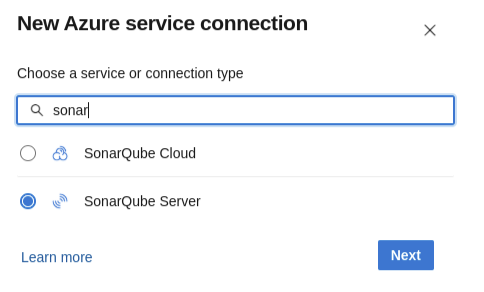
3\. Select **New service connection** and then select **SonarQube Server** from the service connection list.
4\. Enter your SonarQube Server URL, the token created in the first step, and a memorable **Service connection name** (You will need this name when configuring your Azure build pipelines). Then, select **Save** to save your connection.
### Enabling the pull request analysis in your build pipeline
The Azure DevOps extension running in your Azure pipeline can automatically detect branches or pull requests being built (you don’t need to pass them as parameters to the scanner).
To enable the pull request analysis in your Azure pipeline of code stored on Azure DevOps, you must configure a pull request trigger on the target branch (main development branch) as explained above in [#enabling-pull-request-analysis-on-target-branch](#enabling-pull-request-analysis-on-target-branch "mention"). If your code is stored on GitHub or Bitbucket Cloud, see below.
Code stored on GitHub or Bitbucket Cloud
To configure a pull request trigger in your Azure build pipeline for code stored on GitHub or Bitbucket Cloud:
1. Select **Edit** to modify your build pipeline.
2. Go to the **Triggers** tab.
3. Select the correct repository under **Pull request validation**.
4. Select **Enable pull request validation**.
5. Set up the branch filters: Note that this is the **target** branch of the pull request. See the [Microsoft documentation](https://docs.microsoft.com/en-us/azure/devops/pipelines/build/triggers?view=azure-devops\&tabs=yaml#pr-triggers) for more details.
6. Select **Save** to update your pipeline.
## Disable pull request annotations
Using the default setup, SonarQube Server will add annotations on issues it detects in your Azure DevOps pull request (PR). It’s possible to completely remove the PR integration with Azure DevOps to remove these, but that’s not ideal if you want to keep reporting the quality gate status and analysis metrics to your PRs.\
\
To disable annotations from SonarQube Server on your Azure DevOps PRs:
1. First check if your Azure organization has already been integrated with SonarQube Server. See the [Setting up integration at global level](/sonarqube-server/2025.2/devops-platform-integration/azure-devops-integration/setting-up-integration-at-global-level.md) page.
2. Next, retrieve your project and navigate to **Project Settings** > **General Settings** > **DevOps Platform Integration**.
3. Complete all of the required fields and deselect **Enable Inline Pull Request Annotations**.
4. Select **Save** to finish and if successful, you will see confirmation and configuration validation notifications.
## Related pages
* [Azure Pipelines integration overview](/sonarqube-server/2025.2/devops-platform-integration/azure-devops-integration/azure-pipelines-integration-overview.md)
* [Setting up integration at global level](/sonarqube-server/2025.2/devops-platform-integration/azure-devops-integration/setting-up-integration-at-global-level.md)
* [Creating and configuring your project](/sonarqube-server/2025.2/devops-platform-integration/azure-devops-integration/creating-your-project.md)
* [Troubleshooting analysis](/sonarqube-server/2025.2/devops-platform-integration/azure-devops-integration/troubleshooting-analysis.md)
---
# Agent Instructions
This documentation is published with GitBook. GitBook is the documentation platform designed so that both humans and AI agents can read, navigate, and reason over technical content effectively. Learn more at gitbook.com.
## Querying This Documentation
If you need additional information that is not directly available in this page, you can query the documentation by asking a question.
Perform an HTTP GET request on the following URL with the `ask` and `goal` query parameters:
```
GET https://docs.sonarsource.com/sonarqube-server/2025.2/devops-platform-integration/azure-devops-integration/setting-up-project-integration.md?ask=&goal=
```
`ask` is the immediate question: it should be specific, self-contained, and written in natural language.
`goal` is what the user is ultimately trying to achieve, the reason they need the answer. Sharing it helps GitBook give you a better, more relevant answer. A goal is most helpful when it describes the outcome the user wants rather than restating the question. For example, with `ask=how do I create an API token`, a goal like `automate deployments from our CI pipeline` lets GitBook tailor the answer to that use case.
The response will contain a direct answer to the question and relevant excerpts and sources from the documentation.
Use this mechanism when the answer is not explicitly present in the current page, you need clarification or additional context, or you want to retrieve related documentation sections.