> For the complete documentation index, see [llms.txt](https://docs.sonarsource.com/llms.txt). Markdown versions of documentation pages are available by appending `.md` to page URLs; this page is available as [Markdown](https://docs.sonarsource.com/sonarqube-cloud/architecture-analysis.md).
# Architecture analysis
Document, maintain, and improve your software architecture by comparing current and intended architectures, to raise architecture problems.
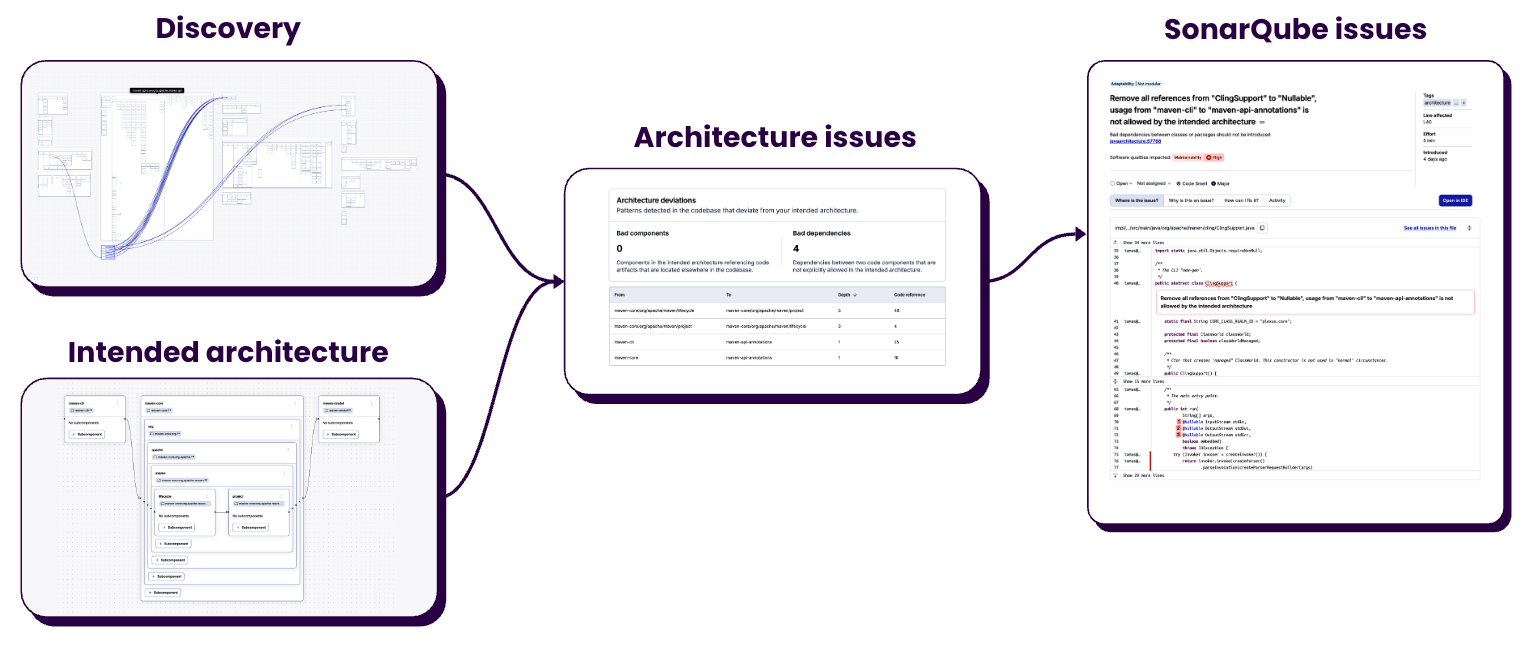
Sonar Architecture helps you document, maintain, and improve your software architecture by comparing your current architecture against an intended one, so you can catch and fix architecture problems early.
SonarQube Cloud provides tools that allow you to:
* Visualize your current codebase architecture.
* Create an intended architecture.
* Raise architecture problems when flaws or deviations from the intended architecture are detected.
* Raise [SonarQube issues](/sonarqube-cloud/managing-your-projects/issues/introduction.md) for underlying architecture problems, as part of existing workflows (quality gate for example).
* See how your projects connect to each other and to the rest of your system, and enforce the same architecture decisions across many projects.
Architecture analysis runs on each analysis with no additional configuration.
Architecture is available on the Team and Enterprise plans. Enterprise architecture is available on the Enterprise plan.
If you're new to Sonar Architecture, start with [#concepts-and-terminology](#concepts-and-terminology "mention") to learn the key terms.
{% content-ref url="/pages/8mbvMvocEAGKLXw6A3LP" %}
[Project architecture](/sonarqube-cloud/architecture-analysis/project-architecture.md)
{% endcontent-ref %}
{% content-ref url="/pages/ykDFJE2GFSTOVTxWEZnh" %}
[Enterprise architecture](/sonarqube-cloud/architecture-analysis/enterprise-architecture.md)
{% endcontent-ref %}
## Why manage your architecture?
Most organizations and teams do not manage their software architecture, and those that do, manage it by hand. Teams leave their architecture unattended, consciously or not. The result is architecture erosion, also called structural technical debt.
Architecture erosion has three major impacts:
* It requires more work to make changes.
* It makes it harder to keep the impact of changes under control.
* Accumulated structural technical debt eventually makes the application impossible to change.
The increasing use of AI coding has accelerated this phenomenon. To understand how SonarQube Cloud can help you reduce structural technical debt, go to [#roles-approach-and-workflow](#roles-approach-and-workflow "mention").
## Supported languages
C#, Java, JavaScript, Python, and TypeScript.
## Concepts and terminology
### Architecture
The architecture of an application is about how its physical and logical containers are organized and interconnected.
When dealing with architecture, there are three parts that need to be managed, in this order:
* Structure: How code is organized into a hierarchy of containers.
* Relationships: How containers depend on each other.
* Design: How containers interact with each other.
### Current architecture
How code is *currently* organized into containers, and how these containers actually interact. Current architecture is automatically derived from the code.
### Intended architecture
How code *should* be organized into containers, and how these containers should interact. Intended architecture is defined by tech leads.
### Tangles
A tangle is a set of classes or files that depend on each other in a cycle. There is a path from every item to every other item in the tangle's dependency graph. Tangles make code more complex, and harder to understand and maintain.
### Containers
In the context of code architecture, containers are units of code. Their relationships with other containers form the architecture of your software.
## Roles, approach and workflow
Sonar Architecture helps you document, maintain, improve, transform, and evolve software architectures. It engages tech leads and developers alike, and reduces structural technical debt by becoming part of the development process.
### Roles
Two distinct roles are involved in defining and evolving a software architecture. Often, though not always, different team members perform them:
**Tech lead**
The person on the team with the skills and the standing to make architectural decisions. A tech lead:
* Defines the [intended architecture](#intended-architecture).
* Sees the deviations between intended architecture and current architecture.
* Reviews flaws in the current architecture and suggests solutions for fixing them.
**Developer**
Person who makes code changes to the project on a daily basis. A developer:
* Has access to the intended architecture defined by tech leads.
* Makes sure no deviations are introduced in the code.
* Follows architectural recommendations.
### Approach
Sonar takes a divide-and-conquer approach, handling each dimension of architecture separately:
1. **Comprehend current architecture:** Give people and AI a live reference point for how the code is organized today.
2. **Formalize intended architecture:** Let tech leads define the intended architecture and enforce it, in small steps. AI can use the model too, for example as context in a request.
3. **Prioritize architectural problems:** Give tech leads a clear view of architectural problems, in priority order.
4. **Make structural problems actionable:** Use SonarQube to stop people and AI from eroding the architecture further. Break the existing problems into smaller actions that developers or AI can take.
### Workflow
Sonar provides a complete workflow which ensures that:
* The whole team understands the current architecture, and the evolving intended architecture.
* Tech leads can incrementally formalize architectural decisions.
Architectural decisions that imply code changes raise [SonarQube issues](/sonarqube-cloud/managing-your-projects/issues/introduction.md) that can be resolved by developers.
Without action from tech leads, no SonarQube issues are raised.
## Additional resources
For more on getting started with Sonar Architecture, see the selection of videos, presentations, and blog posts on our Community's [Resources for architecture management](https://community.sonarsource.com/t/resources-for-architecture-management-in-sonarqube/177657) page.
---
# Agent Instructions
This documentation is published with GitBook. GitBook is the documentation platform designed so that both humans and AI agents can read, navigate, and reason over technical content effectively. Learn more at gitbook.com.
## Querying This Documentation
If you need additional information that is not directly available in this page, you can query the documentation by asking a question.
Perform an HTTP GET request on the following URL with the `ask` and `goal` query parameters:
```
GET https://docs.sonarsource.com/sonarqube-cloud/architecture-analysis.md?ask=&goal=
```
`ask` is the immediate question: it should be specific, self-contained, and written in natural language.
`goal` is what the user is ultimately trying to achieve, the reason they need the answer. Sharing it helps GitBook give you a better, more relevant answer. A goal is most helpful when it describes the outcome the user wants rather than restating the question. For example, with `ask=how do I create an API token`, a goal like `automate deployments from our CI pipeline` lets GitBook tailor the answer to that use case.
The response will contain a direct answer to the question and relevant excerpts and sources from the documentation.
Use this mechanism when the answer is not explicitly present in the current page, you need clarification or additional context, or you want to retrieve related documentation sections.