> For the complete documentation index, see [llms.txt](https://docs.sonarsource.com/llms.txt). Markdown versions of documentation pages are available by appending `.md` to page URLs; this page is available as [Markdown](https://docs.sonarsource.com/sonarqube-cloud/getting-started-with-enterprise/viewing-enterprise-reports/viewing-project-regulatory-reports.md).
# Viewing project regulatory reports
Regulatory reports offer insight into a project's quality gate and quality profile information, ratings, and distribution of issues in new and overall code.
Starting in [Enterprise](https://www.sonarsource.com/plans-and-pricing/enterprise/), you can download a regulatory report for any long-lived branch of a project, typically the main branch. See [Long-lived branch pattern](/sonarqube-cloud/managing-your-projects/project-analysis/long-lived-branch-pattern.md) if the long-lived branch is other than main.
The regulatory report is different from the regulatory standards in project compliance reports, which show how your project measures up against regulations such as the EU Cyber Resilience Act and MISRA C++:2023. See [Project compliance reports](/sonarqube-cloud/getting-started-with-enterprise/viewing-enterprise-reports/project-compliance-reports.md#regulatory) for details.
{% hint style="info" %}
Before you can view the Enterprise-level reports, your organization must be added to an enterprise. For more information, see [Managing your enterprise](/sonarqube-cloud/administering-sonarcloud/managing-enterprise.md).
{% endhint %}
## Downloading regulatory reports
To download a regulatory report:
1. Retrieve the project. See [Retrieving projects](/sonarqube-cloud/managing-your-projects/retrieving-projects.md) for more details.
2. Go to **Summary.**
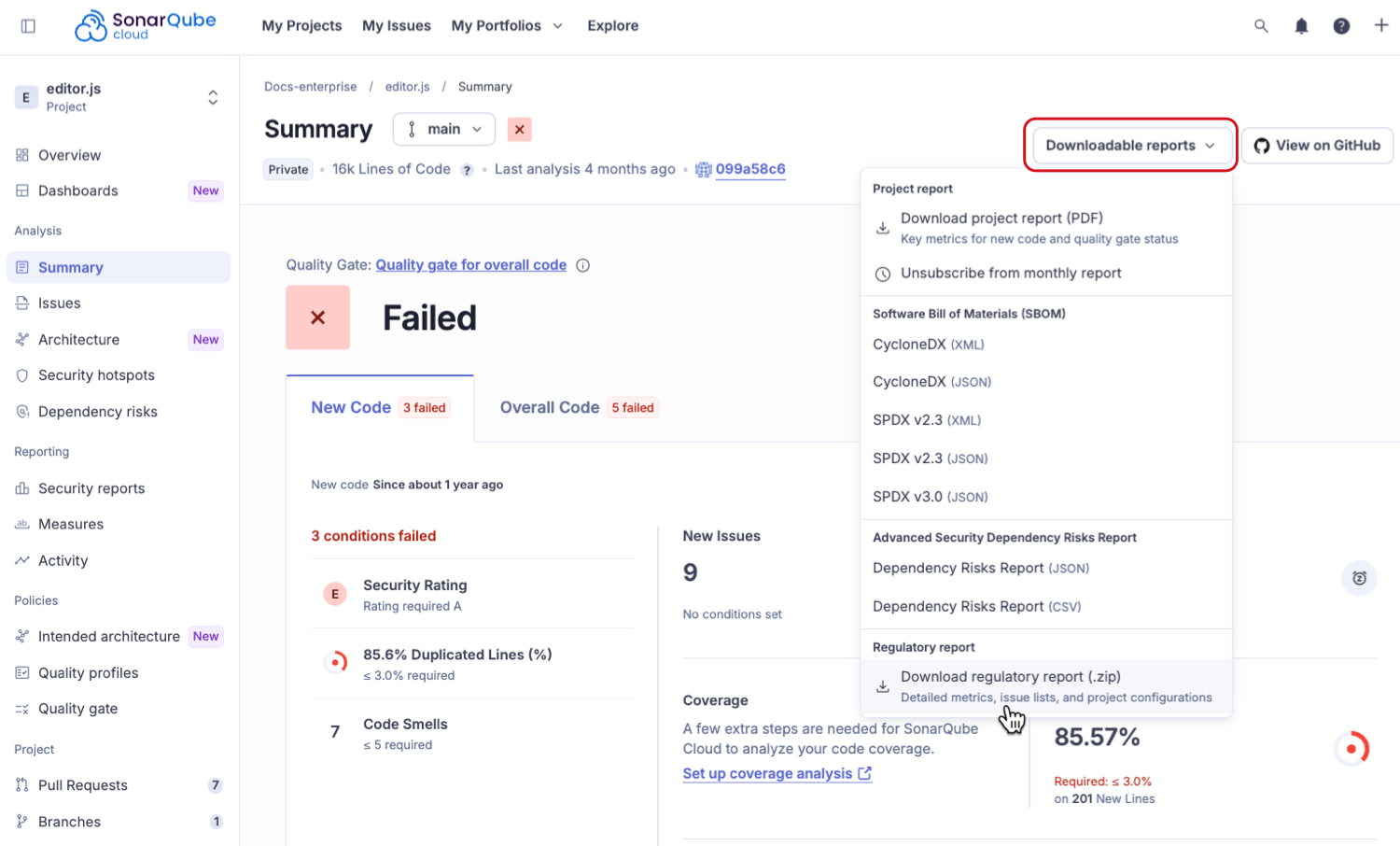
3. Click **Downloadable reports** and select **Download regulatory report (.zip)** from the drop down menu.
Alternatively:
1. Go to **Project information**.
2. In the **Regulatory Report** section, choose the project branch from the drop down menu for which you want to download the report.
3. Click **Download report**.
SonarQube generates the report for download, which may take a few minutes depending on the size of the project.
## Contents of the regulatory report’s ZIP file
The reports are in a ZIP file containing a snapshot of the latest analysis of the selected branch and include TXT, CSV, and PDF files.
The PDF file includes:
* **Project overview**:
* Project details
* Quality gates information and status
* **Project rating** **overview** for:
* New code broken down by new issues, accepted issues, coverage, duplication, and security hotspots.
* Overall code broken down by security, reliability, maintainability, accepted issues, coverage, duplication, and security hotspots.
* **Distribution of issues in new code** showing open issues and breakdown by severity, based on security, reliability, maintainability.
* **Distribution of issues in overall code** showing open issues and breakdown by severity, based on security, reliability, maintainability.
* **Quality gate and quality profiles** information.
* **Files** lists all relevant files included in the ZIP file.
* **Definitions** lists all the definitions of terms related to the report.
The PDF regulatory report is generated with metrics from software qualities (security, reliability, maintainability). Some CSV files may contain metrics from both software qualities and rule types (vulnerabilities, bugs and code smells) and they are marked accordingly.
If you have [SonarQube Advanced Security](https://www.sonarsource.com/solutions/security/), the regulatory report ZIP file includes both a risk report and a software bill of materials.
## Related pages
* [Project compliance reports](/sonarqube-cloud/getting-started-with-enterprise/viewing-enterprise-reports/project-compliance-reports.md)
* [Viewing project PDF reports](/sonarqube-cloud/getting-started-with-enterprise/viewing-enterprise-reports/project-pdf-reports.md)
* [Cyber Resilience Act capability mapping](https://docs.sonarsource.com/cyber-resilience-act)
---
# Agent Instructions
This documentation is published with GitBook. GitBook is the documentation platform designed so that both humans and AI agents can read, navigate, and reason over technical content effectively. Learn more at gitbook.com.
## Querying This Documentation
If you need additional information that is not directly available in this page, you can query the documentation by asking a question.
Perform an HTTP GET request on the following URL with the `ask` and `goal` query parameters:
```
GET https://docs.sonarsource.com/sonarqube-cloud/getting-started-with-enterprise/viewing-enterprise-reports/viewing-project-regulatory-reports.md?ask=&goal=
```
`ask` is the immediate question: it should be specific, self-contained, and written in natural language.
`goal` is what the user is ultimately trying to achieve, the reason they need the answer. Sharing it helps GitBook give you a better, more relevant answer. A goal is most helpful when it describes the outcome the user wants rather than restating the question. For example, with `ask=how do I create an API token`, a goal like `automate deployments from our CI pipeline` lets GitBook tailor the answer to that use case.
The response will contain a direct answer to the question and relevant excerpts and sources from the documentation.
Use this mechanism when the answer is not explicitly present in the current page, you need clarification or additional context, or you want to retrieve related documentation sections.