# Understanding measures and metrics

Metrics are used to measure:

* Security, maintainability, and reliability attributes on the basis of statistics on the detected security, maintainability, and reliability issues, respectively.
* Test coverage on the basis of coverage statistics on executable lines and evaluated conditions.
* Code cyclomatic and cognitive complexities.
* Security review level on the basis of statistics on reviewed security hotspots.

Metrics also include statistics on:

* Duplicated lines and blocks.
* Code size (the number of various code elements).
* Issues.

For most metrics, SonarQube computes two values or ratings: one for overall code and one for new code.

* Overall code is all analyzed code in the project or branch, the old code plus new code.
* New code is the code that falls under your new code definition. It’s the code that has been recently added or modified. See [#new-code-definitions](https://docs.sonarsource.com/sonarqube-server/about-new-code#new-code-definitions "mention") for more information.

The computed values might be different for overall code and new code because the scope is different. For example: your overall code might get an A for maintainability rating, while new code introduces more technical debt and gets a B for maintainability rating.

Finally, metrics also include the quality gate status result. Most metrics can be used to define the quality gate conditions.

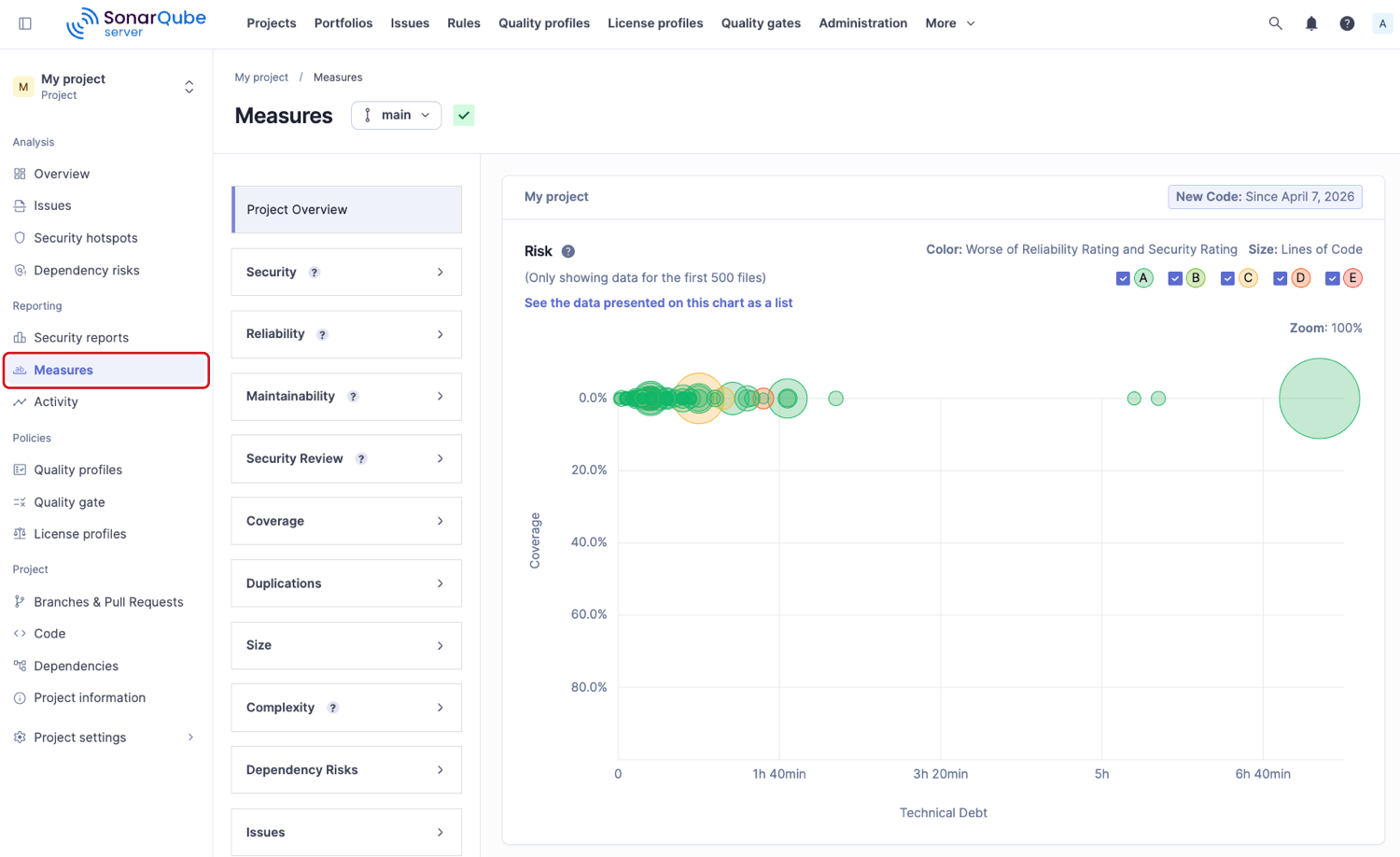
You can find these metrics in the **Measures** tab of your projects, applications and portfolios.

<div align="left"><figure><img src="https://2744305742-files.gitbook.io/~/files/v0/b/gitbook-x-prod.appspot.com/o/spaces%2F3VWSqvZ4eaBLWvA6epdv%2Fuploads%2FfU0kT1ZICxKZMKOviKM5%2Fproject-measures.png?alt=media&#x26;token=ff00d488-025b-47e3-9871-57bbc3408c84" alt="The Measures page in SonarQube."><figcaption></figcaption></figure></div>

You can retrieve the metrics through the [web-api](https://docs.sonarsource.com/sonarqube-server/extension-guide/web-api "mention") by using the metric key.

## Security <a href="#security" id="security"></a>

A list of security metrics used in the Sonar solution. See [security-related-rules](https://docs.sonarsource.com/sonarqube-server/quality-standards-administration/managing-rules/security-related-rules "mention") for more information.

{% tabs %}
{% tab title="MULTI-QUALITY RULE MODE METRICS" %}

<table><thead><tr><th width="194.21588134765625">Metric</th><th width="157.9886474609375">Metric key</th><th>Definition</th></tr></thead><tbody><tr><td>Security issues</td><td><code>software_quality_security_issues</code></td><td>The total number of issues impacting security.</td></tr><tr><td>Security issues on new code</td><td><code>new_software_quality_security_issues</code></td><td>The total number of security issues raised for the first time on new code.</td></tr><tr><td>Security rating</td><td><code>software_quality_security_rating</code></td><td>Rating related to security. The rating grid is as follows:<br>A = 0 or more info issues<br>B = at least one low issue<br>C = at least one medium issue<br>D = at least one high issue<br>E = at least one blocker issue</td></tr><tr><td>Security rating on new code</td><td><code>new_software_quality_security_rating</code></td><td>Rating related to security on new code.</td></tr><tr><td>Security remediation effort</td><td><code>software_quality_security_remediation_effort</code></td><td><p>The effort to fix all vulnerabilities. The remediation cost of an issue is taken over from the effort (in minutes) assigned to the rule that raised the issue (see Technical debt in the Maintainability section).</p><p>An 8-hour day is assumed when values are shown in days.</p></td></tr><tr><td>Security remediation effort on new code</td><td><code>new_software_quality_security_remediation_effort</code></td><td>The same as Security remediation effort but on new code.</td></tr></tbody></table>
{% endtab %}

{% tab title="STANDARD EXPERIENCE METRICS" %}

<table><thead><tr><th width="177.1988525390625">Metric</th><th width="167.5604248046875">Metric key</th><th>Definition</th></tr></thead><tbody><tr><td>Vulnerabilities</td><td><code>vulnerabilities</code></td><td>The total number of vulnerabilities.</td></tr><tr><td>Vulnerabilities on new code</td><td><code>new_vulnerabilities</code></td><td>The total number of vulnerabilities raised for the first time on new code.</td></tr><tr><td>Security rating</td><td><code>security_rating</code></td><td>Rating related to security. The rating grid is as follows:<br>A = 0 vulnerability<br>B = at least one minor vulnerability<br>C = at least one major vulnerability<br>D = at least one critical vulnerability<br>E = at least one blocker vulnerability</td></tr><tr><td>Security rating on new code</td><td><code>new_security_rating</code></td><td>Rating related to security on new code.</td></tr><tr><td>Security remediation effort</td><td><code>security_remediation_effort</code></td><td><p>The effort to fix all vulnerabilities. The remediation cost of an issue is taken over from the effort (in minutes) assigned to the rule that raised the issue (see Technical debt in the Maintainability section).</p><p>An 8-hour day is assumed when values are shown in days.</p></td></tr><tr><td>Security remediation effort on new code</td><td><code>new_security_remediation_effort</code></td><td>The same as Security remediation effort but on new code.</td></tr></tbody></table>
{% endtab %}
{% endtabs %}

## Reliability <a href="#reliability" id="reliability"></a>

A list of [#reliability](https://docs.sonarsource.com/sonarqube-server/quality-standards-administration/managing-rules/software-qualities#reliability "mention") metrics used in the Sonar solution.

{% tabs %}
{% tab title="MULTI-QUALITY RULE MODE METRICS" %}

<table><thead><tr><th width="170.530517578125">Metric</th><th width="176.128662109375">Metric Key</th><th>Definition</th></tr></thead><tbody><tr><td>Reliability issues</td><td><code>software_quality_reliability_issues</code></td><td>The total number of issues impacting reliability.</td></tr><tr><td>Reliability issues on new code</td><td><code>new_software_quality_reliability_issues</code></td><td>The total number of reliability issues raised for the first time on new code.</td></tr><tr><td>Reliability rating</td><td><code>software_quality_reliability_rating</code></td><td><p>Rating related to reliability. The rating grid is as follows:</p><p>A = 0 or more info issues<br>B = at least one low issue</p><p>C = at least one medium issue</p><p>D = at least one high issue</p><p>E = at least one blocker issue</p></td></tr><tr><td>Reliability rating on new code</td><td><code>new_software_quality_reliability_rating</code></td><td>Rating related to reliability on new code.</td></tr><tr><td>Reliability remediation effort</td><td><code>software_quality_reliability_remediation_effort</code></td><td>The effort to fix all reliability issues. The remediation cost of an issue is taken over from the effort (in minutes) assigned to the rule that raised the issue. An 8-hour day is assumed when values are shown in days.</td></tr><tr><td>Reliability remediation effort on new code</td><td><code>new_software_quality_reliability_remediation_effort</code></td><td>The same as Reliability remediation effort but on new code.</td></tr></tbody></table>
{% endtab %}

{% tab title="STANDARD EXPERIENCE METRICS" %}

<table><thead><tr><th width="175.11505126953125">Metric</th><th width="170.5703125">Metric key</th><th>Definition</th></tr></thead><tbody><tr><td>Bugs</td><td><code>bugs</code></td><td>The total number of bugs.</td></tr><tr><td>Bugs on new code</td><td><code>new_bugs</code></td><td>The total number of bugs raised for the first time on new code.</td></tr><tr><td>Reliability rating</td><td><code>reliability_rating</code></td><td><p>Rating related to reliability. The rating grid is as follows:</p><p>A = 0 bug</p><p>B = at least one minor bug</p><p>C = at least one major bug</p><p>D = at least one critical bug</p><p>E = at least one blocker bug</p></td></tr><tr><td>Reliability rating on new code</td><td><code>new_reliability_rating</code></td><td>Rating related to reliability on new code.</td></tr><tr><td>Reliability remediation effort</td><td><code>reliability_remediation_effort</code></td><td>The effort to fix all reliability issues. The remediation cost of an issue is taken over from the effort (in minutes) assigned to the rule that raised the issue. An 8-hour day is assumed when values are shown in days.</td></tr><tr><td>Reliability remediation effort on new code</td><td><code>new_reliability_remmediation_effort</code></td><td>The same as Reliability remediation effort but on new code.</td></tr></tbody></table>
{% endtab %}
{% endtabs %}

## Maintainability <a href="#maintainability" id="maintainability"></a>

A list of [#maintainability](https://docs.sonarsource.com/sonarqube-server/quality-standards-administration/managing-rules/software-qualities#maintainability "mention") metrics used in the Sonar solution.

{% tabs %}
{% tab title="MULTI-QUALITY RULE MODE METRICS" %}

<table><thead><tr><th width="209.70947265625">Metric</th><th width="169.422607421875">Metric key</th><th>Definition</th></tr></thead><tbody><tr><td>Maintainability issues</td><td><code>software_quality_maintainability_issues</code></td><td>The total number of issues impacting maintainability.</td></tr><tr><td>Maintainability issues on new code</td><td><code>new_software_quality_maintainability_issues</code></td><td>The total number of maintainability issues raised for the first time on new code.</td></tr><tr><td>Technical debt</td><td><code>software_quality_maintainability_remediation_effort</code></td><td>A measure of effort to fix all maintainability issues. See below.</td></tr><tr><td>Technical debt on new code</td><td><code>new_software_quality_maintainability_remediation_effort</code></td><td>A measure of effort to fix the maintainability issues raised for the first time on new code.</td></tr><tr><td>Technical debt ratio</td><td><code>software_quality_maintainability_debt_ratio</code></td><td>The ratio between the cost to develop the software and the cost to fix it. See below.</td></tr><tr><td>Technical debt ratio on new code</td><td><code>new_software_quality_maintainability_debt_ratio</code></td><td>The ratio between the cost to develop the code changed on new code and the cost of the issues linked to it. See below.</td></tr><tr><td>Maintainability rating</td><td><code>software_quality_maintainability_rating</code></td><td>The rating related to the value of the technical debt ratio. See below.</td></tr><tr><td>Maintainability rating on new code</td><td><code>new_software_quality_maintainability_rating</code></td><td>The rating related to the value of the technical debt ratio on new code. See below.</td></tr></tbody></table>
{% endtab %}

{% tab title="STANDARD EXPERIENCE METRICS" %}

<table><thead><tr><th width="209.27630615234375">Metric</th><th width="168.7783203125">Metric key</th><th>Definition</th></tr></thead><tbody><tr><td>Code smells</td><td><code>code_smells</code></td><td>The total number of code smells.</td></tr><tr><td>Code smells on new code</td><td><code>new_code_smells</code></td><td>The total number of code smells raised for the first time on new code.</td></tr><tr><td>Technical debt</td><td><code>sqale_index</code></td><td>A measure of effort to fix all code smells.</td></tr><tr><td>Technical debt on new code</td><td><code>new_technical_debt</code></td><td>A measure of effort to fix the code smells raised for the first time on new code.</td></tr><tr><td>Technical debt ratio</td><td><code>sqale_debt_ratio</code></td><td>The ratio between the cost to develop the software and the cost to fix it.</td></tr><tr><td>Technical debt ratio on new code</td><td><code>new_sqale_debt_ratio</code></td><td>The ratio between the cost to develop the code changed on new code and the cost of the issues linked to it.</td></tr><tr><td>Maintainability rating</td><td><code>sqale_rating</code></td><td>The rating related to the value of the technical debt ratio.</td></tr><tr><td>Maintainability rating on new code</td><td><code>new_squale _rating</code></td><td>The rating related to the value of the technical debt ratio on new code.</td></tr></tbody></table>
{% endtab %}
{% endtabs %}

<details>

<summary>Technical debt</summary>

The [technical debt](https://www.sonarsource.com/learn/technical-debt/) is the sum of the maintainability issue remediation costs. An issue remediation cost is the effort (in minutes) evaluated to fix the issue. It is taken over from the effort assigned to the rule that raised the issue.

<div align="left"><figure><img src="https://content.gitbook.com/content/3VWSqvZ4eaBLWvA6epdv/blobs/OoSMk6dja60PyCh98cOo/sonarqube-issues-remediation-cost.png" alt="Remediation cost shown on a SonarQube issue card." width="552"><figcaption></figcaption></figure></div>

An 8-hour day is assumed when the technical debt is shown in days.

</details>

<details>

<summary>Technical debt ratio</summary>

The *technical debt ratio* is the ratio between the *cost to fix the software* (known as [#technical-debt](#technical-debt "mention")) and the *cost to develop the software*. It is calculated based on the following formula:

`sqale_debt_ratio` = technical debt /(cost to develop one line of code \* number of lines of code)

Where the cost to develop one line of code is predefined in the database (by default, 30 minutes, can be changed, see [metrics-parameters](https://docs.sonarsource.com/sonarqube-server/instance-administration/analysis-functions/metrics-parameters "mention")).

**Example**:

* Technical debt: 122,563
* Number of lines of code: 63,987
* Cost to develop one line of code: 30 minutes
* Technical debt ratio: 6.4%

See the [#calculating-lines-of-code](https://docs.sonarsource.com/sonarqube-server/server-update-and-maintenance/monitoring/lines-of-code#calculating-lines-of-code "mention") to understand what is considered *a line of code*.

</details>

<details>

<summary>Maintainability rating</summary>

The maintainability rating reflects the density of technical debt relative to the size of the code. A lower ratio means a better rating.

The default Maintainability rating scale `(sqale_rating)` is:

* **A** ≤ 5% to 0%
* **B** ≥ 5% to <10%
* **C** ≥ 10% to <20%
* **D** ≥ 20% to < 50%
* **E** ≥ 50%

You can define another maintainability rating grid: see [#maintainability-rating](https://docs.sonarsource.com/sonarqube-server/instance-administration/analysis-functions/metrics-parameters#maintainability-rating "mention").

</details>

## Security review <a href="#security-review" id="security-review"></a>

A list of security review metrics used in the Sonar solution. See [security-hotspots](https://docs.sonarsource.com/sonarqube-server/user-guide/security-hotspots "mention") for more information.

{% tabs %}
{% tab title="MULTI-QUALITY RULE MODE METRICS" %}

<table><thead><tr><th width="192.02484130859375">Metric</th><th width="198.5667724609375">Metric key</th><th>Definition</th></tr></thead><tbody><tr><td>Security hotspots</td><td><code>security_hotspots</code></td><td>The number of security hotspots.</td></tr><tr><td>Security hotspots on new code</td><td><code>new_security_hotspots</code></td><td>The number of security hotspots on new code.</td></tr><tr><td>Security hotspots reviewed</td><td><code>security_hotspots_reviewed</code></td><td>The percentage of reviewed security hotspots compared in relation to the total number of security hotspots.</td></tr><tr><td>New security hotspots reviewed</td><td><code>new_security_hotspots_reviewed</code></td><td>The percentage of reviewed security hotspots on new code.</td></tr><tr><td>Security review rating</td><td><code>security_review_rating</code></td><td><p>The security review rating is a letter grade based on the percentage of reviewed security hotspots. Note that security hotspots are considered reviewed if they are marked as Acknowledged, Fixed, or Safe.</p><p>The rating grid is as follows:<br>A = >= 80%<br>B = >= 70% and &#x3C;80%<br>C = >= 50% and &#x3C;70%<br>D = >= 30% and &#x3C;50%<br>E = &#x3C; 30%</p></td></tr><tr><td>Security review rating on new code</td><td><code>new_security_review_rating</code></td><td>The security review rating for new code.</td></tr></tbody></table>
{% endtab %}

{% tab title="STANDARD EXPERIENCE METRICS" %}

<table><thead><tr><th width="192.52203369140625">Metric</th><th width="198.4559326171875">Metric key</th><th>Definition</th></tr></thead><tbody><tr><td>Security hotspots</td><td><code>security_hotspots</code></td><td>The number of security hotspots.</td></tr><tr><td>Security hotspots on new code</td><td><code>new_security_hotspots</code></td><td>The number of security hotspots on new code.</td></tr><tr><td>Security hotspots reviewed</td><td><code>security_hotspots_reviewed</code></td><td>The percentage of reviewed security hotspots compared in relation to the total number of security hotspots.</td></tr><tr><td>New security hotspots reviewed</td><td><code>new_security_hotspots_reviewed</code></td><td>The percentage of reviewed security hotspots on new code.</td></tr><tr><td>Security review rating</td><td><code>security_review_rating</code></td><td><p>The security review rating is a letter grade based on the percentage of reviewed security hotspots. Note that security hotspots are considered reviewed if they are marked as Acknowledged, Fixed, or Safe.</p><p>The rating grid is as follows:<br>A = >= 80%<br>B = >= 70% and &#x3C;80%<br>C = >= 50% and &#x3C;70%<br>D = >= 30% and &#x3C;50%<br>E = &#x3C; 30%</p></td></tr><tr><td>Security review rating on new code</td><td><code>new_security_review_rating</code></td><td>The security review rating for new code.</td></tr></tbody></table>
{% endtab %}
{% endtabs %}

## Coverage <a href="#coverage" id="coverage"></a>

A list of coverage metrics used in the Sonar solution. See Test coverage [overview](https://docs.sonarsource.com/sonarqube-server/analyzing-source-code/test-coverage/overview "mention") page for more information.

<table><thead><tr><th width="191.5035400390625">Metric</th><th width="195.591552734375">Metric key</th><th>Definition</th></tr></thead><tbody><tr><td>Coverage</td><td><code>coverage</code></td><td><p>A mix of line coverage and condition coverage. Its goal is to provide an even more accurate answer to the question:</p><p>How much of the source code has been covered by unit tests?</p><p><code>coverage = (CT + LC)/(B + EL)</code></p><p>where:</p><ul><li>CT: conditions that have been evaluated to true at least once</li><li>LC: covered lines = lines_to_cover - uncovered_lines</li><li>B: total number of conditions</li><li>EL: total number of executable lines (lines_to_cover)</li></ul></td></tr><tr><td>Coverage on new code</td><td><code>new_coverage</code></td><td>This definition is identical to coverage but is restricted to new or updated source code.</td></tr><tr><td><p>Lines to cover</p><p><br></p></td><td><code>lines_to_cover</code></td><td>Coverable lines. The number of lines of code that could be covered by unit tests, for example, blank lines or full comments lines are not considered as lines to cover. Note that this metric is about what is possible, not what is left to do - that’s uncovered lines.</td></tr><tr><td>Lines to cover on new code</td><td><code>new_lines_to_cover</code></td><td>This definition is identical to lines to cover but restricted to new or updated source code.</td></tr><tr><td>Uncovered lines</td><td><code>uncovered_lines</code></td><td>The number of lines of code that are not covered by unit tests.</td></tr><tr><td>Uncovered lines on new code</td><td><code>new_uncovered_lines</code></td><td>This definition is identical to uncovered lines but restricted to new or updated source code.</td></tr><tr><td>Line coverage</td><td><code>line_coverage</code></td><td><p>On a given line of code, line coverage simply answers the question:</p><p>Has this line of code been executed during the execution of the unit tests?</p><p>It is the density of covered lines by unit tests:</p><p><code>line_coverage = LC / EL</code></p><p>where:</p><ul><li>LC = covered lines = lines_to_cover - uncovered_lines</li><li>EL = total number of executable lines (lines_to_cover)</li></ul></td></tr><tr><td>Line coverage on new code</td><td><code>new_line_coverage</code></td><td>This definition is identical to line coverage but restricted to new or updated source code.</td></tr><tr><td>Line coverage hits</td><td><code>coverage_line_hist_data</code></td><td>A list of covered lines.</td></tr><tr><td>Condition coverage</td><td><code>branch_coverage</code></td><td><p>The condition coverage answers the following question on each line of code containing boolean expressions:</p><p>Has each boolean expression been evaluated both to <code>true</code> and to <code>false</code>?</p><p>This is the density of possible conditions in flow control structures that have been followed during unit tests execution.</p><p><code>branch_coverage = (CT + CF) / (2*B)</code></p><p>where:</p><ul><li>CT = conditions that have been evaluated to true at least once</li><li>CF = conditions that have been evaluated to false at least once</li><li>B = total number of conditions</li></ul></td></tr><tr><td>Condition coverage on new code</td><td><code>new_branch_coverage</code></td><td>This definition is identical to condition coverage but is restricted to new or updated source code.</td></tr><tr><td>Condition coverage hits</td><td><code>branch_coverage_hits_data</code></td><td>A list of covered conditions.</td></tr><tr><td>Conditions by line</td><td><code>conditions_by_line</code></td><td>The number of conditions by line.</td></tr><tr><td>Covered conditions by line</td><td><code>covered_conditions_by_line</code></td><td>Number of covered conditions by line.</td></tr><tr><td><p>Uncovered conditions</p><p><br></p><p><br></p></td><td><code>uncovered_conditions</code></td><td>The number of conditions that are not covered by unit tests.</td></tr><tr><td>Uncovered conditions on new code</td><td><code>new_uncovered_conditions</code></td><td>This definition is identical to Uncovered conditions but restricted to new or updated source code.</td></tr><tr><td>Unit tests</td><td><code>tests</code></td><td>The number of unit tests.</td></tr><tr><td>Unit test errors</td><td><code>test_errors</code></td><td>The number of unit tests that have failed.</td></tr><tr><td>Unit test failures</td><td><code>test_failures</code></td><td>The number of unit tests that have failed with an unexpected exception.</td></tr><tr><td>Skipped unit tests</td><td><code>skipped_tests</code></td><td>The number of skipped unit tests.</td></tr><tr><td>Unit tests duration</td><td><code>test_execution_time</code></td><td>The time required to execute all the unit tests.</td></tr><tr><td>Unit test success density (%)</td><td><code>test_success_density</code></td><td><code>test_success_density</code> = (<code>tests</code> - (<code>test_errors</code> + <code>test_failures</code>)) / (<code>tests</code>) * 100</td></tr></tbody></table>

## Duplications <a href="#duplication" id="duplication"></a>

A list of duplication metrics used in the Sonar solution.

{% hint style="warning" %}
Duplication detection is not supported for Terraform and similar IaC languages, Dart, and CSS.
{% endhint %}

<table><thead><tr><th width="164.859375">Metric</th><th width="172.530517578125">Metric key</th><th>Definition</th></tr></thead><tbody><tr><td>Duplicated lines density (%)</td><td><code>duplicated_lines_density</code></td><td><p>Duplicated lines density is calculated by using the following formula:</p><p><code>duplicated_lines_density= duplicated_lines / lines * 100</code></p></td></tr><tr><td>Duplicated lines density (%) on new code</td><td><code>new_duplicated_lines_density</code></td><td>The same as duplicated lines density but on new code.</td></tr><tr><td>Duplicated lines</td><td><code>duplicated_lines</code></td><td>The number of lines involved in duplications.</td></tr><tr><td>Duplicated lines on new code</td><td><code>new_duplicated_lines</code></td><td>The number of lines involved in duplications on new code.</td></tr><tr><td>Duplicated blocks</td><td><code>duplicated_blocks</code></td><td><p>The number of duplicated blocks of lines.</p><p>For a block of code to be considered as duplicated, for Non-Java projects:</p><ul><li>There should be at least 100 successive and duplicated tokens.</li><li><p>Those tokens should be spread at least on:</p><ul><li>30 lines of code for COBOL</li><li>20 lines of code for ABAP</li><li>10 lines of code for other languages</li></ul></li></ul><p>for Java projects:</p><ul><li>There should be at least 10 successive and duplicated statements whatever the number of tokens and lines.</li></ul><p>Differences in indentation and in string literals are ignored while detecting duplications.</p></td></tr><tr><td>Duplicated block on new code</td><td><code>new_duplicated_blocks</code></td><td>The number of duplicated blocks of lines on new code.</td></tr><tr><td>Duplicated files</td><td><code>duplicated_files</code></td><td>The number of files involved in duplications.</td></tr></tbody></table>

## Size <a href="#size" id="size"></a>

A list of size metrics used in the Sonar solution.

<table><thead><tr><th width="168.36083984375">Metric</th><th width="171.3934326171875">Metric key</th><th>Definition</th></tr></thead><tbody><tr><td>New lines</td><td><code>new_lines</code></td><td>The number of physical lines on new code (number of carriage returns).</td></tr><tr><td>Lines of code</td><td><code>ncloc</code></td><td>The number of physical lines that contain at least one character which is neither a whitespace nor a tabulation nor part of a comment.</td></tr><tr><td>Lines</td><td><code>lines</code></td><td>The number of physical lines (number of carriage returns).</td></tr><tr><td>Statements</td><td><code>statements</code></td><td>The number of statements.</td></tr><tr><td>Functions</td><td><code>functions</code></td><td><p>The number of functions. Depending on the language, a function is defined as either a <em>function</em>, a <em>method</em>, or a <em>paragraph.</em> Language-specific details:</p><ul><li>COBOL: It’s the number of paragraphs.</li><li>Dart: Any function expression is included, whether it’s the body of a function declaration, of a method, constructor, getter, top-level or nested function, top-level or nested lambda.</li><li>Java: Methods in anonymous classes are ignored.</li><li>VB.NET: Accessors are not considered to be methods.</li></ul></td></tr><tr><td>Classes</td><td><code>classes</code></td><td>The number of classes (including nested classes, interfaces, enums, annotations, mixins, extensions, and extension types).</td></tr><tr><td>Files</td><td><code>files</code></td><td>The number of files.</td></tr><tr><td>Comment lines</td><td><code>comment_lines</code></td><td>The number of lines containing either comment or commented-out code. See below for calculation details.</td></tr><tr><td>Comments (%)</td><td><code>comment_lines_density</code></td><td><p>The comment lines density. It is calculated based on the following formula: <code>comment_lines_density=[comment_lines / (lines + comment_lines)] * 100</code></p><p>Examples:</p><ul><li>50% means that the number of lines of code equals the number of comment lines.</li><li>100% means that the file only contains comment lines.</li></ul></td></tr><tr><td>Lines of code per language</td><td><code>ncloc_language_distribution</code></td><td>The <em>non-commented lines of code</em> distributed by language.</td></tr><tr><td>Projects</td><td><code>projects</code></td><td>The number of projects in a portfolio.</td></tr></tbody></table>

<details>

<summary>Comment lines</summary>

Non-significant comment lines (empty comment lines, comment lines containing only special characters, etc.) do not increase the number of comment lines.

The following piece of code contains 9 comment lines:

```css-79elbk
/**                                            +0 => empty comment line
 *                                             +0 => empty comment line
 * This is my documentation                    +1 => significant comment
 * although I don't                            +1 => significant comment
 * have much                                   +1 => significant comment
 * to say                                      +1 => significant comment
 *                                             +0 => empty comment line
 ***************************                   +0 => non-significant comment
 *                                             +0 => empty comment line
 * blabla...                                   +1 => significant comment
 */                                            +0 => empty comment line

/**                                            +0 => empty comment line
 * public String foo() {                       +1 => commented-out code
 *   System.out.println(message);              +1 => commented-out code
 *   return message;                           +1 => commented-out code
 * }                                           +1 => commented-out code
 */                                            +0 => empty comment line
```

In addition:

* For COBOL: Generated lines of code and pre-processing instructions (SKIP1, SKIP2, SKIP3, COPY, EJECT, REPLACE) are not counted as lines of code.
* For Java and Dart: File headers are not counted as comment lines (because they usually define the license).

</details>

## Complexity <a href="#complexity" id="complexity"></a>

Complexity metrics used in the Sonar solution.

<table><thead><tr><th width="169.76348876953125">Metric</th><th width="188.211669921875">Metric key</th><th>Definition</th></tr></thead><tbody><tr><td>Cyclomatic complexity</td><td><code>complexity</code></td><td>A quantitative metric used to calculate the number of paths through the code.</td></tr><tr><td>Cognitive complexity</td><td><code>cognitive_complexity</code></td><td>A qualification of how hard it is to understand the code’s control flow. See <a href="https://www.sonarsource.com/resources/library/cyclomatic-complexity/">Cyclomatic complexity: developer's guide</a> for more information or sign up to download <a href="https://www.sonarsource.com/resources/white-papers/cognitive-complexity/">Cognitive Complexity white paper</a> for a complete description of the mathematical model applied to compute this measure.</td></tr></tbody></table>

### Cyclomatic complexity <a href="#cyclomatic-complexity" id="cyclomatic-complexity"></a>

Cyclomatic complexity is a quantitative metric used to calculate the number of paths through the code. The analyzer calculates the score of this metric for a given function (depending on the language, it may be a function, a method, a subroutine, etc.) by incrementing the function’s cyclomatic complexity counter by one each time the control flow of the function splits resulting in a new conditional branch. Each function has a minimum complexity of 1. The calculation formula is as follows:

Cyclomatic complexity = 1 + number of conditional branches

The calculation of the overall code’s cyclomatic complexity is basically the sum of all complexity scores calculated at the function level. In some languages, the complexity of external functions is additionally taken into account.

Note that function-level complexity scores cannot be viewed directly in SonarQube, they are only used to calculate the overall code's cyclomatic complexity.

Split detection by language.

<details>

<summary>ABAP</summary>

The ABAP analyzer calculates the cyclomatic complexity at the function level. It increments the cyclomatic complexity by one each time it detects one of the following keywords:

* `AND`
* `CATCH`
* `DO`
* `ELSEIF`
* `IF`
* `LOOP`
* `LOOPAT`
* `OR`
* `PROVIDE`
* `SELECT…ENDSELECT`
* `TRY`
* `WHEN`
* `WHILE`

</details>

<details>

<summary>C/C++/Objective-C</summary>

The C/C++/Objective-C analyzer calculates the cyclomatic complexity at function and coroutine levels. It increments the cyclomatic complexity by one each time it detects:

* A control statement such as: `if`, `while`, `do while`, `for`
* A switch statement keyword such as: `case`, `default`
* The `&&` and `||` operators
* The `?` ternary operator
* A lambda expression definition

{% hint style="info" %}
Each time the analyzer scans a header file as part of a compilation unit, it computes the measures for this header: statements, functions, classes, cyclomatic complexity, and cognitive complexity. That means that each measure may be computed more than once for a given header. In that case, it stores the largest value for each measure.
{% endhint %}

</details>

<details>

<summary>C#</summary>

The C# analyzer calculates the cyclomatic complexity at method and property levels. It increments the cyclomatic complexity by one each time it detects:

* one of these function declarations: method, constructor, destructor, property, accessor, operator, or local function declaration.
* A conditional expression
* A conditional access
* A switch case or switch expression arm
* An and/or pattern
* One of these statements: `do`, `for`, `foreach`, `if`, `while`
* One of these expressions: `??`, `??=`, `||`, or `&&`

</details>

<details>

<summary>COBOL</summary>

The COBOL analyzer calculates the cyclomatic complexity at paragraph, section, and program levels. It increments the cyclomatic complexity by one each time it detects one of these commands (except when they are used in a copybook):

* `ALSO`
* `ALTER`
* `AND`
* `DEPENDING`
* `END_OF_PAGE`
* `ENTRY`
* `EOP`
* `EXCEPTION`
* `EXEC CICS HANDLE`
* `EXEC CICS LINK`
* `EXEC CICS XCTL`
* `EXEC CICS RETURN`
* `EXIT`
* `GOBACK`
* `IF`
* `INVALID`
* `OR`
* `OVERFLOW`
* `SIZE`
* `STOP`
* `TIMES`
* `UNTIL`
* `USE`
* `VARYING`
* `WHEN`

</details>

<details>

<summary>Dart</summary>

The Dart analyzer calculates the cyclomatic complexity for:

* top-level functions
* top-level function expressions (lambdas)
* methods
* accessors (getters and setters)
* constructors

It increments the complexity by one for each of the structures listed above. It doesn’t increment the complexity for nested function declarations or expressions.

In addition, the count is incremented by one for each:

* short-circuit binary expression or logical patterns (`&&`, `||`, `??`)
* if-null assignments (`??=`)
* conditional expressions (`?:`)
* null-aware operators (`?[`, `?.`, `?..`, `...?`)
* propagating cascades (`a?..b..c`)
* `if` statement or collection
* loop (`for`, `while`, `do`, and `for` collection)

`case` or pattern in a `switch` statement or expression

</details>

<details>

<summary>Java</summary>

The Java analyzer calculates the cyclomatic complexity at the method level. It increments the Cyclomatic complexity by one each time it detects one of these keywords:

* `if`
* `for`
* `while`
* `case`
* `&&`
* `||`
* `?`
* `->`

</details>

<details>

<summary>JS/TS, PHP</summary>

The JS/TS analyzer calculates the cyclomatic complexity at the function level. The PHP analyzer calculates the cyclomatic complexity at the function and class levels. Both analyzers increment the cyclomatic complexity by one each time they detect:

* A function (i.e non-abstract and non-anonymous constructors, functions, procedures or methods)
* An `if` or (for PHP) `elsif` keyword
* A short-circuit (AKA lazy) logical conjunction (`&&`)
* A short-circuit (AKA lazy) logical disjunction (`||`)
* A ternary conditional expression
* A loop
* A `case` clause of a `switch` statement
* A `throw` or a `catch` statement
* A `goto` statement (only for PHP)

</details>

<details>

<summary>PL/I</summary>

The PL/I analyzer increments the cyclomatic complexity by one each time it detects one of the following keywords:

* `PROC`
* `PROCEDURE`
* `GOTO`
* `GO TO`
* `DO`
* `IF`
* `WHEN`
* `|`
* `!`
* `|=`
* `!=`
* `&`
* `&=`
* A `DO` statement with conditions (Type 1 `DO` statements are ignored)

{% hint style="info" %}
For procedures having more than one return statement: each additional return statement except for the last one, will increment the complexity metric.
{% endhint %}

</details>

<details>

<summary>PL/SQL</summary>

The PL/SQL analyzer calculates the cyclomatic complexity at the function and procedure level. It increments the cyclomatic complexity by one each time it detects:

* The main PL/SQL anonymous block (not inner ones)
* One of the following statements:
  * `CREATE PROCEDURE`
  * `CREATE TRIGGER`
  * basic `LOOP`
  * `WHEN` clause (the `WHEN` of simple `CASE` statement and searched `CASE` statement)
  * cursor `FOR LOOP`
  * `CONTINUE` / `EXIT WHEN` clause (The `WHEN` part of the `CONTINUE` and `EXIT` statements)
  * exception handler (every individual `WHEN`)
  * `EXIT`
  * `FORLOOP`
  * `FORALL`
  * `IF`
  * `ELSIF`
  * `RAISE`
  * `WHILELOOP`
* One of the following expressions:
  * `AND` expression (`AND` reserved word used within PL/SQL expressions)
  * `OR` expression (`OR` reserved word used within PL/SQL expressions),
  * `WHEN` clause expression (the `WHEN` of simple `CASE` expression and searched `CASE` expression)

</details>

<details>

<summary>VB.NET</summary>

The VB.NET analyzer calculates the cyclomatic complexity at function, procedure, and property levels. It increments the cyclomatic complexity by one each time it detects:

* a method or constructor declaration (`Sub`, `Function`),
* `AndAlso`
* `Case`
* `Do`
* `End`
* `Error`
* `Exit`
* `For`
* `ForEach`
* `GoTo`
* If
* `Loop`
* `On Error`
* `OrElse`
* `Resume`
* `Stop`
* `Throw`
* `Try`
* `While`

</details>

## Issues <a href="#issues" id="issues"></a>

A list of issues metrics used in the Sonar solution. See the Issues [introduction](https://docs.sonarsource.com/sonarqube-server/user-guide/issues/introduction "mention") page for more information.

{% tabs %}
{% tab title="MULTI-QUALITY RULE MODE ISSUE METRIC" %}

<table><thead><tr><th width="189.7698974609375">Metric</th><th width="180.6690673828125">Metric key</th><th>Definition</th></tr></thead><tbody><tr><td>Issues</td><td><code>violations</code></td><td>The number of issues in all states.</td></tr><tr><td>Issues on new code</td><td><code>new_violations</code></td><td>The number of issues raised for the first time on new code.</td></tr><tr><td>Open issues</td><td><code>open_issues</code></td><td>The number of issues in the Open status.</td></tr><tr><td>Accepted issues</td><td><code>accepted_issues</code></td><td>The number of issues marked as Accepted.</td></tr><tr><td>Accepted issues on new code</td><td><code>new_accepted_issues</code></td><td>The number of Accepted issues on new code.</td></tr><tr><td>False positive issues</td><td><code>false_positive_issues</code></td><td>The number of issues marked as False positive.</td></tr><tr><td>Blocker severity issues</td><td><code>software_quality_blocker_issues</code></td><td>Issues with a Blocker severity level.</td></tr><tr><td>High severity issues</td><td><code>software_quality_high_issues</code></td><td>Issues with a High severity level.</td></tr><tr><td>Medium severity issues</td><td><code>software_quality_medium_issues</code></td><td>Issues with a Medium severity level.</td></tr><tr><td>Low severity Issues</td><td><code>software_quality_low_issues</code></td><td>Issues with a Low severity level.</td></tr><tr><td>Info severity issues</td><td><code>software_quality_info_issues</code></td><td>Issues with an Info severity level.</td></tr></tbody></table>
{% endtab %}

{% tab title="STANDARD EXPERIENCE METRICS" %}

<table><thead><tr><th width="186.53125">Metric</th><th width="188.4197998046875">Metric key</th><th>Definition</th></tr></thead><tbody><tr><td>Issues</td><td><code>violations</code></td><td>The number of issues in all states.</td></tr><tr><td>Issues on new code</td><td><code>new_violations</code></td><td>The number of issues raised for the first time on new code.</td></tr><tr><td>Accepted issues</td><td><code>accepted_issues</code></td><td>The number of issues marked as Accepted.</td></tr><tr><td>Open issues</td><td><code>open_issues</code></td><td>The number of issues in the Open status.</td></tr><tr><td>Accepted issues on new code</td><td><code>new_accepted_issues</code></td><td>The number of Accepted issues on new code.</td></tr><tr><td>False positive issues</td><td><code>false_positive_issues</code></td><td>The number of issues marked as False positive.</td></tr><tr><td>Blocker issues</td><td><code>blocker_violations</code></td><td>Issues with a Blocker severity level.</td></tr><tr><td>Critical issues</td><td><code>critical_violations</code></td><td>Issues with a Critical severity level.</td></tr><tr><td>Major issues</td><td><code>major_violations</code></td><td>Issues with a Major severity level.</td></tr><tr><td>Minor issues</td><td><code>minor_violations</code></td><td>Issues with a Minor severity level.</td></tr><tr><td>Info issues</td><td><code>info_violations</code></td><td>Issues with an Info severity level.</td></tr></tbody></table>
{% endtab %}
{% endtabs %}

## Severity <a href="#severity" id="severity"></a>

A lists of severity levels used in the Sonar solution. See [#software-quality-severity](https://docs.sonarsource.com/sonarqube-server/quality-standards-administration/managing-rules/software-qualities#software-quality-severity "mention") for more information.

{% tabs %}
{% tab title="MQR SEVERITY TYPES" %}

<table><thead><tr><th width="193.37860107421875">Severity</th><th>Definition</th></tr></thead><tbody><tr><td>Blocker</td><td>An issue that has a significant probability of severe unintended consequences on the application that should be fixed immediately. This includes bugs leading to production crashes and security flaws allowing attackers to extract sensitive data or execute malicious code.</td></tr><tr><td>High</td><td>An issue with a high impact on the application that should be fixed as soon as possible.</td></tr><tr><td>Medium</td><td>An issue with a medium impact.</td></tr><tr><td>Low</td><td>An issue with a low impact.</td></tr><tr><td>Info</td><td>There is no expected impact on the application. For informational purposes only.</td></tr></tbody></table>
{% endtab %}

{% tab title="STANDARD EXPERIENCE SEVERITY TYPES" %}

<table><thead><tr><th width="194.760009765625">Severity</th><th>Definition</th></tr></thead><tbody><tr><td>Blocker</td><td>An issue that has a significant probability of severe unintended consequences on the application that should be fixed immediately. This includes bugs leading to production crashes and security flaws allowing attackers to extract sensitive data or execute malicious code.</td></tr><tr><td>Critical</td><td>An issue with a critical impact on the application that should be fixed as soon as possible.</td></tr><tr><td>Major</td><td>An issue with a major impact on the application.</td></tr><tr><td>Minor</td><td>An issue with a minor impact on the application.</td></tr><tr><td>Info</td><td>There is no expected impact on the application. For informational purposes only.</td></tr></tbody></table>
{% endtab %}
{% endtabs %}

## Quality gates <a href="#quality-gate" id="quality-gate"></a>

Quality gates metrics used in the Sonar solution. See [introduction-to-quality-gates](https://docs.sonarsource.com/sonarqube-server/quality-standards-administration/managing-quality-gates/introduction-to-quality-gates "mention") for more information.

<table><thead><tr><th width="195.242919921875">Metric</th><th width="189.7052001953125">Metric key</th><th>Definition</th></tr></thead><tbody><tr><td>Quality gate status</td><td><code>alert_status</code></td><td>The state of the quality gate associated with your project. Possible values are ERROR and OK.</td></tr><tr><td>Quality gate details</td><td><code>quality_gate_details</code></td><td>Status (passed or failed) of each condition in the quality gate.</td></tr></tbody></table>

## Advanced security (SCA) <a href="#sca" id="sca"></a>

Advanced security (SCA) metrics used in the Sonar solution. Advanced security is available as an [add-on starting in Enterprise](https://www.sonarsource.com/plans-and-pricing/sonarqube/).

{% hint style="info" %}
SCA metrics are not shown in the user interface for portfolios at this time.
{% endhint %}

<table><thead><tr><th width="200.0013427734375">Metric</th><th width="192.0462646484375">Metric key</th><th>Definition</th></tr></thead><tbody><tr><td>SCA issue threshold</td><td><code>sca_count_any_issue</code></td><td>The total number of dependency risks.</td></tr><tr><td>SCA issue threshold on new code</td><td><code>new_sca_count_any_issue</code></td><td>The total number of dependency risks raised for the first time on new code.</td></tr><tr><td>SCA severity threshold</td><td><code>sca_severity_any_issue</code></td><td>Indicates whether there is any dependency risk at or above the specified severity.</td></tr><tr><td>SCA severity threshold on new code</td><td><code>new_sca_severity_any_issue</code></td><td>Indicates whether there is any dependency risk at or above the specified severity raised for the first time on new code.</td></tr><tr><td>SCA vulnerability threshold</td><td><code>sca_severity_vulnerability</code></td><td>Indicates whether there is any vulnerability dependency risk at or above the specified severity.</td></tr><tr><td>SCA vulnerability threshold on new code</td><td><code>new_sca_severity_vulnerability</code></td><td>Indicates whether there is any vulnerability dependency risk at or above the specified severity raised for the first time on new code.</td></tr><tr><td>SCA licensing risk threshold</td><td><code>sca_severity_licensing</code></td><td><p>Indicates whether there is any license dependency risk at or above the specified severity.</p><p><strong>Note</strong>: License risks are currently always HIGH severity. If this parameter is set to BLOCKER, no license risk will fail the quality gate.</p></td></tr><tr><td>SCA licensing risk threshold on new code</td><td><code>new_sca_severity_licensing</code></td><td><p>Indicates whether there is any license dependency risk at or above the specified severity raised for the first time on new code.</p><p><strong>Note</strong>: License risks are currently always HIGH severity. If this parameter is set to BLOCKER, no license risk will fail the quality gate.</p></td></tr><tr><td>SCA rating threshold</td><td><code>sca_rating_any_issue</code></td><td><p>Rating related to dependency risks. The rating grid is as follows:</p><ul><li>A = 0 or more info risks</li><li>B = at least one low risks</li><li>C = at least one medium risk</li><li>D = at least one high risk</li><li>E = at least one blocker risk</li></ul></td></tr><tr><td>SCA rating threshold on new code</td><td><code>new_sca_rating_any_issue</code></td><td>Rating related to dependency risks in new code.</td></tr><tr><td>SCA vulnerability rating threshold</td><td><code>sca_rating_vulnerability</code></td><td>Rating related to vulnerability risks.</td></tr><tr><td>SCA vulnerability rating threshold on new code</td><td><code>new_sca_rating_vulnerability</code></td><td>Rating related to vulnerability risks in new code.</td></tr><tr><td>SCA license rating threshold</td><td><code>sca_rating_licensing</code></td><td>Rating related to dependency licenses. License risks always have a rating of D. so using a threshold of E will not fail the quality gate.</td></tr><tr><td>SCA license rating threshold on new code</td><td><code>new_sca_rating_licensing</code></td><td>Rating related to dependency licenses in new code.</td></tr></tbody></table>

## Related pages <a href="#related-pages" id="related-pages"></a>

* [monitoring-metrics](https://docs.sonarsource.com/sonarqube-server/user-guide/code-metrics/monitoring-metrics "mention")
* [Broken link](https://docs.sonarsource.com/sonarqube-server/user-guide/code-metrics/broken-reference "mention")
* [metrics-parameters](https://docs.sonarsource.com/sonarqube-server/instance-administration/analysis-functions/metrics-parameters "mention")
* [introduction-to-quality-gates](https://docs.sonarsource.com/sonarqube-server/quality-standards-administration/managing-quality-gates/introduction-to-quality-gates "mention")
* [web-api](https://docs.sonarsource.com/sonarqube-server/extension-guide/web-api "mention")

## Related online learning

* <i class="fa-video">:video:</i> [Understanding SonarQube key metrics](https://www.sonarsource.com/learn/course/core-concepts/3a1c4581-9a8c-4c74-8c5d-0ced314223ad/understanding-sonarqube-key-metrics)
* <i class="fa-video">:video:</i> [What's the difference between Security Hotspots and Security Issues?](https://www.sonarsource.com/learn/course/core-concepts/74553ed9-4228-4c54-8cb1-0a0f8653b866/whats-the-difference-between-security-hotspots-and-security-issues)
